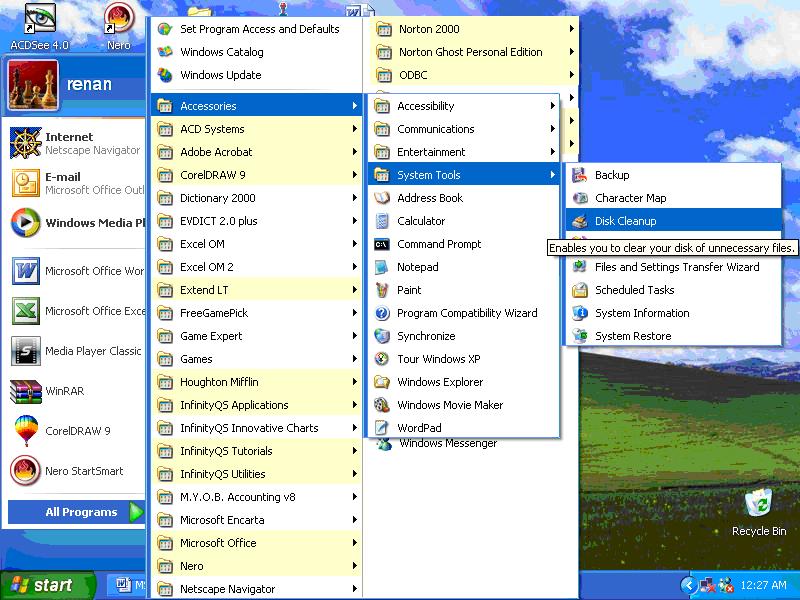
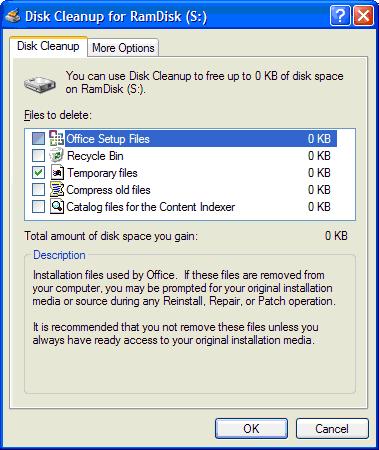
How to Use Disk Cleanup in MS Windows XP Professional. by Kyle · Published July 29, 2008 · Updated August 6, 2008 Go to the Windows Start menu and click the All Programs option. Click the Accessories option, choose the System Tools option, and then double-click Disk Cleanup option. Select the Drives drop-down list and choose the drive to clean up. Click the OK button. The Disk Cleanup for [drive] dialog box appears with a list of files that are recommended for deletion. Select the files to be deleted and then click the OK button. A prompt will appear asking for a confirmation of the files to be deleted. Click the Yes button. Share
0 How To Install A Non-Plug And Play Device Using the Add Hardware Wizard in MS Windows XP Professional September 13, 2008 by Kyle by Kyle · Published September 13, 2008 · Last modified January 20, 2009
0 How To Create A Network Place By Using The Add A Network Place Wizard In Ms Windows XP Professional February 19, 2008 by Anthony by Anthony · Published February 19, 2008 · Last modified March 31, 2009
2 View All Devices in Windows XP Device Manager June 12, 2008 by Jules by Jules · Published June 12, 2008
You can use Long Path Tool to fix this problem. Here's how it helps: Finds files/folders with too-long paths. Moves,…
@Fritz Liessling - Thank you for your feedback. I understand that you are looking for other resolutions, but within Windows…

i get all these boxes and circles and strange code on my windows program howto get it baack to english
how to fix this i get this computor code on my ep pro programs cant read it need it back to english would apreciate the help
@linda – Can you be more specific with your problem description?
The general answer is programming errors, but there can be issues with hardware resource dependencies, which can often be fixed by driver updates.
Anthony
what is an infinite loop error in windows xp? what are some reasons for the system to crash in windows xp