How to Fix Unknown Device Problems
Most people using Windows are already familiar with device drivers, which are small software programs that enable Windows to communicate with different hardware devices. Windows XP, Vista, Window 7, Windows 8.1, and Windows 10 actually support quite a lot of hardware by default, but some hardware devices will need additional device drivers to prevent unknown device problems.
Missing Device Drivers
So what happens if these additional device drivers are missing? Well in most cases that will result in unknown device errors or unknown USB device errors. Windows will show a device not recognized error and list the unknown device in the “Other devices” category in the Device Manager. An unknown USB device error happens in case of a USB device, which is actually one of the most common unrecognized type of devices.
Below is an example of unknown devices in Windows XP.
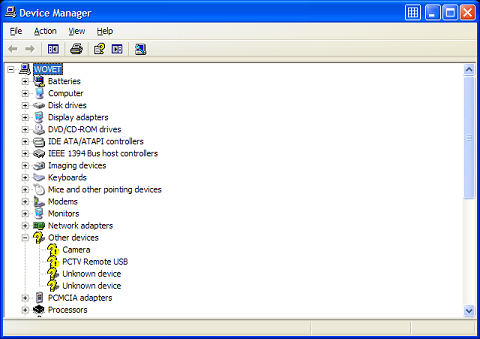
Since Vista (and now also Windows 7, Windows 8 and Windows 10) supports even more devices than Windows XP, you should expect unknown device errors to happen a lot less in later Windows versions. But they do happen. Here is an example of the Device Manager in Vista with an unknown device.

Complicating the unknown device error is the fact that different device drivers are required for 32-bit and 64-bit versions of Windows. Drivers for 64-bit versions of Windows have been very hard to find in the past, but this has improved with the increased use of Vista Windows 7 and 8 (and now also with Windows 10), which all come in 64-bit versions. They are actually the most common versions these days, since the amount of RAM in computers has been increasing and high end CPUs have become more common.
Unknown device errors can happen for all types of devices. As mentioned, the most common unknown device is a unknown USB device, and less common is the PCI unknown device. USB and PCI are both bus types that allow for hardware to communicate with the computer. Examples of unknown USB devices are USB webcams, mobile phones, and external USB hard drives. PCI unknown devices are more likely to be video cards, audio cards and network cards (apart from PCI you will also see PCI Express, or PCIE).
Solving an Unknown Device Problem
The most common cause for the unknown device error is a missing driver. The way to solve it is to find the right driver and (re)install the device driver for the hardware device. If you right-click the unknown device in the Device Manager you can select the driver update option. This will search for a device driver for your hardware.
In Windows 10 you can also try using the Windows Troubleshooter (click Start, type “Troubleshoot” and then click “Troubleshooting“. Click the View all option, and then run the Hardware and Devices troubleshooter.)
For unknown USB devices, always try unplugging the device first and then re-plugging it after waiting a few seconds. Sometimes the device recognition fails without reason and simply re-plugging the USB device helps.
It is also useful to check the error code. You can find the error code by right-clicking the unknown device in the Device Manager, and selecting Properties in the popup menu. This will show you the device status, including the error code. Unknown devices often have error code 1, as this represents the status that the device is not configured correctly.

Other common error codes for devices are:
- code 10, this device cannot start.
- code 28, the drivers for this device are not installed.
- code 31, the device is not working properly because because Windows cannot load the drivers required for this device.
- code 37, Windows cannot initialize the device driver for this hardware.
- code 39, Windows cannot load the device driver for this hardware. The driver may be corrupted or missing.
There are many more possible error codes, but not all result in an unknown device problem. Always try to uninstall the device and restart the computer as this will result in the driver being reinstalled. To do this, open the Device Manager, locate the unknown device, right-click it and in the popup menu click Uninstall.
If Windows does not have a driver for the unknown device, you will need to find and download a driver for the unknown device. In case you know the brand and model of the device, you can try to find the driver on the manufacturer’s website.
If you cannot find a driver for the unknown device or unknown USB device, you can try and use a driver finder program. This type of program will automatically detect and identify all your hardware devices, including unknown devices, and provide the latest drivers available for it. In a way, it acts as an ‘unknown device’ finder or locator.
Still could not find the driver for your unknown device? Leave a comment and I’ll see if we can help you out!

I had windows 7 installed recently and now the built-in bison webcam doesn’t work. I downloaded the driver package from the acer (9300)site and when I click on the live cam icon the pop out window opens but says that I have no video capture hardware. Is there a way that I can get this working???
@Bob – If the ipod does not even charge when you plug it into the mains, then that indicates a hardware problem. Not something I would expect you can fix on your computer.
Suggest you take it to a specialist or repair center that can check the actual connector.
Basically; my ipod touch 16 gig 4 th gen was working perfectly yesterday but now when i plug it into my computer or into the mains it doesnt charge and is never recognised. i havent made any big changes recently and all the thing that dont work with my ipod work perfectly with my brothers iphone 4s. whe ni plug my ipod to my computer it say it could not be recognised and ‘Windows has stopped this device because it has reported problems. (Code 43)’
I need help urgently,
Many thanks for your help!
I tried uninstalling the USB Root Hub devices made no difference unfortunately, so went for the worse case scenario and purchased a new wireless card, installed and now working fine with no problems !! thank you Anthony for all your help in trying to resolve my problem, in my case turned out to be a hardware problem.
@mercer2773 – Worst case scenario there is a problem with the hardware connection causing the wireless card to malfunction on an irregular basis. But I am still hoping that it is an issue with Windows 7 or a defect configuration.
Have you tried uninstalling the USB Root Hub devices in the device manager and then reboot? That will reinstall those devices automatically and often fix issues with USB configuration issues.
When i got home turned on laptop , everything loaded ok, wireless working fine, card displayed in device manager so unable to get any fault codes to give you ! Having said that after a few minutes it would disconnect itself and reinstall drivers then ask for the code for the secure connection before it would work, it did this a couple of times, each time it did this if you look at device manager it would display a number :ie #1 #2 and so on after the name of the wireless card,
i presume it does that each time it reinstalls .
I took out the wireless card and reconnected it , to see if that would make any diifference :ie new hardware install , still have some problems with disconnection then got a pop up message about this device would work faster connected to 2.0 usb drive. Checked windows update to see if it had loaded any up to date drivers, and it had installed a current driver ! So very confused as to what is going on, as you say it could be a issue with Windows 7 and usb devices conflicting,
but whati can i do to stop this happening.
So the unknown device problem seems to be the wireless card !
@Anthony thank you for reply, i am not at the laptop at the moment i will look when i get home tonight ! my question for now is why has my wireless card no longer working and not showing on device manager ?
@mercer2773 – The Advent 8117 laptop has a RaLink RT73 wireless card, and the drivers for that should be on the hard disk itself. Although it comes with Vista by default, there are drivers for that wireless card for Windows 7.
But USB problems are more common with Windows 7, especially the 64-bit version, simply since not all hardware manufacturers have 64-bit versions of their USB drivers.
Can you check the hardware ID of the USB device that comes up as unknown and let me know what it is?
I have a problem with a Advent 8117 laptop, running Windows 7 ultimate (64 bit) keeps coming up unknown usb device, when you first start the laptop it displays loading usb driver, then displays unable to load driver device unknown, open up device manager drop down list shows unknown usb device with a yellow cross. The problem is when you try to update driver,
windows says it already has a up to date driver .
The main problem is my wireless card is no longer displayed in device manager, and will only connect through eternet connection, could this problem be linked , ie: wireless card problem
i have not changed this card it is the original one from manufacture ? please help
@Mary – You will at least need a working Internet connection to download the missing drivers. So I would first try to get the network card or wireless network working.
If the manufacturer is unknown in the Details tab of the device properties, then the only option is to look at the hardware ID instead of the manufacturer property.
Hardware ID’s look like: PCI\VEN_1002&DEV_94C8&SUBSYS_011F1025
In this case that is an ATI Mobility Radeon video card, but more importantly, the hardware ID is unique and will tell you exactly which device it is, including of course the manufacturer.
You can look up vendor ids and device ids at an online website, but if you list the hardware ID of your network card I can direct you to the driver for it.
But please also list your computer brand and model, including Windows version, as that will make finding drivers easier.
Okay. I found the unknown drivers. Problem is, I can’t install them, or update them, because my network adapter doesn’t work either. All I could get were the names of the devices, and the location. The type for all nine unknown devices says “other devices.” The manufacturer is unknown. Therefore, I don’t know which manufacturer’s website to get on to manually install the drivers. Help?
Yea i searched all over online & found the same answers your saying. I think im just gonna try the few computers & if it still doesnt work i guess i have to cut my loses.
What i am gonna do though is i’ve been reading the package the flash drive came in & also been reading daneelectronics website. Now on the website it states they are no responsable for any of their products that flaw kind of like how mine did. But when reading the package, it says gurenteed satisfication & also never mentions the not responsible comment & only thing about its website it mentions is to visit it for more dane products. Point is on the package it basically can lure people into a false security that backing up your files on there product is a sure bet in which now im gonna contact a lawyer. Theres priceless files on it that their product basically took away from me.
If i would of known they were this sh*tty i would of never of baught this thing. Im new to using flash drives & i have another brand actually had for about 5 years & it still works. I buy a 4gb dane elec 2 weeks ago & it ruined me. Also i been searching online & literally found hundreds of reports of the same exact 4gb dane elec flash drive doing the same problems so i say i have a nice case.
My advice to anyone reading this DO NOT, i repeat DO NOT buy or even USE a Dane Elec flash drive, infact i would not use no dane elec products at all. They are pretty cheap in price but it literally stole important files from me that i will never see again & also if you check around google you will see i am not the only one with this problem. So thats my advice to anyone reading this. Im reporting them to the better buisness beru right now as i type this also.
Well thanx Anthony for trying to help dude i really appreciate bro. You took your time out to help out a stranger & thats good lookin out where im from. Thanx again
@bobbyP – You can always take it to a computer repair shop, and have them try it. But if it is really broken as I suspect, you might need a specialized data recovery service. And that will be expensive, you would need to assess for yourself it that is worth it to you.
Really, if the disk is still okay, it will work on another computer. So maybe try a few (friends or colleagues), and if none of them work, the data recovery service is the only option.
So do you think i could take it to a computer repair shop or anyone who knows more about computers & have the date files on the flash drive extracted to another flash drive or does it look like im screwed from your view with never seeing these files & pics again?
@bobbyP – That does not look good. If the disk also does not work in a different computer, it might be broken. The lock option is an option, but it is very recognizable. For SD cards it is a little switch on the sides (generally there is a text “Lock” near it on the top of the SD card).
On USB flash drives this lock mechanism is less common though.
I tried it in another computer & the same thing accurs, also my 2gb flash drive when opened in my computer the little light blinks green, the 4gb not working the light is orange/red & doesnt blink. Also i been through the trouble shooter & everything i can think of & still cannot find the problem. I mean even if i could just access it to get the files out to put them on another usb drive that would be fine, im just scared im losing my kids pictures & stuff.
I dont know if your familiar with Daneelec flash drives but i was under the impression that some flash drives have a little switch to lock & unlock it from use, does Dane Elec have these switches & if they do then would u know where its located at i mean its the only thing i can think of. Im hoping the flash drive isnt bad, i just got it 2 weeks ago.
@bobbyP – You can try the troubleshoot option in the Device properties, as Microsoft recommends for error code 43 in the Device Manager.
But I suggest you also try the 4GB flash disk in a different computer to make sure the drive itself is still fine.
Is your computer a laptop or a desktop?