Receiving Error Message: Error! No Text Of Specified Style In Document When Using MS Word
The “No text of specified style in document” error in Microsoft Word indicates a problem with a style reference. Style references are fields in Word that are used to automatically generate content. Examples are table of contents, bibliographies, and figure tables.
If the field to which the reference is pointing cannot be found, the mentioned error will show.
A style reference in Word looks like this:
{STYLEREF "stylename" [switches]}or, for an example of a table:
Table { STYLEREF 2\s}-{SEQ Table \* ARABIC \s 4}You can view these codes by pressing the Alt + F9 keys in MS Word.
The most common usage for STYLEREF is to pick up chapter titles in the headers. To fix the error in Word for figure tables, follow these steps to exclude the chapter number from the captions:
- From the Insert menu, choose Reference, and then click Caption.
- Click the Numbering button.
- Uncheck the Include chapter number box.

- Click the OK button twice.

Note: These instructions are for Word XP.
In later versions of Word, the instructions differ a little because Microsoft changed the user interface for Word.
Here are the steps for Word 2019:
- In the menu click the References option.
- On the Ribbon, click the Insert Caption button.
- In the Caption dialog box, click the Numbering button.
- Uncheck the Include chapter number checkbox.
- Click OK twice to close both dialog boxes.


After making changes to any fields or field settings in Word, make sure to update the fields. To do this, press Ctrl + A to select all content, and then press the F9 key.
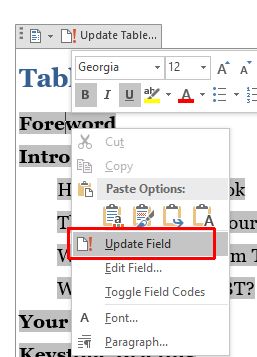
If you just want to update a single field, simple select it, right-click, and select the option Update Field.
Related: How to Insert Footnotes or Endnotes Using Multiple Number Formats In MS Word XP


This can be addressed using LongPathTool.
I would like to download windows vista
You can use Long Path Tool to fix this problem. Here's how it helps: Finds files/folders with too-long paths. Moves,…
Thank you. It works.
@Fritz Liessling - Thank you for your feedback. I understand that you are looking for other resolutions, but within Windows…