With broadband internet widely available, many PC users are actively using their webcams for video chatting and online meetings. Not only does the increased bandwidth facilitate the use of video over the internet, improved webcams and better video compression also help a lot.
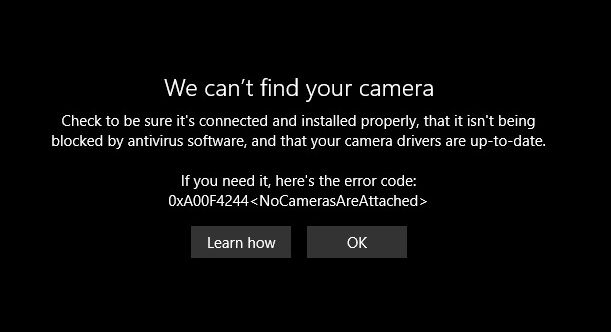
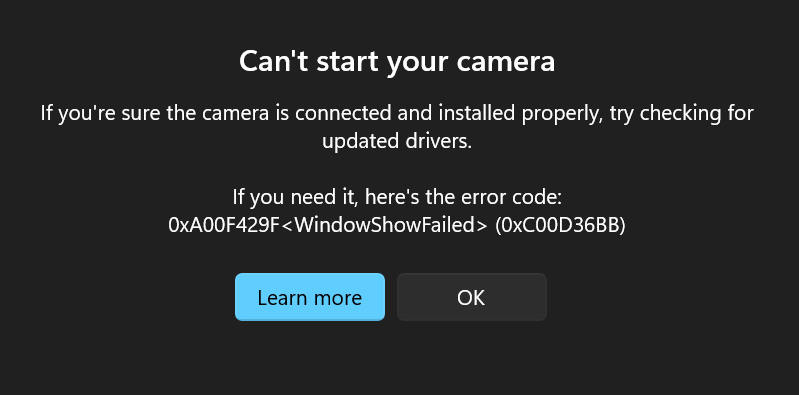
But if your hardware is not working as it should be, a webcam is not much fun. So dealing with webcam problems can be a necessary evil. Webcam problems often simply mean there is no image to be seen, but in other cases you might actually get an error message or will not be able to select the webcam as the video source in your programs.
Steps to solve the webcam problems
The very first step is of course to check your webcam connection. Most webcams use the USB port to connect to the PC, so check if your USB cable is properly plugged. For build-in webcams this steps does of course not apply. Many new laptops have a build-in webcam. Also try connecting your webcam directly to your PC instead of through a USB hub (if you are using one).
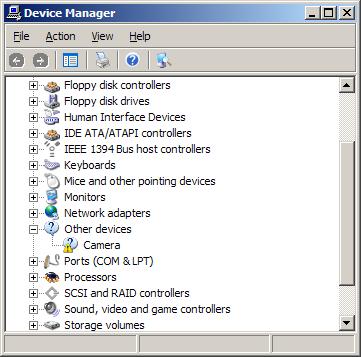
The next thing is to do is to check your Windows Device Manager and see if the hardware is recognized and installed properly.
It might be that the hardware is recognized as a camera, but the right drivers are not installed. The yellow explanation mark will indicate a problem.

If the device is not recognized in Windows XP, it will be listed under Other Devices.
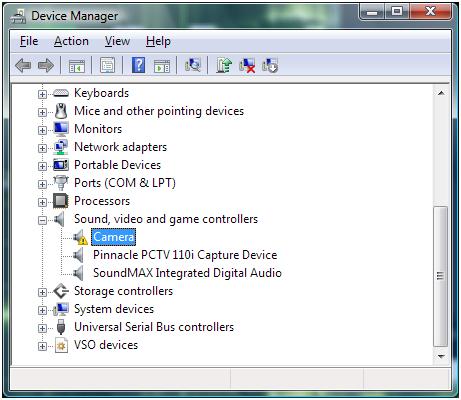
In either case you can try to update the drivers. Right-click the device, and in the popup menu select Update Driver Software. Then follow the instructions on screen, but make sure you allow Windows to search the web for updated drivers.
In case no driver for the webcam can be found, you can try a third party driver finding program that scans your PC for installed hardware and allows you to install missing drivers.
If this fails, the next step would be to uninstall the software that came with your webcam. Use the Add or Remove Programs feature in the Control Panel. If that does not work you can use a third party uninstaller.
After uninstalling the software, restart your PC and then reinstall the webcam software. In most cases this will solve the problems. Depending on the software, you might need to unplug your webcam during the software installation.
If the drivers and webcam software are correctly installed, and you still cannot see any video, there can be a problem with the program settings. Most chat and meeting software have a configuration option to select the video source for the webcam feature. If you have multiple devices that qualify for video, you might need to select your webcam device as the source for the webcam feature in that program.
Some webcams and programs require additional software, although that should be installed with the webcam if things are right. But is does not harm to check if your Java, Flash and Quicktime software are installed and up to date. But certainly check your DirectX software, since all video applications, including webcams, use DirectX for video processing. Try downloading the latest DirectX version and install it (Windows XP: DirectX 9.0c – Windows Vista: DirectX 10).
Lastly, if your webcam’s image is not sharp, check to see if it has a focus ring. A blurry image can sometimes simply mean the webcam is not in focus. Adjusting the focus through the ring can solve that problem.
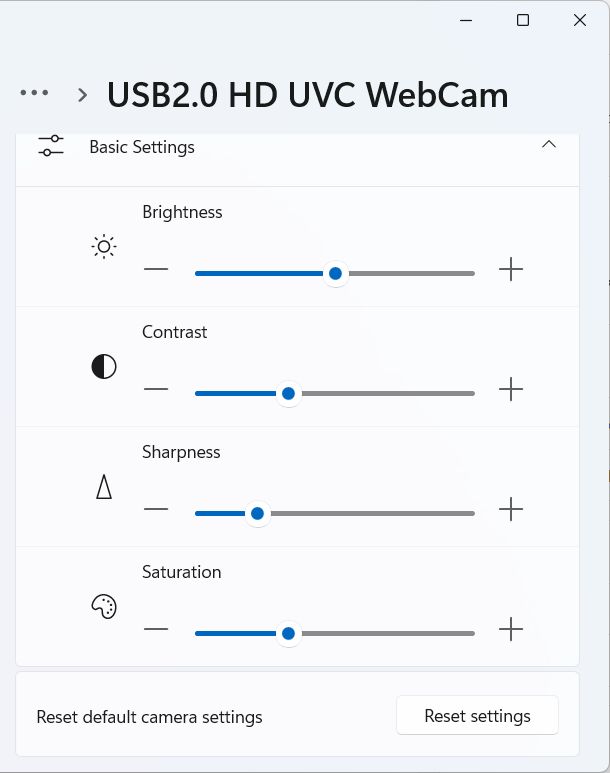
Other picture quality problems with webcams can be addressed by changing the video capture properties for the webcam. Most programs that can use a webcam will have an option to access the properties of the video source, which will bring up the video capture properties window.
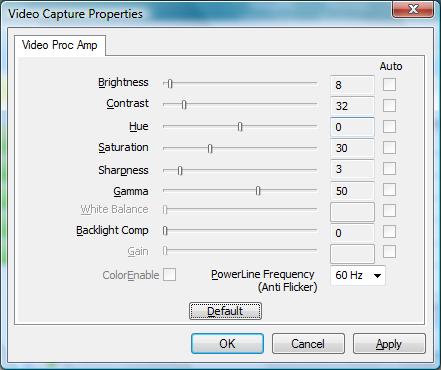
Do keep in mind that not all settings will be enabled depending on the webcam and the webcam driver installed on your computer. In the example you can see that some settings are disabled. The example shows the video capture properties for an Acer Crystal Eye webcam.
If you are using your webcam for instant messaging with one of the popular chat programs, have a look at EatCam, which allows you to record your webcam chats from MSN, YM, ICQ, Skype, AIM and a few more!
Comments
704 Comments on How To Fix Webcam Problems
-
Fergal McGeown on
9th Oct 2008 1:49 am
-
Kyle on
14th Oct 2008 11:37 am
-
zoe on
9th Nov 2008 11:09 am
-
Kyle on
9th Nov 2008 5:33 pm
-
suganthan on
11th Nov 2008 5:00 am
-
Kyle on
11th Nov 2008 3:25 pm
-
ziad on
13th Nov 2008 4:01 am
-
gagan on
19th Nov 2008 2:14 am
-
Kyle on
19th Nov 2008 4:16 pm
-
michael on
20th Dec 2008 5:51 am
-
Brittany on
21st Dec 2008 4:57 am
-
dlim on
22nd Dec 2008 7:44 am
-
Kyle on
22nd Dec 2008 2:35 pm
-
Bernice on
25th Dec 2008 1:24 am
-
dlim on
25th Dec 2008 5:10 pm
-
Kyle on
26th Dec 2008 10:22 am
-
Scott on
27th Dec 2008 6:08 pm
-
Kristyy on
28th Dec 2008 11:53 am
-
Aaron on
30th Dec 2008 10:48 pm
-
Sam on
3rd Jan 2009 10:40 am
-
BlogAdmin on
5th Jan 2009 2:17 pm
-
Katelin on
13th Jan 2009 3:58 am
-
Kyle on
13th Jan 2009 7:28 am
-
Katelin on
14th Jan 2009 12:31 am
-
Rono on
17th Jan 2009 2:32 am
-
Kyle on
17th Jan 2009 10:23 am
-
rono on
18th Jan 2009 12:37 am
-
Kyle on
20th Jan 2009 6:26 am
-
Cholo on
20th Jan 2009 9:51 pm
-
Rono on
22nd Jan 2009 11:51 pm
-
grace on
27th Jan 2009 6:18 am
-
Kyle on
27th Jan 2009 12:53 pm
-
Matthew on
28th Jan 2009 7:40 am
-
BlogAdmin on
28th Jan 2009 10:02 am
-
Misty on
30th Jan 2009 8:44 pm
-
wally on
31st Jan 2009 10:51 pm
-
Kyle on
2nd Feb 2009 1:30 pm
-
Sandra on
4th Feb 2009 8:25 pm
-
Sandra on
4th Feb 2009 8:28 pm
-
Kyle on
4th Feb 2009 9:12 pm
-
susie kadloo on
7th Feb 2009 4:17 am
-
tam on
7th Feb 2009 10:57 pm
-
Reg Pither on
11th Feb 2009 3:01 pm
-
Kyle on
11th Feb 2009 4:00 pm
-
Reg Pither on
11th Feb 2009 4:25 pm
-
Reg Pither on
12th Feb 2009 9:14 am
-
Kyle on
12th Feb 2009 1:40 pm
-
jacqueline on
15th Feb 2009 9:24 pm
-
Ry on
19th Feb 2009 4:37 am
-
Kyle on
19th Feb 2009 1:35 pm
-
Kat on
22nd Feb 2009 12:08 pm
-
Kyle on
22nd Feb 2009 9:33 pm
-
Lauren on
23rd Feb 2009 10:18 pm
-
Kyle on
24th Feb 2009 12:21 pm
-
Gil on
28th Feb 2009 1:18 am
-
Kyle on
28th Feb 2009 4:37 pm
-
bret on
2nd Mar 2009 9:25 pm
-
Kyle on
3rd Mar 2009 1:10 pm
-
Geraldine Murfin-Shaw on
5th Mar 2009 10:49 pm
-
Kyle on
6th Mar 2009 9:13 am
-
Marie on
11th Mar 2009 6:33 pm
-
Kyle on
11th Mar 2009 10:41 pm
-
james kandall on
13th Mar 2009 4:54 am
-
Kyle on
13th Mar 2009 9:13 pm
-
Tiana on
14th Mar 2009 1:28 am
-
Kyle on
15th Mar 2009 4:03 pm
-
peter on
16th Mar 2009 1:39 pm
-
Kyle on
16th Mar 2009 3:21 pm
-
peter on
17th Mar 2009 8:32 am
-
peter on
17th Mar 2009 9:09 am
-
Natalie on
17th Mar 2009 4:38 pm
-
Kyle on
17th Mar 2009 7:48 pm
-
Kyle on
17th Mar 2009 7:59 pm
-
Rodio on
23rd Mar 2009 2:09 pm
-
Kyle on
23rd Mar 2009 10:12 pm
-
Joe on
26th Mar 2009 2:00 pm
-
Kyle on
26th Mar 2009 4:08 pm
-
Raini on
27th Mar 2009 8:04 pm
-
dothan on
29th Mar 2009 4:42 pm
-
Kyle on
29th Mar 2009 5:10 pm
-
dothan on
29th Mar 2009 9:41 pm
-
Kyle on
30th Mar 2009 10:35 am
-
Chris on
31st Mar 2009 5:52 pm
-
Kyle on
31st Mar 2009 9:31 pm
-
Chris on
1st Apr 2009 4:01 am
-
James Hin on
1st Apr 2009 11:13 am
-
Kyle on
2nd Apr 2009 8:16 am
-
James Hin on
2nd Apr 2009 5:22 pm
-
Lisa on
4th Apr 2009 4:37 am
-
Kyle on
4th Apr 2009 10:15 am
-
drshubhekshya on
5th Apr 2009 2:25 am
-
Kyle on
5th Apr 2009 9:27 pm
-
Vicki on
9th Apr 2009 3:14 am
-
Kyle on
9th Apr 2009 9:36 am
-
leah on
9th Apr 2009 2:27 pm
-
Vicki on
10th Apr 2009 2:59 pm
-
Kyle on
10th Apr 2009 4:22 pm
-
Alicia on
11th Apr 2009 11:57 am
-
Kyle on
11th Apr 2009 12:09 pm
-
akurei on
11th Apr 2009 8:27 pm
-
Kyle on
11th Apr 2009 11:22 pm
-
ilovsonic on
12th Apr 2009 8:16 am
-
Kyle on
12th Apr 2009 7:17 pm
-
si on
12th Apr 2009 9:01 pm
-
si on
12th Apr 2009 9:04 pm
-
Kyle on
13th Apr 2009 9:40 am
-
serafin on
18th Apr 2009 6:53 am
-
Kyle on
18th Apr 2009 12:17 pm
-
Sarah on
1st May 2009 3:53 am
-
Spirit on
1st May 2009 3:08 pm
-
Kyle on
1st May 2009 10:20 pm
-
Joseph on
7th May 2009 3:07 am
-
Kyle on
7th May 2009 1:27 pm
-
Joseph on
7th May 2009 9:29 pm
-
Kyle on
8th May 2009 8:15 am
-
Kerry on
9th May 2009 7:46 am
-
Kyle on
9th May 2009 3:55 pm
-
Kerry on
9th May 2009 4:00 pm
-
mel on
11th May 2009 3:50 am
-
Kyle on
11th May 2009 11:15 am
-
Jade on
11th May 2009 11:23 am
-
Kyle on
11th May 2009 1:56 pm
-
josseph estephan on
12th May 2009 9:00 am
-
Kyle on
12th May 2009 1:05 pm
-
Timothy Ong on
14th May 2009 2:59 am
-
Kyle on
14th May 2009 8:52 am
-
zulazmal on
19th May 2009 4:01 am
-
Kyle on
19th May 2009 8:22 am
-
joy on
22nd May 2009 2:23 am
-
Kyle on
22nd May 2009 11:48 am
-
Tara on
23rd May 2009 12:41 am
-
Kole on
25th May 2009 11:29 am
-
Ellise on
25th May 2009 1:10 pm
-
Kyle on
25th May 2009 3:42 pm
-
Steph on
25th May 2009 11:30 pm
-
Kyle on
26th May 2009 12:15 pm
-
adrian on
26th May 2009 12:32 pm
-
Kyle on
26th May 2009 3:24 pm
-
Kole on
27th May 2009 8:30 pm
-
Kyle on
28th May 2009 3:03 am
-
michelle on
29th May 2009 1:36 pm
-
Alaa on
29th May 2009 5:36 pm
-
Keira on
29th May 2009 6:32 pm
-
Kyle on
29th May 2009 9:29 pm
-
fatima on
30th May 2009 6:37 am
-
Kyle on
30th May 2009 9:37 pm
-
Scotty on
2nd Jun 2009 5:17 pm
-
Kyle on
2nd Jun 2009 8:06 pm
-
ralden on
4th Jun 2009 3:48 am
-
Kyle on
4th Jun 2009 12:02 pm
-
Art on
5th Jun 2009 1:54 am
-
Art on
5th Jun 2009 1:57 am
-
Art on
5th Jun 2009 4:01 am
-
ralden on
5th Jun 2009 8:58 am
-
Kyle on
5th Jun 2009 1:30 pm
-
Art on
6th Jun 2009 1:01 am
-
Art on
6th Jun 2009 1:21 am
-
David on
6th Jun 2009 4:47 am
-
David on
6th Jun 2009 4:57 am
-
Art on
6th Jun 2009 5:58 am
-
Kyle on
6th Jun 2009 3:10 pm
-
Art on
6th Jun 2009 3:18 pm
-
David on
6th Jun 2009 9:03 pm
-
Kyle on
6th Jun 2009 9:48 pm
-
ralden on
7th Jun 2009 6:15 am
-
Kyle on
7th Jun 2009 1:15 pm
-
Mary on
9th Jun 2009 1:20 am
-
Kyle on
9th Jun 2009 8:55 am
-
Claire on
9th Jun 2009 9:53 pm
-
ralden on
10th Jun 2009 2:10 am
-
Kyle on
10th Jun 2009 6:55 pm
-
ralden on
11th Jun 2009 2:40 am
-
Ren on
11th Jun 2009 4:31 am
-
Claire on
11th Jun 2009 3:53 pm
-
Kyle on
11th Jun 2009 7:54 pm
-
Claire on
12th Jun 2009 12:18 am
-
Kyle on
12th Jun 2009 11:04 am
-
Juli on
15th Jun 2009 4:13 pm
-
Kyle on
15th Jun 2009 7:25 pm
-
Tim M on
15th Jun 2009 9:46 pm
-
Juli on
16th Jun 2009 1:55 am
-
Kyle on
16th Jun 2009 2:08 pm
-
Tim M on
16th Jun 2009 2:23 pm
-
Kyle on
16th Jun 2009 2:30 pm
-
Jess on
16th Jun 2009 11:23 pm
-
Kyle on
17th Jun 2009 5:39 am
-
Damian on
21st Jun 2009 8:54 am
-
Kyle on
21st Jun 2009 5:52 pm
-
chelsey on
24th Jun 2009 10:24 pm
-
Leo on
25th Jun 2009 12:24 am
-
Kyle on
25th Jun 2009 7:31 pm
-
Leo on
25th Jun 2009 9:59 pm
-
Jack on
27th Jun 2009 4:39 pm
-
Kyle on
27th Jun 2009 9:16 pm
-
perwinkle on
2nd Jul 2009 6:57 pm
-
Kyle on
3rd Jul 2009 12:19 am
-
perwinkle on
3rd Jul 2009 5:54 pm
-
perwinkle on
5th Jul 2009 2:08 pm
-
randall on
9th Jul 2009 6:17 pm
-
eva on
11th Jul 2009 3:10 am
-
eva on
11th Jul 2009 3:16 am
-
Michelle on
11th Jul 2009 3:25 am
-
Kyle on
11th Jul 2009 10:11 am
-
Michelle on
11th Jul 2009 2:10 pm
-
eva on
11th Jul 2009 11:58 pm
-
Stu on
12th Jul 2009 3:02 pm
-
Rene on
13th Jul 2009 5:19 am
-
Kyle on
13th Jul 2009 3:27 pm
-
Ali on
14th Jul 2009 7:59 am
-
Dev on
14th Jul 2009 9:28 am
-
Gary on
14th Jul 2009 5:19 pm
-
Kyle on
14th Jul 2009 6:04 pm
-
Tobias on
15th Jul 2009 11:40 am
-
Kyle on
16th Jul 2009 5:00 am
-
Taylor on
16th Jul 2009 5:24 am
-
Dev on
16th Jul 2009 5:47 am
-
Kyle on
16th Jul 2009 10:49 am
-
Samuel on
19th Jul 2009 10:39 pm
-
Kyle on
20th Jul 2009 7:58 am
-
Stu on
20th Jul 2009 8:26 pm
-
Samuel on
20th Jul 2009 9:05 pm
-
Kyle on
21st Jul 2009 10:24 am
-
Samuel on
21st Jul 2009 12:12 pm
-
meg on
23rd Jul 2009 6:17 pm
-
Stephanie on
24th Jul 2009 4:39 am
-
Kyle on
24th Jul 2009 5:17 am
-
Sam on
25th Jul 2009 11:36 pm
-
Angelina on
26th Jul 2009 2:10 am
-
Karl on
26th Jul 2009 1:18 pm
-
Kyle on
26th Jul 2009 3:16 pm
-
Mars on
27th Jul 2009 2:55 pm
-
Kyle on
27th Jul 2009 3:30 pm
-
Mars on
27th Jul 2009 3:32 pm
-
john quinn on
28th Jul 2009 5:40 pm
-
john quinn on
28th Jul 2009 5:49 pm
-
consonna on
28th Jul 2009 9:30 pm
-
consonna on
28th Jul 2009 9:31 pm
-
Kyle on
29th Jul 2009 2:49 am
-
john quinn on
29th Jul 2009 3:32 pm
-
john quinn on
29th Jul 2009 3:36 pm
-
Kyle on
29th Jul 2009 3:43 pm
-
Lauren B on
30th Jul 2009 10:56 pm
-
Kyle on
31st Jul 2009 6:25 am
-
nicole on
1st Aug 2009 5:55 am
-
Tom on
2nd Aug 2009 2:43 am
-
Anthony on
2nd Aug 2009 2:49 pm
-
Tom on
2nd Aug 2009 6:11 pm
-
Hans on
2nd Aug 2009 6:49 pm
-
Kyle on
3rd Aug 2009 2:36 am
-
Michael on
3rd Aug 2009 1:15 pm
-
Thom on
4th Aug 2009 12:44 am
-
Sapphy on
4th Aug 2009 2:11 am
-
Kyle on
4th Aug 2009 3:14 am
-
Nick on
8th Aug 2009 8:28 pm
-
Kyle on
9th Aug 2009 7:41 am
-
nejra on
9th Aug 2009 7:30 pm
-
Kyle on
10th Aug 2009 1:02 am
-
Sarah Georgina on
10th Aug 2009 1:51 pm
-
Michel Luna on
10th Aug 2009 10:56 pm
-
Kevin on
11th Aug 2009 3:41 am
-
Kyle on
11th Aug 2009 11:17 am
-
Orlando on
13th Aug 2009 6:19 pm
-
Orlando on
13th Aug 2009 6:21 pm
-
Marty on
13th Aug 2009 8:05 pm
-
Paige on
13th Aug 2009 9:52 pm
-
lovemachine on
14th Aug 2009 2:26 pm
-
Kyle on
14th Aug 2009 3:16 pm
-
Kyle on
14th Aug 2009 3:19 pm
-
Kyle on
14th Aug 2009 3:20 pm
-
Orlando on
14th Aug 2009 5:21 pm
-
Kyle on
15th Aug 2009 3:47 am
-
Orlando on
15th Aug 2009 8:19 pm
-
Kyle on
16th Aug 2009 12:10 pm
-
Orlando on
16th Aug 2009 9:31 pm
-
Kyle on
17th Aug 2009 10:54 am
-
Orlando on
17th Aug 2009 8:17 pm
-
sherif on
17th Aug 2009 9:41 pm
-
Kyle on
18th Aug 2009 1:45 pm
-
Orlando on
18th Aug 2009 7:54 pm
-
sahil on
19th Aug 2009 6:15 am
-
Kyle on
19th Aug 2009 3:18 pm
-
Orlando on
19th Aug 2009 7:29 pm
-
Jan on
19th Aug 2009 7:42 pm
-
Gary on
19th Aug 2009 9:14 pm
-
Kyle on
20th Aug 2009 10:58 am
-
vijayas on
20th Aug 2009 5:18 pm
-
brian holmes on
20th Aug 2009 7:22 pm
-
Orlando on
20th Aug 2009 7:26 pm
-
Orlando on
20th Aug 2009 11:39 pm
-
Kyle on
21st Aug 2009 8:24 am
-
brian holmes on
21st Aug 2009 3:22 pm
-
reina on
21st Aug 2009 11:53 pm
-
jon on
22nd Aug 2009 1:48 am
-
Kyle on
22nd Aug 2009 5:17 am
-
rtmason7 on
22nd Aug 2009 10:42 pm
-
Kyle on
23rd Aug 2009 5:37 am
-
FAbio on
23rd Aug 2009 3:42 pm
-
Kyle on
24th Aug 2009 3:24 am
-
Fabio on
24th Aug 2009 8:22 am
-
Kevin G on
25th Aug 2009 6:28 am
-
Kyle on
25th Aug 2009 9:25 am
-
Dan on
25th Aug 2009 8:09 pm
-
Cedric Stanback on
26th Aug 2009 12:34 am
-
Kyle on
26th Aug 2009 12:44 am
-
Kyle on
26th Aug 2009 12:46 am
-
Keahi on
26th Aug 2009 7:23 pm
-
robyn on
27th Aug 2009 4:19 am
-
Kyle on
27th Aug 2009 4:40 am
-
frank on
27th Aug 2009 9:03 am
-
Kyle on
28th Aug 2009 11:56 am
-
Lanjelin on
29th Aug 2009 8:06 am
-
jancy on
29th Aug 2009 8:29 am
-
Kyle on
29th Aug 2009 8:32 am
-
Lanjelin on
29th Aug 2009 8:36 am
-
Kyle on
29th Aug 2009 8:54 am
-
Lanjelin on
29th Aug 2009 9:02 am
-
Nina on
30th Aug 2009 4:10 pm
-
Dan on
30th Aug 2009 11:09 pm
-
ray on
31st Aug 2009 12:27 am
-
uzma on
31st Aug 2009 1:00 am
-
Kyle on
31st Aug 2009 7:30 am
-
Sara on
31st Aug 2009 7:52 pm
-
Kyle on
1st Sep 2009 4:03 am
-
ray on
1st Sep 2009 6:45 am
-
jess on
4th Sep 2009 3:16 pm
-
Kyle on
5th Sep 2009 1:27 am
-
Nina on
5th Sep 2009 10:24 am
-
Kyle on
6th Sep 2009 11:17 am
-
Stan on
8th Sep 2009 6:39 am
-
Kyle on
8th Sep 2009 8:47 am
-
Surfergirl on
10th Sep 2009 7:26 pm
-
Kyle on
11th Sep 2009 3:04 am
-
joan on
11th Sep 2009 1:40 pm
-
maysam on
11th Sep 2009 2:47 pm
-
Kyle on
11th Sep 2009 3:28 pm
-
joan on
11th Sep 2009 4:23 pm
-
Marla Jones on
12th Sep 2009 1:47 am
-
Theo on
13th Sep 2009 8:08 am
-
Nikola on
13th Sep 2009 2:35 pm
-
kaycee on
14th Sep 2009 2:15 am
-
Kyle on
14th Sep 2009 4:25 am
-
Kyle on
14th Sep 2009 4:26 am
-
Kyle on
14th Sep 2009 5:11 am
-
Nikola on
14th Sep 2009 7:31 am
-
kaycee on
14th Sep 2009 9:51 am
-
Surfergirl on
14th Sep 2009 1:37 pm
-
joan on
14th Sep 2009 2:04 pm
-
Kyle on
14th Sep 2009 3:00 pm
-
joan on
14th Sep 2009 3:04 pm
-
Surfergirl on
14th Sep 2009 4:32 pm
-
Lorenzo on
15th Sep 2009 5:47 am
-
Jack Timpano on
15th Sep 2009 9:12 am
-
Kyle on
15th Sep 2009 1:42 pm
-
Jack Timpano on
15th Sep 2009 2:24 pm
-
Kyle on
16th Sep 2009 3:57 pm
-
Theo on
17th Sep 2009 2:41 am
-
Kyle on
17th Sep 2009 6:44 am
-
theo on
17th Sep 2009 8:20 am
-
Nikola on
19th Sep 2009 6:21 pm
-
TOFU on
20th Sep 2009 4:37 am
-
Kyle on
20th Sep 2009 12:55 pm
-
JACK TIMPANO on
20th Sep 2009 1:22 pm
-
Kyle on
21st Sep 2009 4:05 am
-
theo on
22nd Sep 2009 8:44 am
-
rhouel luybao on
22nd Sep 2009 9:43 am
-
Kyle on
22nd Sep 2009 2:26 pm
-
theo on
24th Sep 2009 6:17 pm
-
Cam on
24th Sep 2009 8:03 pm
-
Kyle on
25th Sep 2009 4:51 am
-
theo on
25th Sep 2009 5:29 am
-
Krishna Chaitanya on
25th Sep 2009 5:12 pm
-
Kyle on
26th Sep 2009 5:07 am
-
theo on
26th Sep 2009 5:35 am
-
Kyle on
26th Sep 2009 5:59 am
-
theo on
26th Sep 2009 7:00 am
-
Kyle on
26th Sep 2009 7:14 am
-
theo on
26th Sep 2009 7:35 am
-
theo on
26th Sep 2009 6:46 pm
-
Dr . Ruban on
27th Sep 2009 7:14 am
-
Kyle on
27th Sep 2009 9:22 am
-
Gerard Scullion on
28th Sep 2009 8:45 am
-
Gerard Scullion on
28th Sep 2009 8:55 am
-
Kyle on
28th Sep 2009 9:11 am
-
Gerard Scullion on
28th Sep 2009 10:39 am
-
Kyle on
28th Sep 2009 4:47 pm
-
Lawrence on
28th Sep 2009 7:58 pm
-
Sunitsa on
28th Sep 2009 10:00 pm
-
Kyle on
29th Sep 2009 4:09 am
-
Nicole on
29th Sep 2009 12:45 pm
-
Kyle on
29th Sep 2009 4:16 pm
-
Andrew on
29th Sep 2009 5:14 pm
-
Kyle on
1st Oct 2009 4:41 pm
-
Erik on
2nd Oct 2009 5:27 pm
-
Kyle on
2nd Oct 2009 9:44 pm
-
IvoBg on
4th Oct 2009 10:31 am
-
Erik on
4th Oct 2009 11:25 pm
-
Kyle on
5th Oct 2009 8:42 am
-
nat on
5th Oct 2009 1:51 pm
-
Sam Courtney on
5th Oct 2009 6:05 pm
-
Kyle on
6th Oct 2009 10:53 am
-
mohammad on
6th Oct 2009 12:40 pm
-
Sam Courtney on
6th Oct 2009 1:29 pm
-
Kyle on
6th Oct 2009 9:26 pm
-
Andrew NZ on
9th Oct 2009 9:22 pm
-
Kyle on
10th Oct 2009 4:38 pm
-
Yat on
11th Oct 2009 6:28 pm
-
Kyle on
11th Oct 2009 9:37 pm
-
Yat on
11th Oct 2009 10:37 pm
-
gary worley on
13th Oct 2009 9:50 pm
-
Kyle on
13th Oct 2009 10:07 pm
-
kusdra on
14th Oct 2009 10:12 am
-
Kyle on
14th Oct 2009 4:36 pm
-
Jason on
15th Oct 2009 10:26 pm
-
Kyle on
16th Oct 2009 2:36 pm
-
Kon on
17th Oct 2009 7:27 pm
-
theo on
17th Oct 2009 7:33 pm
-
Kyle on
18th Oct 2009 12:30 pm
-
Oren on
20th Oct 2009 2:53 pm
-
Kyle on
20th Oct 2009 8:05 pm
-
amber on
21st Oct 2009 10:40 pm
-
Allan Comendador on
23rd Oct 2009 9:06 am
-
Kyle on
23rd Oct 2009 9:45 pm
-
Michelle K on
29th Oct 2009 10:22 pm
-
Kyle on
30th Oct 2009 11:28 am
-
Nimra on
31st Oct 2009 4:35 pm
-
Kyle on
1st Nov 2009 10:41 am
-
Matt on
1st Nov 2009 11:54 am
-
jessica on
2nd Nov 2009 11:41 pm
-
Kyle on
3rd Nov 2009 1:04 am
-
Roberta on
3rd Nov 2009 2:36 am
-
mandy on
3rd Nov 2009 5:02 pm
-
Kyle on
3rd Nov 2009 8:37 pm
-
Taurus on
4th Nov 2009 10:31 pm
-
Kyle on
5th Nov 2009 3:51 pm
-
kusdra on
6th Nov 2009 1:56 am
-
chelsea on
6th Nov 2009 11:10 am
-
Teagan on
7th Nov 2009 7:33 am
-
Peter James Hayes on
8th Nov 2009 1:11 am
-
Nitya Anand on
8th Nov 2009 6:40 pm
-
KENNETH NIXON on
10th Nov 2009 12:30 pm
-
Kyle on
10th Nov 2009 5:46 pm
-
Seda on
10th Nov 2009 11:15 pm
-
Kyle on
11th Nov 2009 10:28 am
-
Art W on
11th Nov 2009 5:07 pm
-
Kyle on
11th Nov 2009 6:39 pm
-
sabu on
15th Nov 2009 9:14 am
-
Kyle on
15th Nov 2009 2:17 pm
-
sabu on
16th Nov 2009 8:31 am
-
raghunath on
16th Nov 2009 1:21 pm
-
Kyle on
16th Nov 2009 9:20 pm
-
raghunath on
17th Nov 2009 12:44 pm
-
Kyle on
17th Nov 2009 2:48 pm
-
sabu on
18th Nov 2009 4:00 pm
-
Kyle on
18th Nov 2009 11:12 pm
-
Johnny boy on
19th Nov 2009 12:19 am
-
padee on
19th Nov 2009 6:03 am
-
Eddy on
19th Nov 2009 2:04 pm
-
Kyle on
19th Nov 2009 9:29 pm
-
TeS on
20th Nov 2009 12:54 pm
-
Kyle on
20th Nov 2009 5:20 pm
-
TeS on
20th Nov 2009 5:59 pm
-
Eddy on
20th Nov 2009 6:18 pm
-
Eddy on
20th Nov 2009 7:03 pm
-
TeS on
21st Nov 2009 11:16 am
-
Kyle on
21st Nov 2009 12:37 pm
-
Eddy on
21st Nov 2009 12:53 pm
-
Alin on
22nd Nov 2009 9:29 pm
-
Alin on
22nd Nov 2009 9:31 pm
-
nisha on
23rd Nov 2009 5:54 pm
-
Kyle on
23rd Nov 2009 9:57 pm
-
Jay on
25th Nov 2009 5:20 am
-
Alin on
25th Nov 2009 5:34 pm
-
Kyle on
25th Nov 2009 7:16 pm
-
Sarieecakes on
25th Nov 2009 11:46 pm
-
Sarieecakes on
25th Nov 2009 11:54 pm
-
Sarieecakes on
25th Nov 2009 11:57 pm
-
bob on
27th Nov 2009 3:48 am
-
Dylan on
27th Nov 2009 5:23 am
-
Kyle on
27th Nov 2009 1:34 pm
-
Justin on
28th Nov 2009 6:17 am
-
john on
29th Nov 2009 2:16 am
-
Ejaz Jafri on
29th Nov 2009 7:23 am
-
Kyle on
29th Nov 2009 12:07 pm
-
sani on
1st Dec 2009 11:29 am
-
Kyle on
1st Dec 2009 4:40 pm
-
Peter James Hayes on
1st Dec 2009 11:58 pm
-
Kyle on
2nd Dec 2009 9:56 am
-
David on
6th Dec 2009 2:47 am
-
Adam Lambert on
6th Dec 2009 9:04 am
-
Kyle on
6th Dec 2009 12:41 pm
-
dhiraj on
6th Dec 2009 9:02 pm
-
Kyle on
7th Dec 2009 10:07 pm
-
Haikal on
8th Dec 2009 10:04 am
-
Kyle on
8th Dec 2009 1:57 pm
-
Haikal on
9th Dec 2009 1:58 pm
-
babygirl on
10th Dec 2009 2:46 am
-
Jeff on
10th Dec 2009 10:21 am
-
Kyle on
10th Dec 2009 10:12 pm
-
paul on
11th Dec 2009 3:29 am
-
Kyle on
11th Dec 2009 3:28 pm
-
babygirl on
11th Dec 2009 6:39 pm
-
Eric on
13th Dec 2009 1:24 am
-
billy on
13th Dec 2009 12:25 pm
-
Ashley on
13th Dec 2009 6:20 pm
-
Mike Reyes on
14th Dec 2009 1:27 pm
-
Kyle on
14th Dec 2009 3:58 pm
-
Mike Reyes on
14th Dec 2009 5:13 pm
-
billy on
14th Dec 2009 8:30 pm
-
Kyle on
14th Dec 2009 10:52 pm
-
Charlton on
15th Dec 2009 9:22 pm
-
Kyle on
15th Dec 2009 10:07 pm
-
abhi on
16th Dec 2009 5:37 am
-
Kyle on
16th Dec 2009 12:30 pm
-
Dan on
16th Dec 2009 2:02 pm
-
john on
16th Dec 2009 5:00 pm
-
abhi on
17th Dec 2009 4:33 am
-
Kyle on
17th Dec 2009 1:13 pm
-
Terry Newell on
18th Dec 2009 8:36 pm
-
Kyle on
19th Dec 2009 12:33 am
-
Psibond on
19th Dec 2009 1:43 pm
-
Psibond on
19th Dec 2009 2:22 pm
-
Kyle on
19th Dec 2009 9:08 pm
-
Psibond on
20th Dec 2009 7:04 pm
-
Stacey Liddiard on
20th Dec 2009 10:52 pm
-
keith on
21st Dec 2009 12:59 am
-
Kyle on
21st Dec 2009 12:19 pm
-
juwanaa on
23rd Dec 2009 5:22 pm
-
Kyle on
23rd Dec 2009 9:17 pm
-
Juwanaa on
24th Dec 2009 7:38 am
-
vanisha on
24th Dec 2009 8:49 pm
-
Kyle on
24th Dec 2009 9:01 pm
-
gs on
25th Dec 2009 3:51 am
-
Kyle on
25th Dec 2009 7:23 am
-
Samri on
26th Dec 2009 1:07 am
-
Steph on
26th Dec 2009 6:19 am
-
Haikal on
26th Dec 2009 3:24 pm
-
Doron Zur on
27th Dec 2009 3:10 pm
-
Kyle on
27th Dec 2009 4:01 pm
-
Doron Zur on
27th Dec 2009 4:51 pm
-
Nick B on
27th Dec 2009 7:49 pm
-
daniel on
27th Dec 2009 8:04 pm
-
Minoli on
27th Dec 2009 8:24 pm
-
Kyle on
27th Dec 2009 8:32 pm
-
Nick B on
27th Dec 2009 11:55 pm
-
Samri on
28th Dec 2009 1:57 am
-
Jessica Wray on
28th Dec 2009 3:55 am
-
ritesh on
28th Dec 2009 5:08 pm
-
ritesh on
28th Dec 2009 6:01 pm
-
Kyle on
28th Dec 2009 10:41 pm
-
Fred on
29th Dec 2009 11:26 am
-
Bryan Smith on
29th Dec 2009 3:28 pm
-
ritesh on
29th Dec 2009 4:53 pm
-
Kyle on
29th Dec 2009 5:30 pm
-
Staneke. on
29th Dec 2009 6:15 pm
-
Fred on
29th Dec 2009 10:29 pm
-
Lariah on
30th Dec 2009 7:58 am
-
Nina on
31st Dec 2009 3:59 pm
-
Nina on
31st Dec 2009 4:15 pm
-
Amanda on
31st Dec 2009 11:44 pm
-
Samri on
1st Jan 2010 6:09 am
-
Sadie on
2nd Jan 2010 5:36 am
-
Fred on
2nd Jan 2010 11:24 am
-
Phill on
3rd Jan 2010 12:58 am
-
Kyle on
3rd Jan 2010 3:49 pm
-
Miller on
3rd Jan 2010 10:23 pm
-
Phill on
4th Jan 2010 3:40 am
-
j on
5th Jan 2010 3:56 pm
-
Lisa on
6th Jan 2010 12:28 am
-
Fred on
6th Jan 2010 4:58 am
-
Kyle on
6th Jan 2010 11:57 pm
-
Pierre on
7th Jan 2010 10:05 pm
-
Kyle on
8th Jan 2010 10:17 pm
-
Pierre on
9th Jan 2010 1:57 am
-
Carly on
10th Jan 2010 4:11 pm
-
Kyle on
10th Jan 2010 10:23 pm
-
Carly on
10th Jan 2010 11:43 pm
-
Kyle on
11th Jan 2010 1:38 pm
-
Fiona on
11th Jan 2010 5:52 pm
-
Kyle on
11th Jan 2010 7:18 pm
-
Thomas on
11th Jan 2010 9:55 pm
-
Carly on
11th Jan 2010 10:19 pm
-
Amanda on
11th Jan 2010 11:19 pm
-
Laura on
12th Jan 2010 1:42 am
-
Justin on
12th Jan 2010 3:43 am
-
Fiona on
12th Jan 2010 4:37 pm
-
Kyle on
12th Jan 2010 6:30 pm
-
Carly on
12th Jan 2010 10:58 pm
-
Rachel on
12th Jan 2010 11:40 pm
-
jah on
13th Jan 2010 12:02 am
-
Kyle on
13th Jan 2010 7:06 pm
-
melissa on
13th Jan 2010 8:05 pm
-
Carly on
13th Jan 2010 10:55 pm
-
terri on
14th Jan 2010 4:36 pm
-
Kyle on
14th Jan 2010 4:38 pm
-
Priya on
14th Jan 2010 7:14 pm
-
Yash on
15th Jan 2010 3:47 pm
-
Yash on
15th Jan 2010 7:50 pm
-
Kyle on
15th Jan 2010 10:54 pm
-
Carly on
16th Jan 2010 1:03 am
-
Kyle on
16th Jan 2010 1:36 am
-
Dan on
16th Jan 2010 3:06 am
-
Carly on
16th Jan 2010 3:10 am
-
Ernst Van den Berg on
16th Jan 2010 8:34 pm
-
tj on
18th Jan 2010 4:04 am
-
Hajdemi on
18th Jan 2010 10:04 am
-
Kyle on
18th Jan 2010 10:14 pm
-
Carly on
19th Jan 2010 1:22 am
-
Hajdemi on
19th Jan 2010 12:22 pm
-
Yash on
19th Jan 2010 12:57 pm
-
Kyle on
19th Jan 2010 11:45 pm
-
Hajdemi on
20th Jan 2010 11:39 am
-
gauthier on
21st Jan 2010 1:48 am
-
sarah on
21st Jan 2010 1:52 am
-
destinyJ on
21st Jan 2010 5:37 am
-
Kyle on
22nd Jan 2010 2:44 am
-
arfah on
24th Jan 2010 9:10 pm
-
Lubomir on
26th Jan 2010 12:26 am
-
Tiffany on
27th Jan 2010 4:28 am
-
Kyle on
27th Jan 2010 6:13 pm
-
Lubomir on
28th Jan 2010 1:09 am
-
SHAHZAD on
28th Jan 2010 2:37 pm
-
Milton on
30th Jan 2010 10:03 pm
-
arfah on
31st Jan 2010 1:36 pm
-
Lauren on
1st Feb 2010 10:32 pm
-
Andie on
3rd Feb 2010 4:39 am
-
Stephanie on
5th Feb 2010 7:04 pm
-
Kyle on
5th Feb 2010 11:48 pm
-
Andie on
6th Feb 2010 4:10 pm
-
ruth anne on
7th Feb 2010 7:57 am
-
Havard on
8th Feb 2010 12:35 am
-
chris on
8th Feb 2010 11:05 am
-
liela on
8th Feb 2010 4:36 pm
-
Stubby on
11th Feb 2010 6:28 am
-
Stubby on
11th Feb 2010 11:26 pm
-
Kyle on
11th Feb 2010 11:48 pm
-
Tara on
12th Feb 2010 5:54 am
-
Gerry on
12th Feb 2010 10:12 am
-
Alex on
13th Feb 2010 1:21 pm
-
Ken on
14th Feb 2010 11:18 am
-
Sridhar on
14th Feb 2010 1:11 pm
-
shahbee on
14th Feb 2010 11:07 pm
-
msf on
15th Feb 2010 1:18 am
-
Kyle on
15th Feb 2010 1:48 pm
-
Sweden on
15th Feb 2010 10:45 pm
-
Kyle on
16th Feb 2010 4:20 am
-
Sean on
16th Feb 2010 9:37 am
-
Sweden on
16th Feb 2010 5:15 pm
-
Bre on
17th Feb 2010 6:46 am
-
XxPriya 4 BrandonxX on
18th Feb 2010 4:05 pm
-
Kyle on
18th Feb 2010 5:37 pm
-
Erwin on
19th Feb 2010 7:31 am
-
Rachael on
20th Feb 2010 9:35 am
-
Julien on
20th Feb 2010 10:27 pm
-
justin on
21st Feb 2010 4:21 am
-
Sam on
21st Feb 2010 7:56 am
-
Kyle on
21st Feb 2010 3:43 pm
-
Kate on
21st Feb 2010 4:36 pm
-
maricela on
22nd Feb 2010 2:04 am
-
yol on
22nd Feb 2010 4:40 am
-
Sean on
22nd Feb 2010 9:59 am
-
Nusrat on
22nd Feb 2010 10:02 am
-
Marina on
22nd Feb 2010 4:51 pm
-
Benjamin on
23rd Feb 2010 9:24 pm
-
Jonathan Assouline on
25th Feb 2010 1:24 pm
-
Marika on
26th Feb 2010 1:12 am
-
Chloe on
27th Feb 2010 1:07 am
-
Phil Calverley on
27th Feb 2010 9:25 pm
-
Kyle on
28th Feb 2010 6:05 am
-
Jonathan Assouline on
28th Feb 2010 2:50 pm
-
Emma jenkins on
1st Mar 2010 1:09 pm
-
Kyle on
2nd Mar 2010 3:01 am
-
Jonathan Assouline on
2nd Mar 2010 3:18 am
-
Luke on
2nd Mar 2010 3:30 am
-
Jonathan Assouline on
2nd Mar 2010 3:33 am
-
Luke on
2nd Mar 2010 3:34 am
-
Sean on
2nd Mar 2010 4:26 am
-
Marina on
2nd Mar 2010 9:02 pm
-
Darren Preece on
3rd Mar 2010 9:25 am
-
Kyle on
4th Mar 2010 12:11 am
-
Jonathan Assouline on
4th Mar 2010 2:13 am
-
jay on
5th Mar 2010 11:17 pm
-
Sandy on
6th Mar 2010 7:26 pm
-
sara on
6th Mar 2010 10:25 pm
-
edd on
8th Mar 2010 12:11 pm
-
Kyle on
8th Mar 2010 11:23 pm
-
Jonathan Assouline on
9th Mar 2010 1:24 am
-
FRaz on
9th Mar 2010 10:42 pm
-
arjun on
11th Mar 2010 4:22 pm
-
Kyle on
12th Mar 2010 12:30 am
-
arjun on
12th Mar 2010 5:26 am
-
Prasanna on
12th Mar 2010 12:28 pm
-
eyqaa sb on
13th Mar 2010 8:23 am
-
dent on
13th Mar 2010 10:49 am
-
fraz on
13th Mar 2010 11:02 am
-
noman on
14th Mar 2010 1:22 am
-
yvonne ackles on
14th Mar 2010 1:40 am
-
Kyle on
14th Mar 2010 2:06 pm
-
jake on
17th Mar 2010 9:44 pm
-
jake on
17th Mar 2010 9:46 pm
-
Kyle on
18th Mar 2010 9:11 am
-
karim helmy on
18th Mar 2010 10:56 pm
-
Aisling on
19th Mar 2010 11:15 pm
-
Rob on
20th Mar 2010 3:33 pm
-
Jeff on
21st Mar 2010 12:51 am
Hi there,
I have a Toshiba Laptop with Windows Vista Home Premium. The webcam is built in.
I chat on the internet using msn and yahoo, and sometimes use webcam. The other night I was on msn with webcam and all was well. Then I stopped broadcasting and went to yahoo and tried to use the webcam again but an error message came up saying ‘webcam disconnected’.
I then shut down both msn and yahoo and tried to open the cam just from my desktop and the error message was ‘webcam locked by another application’.
I uninstalled and reinstalled both msn and yahoo but still the same result. The Defice Manager states all is well and I’m connected and using the best cam etc.
Should I try and uninstall then update the webcam using Device Manager. If I uninstall it, how do I reinstall it, will I have to search to find it to install again or will it prompt me through a reinstallation. I’m afraid that when I uninstall it I won’t be able to find it to install again.
Kind Regards
@Fergal – I do understand your worries, but it really is best to try the device reinstall.
There are 3 things you can try:
- first try to update the device drivers from the device manager.
- second, find the exact webcam driver on the Toshiba website based on your laptop model and simply install the driver. It would overwrite your current driver. Since files are refreshed and the registry is updated, this could also fix it.
- if that does not help, uninstall the device from the device manager. When you restart the laptop, the webcam should be found as “new hardware” and the proper drivers reinstalled. If not (although unlikely), the webcam will be listed under “unknown devices” or “other devices” in the device manager. You can then update the drivers from there.
Kyle
Hello,
I have a built in webcam on my laptop, but I also have a webcam that i can move around and put on top of my desk which i prefer to use.
I have successfully installed this webcam but I can not seem to get it to work, it seems my default webcam is the one built inot my laptop.
How can I use my other webcam?
Please hurry!
thank you
@Zoe – Have you checked the Device Manager to make sure both are working properly (no error or missing driver)?
If that is the case, it is really just a matter of selecting the webcam you want to use in the program you are using. Make sure to select the right webcam for the video source.
Maybe have a look at:
http://www.pcauthorities.com/multimedia/record-video-with-your-webcam
This shows how to select the video source in an example program.
If that does not work, the only thing to do is to disable the build in webcam in the Device Manager, after which the external one should become the default used.
Kyle
i have a hp compaq presario c793tu It has a built in webcam. when i on my webcam my picture are yellowish and spotted but there is no error message.
How can i settle this problem?
Thank You.
@suganthan – Unfortunately your problem symptoms do not look familiar to me.
Things I’d suggest you try:
- uninstall the drivers and let Windows reinstall them. Never harms and can often fix issues.
- change the Windows screen resolution to 1024×768 or even lower. Also try different color depths. This can highlight if it is an issue related to the camera resolution in combination with you video card.
- if possible, try a different (external) webcam to see if the problem is linked to the webcam specifically.
- not sure if you tried, but try different programs (MSN/Yahoo messenger, MovieMaker, etc.) to see if it is one program or all.
Hope you get to solve it.
Kyle
i have the wepcam warkin in yahoo masinjer just wen i go to anather chat she nat oben she say the wepcam nat conected to cp
i have bot a new compaq presario notebook bt i m nt able to send the view my cam req neither im able to accept that req every time i jst got the msg is network error bt i hav tried every possible ways n still nt able to send d req n otherwise also my cam is workg properly bt dont know wat’s d problem is??????????? can u help!!!
@Gagan – Assuming you are referring to some messenger software, there is probably an issue with your network settings. Make sure you configure the chat software (Yahoo, MSN, AOL?) to not use a proxy.
Additionally you can check if the network port is blocked by your firewall.
Yahoo: http://help.yahoo.com/l/us/yahoo/messenger/messenger8/webcam/mstabroadcasterr.html?terms=messenger+webcam+port
MSN: http://support.microsoft.com/default.aspx?scid=kb;en-us;324214
AOL: http://webmaster.info.aol.com/connectivity.html
If it’s different software, the problem might be the same, the network info will vary though.
Also try resetting your camera settings to default in the chat software you use.
Kyle
hello mery xmas
i have microsft lifecam 1000 and everytime i have used yahoo messenger it has worked intill recently i have had problems since i had these problesm i have tryed numerous times to reinstall it and still will not work it works on all other site but yahoo messenger what could be the problem
Hello.
I have a HP Pavilion Entertainment PC.
It has a built in webcam. I use it on Yahoo messenger and it worked fine until I moved it upstairs. The internet works faster up here but the webcam shut down! It won’t work-saying its disconnected but the device manager says its working fine. There are no new installs or drivers for it- its up to date. I also shut down yahoo messenger and signed back on. Still doesn’t work.
Please help,
Brittany
hi
I have a dual core penitum 2.2ghz with 2 gb ram.
My system is running on a Windows vista Home premium.
after installing the webcam drivers ( with vista driver) etc..everytime i run the webcam, it works only for 5-7 secs and then it freezes. This happens on msn messenger, yahoo messenger and any other webcam programme.
please advice what is the problem urgently and how to solve it?
thanks
@Michael – Have you tried reinstalling Yahoo messenger instead of the webcam software/driver?
If the webcam works fine with other software, try uninstalling yahoo messenger and then reinstalling it.
@Brittany – Same thing, if your webcam works downstairs, it will work upstairs. Maybe an update for Windows or Yahoo messenger was not properly installed. Try uninstalling Yahoo messenger, download the latest version and reinstall it.
@dlim – Unfortunately there are many issues reported with webcams and Vista. Most are either that the device is not really Vista compatible or that the drivers are incorrect.
Does the webcam work with other software apart from messengers?
Also try: 1) plugging the webcam directly on the PC if you use a USB hub. 2) plug only the webcam on the USB port. If you use multiple devices (external HDD particularly), the USB power can be an issue.
Kyle
I just bought a HP Pavilion Entertainment PC today. It has a built-in webcam, but when I tested it, the camera was out of focus. When I went to configure the Cyberlink YouCam settings, I could not adjust the zoom and focus controls. (I could only adjust settings such as exposure and brightness). How can I adjust the focus?
hi kyle
this is dlim again
i tried disconnecting all my other external usb devices but it still shows only 5-7 seconds and the webcam freezes.
on other programmes, its the same problem. The webcam is said to be vista compatible with vista driver.
please advice?
@dlim – Did you try the webcam at a different PC, to make sure it is not a hardware problem?
Kyle
i recieved a new laptop for my christmas its an ADVENT 5421 T15001G, it has a built in webcam,when im on msn messenger and i invite and send my webcam to my friends, we get connected then both our webcams freeze and my msn signs out, on the little internet globe in the task bar, a little yellow shield comes up? it’s really annoying me because it’s just new. It happens when i go on webcam to anyone, the webcam is a Cyberlink YouCam. Please does anyone know the problem?
Thanks in advance!
hi.
yesterday i brought a Advent 5421. It has a built in webcam.
my web cam was working fine all afternoon, but when i took it upstairs it started not working.
i got onto the cyberlink youcam program and it says no video device can be detetced.
when i turn my laptop on a notice comes up saying the usb device is not recognised, i asume this is my webcam it is talking about becuase i have nothing in my usb slots. i go that device and it says no drivers are installed for this device.So i go onto update driver and update it but it says the best driver softwear for your device is already installed.
Totaly confused and annoyed becuase i havnt even had it for 24hours yet!
Hope You Can Help.
hi
can any1 help i have an advent 4211c with built in webcam every time i try i sed an invite to someone to start seeing my webcam just the logo comes up i have tried to go through tools but still not working
can any1 help much thanks
aaron
Hey there i wonder if you can help. I just bought a new webcam for my pc and installed all the drivers as instructed but when i go to open my webcam on Amcap it always appears with this message ‘ERROR during capture, error code=800706f8′any advice?
many thanks
@Scott – the yellow shield probably indicates that you need to update the internet explorer. Did you try that? In any case, try updating Windows, IE and also your antivirus software. Also check your firewall is not blocking the UDP and TCP ports as advised in an earlier comment.
@Kristyy, @ Aaron – The Advent laptops use the F10 key to turn the webcam on/off, did you try that?
If that is not the issue, you can try updating the USB root hub drivers, or the motherboard drivers since USB ports rely on these devices. I think the Advent laptops use the Sis chipset, so try updating the drivers for that. Easiest is to use a 3rd party driver update program as recommended in the original article.
@Sam – Are you running XP or Vista? In Vista this is an installer error, so make sure you have a valid driver install file and completely uninstall a previous driver version before installing it again.
In XP the cause is not clear. In any case try running “sfc /scannow” in a command prompt to check and correct Windows system files.
Of course it is also useful to try the webcam on a different computer to make sure it is not broken.
Kyle
Ive Reacently started using a sprint broadband card, i think its called siara, my web cam works (slowly) with yahoo, and not at all with Aim or msn, yet when Im not using the broadband card and am using the signal from another computer, it works. Is there any way to fix this?
@Katelin – Although I am not familiar with the Sprint card, the only thing I can immediately suggest is that you check the firewall settings on the Sprint connection. Make sure the correct ports are ‘open’ on the connection. Again:
Yahoo – TCP 5100
MSN – TCP 1863
AIM – TCP & UDP 5190 til 5193
Kyle
Kyle,
Thanks so much! Im not sure how to apply the Ports you listed, are they located in the messenger settings? When I try to talk to my famliy through my web cam, it shows up on their aim as ” not enough bandwidth to establish a connection” could that be that I dont have a strong enough signal to use the webcam? Thanks so much
Kate
hey i have a problem with my bulit in webcam online.
the other day i tried to broadcast with it on justin.tv but it didnt work and shut down my internet explore it said i had an error but my webcam works perfectly on msn and aim, how can i fix this problem i’m having with using it online?
thanks
@Rono – I have not used justin.tv, but I see that it is using Flash. Have you tried updating/reinstalling your Adobe Flash version? And check the instructions on how to configure it: http://www.justin.tv/p/fme
If you Webcam works with other program, it is nothing to do with the webcam, but more likely with your internet connection, or the Flash plugin.
What is the exact error message you get?
Kyle
no i havent tried pdating/reinstalling my Adobe Flash version, this is a new laptop. do you think i should?
the exact error message that shows up is:
“internet explorer has stopped working” and then it restarts my internet explorer.
if nothing works then i might take it back to the shop i bought it from so they can fix this problem.
thanks for replying back kyle.
@Rono – If it is internet explorer that is giving the problems, you can try to disable the IE Add-Ons, they are common causes for problems.
If that helps, enable them one-by-one again to see which one is the problem.
(Tools->Manage Add-ons in IE menu).
Kyle
I have a problem with my Webcam; here the comment I had incounter; while chatting on YM my webcam not properly working with other party wich cant view webcam even I invited and accepted my invitation they can’t see me. Why their’ webcam can viewed? Only in my part can’t viewed. Does any potential problem with my OS Vista or my software? Please advice me or held on this kind problem ASAP.
Many thanks in advance for your quickly response.
kyle thanks for all the help but its not working still, i may need to take it back to the shop i bought it from to see what the problem is and if they can solve it.
hi!i just bought my asus a8h but i cannot use my web cam when i tried to open it at ym it takes too long to respond then it hangs.so i have to shut it down my computer and still cant open my cam.so what is the problem with it?takes year for me to search for an answer but cant find the right way to solve it.pls help me.your my last hope.tnx
@Grace – Does the webcam work with other programs at all? Try Skype or MSN to see if it works there.
Did you check if the camera device has no errors and the correct driver in the Windows device manager?
Try installing the drivers from the manufacturer’s website: http://support.asus.com/download/download.aspx?SLanguage=en-us&model=A8H
You need to download and install version “V321.1.1024.34″ of the “YaHsin Camera Driver”.
Take note that I selected Windows XP, if you are running Vista, first select the correct OS.
Kyle
Hi
I have a problem uninstalling my webcam driver. First I go to the uninstall/change programs thing found through the control panel. Then I click the laptop webcam driver: 1.04.01.1011. Then I hit uninstall. Unfortunately after this, my computer ends up automatically telling me that I’m reinstalling the device even though I don’t want it to. How do I get the computer to stop reinstalling the webcam driver everytime I try to uninstall?
@Matthew – In Vista you can disable the automatic installation of new hardware. In the Control Panel, open the System dialog and select the Hardware tab. Then click the button called “Windows Update Driver Settings”. In the next dialog box you can specify what Vista does when a new device is found.
In XP I do not know of any way to achieve the same result. Best would be to disable the webcam in the Device Manager if you really do not want to use it.
Kyle
i recently installed a logitec quickcam. IT works fine on my office computer. However at home it doesn’t. I try to broadcast thru yahoo messenger and the error says “a network error occurred while connecting to server.” It will e-mail photos thru outloooke express.. I’ve unistalle deverything 4 times and reinstalled..still no luck..any suggestions?
Thanks,
Misty G.
i have a philips spc110nc webcam.it shows in all catagorys that its installed.i tried to get it up on my screen so i can view myself to make sure all the focus and settings were correct and all im getting is a black screen.
@Misty – You probably need to check your connections settings in the Yahoo messenger preferences, and modify them for your proxy or firewall. Basically you have a connection problem on the TCP/IP ports that Yahoo messenger uses for the video chat. Please see earlier comments on the port details.
@Wally – Please check the following link:
http://www.p4c.philips.com/cgi-bin/dcbint/cpindex.pl?ctn=SPC110NC/27&scy=us&slg=AEN#
There is a link that contains updated drivers for the webcam so it will work with the common messengers.
Kyle
Hi! Thanks for this article.
I have a webcam that was working fine but now for some reason it seems to be disconnecting and reconnecting from the USB port automatically even though it is plugged in. I can tell it is doing this because of the noise that the computer makes to let you know something has been connected to the USB (or disconnected.) It seems to happen very quickly…first it will disconnect…then a few seconds later reconnect. Sometimes after reconnecting I see a message saying that the USB Device cannot be recognized. Also, it seems to be happening when the cord from the webcam to the USB is moved. So I am wondering if 1. it could be a short in the webcam cord? or 2. if it is something wrong with the USD port itself (there are two USB ports and it happens when plugged into either one). Any advice on what it may be or how I can figure out what it may be?? Thanks very much!!!
Sorry to comment again but P.S….I have checked the device manager and it says everything is working properly. I have also tried uninstalling the webcam software and re-installing it but I am still having the same problem.
@Sandra – You analyzed is very well yourself already ![]()
My suggestion would indeed be to change the USB cable first, it looks like the most likely cause. Other probable causes with the USB port and settings are not likely. The only thing that I thought of was a power problem, but with a webcam that is not likely as they do not comsume much power (unlike external USB hard disks).
Kyle
theres something wrong with my lap top msn webcam i need help with it
hello!now i use the laptop but you know that is dell webcame right.i lock it i do have a password. last time i were do in it is still working but now it didn’t let me in it said” you have chosen to activate the yahoo!messenger webcame serivice, wich will enable you to view and transmit video images through your computer. yhoo! provides webcane as an enhancement to the yahoo! messwnger communications plantform. yahoo! does not screen or control users or contaent transmitted through any of the yahoo! messenger features se of the yahoo! messenger service is subject to the yahoo! terms of service yahoo!, in its sole discretion may terminate your yahoo!ID immediately and with ouy notice if yahoo! belives you have violated or tried to voilate our terms of service.the”report abuse” eature generates a message to yahoo! that may include text, images, or information ralated to potential misuse of our system. use of yahoo! webcame indicates you consent to the above – described terms and conditions.(that is what yahoo!messnges said) thank you fist i’m waite for you help.!
I have a Microsoft VX-7000 on an XP machine. It works perfectly straight into the PC, perfectly on MSN messenger, but, if I try to use it on any online site, all I get is a black screen with a bar of speckled ‘noise’ at the bottom. What am I doing wrong?
@Susie – You really need to provide more details.
@Tam – I can not make any sense of the story, it look likes you simply need to accept some license terms.
@ Reg – There are more problems with the VX-7000. In most cases updating the driver http://www.microsoft.com/hardware/download/DownloadResult.aspx?category=ICE&type=Webcams&name=VX7000&os=XP_SP2&lang=en
and the software will fix it.
In your case it seems to be more with the site that is accessing the webcam in an incorrect way. Have you contacted the site about this? Or is there more then 1 site this happens with?
Kyle
Kyle – thanks for the reply. I’ll try the driver first, but I’ve tried three different sites and they all have my cam broadcoasting the same black screen plus noise. I’ve been scouring the internet for a couple of days and have found only one other person with the same problem, and they came to the conclusion that it simply doesn’t work with any website. He also rang Microsoft and they couldn’t help either.
Thanks for the link, Kyle… and it all works properly now! ![]()
Obviously, I’d already clicked on ’search for updates’ in the menu of the Lifecam program, but it had said none was available. Turns out the driver I had installed was nearly two years old, although I only bought the cam 6 weeks ago! Thanks for your help!
@Reg – Glad to be of help. Great to see that your webcam is working now!
Kyle
hi, i got a new webcam but when i install it it stops my internet connection , i have a vodafone modem and it seems to uninstall vodafone lite, when i try to reinstall my modem it just wont work, had to uninstall the webcam b4 i could get vodafone again , can u help?
I’m asking this for a friend. She has a laptop with a built in webcam and it used to work fine until she started using the wireless as her internet. Now whenever she tries to use the webcam on any software, it disconnects her from the internet. It’s on Vista and all the drivers are up to date.
@Jacqueline, Ry – The only cause that I am familiar with for disconnecting the Internet connection when using the webcam is outdated router firmware.
Try to log in to the modem/router and find the update option, or download the firmware from the modem/router vendor and follow their update instructions.
Hope it works.
Kyle
hey, i have a built in webcam that works with all my IM programs except for yahoo, it just shows a black sreen, ive made sure that its selected the right webcam and the webcam light turns on when i select to see my webcam, but when i checked the webcam requirements for yahoo and my webcam didnt fit them, but thought it should as it is built in and as it works on the rest of the IM programs. can you help?
@Kat – One thing I can suggest is to make sure your Yahoo messenger connection is set to check the Preferences and make sure your connection is not using a proxy.
Also try disabling the Automatic Super Webcam mode.
Kyle
i have a built in webcam but it isn’t working, it says no webcam device is detected. Can anyone help? My laptop is an Advent 4489 Netbook
@Lauren – Have you tried pressing Function + F10 to activate the laptop?
Kyle
Hi there.
I just got a brand new webcam that works well on various network sites and chat programs except for Yahoo IM. On AIM and MSN, it works, so I don’t get why it shouldn’t on Yahoo. I went to my device manager and determined that I have the most current driver. Yahoo seems to detect the camera, as when I invite someone to access it, it says “broadcasting” but there is only a black screen. I’ve rebooted the computer, restarted Yahoo, unplugged the camera and replugged it in and so far no luck on Yahoo IM. I have the lastest version of Yahoo, the camera is new so I don’t understand why it doesnt work. What can I do?
@Gil – Since your camera is working fine, it must be something in Yahoo IM itself. Have you checked your camera source configuration in the Preference? Sometimes if there are multiple VfW sources, the right source needs to be selected.
Kyle
my webcam is really blurry and when i try 2 focus it the gnob doesnt do anything.plz help me im in dier need
@Bret – Most problems with blurry images are indeed caused by focus issues. If you can not adjust it with a ring (or rotating part) in front of the webcam, the only other common cause is low light.
Depending on the webcam and software that goes with it, you can configure it to adjust for low light conditions. If the automatic setting does not work, try to manually adjust brightness, contrast, color intensity and white balance.
Kyle
I bought a really cheap cam on ebay, its Sonix SN9C201. However it works really well on my screen but my Skype callers can only see black screen when we are calling – I can see them perfectly. I have checked everything and contacted Skype but no reply after three days – going mad here. I checked everything you suggested on this page and read all the letters but do not solve my problem. Can you help?
@Geraldine – There are a lot of such problems with Skype, where one (or both) of the parties get a black screen.
The things you can try are:
- make sure your display mode is set to 32 bit (true color) and not 16 bit color. Just check the display properties.
- downgrade to Skype version 3.0 (older version).
http://www.oldversion.com/Skype.html
Both of these have solved a lot of black screen problems with Skype wbecam usage. Hope it works!
Kyle
I have an Acer Aspire 5735 laptop with the acer crystal eye built in webcam. I would love to record videos through it but I don’t know how to do it. Could it be that simply my laptop does not allow video recording throught its webcam? I could take snapshots just not video recording.
@Marie – have you taken a look at Anthony’s article?
http://www.pcauthorities.com/multimedia/record-video-with-your-webcam
Maybe that can help you.
Kyle
I bought HP PAVILLION TX2500 and i installed YAHOO MESSENGER 8.0 but each time i tried send my cam for viewing it’s just freeze my YAHOO MESSENGER and when i tried to close it, it will not close until i restart my system please i need help
Thank you
@James – The Yahoo freezing on webcam viewing has been a long existing problem with Yahoo messenger. The only thing I am aware of that fixed it for some people is forcing Yahoo messenger to use Video for Windows (VfW).
In the registry you need to add a “UseVfw” DWORD entry with value 1 in the key:
\HKEY_CURRENT_USER\Software\Yahoo\Webcam
If that does not work, try:
\HKEY_CURRENT_USER\Software\Yahoo\Pager\UseVfw
These options should not really be valid anymore considering the use of DirectX now instead of VfW, but no harm in trying.
You could also try changing the display resolution or an older version of Yahoo messenger, but I am not sure if that helps with this problem.
In any case make sure that the right video source is selected in Yahoo messenger.
Kyle
Hi, I have an MP4 touch screen with a built in Anyka webcam. Whenever I try to use it with AmCAP, it says i have no video capture device. I don’t know what is wrong with this, and I have tried to fix it many times. Can you help with that?
@Tiana – Have you checked the device manager to make sure there is no webcam device problem? If all drivers are installed, you should see the webcam device listed and reported as working fine in the Windows Device Manager.
Also check your DirectX version, as AmCAP uses and needs DirectX 9 to work properly.
Kyle
hi i bought a4tech pK-710mj i install the driver then i encounter a problem “Vicamon.exe has encountered a problem and needs to close. ” i dont know how to fix it can you help me how to fix this problem:( sorry from my grammar
@Peter – Are you sure you are installing the right driver version? The error you list seems to indicate a software conflict with the operating system, which is often a problem with the driver.
Does the camera show up in the device manager without problems?
I assume you downloaded the driver and followed the instructions at:
http://www.a4tech.com/ennew/download%20driver.asp?cmodnum=PK-710MJ
Also make sure the latest service packs and updates are installed on your system.
Kyle
yes i install the right drivers version the camera show up in the device manager without problems and i already update my OS service pack 3. i already install properly and follow the instruction. i REMOVE / UNINSTALL any original mouse driver from the PC but there is another problem when i view my web cum and broadcast it turns black screen i don’t know what to do
the same problem is always there the “Vicamon.exe has encountered a problem and needs to close. ” i do not have idea what are the conflict with my Operating system how can i solve this problem
I have an HP Pavilion dv6000 and whenever I try to have a video chat with my friends on Windows Live, it wont connect to their computers. So I tried opening it up on my desk top and it worked just fine. It’s really starting to confuse me and I’ve looked around at different settings and I can’t find a way to fix it.
@Peter – Have a look at a program called SplitCam (http://www.splitcamera.com/) and see if you can use your webcam with it. This has solved issues for other people, although I still can not exactly explain why your “vicamon.exe” is causing problems.
I actually installed the program on Vista Home premium 32-bit and it worked fine with a built in webcam in an Acer latop.
Kyle
@Nathalie – Did you log into Windows Live and set your location properly?
Also check the firewall you are using, in some cases they block the MSN ports (see earlier comments).
Lastly, try downloading the latest version of the Live Messenger http://download.live.com/?sku=messenger
There have been problems with earlier 8 versions.
Kyle
Have creative web cam,installed the drivers,tested the capm working fine. But when I want to use is with my msn(8.0.1) it say unable to start cam
I went to tools Audio & Video settings,it gives an error un able to run Audio & video setup?? Plz help
@Rodio – Have you tried updating MSN to Live Messenger with the link in the previous comment? There have been more problems with version updates, so try version 2009 and see if that solves it.
Kyle
Hi:
I use my TC1000 tablet PC to take field notes, I often take photos with a digital camera to support these notes. When I return to the office I have to download the photos and incorporate them into my notes, not a simple or quick task.
Do you know of a non-obtrusive mini camera that I could directly attach to the TC1000 thus allowing me to seamlessly switch from my note application to the camera, copy an image to the clipboard and past it back into the note?
This real time association between note and image would make things much easier.
Thank you.
Joe
@Joe – If you are looking for a USB version, you could consider the Philips SPC611NC/37 portable webcam. A similar one is the Macally IceCam.
Bluetooth webcams are hardly available, and the WiFi webcams are more targetted at survailance purposes, so USB is probably the best option (also cost-wise).
Kyle
Hi, I have a HP laptop and I just got it last night…
and i tried testing out the webcam and it works fine…on my desktop.
But when I go to use it on aim…it doesn’t show all it showed was a white screen, I saw my friend but she couldn’t see me!
kyle,i’ve got same”ERROR during capture, error code=800706f8′problem with my a4tech webcam.i am using windiws xp,and i tr?ed everything to solve it bu it didn’t work.I would be very glad if you could help me.
@Raini – Although it does not appear to be a network issue, make sure you have the AIM ports (1024 to 5000) open in your firewall (only for AIM!).
Apart from that, you can try and use SplitCam, in some cases that solves webcam issues.
@Dothan – I assume you have made sure you got the latest drivers and reinstalled the drivers already. That would be the first place to start.
Is the problem happening with all programs? And what OS are you running?
I would also suggest you try SplitCam, it is a very simple program that basically works with most webcams and then lets all other programs use the webcam through SplitCam itself.
I’ll put up a review on the program shortly, so things are a bit clearer.
Kyle
thank you for paying attendion to my problems.i’ve got windows xp.i think my computer has a problem about webcams.i have just tried another one(fly oml-300)and it did’t worked too.also,i am having problems with other programs.i restarted the computer,reinstalled the driver,used splitcam but i still can’t use webcam.what can i do now?
@Dothan – That does not look good indeed. If you have the option, try the webcam with the same driver on a different XP system to confirm it is your configuration.
If that works fine, you might need to do a fresh install of XP on your system.
This of course assumes you have tried all the other options, like plug your webcam directly into a USB port on your mainboard and not use a bug, and check the USB settings in your BIOS (changing between 1.1 and 2.0 can make a difference).
Kyle
i had to reinstall windows XP Pro in the last few days. now i find out i cant send or recieve webcam calls on my MSN version 2009. webcam works fine on yahoo sending and recieving. i have zonealarm firewall and iolo antivirus i have shut both of them down and it still wont work. have uninstalled and reinstalled MSN as well. i am about ready to reinstall windows XP Pro.
So please help!!!!!!!
@Chris – MSN 2009 supposedly used UDP ports 5004 through 65535 for webcam calls, so as long as you configure zonealarm to allow those to pass through it should work. Your antivirus should not have anything to do with this problem.
Would be best to define MSN as an exception in the ZoneAlarm program list (inclued the “Msnmsgr.exe” as an “Allow” program). That should allow all ports for MSN.
Kyle
I have uninstalled zonealarm with no luck i have even uninstalled MSN 2009 and went to verison 8 and still i cant send or recieve webcams. i see another XP install coming. lol
Kyle,
So glad to read through the discussion.
I am facing a problem with MSN 2009 where the webcam (whether mine or the other party’s webcam) disconnects. after <1 minute from connecting.
Any idea how to fix this? I use a DSL connection and I am wirelessly connected to the router.
I searched the web and contacted some local IT support friends but didn’t solve the annoying problem. (does it have anything to do with the fact that I don’t have a fixed IP?)
Would appreciate any support.
Thank you in advance.
Best,
James Hin
jameshin22@gmail.com
@James Hin – The issue you mention is something I have seen more with MSN 2009. I can not give an absolute answer, but there are a few things you can try in case you have not already:
- try connecting the laptop to the router by cable if possible to exclude the wireless connection as a problem. I do not suspect the IP to be an issue, the router will take care of properly forwarding traffic, but the bandwidth could be a cause.
- try using a 3rd party program like Trillian or aMSN to make sure it is not your MSN account.
http://sourceforge.net/projects/amsn/
http://www.ceruleanstudios.com/
Other suggestions would depend on what you are running, XP or Vista (other)?
Kyle
Hi Kyle,
Thank you for your reply. I have ready many thread and discussions online but none were able to solve it.
I am using Windows XP and a SpeedTouch 585 router. My MSN account was working prior to installing MSN 2009 (I don’t know how to go back to an earlier version, it forced me to upgrade).
My current router configurations are:
Game or Application Definition
A game or application is made of one or more TCP/UDP port ranges. Each incoming port range can be translated into a different internal (local network) port range. Port ranges can be statically assigned to devices or dynamically assigned using an outgoing trigger.
Protocol Port Range Translate To … Trigger Protocol Trigger Port
Any 1863 – 1863 1863 – 1863 - - Edit Delete
Any 5190 – 5190 5190 – 5190 - - Edit Delete
Any 6891 – 6900 6891 – 6900 - - Edit Delete
Any 6901 – 6901 6901 – 6901 - - Edit Delete
Thank you again for your support.
James Hin
I have a Microsoft Lifecam NX-3000. I can take pictures with it and I can record audio with it. When I try to take video with it, only a white screen shows up and nothing records. It has worked in the past but suddenly it stopped working.
@James Hin – You can assign a static IP to your PC and make sure the MSN ports are forwarded to that IP in the router. THis will ensure the webcam traffic follows the proper route. But I do not think this has anything to do with the 1 minute issue, as the wrong IP route would cause it not to work at all.
You can try the old version from: http://www.oldversion.com/MSN-Messenger.html
@Lisa – The first thing to try would be to uninstall the webcam and reinstall it (force the drivers to be reinstalled). Further steps depend on the program you are using for recording the video, have you looked at: http://www.pcauthorities.com/multimedia/record-video-with-your-webcam ?
Kyle
hello i have a problem….my webcam driver is properly installed and is working properly also but i cannot seee any images through it ,web cam shows broadcasting below but images are black….please help me
@drshubhekshya – What operating system are you using and which program are you using for the webcam? Have you tried different applications to show the webcam image?
Kyle
I am no whiz with computer terminology but hope I can get some help here.
My GE web cam used to ALWAYS work. My problem now is that it will not work with someone in Florida, (I am in Minn). It works with all others. When I click on actions, then Invite to view web cam…….nothing. In fact I cannot even use the BUZZ feature. You know how those are highlighted usually, well with my FL, connection they are not. Sometimes they are highlighted but only if they are not online.
Hope I made this clear,,,,,any help. Thanks. V.
@Vicki – Considering that it works with all your other contacts, it is probably something to do with the setup/configuration of the person you are chatting with in Florida. So not your setup.
Two things i’d suggest you try:
- advise your friend in Florida to use the exact same software version of the chat program that you are using (Skype/MSN/Yahoo/AIM, whatever). Different versions can have compatibility problems with video chat.
- let you friend in Florida check his/her network settings (this will depend on which chat program you are using, but details are available in earlier comments).
Can your friend in Florida see the webcam of other friends and just not yours?
Kyle
my camera in my asus laptop cant work when i try to capture a pictures it says please check the device connection and make sure that the device is not being used by another application or user………..im using skype instead of yahoo messenger when i entering yahoo messenger it says the webcam is not connected…..how can i work the webcam?help me
Kyle, thanks for the input. We are both using Yahoo for camming. He can cam his family out east so dont think that is the problem. Every now and then it will let us connect, this morning it actually worked, but was very blurry, which was not the case a month or so ago. Seems like a mystery, Thanks Vicki
@Leah – Make sure you use only a single application at the time to exclude “in-use” problems. You can try SplitCam (http://www.pcauthorities.com/software-reviews/splitcam-share-your-webcam) if you want to use multiple applications. SplitCam might help solve your problem anyhow.
I am assuming that you checked the Device Manager to ensure the webcam is working?
@Vivki – Really seems to be a connection issue between both your locations. You could try both using Skype or GoogleTalk to see if you have the same problem with those.
Kyle
Hi,
I have an Acer Laptop with a built in webcam and run Window’s XP. My computer is 3 years old.
The other day I was using my webcam on 2 different MSN chats and it was working fine for an hour or so, then it just suddenly froze. I decided to just leave it. Then I tried it today again on MSN and the screen is just black. The I tried opening it from the desktop and it doesn’t work there either, it just shows a grey screen and freezes. Is there anyway I can fix it?
@Alicia – It’s rare for a built in webcam to break down, so more likely is that there is some problem with the drivers or software. Even a Windows update could have caused it.
First check the Device Manager, to make sure the webcam is still shown there and does not have any problems. If necessary uninstall it and reinstall the drivers.
If it shows okay in the Device Manager, you can try an application. You can try SplitCam instead of MSN, also handy for sharing the webcam on more than one application. Check out: http://www.pcauthorities.com/software-reviews/splitcam-share-your-webcam
Kyle
KYLE im having problem on my webcam. i have installed it on vista home. when i tried to use amcap software the camera is working is just fine. but when i started to broadcast it on yahoo messenger 9 , the camera doesn’t have a image it only has a black output. so i told my friends to accept the invitation to view my cam he says that it has no image. . i also tried to configure the webcam on the preferences of my messenger….. hope you could help me on this problem..
@akurei – Assuming you went through the steps to ensure the webcam is working fine, there are a few things you can try:
- the first option is to try an older version of Yahoo Messenger. Try the http://www.oldversion.com website.
- another option is what I advised more people here, use SplitCam. If the image shows in SplitCam, and you select SplitCam capture as the video source in Yahoo messenger, things should work.
One thing is for sure, you should be able to see your own image in Yahoo, otherwise your friends certainly won’t be able to view it.
Kyle
I have a logitech pro 9000 webcam and it doesn’t seem to recognize the microphone any help??
@ilovsonic – The first thing to try is to make sure the webcam is plugged directly into the PC, do not use a USB hub.
A second cause can be the logitech software itself, especially if it is an upgrade. Try uninstalling it and then reinstalling it.
Also run “sfc /scannow” from the command prompt in admin mode, to make sure Windows itself has no problems.
Kyle
i have a notebook laptop (acer) and it has a built in camera i go on msn and click on show my webcam the other person then accepts it and after about 2 mins it will come up with …is not answering
i hope you can help me
pleaseeee hurry im dieing without it :L thankyou
this is about the above comment
when i sed it comes up with … is not answering
… = the person i am trying to go on webcam to
@si – You checked that your camera itself worked? No errors in the device manager and you can see it if you do the local configuration?
If that is the case, check the network settings, because it appears that the accept command is not coming through. This can be a firewall issue.
Apart from that, try using a different chat program, to see if that works.Yahoo messenger uses different ports than MSN does, so that can tell you if there is a problem with your webcam at all or not.
Kyle
everytime i use it in youtube it say internet stoped working
@serafin – Try reinstalling Adobe Flash player. Or at least check your flash settings with respect to the webcam use. You can right-click a youtube video and click Settings in the popup menu. You can then check if your webcam is recognized properly by Flash.
Kyle
I have a Toshiba laptop with Windows Vist installed on it. I have a webcam that is built in to my computer. I used to be able to use it for msn and other things and inside the part where you plug in the power cord, the metal bar that is inside broke off. I sent in my computer to get it fixed and when it came bcak, then the webcam just didn’t work. When I try to use it on msn now, it says that I need to plug a webcam in, but I can’t because it is built into my laptop. I just wanted to know possibly what happened and how I can fix that problem.
I have a Philips SPC530NC webcam. I installed it as the manual says but i have only the lowest resolution available (160 x 120). I tried reinstalling .. restoring windows .. i`m stll stuck with the 160 x 120 resolution. What can i do ?
sorry for my bad english
@Sarah – If they opened your laptop to repair the power plug, chances are a connection cable inside was left disconnected. If you did not change the software configuration, nothing else can explain the problem. I suggest you have them open it and check the connections again.
N@Spirit – The Philips SPC530BC should be able to do VGA (640×48), so something is indeed wrong. You can try updating/reinstalling the drivers anbd software from the Philips support site: http://www.p4c.philips.com/cgi-bin/dcbint/cpindex.pl?scy=IN&slg=ENG&cat=PC_CAMERAS_CA&sct=WEBCAMS_SU&session=20090501181548_86.90.23.236&grp=PC_PRODUCTS_GR&ctn=SPC530NC/00&mid=Link_Software&hlt=Link_Software
And try different programs to view/record the webcam image, maybe the program you are using has limitations.
Kyle
I just spent over 1,500 on a new HP Pavilion computer recently. I then signed up to take an educational course live online utilizing Interwise as the meeting place. The problem is this: My computer which has a built in web cam from CyberLink YouCam which only allows for the lowest outgoing web cam transmission of 320 X 240, while Interwise only allows for an incoming web cam transmission of 176 X 144, resulting in other course participants not being able to see me when I speak. Short of getting another web cam, is there any way to program the computer to transmit at 176 X 144? I really thought by getting a new computer, I wouldn’t have any problems but I didn’t realize I might be a little too advanced. Please advise. Thanks!
@Joseph – Are you sure that Interwise will only allow for an incoming resolution of 176 x 144? What I see from their documentation it appears that they have a maximum video windows size of those dimensions. It does not say anything about the webcam resolution.
Anyway, the only thing I am familiar with that might help you is a program like SplitCam. This is a webcam sharing application, that allows you to use your webcam in multiple applications at the same time. Apart from that it also allows resolution selection.
Anthony actually ded a review on that recently: http://www.pcauthorities.com/software-reviews/splitcam-share-your-webcam
Hope it works.
Kyle
Referring to my prior question, I meant to say that my webcam program (CyberLink YouCam) does not allow for an outgoing video window size lower than 320 X 240, while Interwise only allows for a maximum incoming video window size of 176 X 144. What do I do? Please advise. Thanks!
@Joseph – I understand, but did you try my suggestion? SplitCam supposedly allows client applications to use the webcam even at lower input resolutions. Simply install and run, and while SplitCam is running start Interwise and select SplitCam as the video source.
I have been able to get webcams working this way that were not supported directly from some application.
Kyle
Hey,
My webcam picture keeps appearing really dark and i don’t know how to sort it. The focus is fine, it’s just the picture is so dark. It works perfectly fine on my computer but when i try to use it on my laptop, the picture is just completely dark! I tried to change the light settings on the webcam but that just makes the picture worse, and now i don’t know what else to try. Any suggestions? A huge thank you if you can help!!
Kerry xxx
@Kerry – Each computer can have different software settings for your webcam. The only thing I can suggest to correct your problem is to go into the webcam software and change the settings there. Depending on the webcam brand you will have different software, but most have settings for low light, white balance and color/brightness. These should help you improve your image.
Kyle
It’s an Amcap webcam, and i already tried those settings but nothing seemed to improve the imagine
I’ll have another go at changing them, thank you,
Kerry xxx
how am i suppose to enable the camera source button in my ym?
@mel – I can not answer that, as that seems to be an issue with Yahoo Messenger itself. But the webcam can work despite this though. Have you tried accessing “My Webcam” in the “Messenger” menu?
In some cases the “useVfW” registry key helps.
Please see these links for the details on that:
http://help.yahoo.com/l/us/yahoo/messenger/messenger9/webcam/mstacamfix.html
http://forums.logitech.com/logitech/board/message?board.id=video_clients&message.id=10120&nobounce
Kyle
Hi Kyle! Need your help here. I just recently bought the Microsoft VX-500. The problem is everytime I try to connect it through the Yahoo Messenger it automatically disconnect my Yahoo Messenger. Please help.
@Jade – Most of such connection problems are network related. If you are using wireless, try to use a cable and see if that helps.
Another option is that the firewall is causing problems, since the webcam function in Yahoo messenger uses additional ports, so check the config there as well (make sure Yahoo messenger is an allowed or trusted application or add an exception for the ports Yahoo requires).
Do you have the same problems with a different chat program (skype/MSN)?
Kyle
Hi Kyle
I have Toshiba P 205 satellite laptop, window vista built in webcam and i am facing problem on wireless connection that s i cannot send my webcam to the most msn contact and when i plug the laptop directly to the router it s work well.
My modem is Comtrend Wireless ADSL2 CT-536+
@josseph – There have been many reports of such problems in the past. In most cases it is a matter of network configuration. Make sure that the MSN ports are open and forwarded properly in the firewall, and check your network settings in Vista for the wired and wireless interface. Both need to be the same. You can check if you get the same IP and DNS when connected by typing “ipconfig /all” in a command prompt.
Kyle
Hi Sir,
When I am using my laptop to chat with my friends in the Yahoo Messenger, I noticed that my laptop in-built web cam auto zoom in and out by itself. May I know the causes and how to fix it ?
Thanks,
Timothy
@Timothy Ong – For Logitech webcams the zoom can be disabled through the QuickCam software that comes with the webcam. As far as I know there is no way in Windows itself to disable it, so you need the software that came with your webcam do disable it (of possible).
Kyles
Hi Kyle,
I have one desktop using windows vista home premium and have logitech webcam, my problem is, when i use yahoo messenger 9.0 and to use logitech webcam camera, the error ‘no webcam installed’ but it can be used properly at other program.Can you help me….
@zulazmal – Unfortunately there are a lot of people having problems with yahoo messenger 9.0 and webcams. The easiest solution is to install and use SplitCam (I think have mentioned it in earlier comments). This program is more compatible with webcams and you can then use SplitCam as the video source in YM.
Kyle
I have a gateway laptop window vista computer with built in camera . I have been using yahoo messenger to chat with my family and friends and i have no trouble at all . But recently , when i turn on my webcam and click ,invite to view my webcam , they can see me for a few seconds and then it stops. So i try it again ,but same thing happen . what would be the problem ? Please help me . i am so frustrated . Please forgive me if my English is not perfect .
@joy – The obvious thing to do is to check your recent changes. If you upgraded Yahoo messenger, I’d suggest you try an older version (http://www.oldversion.com/Yahoo-Messenger.html), as there have been more people having problems with the latest version.
Another problem could be a networking issue, but that would only make sense if something changed there. If you switched internet provider, changed from cable to wireless or changed firewall or antivirus software.
The same solution applies there, switch back to the previous configuration to check if the issue is solved.
If it does not work, maybe consider switching to Skype, GoogleTalk or MSN.
Kyle
Hello! I haven’t used video chat in msn for a few years and now I have a Toshiba laptop with a built-in microphone and webcam set and built-in wireless (which I’m using now). I just tried to use video chat with a friend, but only my microphone was working. How can I get my webcam to also pop up? She does not have a webcam, but this wasn’t a problem for me a few years ago.
I’m sorry if this was already asked above, but I looked and didn’t find anything. Thanks!
Hi,
I bought a USB 2.0 webcam and when I connect the cammera I can’t use any other USB device (I get “USB device not recognized”) when I try to plug them in. I have a USB wirelles dongle with which I connect to the net. I have 2 USB ports on the back and 2 on the front.
Thanks,
Kole
I am asking this for a friend, he just got his computer whiped clean and then reinstalled a brand new webcam. the webcam itself seems like it’s on, but there no video on either side. the program isn’t giving an error message , i have tried everything i can think of, help!
@Kole – Some people claim to have fixed such errors by turning off their system completely (remove the battery in case of a laptop) and then turn the system on again after a minute. This basically drains all the power from the motherboard.
You can also check if all your drivers are up to date, is you combine USB 2.0 and USB 1.1. devices, the devices can cause problems, which updated drivers might resolve.
What is the OS you are running, Windows XP or Vista?
@Ellise – What program are you using? Have you tried something like SplitCam or a different webcam program to see if the local webcam feed is working?
Kyle
My boyfriend just go a web cam for his birthday. I do no have a webcam. on his end the web cam works fine but when he trys to connect to me through aim so that i can see him but after 30 seconds or less it freezes on my end, but not on his. How do i fix this problem.
i have a dell inspiron e1505 with windows xp
@Steph – Do yo have the issue with other friends as well or just your boyfriend? This would help in isolating the cause of the problem.
In general though:
- make sure you both use the same version of AIM. Start with the latest version and if that does not help try an older version of AIM.
- in some cases uninstalling and reinstalling (the latest) drivers for your webcam can help.
- make sure Windows updates are installed.
- install the latest version of DirectX.
Kyle
i have problem on my webcam…i have acer emachine laptop with built-in webcam. Before, my friends can view my wecam with a good resolution on yahoo messenger…and after a week, when they view my webcam they tell me that the image is blurred and not good resolution…but in my view on my laptop it is in good resolution…why is that happen..???
i try to test also my webcam on different messanging appication and it works fine, only yahoo messenger give me on my webcam.
i try also remove my yahoo messenger and update to a new one, but the same problem that i encounter….
could you please help me…
thanks in advance!!!
@adrian – That is weird indeed. Did you try an older version of yahoo messenger?
http://www.oldversion.com/Yahoo-Messenger.html
Kyle
I have winXP, and i did try the battery (power off) trick, but it did not help. All the devices I use are USB 2.0 and the drivers are up to date. I really don’t know what could be making all this trouble.
@Kole – You can try “scan for hardware changes” in the Device Manager, as advised by Microsoft in http://support.microsoft.com/kb/871233 and and disabling the power saving on the USB hub, also described there.
Although the later does not seem likely, because your webcam should also not be recognized if that is a problem.
Does the sequence matter at all? If you plug another USB device, and it is properly recognized, and then plug the webcam, what happens?
Kyle
hello sir! i just bought a toshiba a300-20a,windows vista and when im using yahoo messenger i tried to invite my friend to view my webcam but it keeps on saying on the other side that my webcam is not available.what should i do? hoping for your response..thank you
Hi
I have Sony Vaio laptop, windows Vista, with a built-in webcam.
When i try to use it in msn the “show my webcam” option doesn’t get highlighted. i tried everything but it didn’t work, eventually i got a another webcam, Microsoft LifeCam show, and i installed it and everything is correctly done but i still have the same problem, I can see my self through the webcam, but if i want to start a video conversation it doesn’t give any video.
please help.
Why when i am talking, using skype or msn, people see me upside down? How could i change it?
@michelle – This is most likely a network issue. Check if your firewall blocks the yahoo webcam port (see comment 9 earlier).
@Alaa – Have you tried a different program to see if that works (Yahoo, Skype, GoogleTalk or other)? For MSN I do believe both parties must have a webcam before you can share it (not sure if this is true for all versions). So at least try it with a friend that also has a webcam installed for MSN. Also check that you are both running the same version of MSN.
@Keira – That is a setting in the webcam software. Logitech for example has a program called QuickCam, which allows you to flip the webcam image horzintal and vertical. Just check the software that came with your webcam, it should be there.
Kyle
hi i am fatima i have a problem with my webcam i don’t know what’s worng with my cam the messanger can not find my webcam brodcast, tell me how cam i find my yahoo webcam thx.
@fatima – try the SplitCam program that I suggest in earlier posts. A program like that might be able to recognize your webcam, and offer it as a video source in Yahoo messenger.
Another option is to switch back to an older version of Yahoo messenger, as more people have problems with the latest version and their webcam.
Kyle
I have just installed a Microsoft VX7000 using the manufacturers disk. Immediately after installaltion my computer dropped its wireless internet connection and it now will not connect. In addition, my system has slowed right down and freezes whenever I try to fix the internet connection or access the add/remove programs. What has the VX7000 software done and how do I rectify it?
@Scotty – I’d suggest you first check the Device Manager, to make sure there are no resource conflicts with the webcam. Check the properties of the device and then resources. If there is a I/O address, DMA, IRQ or other conflict, it could explain the problems.
If you see no problems, I suggest you check the software that was installed with the Lifecam. It has all kinds of internet functions, so try and disable those first. All that integration is nice if it works, but can cause problems too.
If all fails, try and boot in Safe Mode (F8 at startup), and then uninstall the software.
Hope this helps.
Kyle
my camera source is
WDM Image Capture (Win32), Version: 5.1.2600.5512
and i cant change it. i saw my webcam in the device manager as
imaging devices>USB video device #2
and when i click “my webcam” in my yahoo messenger 9.0
it says “sorry no webcam was found on your system”
my webcam is an a4tech pk-720mj.
please help me!
@ralden – I am wondering if you installed the driver and software completely/correctly. It should not say “USB video device #2″, but the webcam identifier. That is when the drivers are installed and the device is recognized by it.
Did you install the latest drivers and IM Magician software from the A4Tech website?
Kyle
Sir, i have an A4 pk365 webcam, after i install windows XP SP3, my webcam is now working anymore, when i opened it, it says, no video capture hardware…
I tried to uninstall and reinstall but still gives me an error, no video capture hardware….
Is it the upgrade of OS that triggers the problem on webcam?? Please help coz i am using my webcam everyday…
Thanks in advanced! Please email me at atocruz@yahoo.com
correction… I mean my webcam is NOT working anymore after installing SP3
Sir Kyle, another thing is i cannot find Camera on device manager, i tried to scan hardware but still unable to find camera on the list…
I am tired of reinstalling the software but to no avail. I have the driver itself.
Before, i am using xp sp2 and after i upgrade to sp3 i now encountered this problem, “no video capture hardware”.
Please help me what to do.
Appreciate your big help sir.
kyle
no,i’ve intalled the im magician through the use of the free cd installer. i can’t download one from the site. i don’t know how.
is the cd installer useless? do i really need to download it from the site?
last time, yahoo messenger says that my webcam doesn’t support the image size. and so i changed the image size from IM MAGICIAN to 320×240 from 640×480 i think.
after changin it,
.now, yahoo messenger 9.0 says that “Sorry, no webcam was found on your system”
@ralden – Ideally you should use the latest version of IM Magician, so see if it has an update feature if you can not get it from the A4Tech website.
What you can also try is to use a program called SplitCam (we have a review on the site here), that act as an interface between your webcam and programs like Yahoo messenger. That allows you to see if the webcam is working at least. It might be a simple problem of Yahoo not recognizing the webcam.
@Art – The simplest and quickest solution is to uninstall sp3 again: http://support.microsoft.com/kb/950249
Even Microsoft acknowledges that some hardware might work differently (or not) after installing SP3. And you can run XP perfectly fine with SP2 and further individual updates applied.
Kyle
Thanks you sir kyle, i will try to uninstall sp3. Last question sir, my OS is windows xp sp3 (vortex red), i’ve got it on other site for free. Its a vista look like but the OS is XP SP3. After i install that OS (vortex), windows updates pop out and said that there was an SP3 updates for my pc, so i installed those sp3 updates, i think that updates made some conflicts on my webcam… Anyway, i will try to uninstall sp3…
Thank you sir for the response.
Sir, when i tried the ff;
Method 1: Use the “Add or Remove Programs” item in Control Panel
1. Click Start, and then click Run.
2. Copy and then paste the following command in the Open box, and then press ENTER:
appwiz.cpl
3. Click to select the Show Updates check box.
4. Click Windows XP Service Pack 3, and then click Remove.
5. Click Finish to restart the computer after the removal process is complete.
I don’t see “Windows XP Service Pack 3″, only UPDATES on my windows XP and office compatibility.
Is it the OS i installed on my pc which is the XP Vortex Red – SP3 which i said on my previous post.
Question, if i install my previous OS which is “Windows XP Professional SP2″, will i lose my current files on vortex-red XP??
Kyle,
I am running windows ME, (ok everyone go ahead and laugh, it’s not MY pc it’s just the one I get to use most) I do not have a webcam, but my problem is that I can not view anyone else’s webcam. I can click on it all i want when invited, but the computer does absolutely nothing. What can I do to fix this? Then on a quick side question, how can I get my scan disk work again, it just freezes and after doing ctl, alt, del, it tells me it is not responding?
Thanks for any help you can give,
David
P.S.
The computer is my grandfather’s and not a public use pc. It is also a Dell and the sticker on it says it has Pentium 4 on it and is running XP, but it is actually running ME, so I’m not sure as to what it actually has in it.
David
Sir Kyle, my a4 pk635 is now working after i reinstall Windows XP Professonal SP2. I think the problem is A4 PK635 is not compatible on XP SP3.
Thanks!
@Art – Great that it all works again. Pity you had to reinstall, but now just don’t install SP3 again
@David – If it works for you, why upgrade? I still have a P4 around too, with XP it runs fine!
What program are you using for the webcam viewing? In some cases you can only view the webcam of others if you have a webcam yourself as well.
Regarding the scandisk, I could not say what causes that immediately. What happens if you do a chkdsk, does that work?
Kyle
Yes, i will not upgrade my XP to SP3
Thank you and more power!
Kyle,
I am trying to view webcams from friends using yahoo. It used to work just fine, but now like I said I get nothing. As to check disk I don’t have that option, I am using ccleaner from download.com and that has fixed a lot of problems it has had, but not this. And again another quick side question is when watching movies that I’ve downloaded how do I get the sound to slow down? I can watch just over 10 min of the file in just under 8 min real time, and I really can’t stand hearing Samuel L. Jackson sound like a f_______ chipmunk.
Thanks again for any help.
David
@David – You could try an older version of Yahoo messenger, we have heard a lot of feedback from people having problems with version 9.
The chkdsk, is simply available through properties of your drive. In the tools tab, you have cleanup and check disk.
Regarding the video playback, that basically comes down to the right video player and video codec (assuming the file is fine). Try the VLC player, that is compatible with most formats. If needed, install a codec pack (K-Lite or CCC).
Kyle
hey. i’ve tried your advise on using SplitCam. it works fine independently but still, my yahoo messenger cannot recognize my webcam. : (
the only source it has is this one
WDM Image Capture (Win32), Version: 5.1.2600.5512
what else can i do.? huhu
@ralden – That’s a frist. Did you keep SplitCam running while trying to change you camera source in Yahoo messenger? Because that it required, just minimize it.
Only other option I can suggest is to try and install on older version of Yahoo messenger…
Kyle
I have a Acer Aspire 5100 and when i installed Cyberlink Youcam i can’t webcam with my friends it shows a white screen
@Mary – The white screen problem with webcam chats in most cases is caused by different versions of chat programs or incompatibility between programs.
Try using the exact same software and version when you exchange webcam video with friends.
Kyle
Hi there! I need help. I bought a Philips SPC625NC Web cam but cant seem to make it work. I get a black or purple screen, it doesn’t work with MSN either. i have tested the drivers they work fine. Can you please think of any other way to fix it.
hey. i’ve downgraded my yahoo messenger 9 to an 8
and my splitcam is not working
it says
runtime error
the blahblah has requested the Runtime to terminate it in an unusual way
i’ve tried to download it again but still i got the same results
so what now?
@Claire – Nice camera! According to the specs it should work with all chat software.
Did you try downloading the latest drivers and (VLounge) software?
http://www.p4c.philips.com/cgi-bin/dcbint/cpindex.pl?scy=US&slg=AEN&cat=PC_CAMERAS_CA&sct=WEBCAMS_SU&session=20090610145133_86.90.23.236&grp=PC_PRODUCTS_GR&ctn=SPC625NC/27&mid=Link_Software&hlt=Link_Software
Does it even work with the software that comes with the camera or not at all?
It might be you need to have that software running before the camera works in other chat programs.
@ralden – Try running “sfc /scannow” at a command prompt, maybe you have an issue with some Windows system files. Splitcam is relatively simple software, so should not give runtime errors. Apart from that I suggest you completely uninstall Splitcam and Yahoo messenger and then reinstall it (Splitcam first).
Kyle
ok.what if yahoo messenger says that my webcam doesn’t support the required image size?
Hello. I have a Toshiba laptop with Windows Vista. Whenever i try to use my Web Cam, no matter what i try to use it on, it will show up for about 2 seconds then just go to a black screen. Why does it do this and how might i go about fixing it? Thank you.
Many thanks for responding Kyle. The camera doesn’t work at all. I forgot to mention there’s no light either. The installation CD is V.1.10. I downloaded the newest drivers, will try and see if that works and of course I will let you know
@ralden – One of the common causes for the “webcam does not support the required image size” is if there is a TV capture card in the PC. This can prevent Yahoo messenger from recognizing the webcam device.
You can:
- try disabling the TV card to see if it works.
- us a program called vidcap32.exe to select the webcam as the video source for Window Video for Windows (Vfw). Make sure you get a valid copy, as there are rogue versions of that program around (scan the file for virus and spyware after download).
@Ren – Are you using the camera with sufficient light? If the room is dark the webcam can have a problem and turn off.
Kyle
Hi. I have followed the link and installed both – drivers and the software but no change at all. The cam has no light. Splitcam doesn’t work on my pc either. I don’t know what else to do.
@Claire – That is a very weird problem. If possible try the camera on a different computer. If that does not work, I fear you need to take it back to where you bought it and have them fix or replace it.
Kyle
Hello! I am using Compac computer and has youcam downloaded into it. It works perfectly fine if accessed directly in youcam. However, if i was to open it using other websites (e.g.seenly.com), the camera shows it upside down. I have tried any functions on the webcam window itself. Any help will be appreciated
@Juli – Most of the time this is due to a setting in the webcam software, where you can opt to flip the image horizontally or vertically. I have also seen people recommend to unplug the webcam and replug it, but I have no experience with that solving the problem.
Did you try any other software and use the webcam to see if it is a common problem? Yahoo messenger, Skype, do they show the same problem?
Kyle
I just brought 2 new OEM HP VGA EW193aa web cams. I have tried to hook them up to a Dell and Toshiba laptops.. they both don’t work I have downloaded the software from the HP website and also brought the CD to install it directly… AND still nothing.
When I contacted HP support they said to contact the computer mfg’s.
I am running XP pro on both systems.
Can you help?
sorry to bother you again :S
My webcam is built into the laptop, it opens the correct way round. It is only upside down when opened on other websites, it even works when opened using msn etc. I have looked at the functions but it does not include a vertical flip, invert or anything similar switch. Thank You
@Tim M – Can you be more specific as to what they do and what not? Do they show up in the device manager? Can you install the drivers at all?
You have tried different laptops, but have you tried different USB ports on those laptops? Let me have some more detail to see if I can provide more help.
@Juli – Thanks for the details. From what you point out, it is more likely the software that is used on the websites that is causing the problem. Many use the Adobe Flash Player (or QuickTime). I do not think that the Flash Player has a flip option, but you can try to reinstall the latest version of the Flash Player and see if that helps.
http://get.adobe.com/flashplayer/
Kyle
Hi Kyle,
I can not see the webcam in the device mgr. I have tried every USB port I have.
The webcam is a HP VGA EW193aa and I’m trying to run it on a Dell Latitude D610.
I have gone to every website I can to try to solve the problem.. I have downloaded every driver I can. I even brought the CD from HP. I can run multiple external hard drives off the USB ports, so I know they are good. Could it be a interrupt conflict that I can not detect?
Thanks
Tim
@Tim M – If the device is not listed in the Device Manager, there is a serious problem. It should at least show up in “Other devices” or “Imaging devices”, even if no driver is available and the device is not recognized.
If that is the case, simply try deleting/uninstalling the device. Reboot and see if you are asked for a driver this time.
If nothing shows up in the device manager, you should take the camera back I fear, especially if you have the same result on 2 laptops.
Kyle
i have just got a new web cam off the internet it is a AMCAP iv installed it but everytime i go to open the webcam up it says there is no video capture harware ?
i dont know what i need to download to get my webcam to work ?
can you please help me ?
@Jess – AMCAP is a software utility to capture video, I am not familiar with AMCAP webcams. With AMCAP you can indeed capture video from a webcam if compatible. Make sure you have the latest DirectX version installed and that your webcam is fully operational (test it with other software first).
Kyle
Hi Kyle! When I use the embedded can of my notebook, everything works Ok as long as I use msn, skype, etc, but when I try to use live Videochat on pages using flashplayer, the image is flipped vertically. However, when I use an external USB-webcam, everything works fine (also with flashplayer plugin). I haven’t been able to find any special configuration for the enbedded cam or flashplayer, and customer support just suggests that I format my HD and reinstall Windows. Have you an idea or a hint? Thanks a lot!!!
@Damian – I have heard about problems with built in webcams being upside down, and normally the driver is supposed to fix it. That’s probably why the customer support suggests to reinstall, so that all drivers are reinstalled.
I do suggest you uninstall and reinstall the flash player first, to see if that helps. But most likely it is really the driver (and configuration) of the built in webcam. If possible, simply uninstall the built in webcam in the device manager and let Windows reinstall it (try to use the drivers you first had for it).
Kyle
I have come on my laptop tonight and my webcam isnt working. its intergrated and i have no idea how to turn it on, could you help please?
Hi, can you try help me ? I bought a Microsoft VX-7000 webcam The image of webcam is great but for some reason, there are not an option to flip horizontally the image. Without this option, the use of webcam is anoying. Do you know a hack or somthing else to fix the problem ? Sorry for my bad english.
@chelsey – I assume it was working before? What is your laptop brand and model? With some laptops you can turn the webcam on and off using the F10 key.
@Leo – You have installed the LifeCam dashboard? And that does not support it?
There are applications that can capture and flip video when recording, but I am not familiar with an webcam application that can do this on the live video feed of any webcam. Most webcam drivers or support tools offer this when available, so I would expect it to be part of the LifeCam software…
Kyle
Hi Kyle, yes, I have installed the full package of driver and software, both the latest version. My sister have the VX-3000 and the driver of this model have the option to flip the image.
Maybe the problem is with the driver itself. At least for me, the “control panel” of VX-7000 is like a generic driver. The driver of VX-3000 is full customized.
I am testing the Cyberlink YouCam and this program have the option to flip the image. And it is a great program. Maybe I will buy it or search for a freeware program.
Anyway, thanks for trying help me.
I am sorry, but I am unable to give you better descriptions, but my english is not good enough.
Hi Kyle,
I recieved a Siemens Fujitsu laptop last year and used webcam frequently. However, recently i had to send it into the shop to have a software issued repaired and when i got the laptop back the webcam wouldn’t work
The problem is that when i send an invitation it cancels itself just before it connects.
Is it possible that they have changed something on my laptop that causes this?
Regards, Jack
P.S. I have tried with both a built in cam and an individual USB cam and the same thing has happened. I have also re-installed windows live messenger twice and still had the same problem.
@Jack – First try to see if the webcam works locally. Use a program like SplitCam or Debut Video Capture which are described in other posts on the this site.
If that works, it has to be something with your network connection or settings. You might need to open the firewall for msn messenger or any specific ports it needs. Check comment #9 for the details on that.
Kyle
hello there,
i see u hav helped many people here, i was wonderin if u could do the with me! well the problem with my webcam is…. i can’t talk to people on msn who also have a cam.coz it tells me i don’t have a webcam connected but it works fine with people who don’t i don’t understand why it does that!!! can u plz help me out!!
thnx alot!
@perwinkle – First I suggest you check if you have the same MSN messenger version as your friends, sometimes different version can have these problems between them. Also try upgrading to the latest version of MSN if you don’t have it already.
If that does not help, you could actually try uninstalling MSn and installing an older version, I have heard more similar problems with the later MSN versions.
http://www.oldversion.com/MSN-Messenger.html
Kyle
THANX ALOT!!!1
ur a real live savre………..thnx alot…xx cheers m8..x
!!
hey, kyle i hav another problem now!
See my cam it isn’t installed in a laptop or anything. i jus bought it. but it isn’t working on msn. n i dn’t think itz coz of the msn version. coz it used 2 work with one of my m8z b4 but it dosen’t anymore. can u plzzzz try n sort it out or sumting or gimmi sum otha advice on how 2 sort it!!!
hi i have a hp laptop its a dv7-1135nr with a intergrated webcam my problem is my webcam will work with yahoo by usieng the webcam button on any im window, but when i try to bring it up usieng youcam it tells me it is not connected but i know it is it shows in the device manager as usb video device number 2 i am useing windows xp pro
my computer is a dual boot system with vista on drive 1
and
xp pro on drive 2 but it works fine on the vista drive i have uninstalled and reinstalled the cam software and everything it still comes up as usb video device number 2 and have updated the software what can i try next ??????
is it needed a pack 2 on windows xp for the webcam to work…cause i have pack 3
i install it anyways it doesn´t work…
is funny cause it works with music inside the comp and but it doesn´t record my voice…i need help.
Hello! I’m hoping that somebody here can help. I am trying to use my webcam with AIM (version 6.9). My webcam works fine and so does that of the party I am trying to connect to. Everything goes smoothly in terms of connecting through AIM, and we can see each other well, but after about 30 seconds the feed disconnects for no reason. This happens no matter who initiates the video chat between the both of us. We also both have the same webcam and the same version of AIM, running on PCs with Vista. My internet connection is plugged straight into my computer, while the other party is on a wireless broadband network. Any advice would be greatly appreciated, thank you!
@perwinkle – one other thing to try is to use something like SplitCam, which helps in some cases with compatibility problems in webcams: http://www.pcauthorities.com/software-reviews/splitcam-share-your-webcam
@randall – Often such problems are related to conflicts between devices. What is your Video Device number 1? Could be that is a TV card are something and these often cause conflicts. Try disabling the first video device in the Device Manager and see if that helps. Check the Show hidden device options in the View menu of the device manager and delete Video Device number 1 if it is not a valid device.
@eva – Unfortunately not all programs support capturing audio from the webcam microphone. This is related to the USB. Use the latest driver for the webcam (reinstall it if you have upgraded any Windows service packs), and if that does not work, the only option is to use an external microphone (headset or bluetooth device).
@Michelle – I have heard of that problem more, but so far I have no final answer or solution. Does the video feed stop on both ends or only one of them?
And have you tried a different chat program to see if the same happens there? Try Yahoo messenger or Skype if you can.
Kyle
Thanks very much for the advice Kyle. The video feed stops at both ends. Neither of us are using microphones (talking via cell phone) but I don’t know whether or not a mic is neccessary to maintain a video chat in AIM. I’ll try Yahoo and see if that works.
kyle thanks alot!!!
where can i find the right windows service pack to download it?
Hey kyle,
I have a Philips SPC520NC webcam, its been working fine but but recently its stopped working on MSN, it comes up with an error msg when I try and start it, and on Philips Vlounge the cam just shows a purple screen. I reinstated the cam which seemed to fix the problem, but it happened again a few days later and now reinstalling isn’t fixing it at all. thanks if you can help.
I have an HP2133 mini-note with Windows XP Home Edition with built-in VGA camera. Everything was working perfectly then last week the webcam started to not work properly. The image is coming in green and yellow and black, the colors are not right and the resolution is low. I have tried to the system restoration, change settings, un-installed and re-installed the driver, and even reformat my hard drive but it is still the same. Is there a way to fix this problem?
Thanks.
@eva – You can find all the Windows service packs on the Microsoft Windows update site. http://windowsupdate.microsoft.com/
@Stu – That sounds like there is an update which is being installed that causes a problem. Could be an automatic update from Microsoft or from the Philips webcam software or driver.
If possible try a system restore to get back to the working condition, and then disable the automatic updates in Windows as well as the driver software. You can then selectively choose which updates to install and can immediately check if they cause any problem.
@Rene – From whta you describe and what you have tried already, I would suggest you take it back or send it back to the store or get it serviced by an authorized service center. The things you tried should have fixed the issue already, so most likely the webcam is broken or has a bad connection. You could try an external webcam if you have one available (or can borrow), just to make sure that does work.
Kyle
hi kyle, i have an hp pavilion dv6000 with a built in webcam. recently when i try opening my webcam it wont even work. when i use cyberlink youcam it says “cannot connect to this video device (usb video device). please select another capture device via settings or close any application that may be using this video device and restart youcam.” i’ve tried everything. i have vista installed and i updated it with the vista service pack with the new webcam drivers. but the webcam is still not working. so i’m completely out of ideas on what to do to get this thing to work. what do you suggest?
Hi every one… I have a webcam related problem in my HP laptop… Once my yahoo gets disconnected, the web cam doesn’t work even after connecting back to yahoo… It shows “Cam not connected”… I have to restart the laptop to make it work… Please help me…
Hi, just bought a new microsoft lifecam. I followed the instalation prompts. when i try to operate the cam all i get is a black screen. The light is on on the top of the cam indicating there is power ok. Also when i click on the desktop icon which was part of the download it shuts down my pc before restarting it automatically??
Any thoughts
@Ali – First check in the properties of the webcam device in the Device Manager if you can find any setting about sharing or exclusive use. Some webcams have an explicit setting regarding multiple access. If you can not find anything, you could try the SplitCam (or any similar) program. This shares the webcam access on your computer across applications.
@Dev – Have you tried really exiting (terminating) Yahoo messenger, or are you only logging out and back in? If you terminate Yahoo messenger, it should free up the access. If it remains a problem when you terminate and restart yahoo, check if you have all updates from Windows installed. VfW and DirectX updates can have an impact on webcam performance and accessibility.
@Gary – Did you have a look at the Device Manager? No errors reported on the webcam device?
Try updating the drivers from the internet if you have not already, the install CD often has outdated drivers.
Last possibility I see is a USB problem. Try using only the webcam and not other USB devices. Plug it directly into the computer (no hubs).
Kyle
Hello, i have a Fujitsu Siemens Amilo Notebook Pa 3553
My problem is, that my webcam one day, all of a sudden didnt appear in my Windows Live Messenger chat. As a result to that, i tryed to download the ” DeskUpdate ” from Fujitsu Siemens’ official website, which resulted in a Blue Screen and i had to reinstall all my graphic drivers and stuff. But back to the problem. I have tryed to use the guide, and not in ” Add or Remove ” menu, neither in the ” Perfect Uninstaller ” i can find the software my webcam uses, and cant find it in ” Windows Device Manager ” either. I’ve tryed to use the scan from ” DriverDetecter ” But it did only say that i had 4 driver non up to date, 2 for my mouse, and 1 for my audio, the last i couldnt see for some reason. So im rly lost in the driver nightmare..
Prehanded Thanks ![]()
Tobias
@Tobias – Weird that the official DeskUpdate program from Fujitsu Siemens caused that kind of problems.
Regarding your problem, you somehow need to get back to the original drivers or configuration of your webcam. The obvious way is to use system restore if you have a restore point from before the installation of DeskUpdate. A lot more work would be to reinstall the original Windows setup from a recovery CD or partition.
Just to make sure: you have checked that the webcam is on? I believe some Fujitsu Siemens laptop models used Fn+F7 to turn the webcam on/off.
Kyle
I have a Veo Stingray webcam and its just really slow with all my messengers. I have tried to update it but its just really slow do you know of anything that would help speed it up?
Hi Kyle, thanks for replying… Well ya I did exit the yahoo properly… I’ll check for the VFW that u said… If it doesent work I’ll msg u again… And ofcourse I’ll let u know if it works….
@Taylor – Webcam performance is mostly due to USB problems or video resolution. I think the Veo Stingray is USB 1.1 and not USB 2.0, so there should be no problem there. So you could try to reduce the resolution of the webcam to get a better performance.
If you are using a USB hub, you could try connecting the webcam directly to the PC instead of using the hub.
Kyle
Hey Kyle
I haven’t quite the time to look through all the comments to see whether someone has the same problem, but my webcam is playing up a bit.
I’m on an Acer Aspire 6920G, with an inbuilt Acer Crystal Eye webcam.
At first it worked perfectly, however the error is now that you are able to see the webcam on windows live messenger, as in the symbol, the other person will be able to accept an invitation to view it as normal; everything seems to be working perfectly. I am able to see myself on my screen in the webcam box and then suddenly it cuts out before it is able to connect to the other person.
What is the matter with the webcam/ connection?
Thank you very much kyle
Sam
@Samuel – That is most likely a network problem. You should check your firewall to make sure Live Messenger is listed as an exception or at least make sure the ports are allowed. I am assuming you have no bandwidth or connectivity issues. If you are using a wireless network, try plugging your computer in the router with a cable to see if that helps.
Did you try using Yahoo messenger to see if you have the same problem there?
Kyle
Unfortunatly I couldnt do a system restore
Any other ideas on how to get rid of the problem software? “We couldn’t start your camera device. Please check that your camera is not currently in use by another program, and then try again.” thats the message I get in messenger if its any help.
Hey Kyle
It doesn’t seem to be working on yahoo messenger either, does this mean it is a connection problem?
If I need to open a port, which port is recommended for it to work?
Thank you
Sam
@Stu – You could try using SplitCam which I refer to in earlier comments. That helps in sharing your webcam across applications and often helps in the situations that you seem to face on your system.
@Samuel – You indeed appear to have a network/connection error. Check comment number 9 for the references to port details on different messengers.
Kyle
Hey Kyle
Although I am using a Belkin N1 router, I followed the steps to opening the ports on my router and it seems to be working!
Although I’ve only tested it with one person thus far, I hope it will continue to work.
Thank you very much for your help, and I’ll be in touch soon if it decides to malfunction again!
Regards
Sam
ok i have a dell and it has a built in camera and i deosnt work, i have spent days trying to firgure it out, but nothing.please help me.
thanks, Meg
I recently got a brand new acer laptop with windows vista. Everytime i go to video chat with someone, the other person sounds like a chipmunk. It’s the same thing for certain facebook videos i try and watch. I haven’t messed with any sound settings since i received the laptop.. Can you help??
@meg – You need to give a little more detail here. Does the webcam show up properly in the Device Manager? What program are you using to view the webcam and what is the message?
@Stephanie – What happens if you have a voice chat only, without the video?
There are two things I see as possible for now:
- the audio is set to the maximum and the distortion is causing the bad quality. Laptops are not know for good speakers. Just try lowering the volume. If you are using a headset this will not be the problem though.
- your network connection is intermittent or has insufficient bandwidth. Especially with wireless networks this is possible. Try being closer to the router or use a cabled connection to see if this is the cause.
I have a new Dell with Windows Vista and a built-in webcam. I used the webcam for about two weeks, but then all of a sudden, it wouldn’t work with certain chatrooms… it’s fine on Yahoo Messenger, but on specific websites, it won’t work anymore. ???
HEELLP!!!!!!!I
OK.. SO I HAVE A GENIUS EYE 101
AND I HAVE THE CD AND DID EVERYTHING IN THE INSTRUCTIONS
BUT THE COMPUTER DOES NOT DETECT THE WEB CAM
IT DOESNT WORK
I INSTALLED EVERYTHING
AND IT DOESNT WORK!!!!!!
WHY?
thnx so much for your expert advice
i have a HP pavillion DV 6774tx running window vista home. the webcam has been working fine until recently when all of sudden cyberlink youcam refuse to refuse to show my hp built in webcam. when loaded, it says video device not detected. i have checked the device manager, driver is most updated, in fact i redolwnloaded from the HP official website again. the blue light next to my webcam does not lit up.
So i have downloaded a trial version of cyberlink youcam 3.0. this time round, the blue light is lit but still no image can be seen.
any suggestion? i almost give up and going to buy a usb plug in webcam if still no resolution
thanks
@Sam – Check what those websites are using for the webcam access. Most likely this is a flash plugin, so try reinstalling Adobe Flash to see if that helps. Also check the options in the online flash player for webcam access.
@Angelina – If you plug in a new device should be detected. DO you see the webcam device in the Device Manager? It could be under “unknown devices” or “other devices” if the driver is not installed yet.
If that does not happen, make sure you plug the webcam in the computer directly without a USB hub and try removing all other USB devices.
@Karl – I’d suggest you try uninstalling Youcam and the webcam driver and then reinstall both, starting with the webcam driver. If that does not help, you could consider using an application like SplitCam. That should solve it, even though you’d be using an additional application. There are other similar application of course.
Hi there
Ive tried everything now to get this webcam working i just cant get it fixed mayby you can help…Its a D-link USB2.0 PC Camera (SN9C201)
1st of all in my device manager it shows the drivers are installed and working correctly..however when ever i try to switch it on it freezes the application that im using.For example il go into scype and turn on the cam and everything is fine,But as soon as I click the video button to start streaming video scype freezes…Ive tried it with msn and yahoo and same happens.It even does that with the video testing software i got with it.Ive tried it on my roomates computer and it works fine.Im using Windows 7 x86 rc1.Hope you can help..Thanks in advance
@Mars – At least make sure the camera is plugged in a USB port on the motherboard, not in a USB hub. Also check your bios settings for USB, and make sure it is set to USB 2.0.
Apart from that it could be related to the USB controller drivers, since you say the camera drivers are working fine. You can try uninstalling the USB Root Hub devices in the Device Manager. They will automatically be reinstalled upon reboot.
Other than that I can only contribute it to possible compatibility issues with Windows 7…
K that would make sence since my roomie’s pc that i tested it on is using vista….il look into it thanks
Contacts get my image and voice OK.Their sound is good but I get an yellowy strip down the centre screen.Can it be sorted and is the problem mine ?Thanks
P S. Mine is a Dell laptop and I’m using Skype.
i have a philips cam and it wont work on yahoo messenger but it will on msn sometimes i have tryed evrything on yahoo messenger to get it to work is there anyway u can help me with this problem
oh and it always saids it wont connect to the sever
@john quinn – Never heard of that problem before. And I do expect it is a webcam problem. Do you get that with various chat programs or just one?
Only thing I would suggest is try updating or reinstalling DirectX.
@consonna – This might be a network problem. You should check your computer’s firewall and your router to allow the Yahoo messenger application and the webcam ports that Yahoo uses (see comment 9 on that).
If it still fails, you can try SplitCam as suggested in other comments.
I got in touch with Skype and they directed me through a simple solution.
Start-run-enter dxdiag-ok
display tab
disable-Direct Draw Acceleration and Ditect3D Acceleration
went back to my contact and “hey presto” problem sorted
You advised someone earlier to ask their provider,so I did
Thanks again Kyle. J Q
slight mistake,it should read
disable-Direct Draw Acceleration and Direct3D
@john quinn – Since Direct Draw and Direct3D are part of DirectX, my suggestion was at least in the right direction! Thanks for reporting back the details john, and glad to see everything is working for you now without the need to reinstall DirectX!
hey, I’ve been having problems with my web cam lately. i have an acer aspire 5735 laptop, and it works normally on the actual program, and i can take pictures and things, but when I try to go on cam on windows live messenger, it doesn’t let me. it says I haven’t got a web cam. can you please help?
@Lauren B – There are more incompatibilities reported with the new Live Messenger version. Some webcams simply don’t appear to work with it.
You can try:
- making sure your friend has the exact same version of the Live Messenger
- try using an older version of MSN messenger
may i please ask on how to fix my webcam problem? it suddenly appeared black though it shows that someone is viewing my webcam. i un install the driver already, but when trying to install again the driver a message “no find device match, please insert camera first! can anyone help me please!
Hi I have a Samsung R70 laptop that has a built in camera. i have a similar problem with the poster above me. I had a working webcam that i rarely used and when i wanted to use it, all i get is a black screen. I’ve never tried using it on MSN before and I tried taking a couple of pictures way back when i first got it about a year ago. I went to the site to redownload the driver but it says the webcam is not connected and that i should connect it. Any help would be greatly appreciated Thanks!
@nicole – First thing I suggest is you make sure your antivirus software is updated and to run a full scan, because you want to make sure this is not a virus.
If it is a USB webcam, try unplugging it, installing the webcam software / driver and then plug it back in.
@Tom – If it worked before, that means something got updated that caused the problem. You can first follow the same instructions that I gave to Nicole.
When you unplug the webcam, you might need to still uninstall the drivers first (view unplugged devices in the View menu of the Device Manager).
If it is a built in webcam, you can try uninstalling all webcam drivers and software, reboot and then reinstall it.
@Anthony
Thanks for your reply. I just reformatted my computer so I’m pretty sure it’s not a virus. it is a built in webcam and when i went into systems to search for the driver under system — hardware, i looked under the imaging device and i only see USB video device. I don’t see a driver installed for the built in laptop and when I do try to install the device from the samsung site, all it says is that “Please make sure the camera is present, Or the setup may be failed.”
Hie, I just bought an A4Tech PK710-MJ webcam with integrated mic. Everything was good, and it works well offline and with the software given in both audio and video aspect. But when I initiated an online video call with my friend on Windows Live Messenger, the mic just gave up halfway and I needed to restart the whole video call to get it working again while the camera was perfectly fine. I thought it is my bandwidth problem (I am from Malaysia, where we are quite infamous for sucky bandwidth). Hence, I turned off the camera and left the mic functioning. However, the problem still persisted. Is there anything I can do technically, or it is the peripheral’s fault? Thanks.
@Tom – Do you by any chance have a separate driver and utilities disk that came with the Samsung? I once had an older X10 model and it had a Windows system disk and a driver and utilities disk. When I reinstalled Windows on that I had to install a lot from the drivers and utilities disk.
In any case, if the device is listed in the device manager, and the driver software you downloaded does not find it, the driver software is not supporting the right webcam model. The best guarantee you have of getting things back to work is to use the original webcam driver that came with the system.
@Hans – In general I prefer a headset for audio over a webcam with built in microphone. There are two reasons for that: 1) there are many instances where audio over a USB port gives problems 2) with speakers and a webcam mic the audio quality is always inferior.
Since you mention that the audio stopped while you were using it, it can not be a software update or driver problem. I am not sure if you can use only the mic on the webcam, without the video.
First thing to do is make sure it is not the device itself by trying it on a different computer.
When I connected the web cam directly to the pc without using a usb hub the improvement was tremendous. Thanks for the info guys
Michael
Hi
My webcam works perfectly fine in programs such as windows live messenger and arcsoft companion but when it is used on websites that are using flash the image is shown upside down. I have tried re-installing the webcam drivers and updating flash player but the problem still persists.
Hey–
My webcam is one of those webcams where if you turn the lense, it either gets out of focus or comes into focus. Well, one day, I was turning the lense knob, and it got stuck. Now it is out of focus. How to do I “unstuck” it?
-Sapphy
@Thom – Normally the driver should fix these issues. The difference is probably the way the camera is accessed by the programs, Video for Windows or DirectX.
You might actually need to downgrade to an older Flash Player version.
@Sapphy – The only option if of course to force it to turn back. You could try lifting or pressing it a little at the same time, but I don’t see any other way. Since it is plastic, a lubricant probably won’t help. Maybe cleaning it with pressurized air canister could help.
I have an HP Pavilion dv7-1245dx with an integrated webcam. Every time I try to video chat on Yahoo, it will work normally for a short time, but soon whoever I am chatting with will suddenly turn into me. What I mean by that is that instead of seeing my cam and my friend’s, I now see two of myself.
@Nick – One possibility is a bandwidth problem. Is your internet connection fast enough? Also try using a cabled connection if yo are using wireless.
Another thing is to make sure you and your friend are using the exact same version of Yahoo messenger.
pleaseeee heeelp…I have a problem with my web cam. When I turn it on other people can see me but I can’t see them. The camera is installed into the laptop:
@nejra – If you can not see them, that is not a problem with your webcam, but with the program you are using or the network connection.
Try different chat programs, since they use different ports for webcam video, it will tell you if it is a program or network problem. With messengers, make sure you and the other are using the same version to prevent problems.
Well last night i got my webcam disk witch came with my webcam. and i installed my webcam on to my laptop.
It said it was installed but when i clicked on to Windows Live Messenger it said it was there but when i clicked on it it comes up with a white blank box.
And on my laptop it says its there but when i click it up still comes up with a white box.
Whats going on?
can you help me ? fast please (:
x
Hey there..
I just bought a Vaio FW260FE, it has a built-inn webcam, when i use the cam on a program like msn messenger it works just fine, but in skype whenever i turn on my webcam the following legend shows up
“Skype stopped working due to an error, windows will shut down the program and will notify you if there is a solution”
and then the program shuts down, i mean i can use the audio just fine but even if i try to change the webcam configuration in skype the program shuts down before i can even do anything
Hey, I have an Acer Aspire 5100 laptop with a build in webcam. It has always worked for me and I use it in MSN messenger. But now it’s broken and I have tried restarting my computer but still when I go on it I’m all green and purple. Can anyone help me please? Thanks.
@Sarah Georgina – Check the webcam manufacturer’s website to see if there are new drivers for your webcam, the CDs that comes with the webcam often have outdated drivers.
Also try using Yahoo messenger or Skype to see if the webcam works with those programs.
@Michel Luna – Are you running the latest version of Skype? Try downloading and installing Skype again to make sure the latest version is (properly) installed.
Other than that it could be an incompatibility, so try using a program like SplitCam or ManyCam to use the webcam with Skype.
@Kevin – I don’t know of such a problem related to software. You can try reinstalling the drivers and reinstall DirectX, that’s all I can recommend.
Hello –
For the past two weeks I’ve been having some difficulties with my HP laptop built in webcam. For starters, the first time I ever had a problem is two weeks ago when I opened up Cyberlink YouCam (the software I had for the webcam) and the blue light for the cam would appear for about 1-2 seconds, dissapear, and YouCam would freeze and tell me it “could not locate HP Webcam” or something like that and then my computer would suddenly turn off and restart itself. So then I tried going to Device Manager and uninstalling the webcam then rebooting…worked for a day or two and then the problem happened again so I went to Cyberlink’s website and downloaded a patch for my software thinking it would help the problem, it did, but only temporarily and the next day my webcam would not work and the computer would turn off once more whenever I clicked on YouCam. I decided to uninstall the YouCam software from my computer and tried using the webcam on AIM. It worked again for awhile until I shut off my computer to go do something then once I turned it back on to use it once more, the webcam light went on for 1-2 seconds, dissapeared, and a message appeared saying my “webcam was in use by another program” when it wasn’t. After that, the computer shut off again by itself and rebooted…even if I go to test my webcam using QuickPlay the webcam will not show up and my computer will just end up rebooting itself.
I’ve tried everything to fix it. It’s really annoying me and I really want to use my webcam with my friends…can you please help me out? I would appreciate any other ideas you may have…thank you in advance.
Oh and by the way, I already tried to update my webcam drivers…they were already up to date so that didn’t help either.
I just bought a Microsoft life cam vx-5000, about 3 weeks ago. I can install the software and have updated it to the most current version as of 3 weeks ago, with no problems. XP pro finds and installs the web cam, i can find it in my drives, and see myself, so i know its working.
I have 3 problems thought,
1) It puts two icons on my desk top one is called lifecam and the other one is, live windows messenger (i think this what they are labeled, or pretty close to it ). If I click on the life cam icon it tells me that i don’t have a camera hooked up. If i click on the, live windows mess. I can connect and do a cam feed with someone else.
2) I have no audio using the windows live
3) I have no microphone using the windows live, my guess is that, 2 and 3 are related. This is what i have done to fix it, go into the windows live messenger and set up the microphone and speakers, i get a wizard, I choose and set the speakers and microphone to the correct application, click next and a get another screen that tells me i do not have a camera hooked up. Even though I’m doing a video feed with someone else.
Also when i set the speakers and microphone there is a test for the speakers, I press it and can hear the test music no problem. The microphone has a green scale that goes up and down when detecting noise, and when i speak it goes up and down.
Since i can not access the lifecam software I can not use any of features like zoom, fix the color, etc. your help will be greatly appreciated.
every time i click on cyberlink you cam it says no video device detected please plug a video device into your computer if you see an intergrated camera please make sure the camera is switched on
it has never done this before what shall i do
i have a laptop with built in camera..my problem is everytime i turn on i see a black screen i dnt knw why..but they saw me..im scared to download and install because what if ..it become worst..i dont have drviers here..i tried to fix in prefences but still the same…what will i do?
@lovemachine – Can you tell me your laptop make and model?
Most likely you do need to reinstall your drivers, but check the Device Manager first to see if the webcam device is listed without errors.
I also suggest you run a virus check to make sure your PC is not infected.
@Marty – It appears to me like the webcam installation was not completely successful. The webcam microphone issue you mention is actually often related to USB problems. Make sure to plug the webcam directly into a USB port on the computer (not a USB hub in case you use one). Also check the Bios to see if the USB port is configured as USB 2.0 instead of 1.1 (or legacy).
Last thing on the USB, try uninstalling the USB Root Hub devices in the Device manager. They will automatically be reinstalled upon reboot. This can also solve some USB issues.
@Paige – Did the webcam work before? And is it an external webcam or a built in cam? In most cases the software will activate the webcam, only in some laptops you need to press F10 or Fn + F10 to activate it.
Reinstalling the drivers and Youcam is also a good way to try and resolve the issue.
@Orlando – Have you looked at the HP website?
This is for Vista, but there is a link on it to XP as well.
Although it often helps to update drivers, sometimes it actually required to install the original drivers.
Other than that, it could be a conflict with some other device, did you add any hardware or USB device recently?
Kyle,
Yes I’ve checked the HP website for some kind of explanation for my laptop product number and all that, and I do have Windows Vista also. HP’s website provided numuous solutions for webcam issue troubleshooting and I followed all of them but nothing seemed to help. As far as adding any hardware, no I didn’t add anything at all recently. The problem first started with my former YouCam software that I uninstalled the other day, but the problem is still remaining and since I can’t even get the webcam to work with QuickPlay either, I’m beginning to think that maybe it could be that? Is there a way to update QuickPlay?
@Orlando – You can indeed try to reinstall QuickPlay. If the drivers are working, then the native HP software should at least show the camera image.
Kyle,
I went to HP’s website and downloaded a QuickPlay update as well as the newer Cyberlink YouCam update (2.0) as well…things went great, the cam was working after the updates until I decided to reboot my computer to see if it would remain working. After I restarted, I clicked YouCam and the same process happened once again…the cam light went on for 1-2 seconds and YouCam froze and the computer reboot itself.
Is there anything else I can do to prevent this from happening? I know my webcam can work but for some reason something is preventing it from working properly…my drivers are up to date I don’t see what’s going on here.
@Orlando – I really am puzzled by your problem. From what you have described I do not really see what could cause this. Normally problems that introduce themselves again after rebooting are related to the bios or cmos battery, but I can not quite relate that to your problem symptoms. You could see if there is a bios update available and try that.
Other than that the only solutions I see is completely reinstalling the OS, which is not even a guaranteed solution, or taking the laptop to an HP service center.
Just to check, have you run a full system virus scan with updated antivirus software to exclude a virus problem?
Kyle,
Well what I decided to do last night was to completely uninstall the new Cyberlink YouCam update version software that I installed yesterday after the QuickPlay because that right there was just not doing anything for me, so I was convinced it was the YouCam all along.
To double check I opened up the new version of QuickPlay that I installed to check my webcam and it showed up just fine and the cam is working properly again. I noticed a lot of other people were having problems with YouCam so maybe HP should concider fixing up their software…other than that, if anything else goes wrong I will let you know. Thanks for all the help!
@Orlando – I hope that was the cause of the problem for you. Did you already test the webcam with other programs to see if it keeps on working there?
As an alternative to YouCam, you could have a look at Manycam.
Kyle,
I’m really sorry for bothering you like this but my webcam is having more problems again. It was working perfectly fine all day yesterday but I went to test it inside QuickPlay and a message appears saying “your webcam is in use by another program, please close all applications being used by your webcam” but my webcam isn’t even being used by anything else…I’ve tried restarting but the same message appears and the camera light comes on for 2 seconds and shuts off. I don’t get it, it worked after I updated QuickPlay for a whole day but now it’s back to the way it was.
I’m pretty much stumped by now.
i have 2 web cams the first 1 is A4tec and the second is genious
the problem is when i conect them to USB ports i can’t watch them or recording videos from them at the same time i must choose 1 of them to watch of record from
what can i do to record from them both at the same time
thanx
@Orlando – No bother ![]()
Can you please try and install the SplitCam software and see if the webcam works in there? Just install it and see if you can view the webcam for some time.
If it works, then start AIM, YM Skype or any other chat program and configure the video source to be “SplitCam” rather than the physical webcam device (you need to keep the SplitCam program running while doing this).
@sherif – Actually that is a common, known problem. In many cases computers have video devices (TV cards) that cause conflicts with webcams. Disabling the TV card is then often the only solution to the problem.
Having said that, I have successfully used a Logitech QuickCam on a laptop that has an inbuilt webcam. I can use both, but have never tried both at the same time.
But what I do know is that you should make sure to uninstall software like SplitCam, Multicam and Manycam to use webcams at the same time.
Other than that it again is a matter of the right dirvers for the webcams.
What software are you using to watch the webcams? If you use 2 programs, and configure each for a different video source (=webcam), it should work.
Kyle,
Well I tried installing SplitCam like you asked me to but it didn’t work at all…didn’t even come up under the AIM menu for webcam devices and whenever I clicked the small “play” button a message would appear saying “device not supported, error…etc etc” so I uninstalled it.
What I did yesterday after the problem came back was that I went to Device Manager and uninstalled the webcam again then rebooted so it could refresh the driver and then opened up QuickPlay back up and the webcam showed up just fine and worked for AIM perfectly for the rest of the night. Now today I tried the same thing (uninstalling the driver/rebooting) but now it won’t work and just ends up saying “device is in use by another program please close all other applications that may be using the webcam and try again” when there is nothing else using it except QuickPlay.
What I’m not understanding here is why my webcam will work for a day only and then go back to the way it was the day after? I mean, Device Manager says the device is working properly but in my point of view it really isn’t if the light appears for 2 seconds then turns off, eventually leading to my computer rebooting itself. Something must be happening to the driver once I shut off my computer all night and then turn it back on the next day…any other suggestions or ideas that I can try?
I have a problem with my webcam, i have my own labtop built with cam, im using wireless internet form my office and yahoo mesenger blocked frm server. And we login it show try again. Then i use proxy software then my messenger working and my web cam working for some days. Not the problem is this i can open my messenger, but when i invite anyone to view my cam ” waiting for reconnect ” ” waiting ” then ” Network Probelm “. Its disconnected. Please give me some solutiong to work my webcam as it before. And i connect the cam from my room its ok.
@Orlando – Really a weird problem you are facing. Are you certain it is not a virus?
Btw, what is the laptop model you are using?
@Sahil – From what I can understand from your problem I think you need to have the webcam ports from YM checked. Especially in company networks those might not be accessible. Check comment #9 for details
Kyle,
I have an HP Pavilion dv6910us Entertainment Notebook PC.
I’ve done numurous virus scans but it says my computer is perfectly fine.
I`m having a problem with a driverless webcam.When I connected it it was Ok.I discontected it and after that my Pc doesn`t recognize the webcam anymore.I checked in Device Manager, but I could find it.
Thankyou
Great comments and support. I’ve got a similar problem with my Gateway T6321 laptop. The integrated webcam worked fine. I hadn’t used it for a couple months then went to skype again and it was intermittent. Hardware installation is fine, sofware works but all I get is a black screen. Sound records, just no video. I unistalled and reinstalled skype, it worked, next day nothing works. any ideas?
thanks
Gary
@Orlando – I did try and see if I could find anything for you on your webcam problem based on the laptop model, but the only two things left is to make sure Vista SP1 is installed and to run the HP Health Check to check if the bios can be updated.
Other than that, I would advise you to check with HP support directly, maybe they have some more ideas.
@Jan – Did you mean you “could find it” or “could NOT find it”?
If it could not be found, you can look at the disconnected devices (View menu of the Device Manager), and see if it is listed there. You might need to uninstall it from there first.
@Gary – Did you use the same version of Skype a few months back? It might be the latest version is causing the problems. How about other programs, does the webcam work there or also not? (try SplitCam, since you do not need a chat partner to test it there).
If you have the webcam driver, try reinstalling it, because the sequence of driver and program installations can really matter.
sir am having dell inspiron laptop with built in camera. am facing problems regarding web cam, whenever am chating i would invite some body to view my photo, but a black screen is appearing instead of photo. how can i rectify this problem. i also checked device manager, every thing is ok except other devices. there is question/exclamatory mark in network controller and modem device on high definition audio bus. please guide me
We’ve have a HP Pavillion notebook DV6000 for two years. The microphone has always had so much static coming from it that it has been essentially useless. We sent it in to HP under warranty be repaired at the very beginning but all they did was wipe out the hard drive and send it back unfixed.
My daughter is going away to college and would like to use Skype to communicate with friends and family. Does anyone have any ideas on how to fix the static problem in the mic? I gather it has been a long time problem for HP.
Thanks so much.
Kyle,
I updated my BIOS but the problem is still happening. I guess I’ll have to contact HP about this if there is really nothing else to do.
Thanks for all the help.
Edit:
I contacted HP but they were no help. They basically just repeated the same solutions for me when I specifically said I’ve done them already. So what I’ll most likely have to do is just buy a new webcam to use for my laptop and that’ll solve everything.
@vijayas – Try to install the proper drivers so that all devices are recognized and working without reporting errors. That is the first step in ensuring malfunctioning devices are not causing your problems.
And first try to see if the webcam works on a local software program, so you an see if the webcam itself is working properly. Then you can try a chat program.
@brian holmes – If the mic has static in all programs, it is most likely a real hardware issue. Other than trying to adjust the recording volume, there is not much you can do. But, a cheap headset with a microphone should work fine, so you can still use the webcam in combination with the headset mic to communicate with your daughter.
@Orlando – If HP can also not come up with anything concrete I do fear a new webcam is the only option. Sorry I could not be of further help.
We’ll go with the cheap headset solution. (And get a MAC the next time round!) Thanks so much.
hey !
i have a microsoft vx2000 webcam that i got recently; it’s brand new and i installed the software and everything, but when i try to use skype or record video comments on facebook, the playback is super fastforwarded. like if i record a 2 minute video on facebook and try to play it back, it shows in about 30 seconds or something (as if i was fast forwarding through the video)
any ideas? please and thank you !
hey i am having a similar problem with my quickplay software on my hp laptop. when i go to view my webcam it says the cam cannot be accessed cuz its in use by another program but there isnt anything else using the webcam. i tried restarting a few times and it still happens. my webcam is built in too wat can i do to fix this?
@reina – First try updating your DirectX software, since video playback requires it.
Try updating your webcam drivers through the Device Manager, the drivers you installed from the CD probably are not the most recent ones.
Further I am not quite getting your comment on the Skype symptoms, that can not fast forward as it is realtime… What exactly do you see?
@jon – Have you tried following the steps on the HP website? Reinstalling the drivers might help, and also try using various programs, SplitCam generally works with most webcams.
Kyle…. I have a Toshiba Satellite with a built in cam. My problem is, it works with some and not with others on my contacts list. The little icon present when chatting is either highlighted or not. Why can I invite some to view my webcam and not others?? My mom retired to another state and I’m a military member, so some kind of visual contact is important for me.
Thanks for any response.
Mason
@rtmason7 – What software are you using for the chat?
In some cases problems like you mention can be resolved by ensuring both parties are running the same version of the chat/instant messenger software.
Another possible problem could be that the other parties you can not share you webcam with have a firewall active that is blocking the webcam internet ports (or blocking the program altogether). Comment #9 has some info on which ports are used by various messenger programs.
help me plz….i was recording a video with my integrated hp webcam (laptop: hp dv6-1124el) and when i was recordin the webcam stopped…i restart the laptop and nothing don’t work, indevice manager ther is unknow device, i reinstall the driver but nothing….i’m using windows 7 rtm, webcam worked since today….. plz help me…
@FAbio – Not sure if HP has Windows 7 compatible drivers for the webcam already as many webcam manufacturers do not as of yet.
One thing to try is to see if you have the latest Bios update in your computer, as that can affect compatibility issues with Windows 7. Other than that the only option I see is to uninstall the device in the Device Manager, reboot and have Windows 7 detect the hardware again and install the appropriate driver.
The webcam worked till yesterday with windows 7
i call support and thay will change webcam lol…;) thanks for help ^^
i have a built in webcam on my gateway netbook. when i log into skype and use it in a video chat, it works fine for the first minute or so, then the person that im talking to says that my video just freezes. my audio still works though. its happened everytime i use it and with 3 different people, so i know its not their webcams. something must be wrong with my webcam… but i dont know how to keep it from freezing. help! thanks a ton! -Kevin G.
@Kevin G – My first question would be if you have tried other programs? If it happens only with Skype, you could try reinstalling the latest version of Skype. If other (chat) programs also have the same problem with your webcam, it is indeed more likely a webcam problem.
I have a built in webcam on my dell inspiron. I recently had the hardrive replaced and now when I attempt to access my webcam via the start button or the search feature (or at all) only the “webcam console” (i.e. the menu that controls the settings on the webcam) comes up and not the webcam itself.
Have a sony vaio webcam says no input and has a blue screen how do i fix that?
@Dan – You might need to download and install the Dell Webcam Manager again.
@Cedric Stanback – Do you mean you get a blue screen of death error when you try to access the webcam or do you mean the image shows blue instead of the webcam image?
Hello,
I have and acer aspire 4530 running windows vista and I just downloaded skype and now my webcam shows a black screen on skype and on facebook, I tried finding out the problem and the notification says that the webcam is in use by another application can you please give me some advice on how to make the webcam configured so it works for both skype and facebook?
thank you
hi there !
my dad bought me a $60.00 webcam and every time i go on msn and talk to people it makes these weird noises. It repeats everything that im saying and sounds like its drowning and even when were not talking it sounds very strange almost like monster noises or some sort. I always talk to my family on here and my friends because i don’t see them can you please help me out
sincerly robyn
@Keahi – You can check your webcam properties in the Device Manager and see if the driver has some setting regarding sharing. Some vendors also put this setting (if available) in the webcam software, like QuickCam if I recall.
Another option is to use a webcam sharing program like SplitCam or ManyCam. These programs act as a virtual webcam, sharing your webcam at the same time with different applications.
@robyn – Are you using the webcam mic? Any chance there is audio from the speakers going back into the mic? Try using a headset only and see if that works, so you can pinpoint the problem. Make sure to select the right audio input source in the program you are using.
Hi Kyle,
Just a day before got a cam INTEX 305WC, 8MPand it has the plug and play mode, when i go to my computer i could see my camera connected with a cam icon. When i ope it
i could see the video but it is not clear the picture looks like a negative mixed
with yellow and floursent shade. More simple to say lot of HUE in it.
What could be the problem and remedy? how to check whether the camera is fine r my computer has a problem. Advice plz.
i had a logitech cam and the driver was installed for that. but intex is plug and play
@frank – Did you uninstall all software related to the logitech cam? Also uninstall the logitech drivers in the Device Manager (you might need to select Show unplugged devices in the View menu).
That might solve it, let me know if it helps.
Hi please help me. My cam is working very bad in msn and skype. in msn i get a picture but its very blurry and also freeze up all the time. same thing with skype and with some ppl they see me about 6 seconds and then my cam quits while i see them very good. And sometimes it works perfectly on both msn and skype. why is that? and how can i fix it? please help me sort it =)
Hi Kyle,
I just bought an ASUS K40ij laptop. It’s built in webcam works just fine, but the only problem is that the image appears on it is more likely to be black and white. My friend who uses a different brand of laptop has a colored appearance on his webcam. Where both using it on the same room having the same room light.
His cam was clear (colored) while mine was black and white. But when i add more lights it turns colored. What do u think is the problem? Please help.
Thanks,
Jancy
@Lanjelin – If the webcam is working fine in some cases, and not in other, it might not be the webcam itself. What type of network connection are you using? Bandwidth could be a problem, especially in case of wireless connections.
Also check if you are running anything else, try running only the chat client and see if it still occurs.
Hi again. im using broadband if that is what you mean. my english is not so good.
And nothing else is running. only skype.
@jancy – Most webcams have a setting to compensate for low-light conditions. Implementation and quality will vary, that is probably why you see the differences.
In some cases the webcam has its own software to change the low-light settings, and in some cases you can change it in the program using the webcam. Our Asus laptop (running XP) does not hav a webcam program installed, but in SplitCam I can change the settings to adjust the webcam image. File menu, Video Config, Image tab.
@Lanjelin – In the case of broadband your network should not be a problem. Are you have these problems with the same people or do the problems sometimes happen with a person and not another time with the same person?
It can help if you and the other person in the chat use the same version of the messenger software. So at least try both updating to the latest version of Skype and Windows Live Messenger.
it is specialy bad with this one person but i think we have same skype version. but there are others too. and always same ones. i will try to update them though =) thank you so much for your answers *hugs!!*
Kyle… I have a problem with yahoo webcam. I usually chat with someone on yahoo messenger and we view each other on webcam. i am using my toshiba laptop and have a built-in webcam (wireless connection). Last time, while we were chatting and viewing our webcams, and after some minutes, it came that i view MYSELF in his webcam window instead of viewing HIM. in other words, i watched myself in my webcam and also in his webcam that he sent me. so, in both webcam windows (mine and him), i can view myself or watching myself at the same time. what is that?
is it a webcam yahoo problem?
OR, could it be that my partner is recording my webcam?
OR, could it be a third party, a hacker who is hijacking my webcam and is watching me?
I am waiting for your reply ASAP.
thanks in advance.
So, i have a HP computer about two years old. i’ve upgraded the computer to a Vista program and i’ve installed the Microsoft vx-1000 webcam to it. When i try using the webcam using the program that came with it, it works perfectly fine but when i try to use it online with my friends using msn windows live messenger, or AIM, my screen gets all fuzzy and only the audio works…
what should i do to fix this problem?
Thank You
hi kyle… i have a laptop, toshiba with built-in wbcam,, my problem is, sometimes it work most of the time not, when i turn on my laptop, i always check it, by pushing the icon to see if it work,, but most of a time it not working.. only the audio work when i chat to my friends..what should i do to fix this problem? my laptop is 15months old,, thanks godbless us all.
i have dell inspiron 1525 laptop.it is 10 months old.it has laptop integrated webcam.this webcam worked till last week.but now laptop integrated webcam is not working. in webcam center(software of webcam)it displays error “video preview cant be created.please reconnect your camera”. it is not working in msn messenger or skype even. but strange thing is that it is working in yahoo messenger.
i have uninstalled/reinstalled webcam driver n software. i updated them even but still same problem. in device manage device is working properly.
i even tried installing another webcam it is not working even,thats A4tech.its displaying error and shows black screen.
i dont know what to do. please help. thanks in advance.
@Nina – I have heard of this problem before, but I do not think it is related to recording or a hacker viewing your webcam. Those actions would take place on the recipients systems, so you would not even notice.
Try (re)installing the latest DirectX from Microsoft’s website, and you can also try if it happens in a different chat program like Skyp or MS Live.
@Dan – Have you installed Vista Service Pack 1? That is required as there were problems in Vista with webcams and USB that were solved in SP1.
Other things that can help are reinstalling DirectX (version 10 for Vista), reinstalling your video drivers (use the manufacturer’s driver, not the default Microsoft drivers).
@ray – Same thing, try reinstalling DirectX and your video driver.
@uzma – Try reinstalling DirectX. Older versions of Yahoo messenger use Video for Windows, not the newer DirectX, so maybe that is why Yahoo works.
my webcam on the computer dosen´t woek becous its stuck on white balance how can i fix that ?
@Sara – In the program that you use for your webcam, check the video input settings. For a webcam there should be an option to change the video capture properties, which includes settings for white balance.
I’ll add a screenshot to the main article for this.
thanks kyle… i’ll try..
I have a Dell inspiron 1420 laptop with windows vista and intel core 2 duo inside. Whenever my contacts on msn send me a webcam invite, I accept it and all of a sudden everything freezes and 15 or so seconds later I’m automatically signed out. This keeps on going and going for almost a year now. It was working very well and now this freezing and signing out trouble is getting me mad!!!
Can you help me ASAP!!!! PLEASE!
@jess – I think this is more a msn problem than a webcam problem. Have you tried other messenger programs? Does the problem occur there too?
Try uninstalling msn completely and then reinstall it, or try an older version of msn.
Thx Kyle for your reply… i have another question. whenever i use my webcam on yahoo, in the beginning in the statistics option- the Connection Mode is: server. After a while, y webcam starts pausing and the Connection Mode becomes: peer to peer…. i have heard that when the connection is peer to peer, this indicates a webcam spying or hacking. is it true?
thanks in advance.
@Nina – Yahoo messenger can switch between server and peer to peer mode, which basically indicates that you do not go through the Yahoo servers anymore. That can actually be an advantage in some cases where the Yahoo servers are not very responsive (or slow). P2P means your IP is available to the other YM party, but it does not necessarily mean that is is being spy-ed or hacked.
As long as you know the other party and share your webcam only with people you know, there should be no problem.
I recently just bought a AMCAP webcam, set up is fine all is working however my video picture is visible but still not as clear and crisp as I was hoping it would I have tried just about everything from focusing, lighting etc. any ideas on how to improve on picture quality so it nice and clear?
@Stan – I am not familiar with the AMCAP webcams, only with a webcam program called AMCAP. What webcam model did you buy?
In any case, there are a few possibilities to solve bad picture quality:
- focus ring on the webcam itself
- correct device driver for the webcam
- video capture settings (picture size, frame rate)
- low light conditions or the setting for automatic low light correction
- USB port driver problems – update or reinstall your drivers and make sure to use a USB 2.0 port
Have you looked at all these?
I have a HP Pavilion a1323w with a ATI Radeon Xpress 200 Series. My webcam is a Labtec 1200. I have Direct X 9.0c running Windows XP. I installed the drivers for the web cam and also checked to make everything is working correctly. I can pull up the web cam and see myself but when I try to use it in yahoo messenger I get the following error. “Sorry no web cam was found on your system”. I then went in and pulled up the “Camera Source” this is what shows “Microsoft WDM Image Capture (Win32), Version: 5.1.2600.5″. There is not an option to choose my camera. I have researched the internet for 4 days now and I am at my wits end. Can you please help?
@Surfergirl – I have had the same on some laptops in the past, YM simply reported “no webcam”. On an Acer laptop I was able to solve it by installing a program called ManyCam. Once installed, I have it running, then start YM and now I actually have 2 video sources, the Crystal Eye webcam as well as ManyCam. And it works fine.
See if it works for you.
how i can fix my webcam problem?????
my webcam can connected but in a few minutes they always not connnected…
why?????how can i fix this???
hii ,i bought a new webcam but i cant use it because wen it need to be installed on my pc usind a cd ..but the cd is missing …plz if there is a solution tell me i have windows xp ..any help plz?
@joan – What webcam program are you using? And what is your webcam type?
my unit is HP Pavilion dv9408ca Notebook PC
i use vista……..
I purchased a Microsoft LiveCam VX 7000 for my desk top computer (has Vista). When I try to use Skype I get an error msg that says “Video source isn’t delivering the stream in the correct format”. I have tried your suggestions to download the current drivers & updated the software. I checked the device mgr & it says everything is fine. I can see my son when using Skype. They can hear me, but don’t get the video image. I first webcam I had you could only see my outline, the color & image were very bad, so I returned it & got the Microsoft webcam. I am getting very frustrated. My son, daughter-in-law & first grandbaby (due in Jan) are moving 3000 miles away. I need to be able to stay in touch & to See them & have them see me. What else can I do? Marla
I need HELP!
I have a HP Pavilion dv6353us Notebook PC and the built-in webcam has suddenly stopped working. I usually run it through Cyberlink(YouCam), when I open cyberlink It says device not recognized. When I open up QuickPlay to test the Webcam their is no webcam icon. I went to the HP site and search for drivers but nothing really came up. I also tried a System Restore which didn’t work either, Cyberlink and Quickplay still didn’t detect the cam. I also tried Stillcam and msn seems to detect the webcam but their is no picture and the blue light doesn’t come on and the exact same thing happend when I just opened it in Stillcam. This may sound silly but how do you re-install programs that came with the computer if you uninstall them, because I uninstalled YouCam(Cyberlink) and then tried a system restore and cyber link was back but now it won’t even open. If worse comes to worse would a system restoration fix the problem?
Big problem, please help!
I bought Sweex Multi LED Webcam and it worked very good for about 3 weeks. When I tried to use webcam several days ago, all I could see was black screen. Then I reinstalated all the software and when I click on my camera (USB Video Device) – again black screen. I also tried to update driver for webcam, restarted Windows and again same problem!
hi!i have a problem with my webcam.i have an acer aspire 4736z.at first when i’m using my webcam with yahoo messenger,it functioned well but 1 day when i was about to use it,it always says “server’s busy.close the window and try again after few minutes”.it pisses me off because i haven’t use my webcam for about 1 week now.what can i do about this?i’m not so good with computer troubleshooting?please help me…i’ll appreciate it.thanks.hope to hear something as soon as possible.
@joan – What program are you using?
In most cases such problems are network related. If you are using a laptop, try connecting at a different location. If you are using wireless, try using a cabled connection to see it the problem persists.
@Marla Jones – You might need to change the settings for the video source. Changing the video size can help in some cases.
One other thing to try is to download and install DirectX 10 (it should be installed in Vista already, but no harm in reinstalling).
@Theo – You should be able to update the drivers and download the QuickPlay software from the HP support website.
If you are running Vista, you might need to use the Acer Chicony webcam driver instead.
@Nikola – If you can, use the System Restore feature to restore the configuration of a few weeks ago. That should make it work again. Does the problem happen with all webcam software (YM, MSN, Skype, ManyCam)?
@kaycee – That means the Yahoo server is busy. Nothing you can do about that though. Do you have any network problems?
Try:
- using a cabled connection if you can (in case you use wireless)
- using the webcam at a different location (internet cafe, office) to exclude the network as the cause.
@joan – What program are you using?
In most cases such problems are network related. If you are using a laptop, try connecting at a different location. If you are using wireless, try using a cabled connection to see it the problem persists.
@Marla Jones – You might need to change the settings for the video source. Changing the video size can help in some cases.
One other thing to try is to download and install DirectX 10 (it should be installed in Vista already, but no harm in reinstalling).
@Theo – You should be able to update the drivers and download the QuickPlay software from the HP support website.
If you are running Vista, you might need to use the Acer Chicony webcam driver instead.
@Nikola – If you can, use the System Restore feature to restore the configuration of a few weeks ago. That should make it work again. Does the problem happen with all webcam software (YM, MSN, Skype, ManyCam)?
@kaycee – That means the Yahoo server is busy. Nothing you can do about that though. Do you have any network problems?
Try:
- using a cabled connection if you can (in case you use wireless)
- using the webcam at a different location (internet cafe, office) to exclude the network as the cause.
@maysam – What is the manufacturer and model of your webcam?
In any case you could try a driver update program to find the right driver.
Unfortunatelly yes, with all software…
Thanks for the advise, I’ll try!
is that so? geez thanks kyle!well i hope the yahoo server won’t be busy anymore.so i can use my webcam.i dont have any other connection problem i think..if it’s with the connection,i’m using a wireless connection..
Kyle, Thanks for getting back with me. I apologize to just now getting around to loading the Manycam application. I have tried that and I get “Can not connect to Video Source. Please check another capture device”. Do you have any other suggestions. I really do not want to go out and purchase another video card but I will if need be. Thanks for everything!
hello kyle….thanks for the reply/….
i did not use wireless……i use cabled,,,but i think it is not in the network problem…..i guest in my webcam??????coz its built-in……i dont know how to fix my webcam that always lost connection….
@Surfergirl – This is ManyCam that gives you the message “Can not connect…”?
Very strange, it makes me think the webcam is not working properly. Have tried downloading and installing the Labtec 1200 webcam software?
@Joan – Even built-in webcams internally simply connect to a USB controller, so there is not much difference with an external webcam. I would still suggest you try it in a different location (network), even if it is to affirm that the network is not the problem as you expect.
hehehehehehe…kyle….what u mean different location or network????
sorry coz im not so much fluent in english//////coz im a filipino…
Yes, It is Manycam that is giving me that error. I have downloaded the software for the webcam from the disc and also from the website. I am at my wits end with this thing and yahoo messenger LOL!
Hey, I have an issue with my cam. Its a built in web cam on my gateway laptop. And I’ve been recording video blogs for the past 6 months. Now all of a sudden when I try to record a video it just freezes up. And I’m not online at the time or anything. I sit infront of my computer and turn on the cam and the motion is fine, until i hit record and then it freezes and freezes and freezes. Please Help!!!!!
Hi Kyle, i have a problem, i run a logitech pro 4000 webcam, but when i try to use it to see my friends on msn (australia) they can’t see me and vice versa, and i even tried it on yahoo messenger with a friend but no go, my windows live messenger is 14.0, but i’m still frustrated about this cam not working …………please help.
thanks
Jack.
@Lorenzo – Some update or software install must have affected your webcam setup. The simplest would be to use the System Restore to go back to a configuration that worked fine.
You can always try reinstalling the webcam driver (software) and then recording software (in that order).
@Jack Timpano – The webcam does work locally? I mean you can see yourself if you test the webcam on your computer?
And what DO you see when you share the webcam with other? Blank, white, black, or does it give an error?
sometimes black, sometimes white when i enlarge, and sometimes the box goes small. on msn the cam runs, then it says connected, then it drops out.
@Jack Timpano – If you have not already, try reinstalling your webcam drivers (leave the messenger programs installed).
If that does not help, try a program like SplitCam or ManyCam and see if the webcam has any problems with local functionality.
If it does not, most likely it is a network problem. Also make sure you and your friends are using the same versions of the messenger software, a combination of an older and newer version of the software can definitely cause such problems.
I re-installed Cyberlink and now it opens but no picture and the blue light is still not turning on. I think the problem is the HP webcam not Cyberlink(You Cam).
I tried updating Quickpkay with the HP QuickPlay Web Update. It didn’t work, afte the failed installation a message cam up saying:
The InstallShield Engine(IKernal.exe) could not be installed. iKernal.exe could not be copied to ‘C:/Program Files/Common Files/InstallShield/Engine/6/Intel 32′. Make Sure that you have the appropriate privileges to copy files to this folder. (0×20)
@Theo – Have you tried first uninstalling QuickPlay completely? Try that, reboot and then try installing again.
Alternatively you could have a look at Microsoft’s solution to fix ikernal.exe errors, but I am not sure if that is the best way. Uninstalling and reinstalling QuickPlay is a lot simpler.
Well that didn’t work, maybe i’ll try un+installing again.
Well now we know it’s the HP webcam and not Cyber Link(YouCam), I’m just still baffled on what to do. Like I was saying it’s weird because msn detects something, but just not the HP webcam.
Kyle, you told me several days ago to use the System Restore feature to restore the configuration and fix the problem with my camera. I tried this, but after the computer is restarted it shows a message: System cannot be restored….
Do you have any other ideas?
Just to remember you – I tried to use my camera but I could see only black screen, altought I my camera was working properly in the begining!
Firstly, my laptop doesnt have an intergrated webcam but it has an icon there. And whenever i presses it, there will be great distortion noises going on and on.
Well i recently brought a webcam, everything seems fine until i tried to webcam-ing with my friend and realize that the distortion noises still occurs and there is a black image.
However when i enter the webcam function itself, the cam is workable.
Help ? (:
@Nikola – If the system restore did not work, it is probably disabled, which is possible of course since you can turn it off.
If you have tried reinstalling the device driver and the webcam software, the only other thing I can think of is to download and install DirectX form the Microsoft website. Sometimes reinstalling DirectX can help.
Just to make sure, you do not have any other video input devices like a TV card in the PC? If you do, try disabling that, because multiple video input sources can cause problems with webcam programs.
@TOFU – What is you laptop make and model? It is strange to have webcam software installed if there is no webcam. What is the software called that starts when you click the icon?
To me it seems there is some conflict going on, either with your webcam hardware or the installed software. Try uninstalling the webcam, including the software that is associated with the icon that you had already.
Then reinstall the webcam driver and plug it again.
Hi Kyle
I’m now running my webcam through Skype
I now can cam with others, but my new problem is that the person i can see it frreezes.
how can i fix this problem
cheers
Jack.
@JACK TIMPANO – Webcam freezing is mostly related to drivers or incompatible software versions. Are your friends and you using the same version of Skype?
If not, try that. Otherwise you could try running an older version of Skype (new is not always better…)
Uninstalled QuickPlay and then updated and still no webcam, I got rid of Splittcam and now when I open Cyberlink(YouCam) the following comes up:
“No device detected, Please plug in a video device into your computer”.
i am using my asus f80series notebook. at yahoo messenger my friend unable to view my image or my broadcast image, the only thing he able to see is all black image, but i able to see my image on my screen and the info that i am broadcasting with 1 viewer. and i dont know really whats the problem. kindly help me…
@rhouel luybao – Check if you are both using the same version of Yahoo messenger, and if not update one of them.
Also try using Skype or MSN to see if it works there, so you know if the webcam and internet connection are fine.
I don’t even know what to do at this point?
Even the webcam icon comes up if I search for it, but then QuickPlay opens up and nothing is there..
Would a System Restoration fix everything, cause I’m not sure what else to do?
i have an amillo li3710 what does the red light next to the web cam mean?
@theo – Did you reinstall QuickPlay after you installed it? If not, try that (get the latest version online). If that does not help, you can always use use a System Restore to bring things back to their original settings of couse. If it worked at the start, it will again after that.
@Cam – It is in the manual, it it is red, the webcam is in use by a program. If it is blue, the webcam is switched on. You can use Fn+F7 to turn the webcam on and off.
Wait no I tried that last week twice and nothing happened and yes used system recovery to un and reinstall QuickPlay and then updated it but still nothing.
I meant to ask would doing a system reformat fix everything?
i have “Takeit company” PC CAM with 320k pixels.while im webchatting with my buddies it displays BANDWIDTH EXCEEDED.but others cam is viewable.whats the problem
@theo – You should only reformat if you are certain you can recover the original installation. Do you have a recover partition on the computer? You can also use a recovery CD that came with the computer as it will also have the drivers for all devices.
@Krishna Chaitanya – Although I am not familiar with your webcam brand, the bandwidth exceeded is related to the USB port the webcam is connected to. Make sure you plug the webcam directly into the computer and do not use a usb hub, in case you are using one. You can also try plugging the webcam in a different USB port. If you are using multiple USB devices, try unplugging all apart from the webcam.
Do you know if the webcam is USB 2.0 compatible?
Whoops too late I did a system restore so everything is at factory settings, but still no webcam. I’m glad I backed everything up, but if restoring it to the way when i bought it still doesn’t detect it, then I don’t know… My laptop never came recovery discs.
*SIGH*
@theo – You have QuickPlay installed and working, but it does not show/detect your webcam now?
And in the device manager, do you see the webcam there under Imaging Devices? Or if the driver is not there, you should have an Uknown or Other device.
Quickplay is working, just there is no webcam icon in it when I open it. and no image device in the manager. How can I find out what kind of webcam I have(logitech, chicony?).
Also something just came up saying “One of the USB devices attached to this computer has malfunctioned, and windows does no recognize it”.
Unknown Device.
@theo – That indeed indicates that the (right) webcam driver is not yet installed.
The link to the HP support website that I gave in comment #342 should allow you to download the driver for the webcam (just pick the right Windows version and check the webcam download).
I think your webcam is a Chicony model. You might be able to see that in the Device Manager. Click the unknown device and select properties. In the Details tab, select the Manufacturer in the Property list.
Nothing really shows up when I click properties.
(Standard USB Host Controller)
Universal Serial Bus controllers
But I’ll try the drivers on at the HO site.
I’m not really sure what happnened, but I woke up and the computer was off, so I turned it on and it was running some updates. After that I went into devices and the HP Webcam was there, but wasn’t working stiil, the computer still said it had some updates to do and then it restarted itself. After I logged on again, the webcam now works…..I don’t know what happened but it seems to be working!!
Thank you for your time and help! Your aweseom!
who knows I might be back for help!
i m using msn ,to chat,,but when i trying to view the other person web cam to whom i m chating ,,i cant see the cam & the other person also cant see me,,even we send cam invitation to see each other,,,,plzz solve my problem,,,i will be most thankful to u,,
@Dr . Ruban – The first thing to do is to check if you are both using the same version of msn messenger (or live messenger) and if it is different, make it the same (upgrade one of them).
I recently purchased a technika H16WC-01 webcam from Tesco (I know, but I needed one in a hurry) and have installed the driver and software. When I plug in the camera, I get a message that one of my USB devices has malfunctioned and when I check the devices it lists the camera as ‘Unknown Device’. I have tried uninstalling, reinstalling, downloading drivers from the Tesco site and everything I know but still the same. I have tried this on my laptop and my desktop and both give the same error. From the Tesco site I noticed a lot of driver problems but none address my problem, can you help please.
Sorry forgot to say my OS is Windows XP
Regards
Gerard
@Gerard Scullion – Have you tried http://rapidshare.com/files/215871588/Technika_H16WC-01.zip ? That driver seems to work for a lot of people.
Hi Kyle,
Thanks for the very fast response. I followe the link, downloaded the driver and installed it on a completely different computer with win xp and still the same message:-
One of the USB devices attached to this computer has malfunctioned, and Windows does not recognise it.
The location of the device is shown in bold type.
USB Root Hub (2 ports)
Unknown Device (in bold)
Unused Port
Recommendation
Try reconnecting the device. If Windows still does not recognise it, replace the device.
When it is plugged in, the power light on the camera is illuminated so power is getting to it and the driver you suggested for me to download is exactly the same as the one on the CD provided. Could it be a dud?
@Gerard Scullion – You mean the webcam? Well if it is indeed new, you could try and take it back to see if they can either test it for you or replace it.
But it is definitely a hardware driver issue. One thing you could try is to right-click the Unkown Device in the Device Manager, and in the popup menu select Update Driver. Opt to browse on your computer and then select from list. In the show compatible hardware, the technika driver should be listed.
Hi Kyle
I Just recently downloaded Windows Live Messenger 9.0 and once i come to use
the webcam it doesn’t work and wont even let me open the
audio and video setup. Would you be able to help please?
Thanks
Hi Kyle!. I just purchased a Logitech quickcam to Skype with, as the built in webcam on my crappy Acer is no good. I installed it the other day and it was working fine, but now my computer will not detect it. It will only pick up the built-in webcam. I know it is working because it allowed me to take pictures when I clicked on the icon in My Computer, but even when I click on the Logitech Quickcam, it still only detects the built-in cam. Please help! I’m away from home at university and I miss talking to my friends and fam
Any suggestions? I have NO idea how to fix this.
@Lawrence – Does the webcam show in your Device Manager and can you use it in other programs? Also check if you have other video input devices (like a TV Card), as you might need to disable them in order for some programs to allow you to work with the webcam.
@Sunitsa – Try disabling the buitl-in webcam in the Device Manager.
Hi! So, I have a problem. I wanted to buy a new webcam for my computer, but my mom found an old one in our house and so Im using that one. I installed it an everything was great, until I realized that it had horrible picture quality. I’ve tried different lighting, fixed the brightness, contrast etc. AND the webcam either doesn’t have a manual focus, or its broken. Is there any way I can fix it without buying a new webcam? PLEASE PLEASE HELP!
Thanks a bunch,
Nicole
@Nicole – If the webcam is working and you have the right driver, there is not too much you can do. In general, ensure the webcam is connected to a USB 2.0 port (and do not use a USB hub), and try changing the image size of the webcam (in the software) if possible.
I read your infomative article about webcam problems. How would you solve this?
Purchased a Microsoft Webcam (lifecam vx5000). Downloaded updated software from their site. At the point of installation where you are asked to connect the device to a usb port, the blue screen of death appeared. The webcam works just fine on another computer whether it is installed with or without the software.
Thanks.
@Andrew – Is your computer set for USB 2.0 ports? You can check this in the bios.
Also try updating the drivers on the USB Root hub in the Device Manager.
Are you using any other USB devices? Try using the webcam only to see if there is a conflict with another USB device (I think this is the least likely scenario, but no harm in trying it).
I have 4 Microsoft Lifecam VX-1000 webcams hooked to my PC. They are used for 24/7 surveillance. Each has a USB-to-Ethernet extension cable adapter to extend the cable distance to 50′ (can work up to 150′). In conjunction with H264WebCam, the system works very well. I’ve confirmed it to work for 12 hours straight typically. However, when I come home from work at night, I notice at least one camera is not powered on, even though the software may show an old frame from hours before. If I restart the software, none of the webcams work anymore. Re-plugging the USB cables doesn’t work; if I do, Windows says the devices are unrecognized and that there may be a problem with them. Trying to reset the hubs (which are integrated into the motherboard) via Device Manager doesn’t work. I’ve used the newest drivers as well as older ones. The cabling continuity is good. I’ve tried load balancing by putting some cams on other ports. I’ve disabled selective suspend (power save options). I’m streaming at only 15 fps per camera to conserve USB bandwidth. All these troubleshooting attempts have failed at solving the issue. The only way to resolve is to reboot. After rebooting, everything works great again for hours. I could schedule daily reboots but this is unfeasible as the PC is not dedicated just for surveillance (I game as well). It doesn’t matter what software runs or not, the problem persists. I believe it’s a USB power issue, or maybe the cams ‘fall asleep’ during the evening hours when no motion is detected in darkness.
My system: Asus M4A79T motherboard, AMD Phenom II X4 955 at stock (3.2 GHz), 8 GB. DDR3-1333 RAM, ATI Radeon 4870 2 GB. PCIe video, USB card reader, Logitech RumblePad 2, 850-watt Corsair power supply. Only 3 months old.
@Erik – I am obviously not aware of such a specific setup, but have you tried using a (powered) USB hub to make sure the USB power limitation is not an issue? You probably need to check if the hub is USB 2.0 compatible and also check the specific power settings for each of the hub ports as they can very a lot.
Other than that I would also think it could be the power settings on the USB devices and the overall PC power scheme, but you seem to have verified that already.
Hello, a month ago I bought a camera a4tech pk 720mj, which has a built in microphone. I installed the driver for the camera as well as writing in instructions. My problem is the following, I use MSN Messenger for video chat, after 5 minutes video chat microphone to the camera blocking, on the other side see me but not hear me. Driver for the camera I took it from the official site of A4TECH, but this did not help. I hope you can help me.
Greetings and sorry for my bad English!
@Kyle (author):
After more troubleshooting, I found the likely culprit: the webcam drivers. Once the problem manifested itself again, I tried disabling and re-enabling each webcam driver in Device Manager (under Imaging Devices). I did not reinstall any software. I didn’t reboot as Windows insisted. I simply restarted H264WebCam instead afterwards. All the cameras worked great again, without having to reboot. Now, I need to figure out how to automate the device driver disable/enable process… (any ideas?).
Microsoft designed the drivers… go figure.
Your help is appreciated. Thank you very much.
@IvoBg:
This may seem obvious, but have you checked the microphone volume level? Control Panel -> Sound -> Recording Devices.
@Erik – Disabling and re-enabling devices can indeed help, works great for fixing network device problems as well. Thanks for reporting back your findings.
Regarding the automation, the obvious answer is to program it. You could use the service control manager and disable/enable the related service, or you could change the registry using the appropriate API. There are some samples around online.
@IvoBg – The audio recording level is indeed something to check first. Other than that, you should check the USB ports. Try unplugging all USB devices other than the webcam, do not use a USB hub, and check the bios for the USB settings (should be USB 2.0). Have you tried a different chat program, other than MSN messenger? If possible, check YM or Skype to see if the problem is software related.
i received a hp laptop from my school. it has a biult in webcam with it
everytime i go to use it the picture is blurry and looks pixilated. i have changed the settings on it back to default but it still turns out blurred, even if i am not moving the laptop at all.
also it freezes alot.
no one else has this problem
Hi Kyle I really hope you can help. I have a fujitsu siemens laptop and have been using for about a year. I am a total novice to webcams and therefore i do not know where to even start in order to resolve this issue. The laptop is running MS VISTA. Whenever I go onto cyberlink power dv, its tells me that no camera device has been detected and that I should reconnect and retry. I have had a look at some of the above comments and have tried to follow the advise you have given others. I have checked that the webcam is switched on (Fn+F7), I have tried pressing Fn+F10 (I’m not sure what this is for but you had suggested this to someone else). I have checked the device manager and the webcam is listed in there and there are no yellow warning triangles next to it – however i have noticed that the webcam is not listed when you select to view scanners/cameras. Please help as all your asisstance will be much appreciated.
@nat – The first thing to check is the webcam driver. Just check if you have the exact same driver version as the others who do not have the problem. If not, make sure to install the same driver.
@Sam Courtney – So your webcam does not show up in any program that is capable of using webcams?
If so, check if there is any other video device installed (like a TV card) and try disabling that in the device manager. Also try downloading and reinstalling DirectX.
I’ve Acer aspire 5735 laptop.My Provlem Is Wheen I just move tha laptop Power off sudenley.when i Remove battary than Replace Tha battary and prass power button laptop on ok.But when i move tha laptop physicaly laptop was power less.ples Solition me,What can i do.
Hi Kyle thanks for such a quick reply. I have tried all of the things you suggested. Yahoo messenger seems to recognise the webcam ok but cyberlink powerdvd still does not pick up that there is a webcam on this laptop. I have tried to deinstall directx however i cannot find it in add/remove software, therefor i tried to download and install it but the system states that an upto date version of directx is already installed on my laptop and will not therefore continue with the installation??? Not exactly sure where to go from here. I’m not too bad with computers but this one seems to be a bit beyond my capabilities.
@mohammad – Looks like a loose contact in the battery compartment. Have you tried putting some paper or cardboard between the battery to make sure it fits tightly?
@Sam Courtney – It might simply be a compatibility issue with the Cyberlink software. Sorry, but I have never used that in combination with a webcam. What exactly do you want to use the software for? Maybe I can recommend a different program for that purpose.
Kyle, I have a problem with CyberLink YouCam v1.0.0.2117 that came free with my Compaq Presario A900 (Vista Home Premium SP2 with in-built webcam) in that YouCam keeps popping up during Skype (v4.0.0.226) video call sessions. I’ve seen a couple of other questions about it on the web but no solutions so far.
Any ideas? Should I just uninstall YouCam and if so, can you reccommend a good other Freeware product?
Many thanks
Andrew
@Andrew NZ – You can indeed try uninstalling YouCam. There are plenty of other nice webcam programs, but it depends on what you want to use it for. Personally I just have my webcam drivers installed and use it in chat programs. If I want to record video with my webcam I use Debut Video Capture.
If you have sharing issues, you can use SplitCam or ManyCam, the latter also has a lot of nice webcam effects.
Hi,
My Logitech Pro 9000 used to work perfectly on the old msn messenger, after i updated it (forced by msn) it couldn’t connect to the receiver. I’ve tried changing firewall settings, reinstall both the cam and messenger but still doesn’t work.
Have you got any solutions for me?
Thanks in advance,
Yat
@Yat – The simplest solution might be to reinstall the old msn messenger version.
It is very weird and frustrating that newer messenger versions have problems like that with existing webcam configurations, by Miscrosoft does seem to have the biggest problems. Switching to Yahoo messenger, Skype, GoogleTalk, AIM…. also an option
Thanks for the last reply, I have tried that already and msn messenger would not let me log on if I don’t update it.
Is there another solution?
Thanks
Yat
I have a compaq 5000 I installed a logitech quickcam when I play drums my movement is 1 or 2 seconds ahead of the sound what do I do
@Yat – You can try using SplitCam as the source for your webcam, sometimes that works in such situations.
@gary worley – Are you using the webcam mic? If so, try using an separate microphone and place is close to the drum set. Make sure to change the input source for the audio recording.
hi kyle i have a problem with my webcam, usually work fine but sudenly not work after i uninstalled kaspersky antivirus, i check at device manager and nothing wrong, and i can open the webcam from my computer also, and when i open control panel-> scaners and cameras, i found my usb pc camera vc305 is work fine.
My problem is when i invite to view my webcam on yahoo messenger, ym always got froze ( not responding). so i must restart again.
i try to re-install YM from YM 8 to YM 9 and re install driver webcam but still the same
thank’s
@kusdra – First thing I’d suggest is to check the Windows firewall configuration to see if YM is defined as an allowed application and if the webcam ports are not blocked (comment #9).
I got a HP laptop with built in cam and well usually when i get in my yahoo and use the web cam everything goes well there’s no problems or errors but when i try to use it on the msn it just will keep loading and crash (like it loads loads loads and then it just cancels itself without never showing up) whats wrong with it? why does it works correctly with the yahoo and not with msn i would have reinstalled it before but well i cant really find web cam software from the HP its kinda hard to find stuff like that.
@Jason – You can try reinstalling the HP webcam driver, but since it works with other programs, it is more likely that there is a conflict with the MSN program. Have you tried different versions of MSN messenger? You download older versions here.
dear Kyle,
I have a problem with using my Airis N729 .
It worked all fine since I installed it some months ago, I only used it for video calls in windows live messenger 9.
But last week (after installing Skype and using it to phone –> the video call wasn’t working in Skype, was always initialising) , something has changed: my video isn’t working anymore in Messenger: all I (and the destinee) see now is a grey box instead of my video (toatlly grey, not the screen with a red cross).
I tried on ooVoo a web-based videocall, and there the same problem ( my screen kept black there). I am able to see the destinees video without problem, my microphone is workign as always.
i tried un- and re-installing the drivers, I tried a system recovery too a point that it all was working fine.. but no result. Now I even get errors when trying to re-install them from the setup on the drivers disk or from the Airis-website.
I can’t imagine what changed, maybe you can help me, I would be so thankful!
I posted in the wrong thread before..
I’m back, actually the cam stopped working that same day it started working again, but every single time I tried to post here the site would say “Opps, Duplicate post”, I tried posting for almost a week. Anyways…I noticed that HP does an update once a week checking for software and driver, etc. well after the last two the webcam was working and showed up in the Device Manager for about 2 mins and then just suddenly stopped working. I tried updating the drivers but it said they were already up to date. The weekly HP update just came up again, I assume the Cam will show up in the Device Manager and the Cam will probably work for 30 seconds, I was wondering what I could try doing, maybe un-installing the cam, although who knows if the recovery manger will work this time?
@Kon – First thing I’d suggest is to uninstall Skype, uninstall MSN messenger and then reinstall MSN messenger. You want to make sure that the MSN messenger installation was not affected by the Skype installation. Some generic system files can be shared, so if the Skype installation replaced the MSN files with incompatible files, something like this could happen.
@theo – Not sure why you got the posting errors, glad it’s working again for you though. Regarding your webcam problem, it is really unique. You should at least first make sure that the system restore is enabled, so you can revert back to previous configurations when you make changes.
Have you tried an external webcam already to see if that gives the same problems?
hi, i have a webcam and it used to work on msn messanger before, now when i try to start video chat, it loading for few seconds then it says something like “webcam season has ended” or something like that, i tried to re-install the webcam like 5 times and it didn’t seem to help
have you got any solutions for me?
thanks in advance
@Oren – It might be the msn messenger, not the webcam driver. Have you tried reinstalling the messenger? It could also be that an msn messenger update was installed that causes the problem. Try downloading and installing an older version of msn messenger.
I have an HP G60-117US with a built-in laptop. I recently had my laptop sent out for service/repair and when i got my laptop back my webcam no longer worked. I have reinstalled programs that were originally on there in hopes that it would fix it and it has not. if anyone has any suggestions on how to fix my problem please let me know.
Hi All,
Please help me, I have an built in webcam on my Acer loptop. But when i used the webcome on ym always error was encountered that “ser busy tried to connect again later,” but when I reconnect same problem was encountered. We dont have problem on my internet connection browsing of pages was already ok, on broadcasting of webcam only is my problem,
I will wait for your advice,
Thanks all,
God bless
@amber – Weird that the service department caused your webcam not to work anymore. Have you contacted them to ask what they did, so you can see if it has a relation to your problem?
Do you see the webcam in the Device Manager?
@Allan Comendador – That really is an issue with the YM program not being able to connect to the YM server. Did you check that YM is not blocked by your firewall and made sure the YM webcam ports are open?
I have a Sony Vaio laptop and the built-in webcam used to work fine, but lately whenever I record a video, the sound is sped up and if it’s a long video, the sound starts getting deeper and deeper in the end, sort of like a demonic-sounding thing. Any suggestions?
@Michelle K – Are you using the built-in microphone or an external microphone?
If you are using a built-in microphone, try using an external one if you have (even the mic from a headset will do).
Another thing to try is to make an audio-only recording with an audio recording program (not the same you use for the video recording), and see what happens there. Basically you first want to isolate what the cause of the problem is, the mic, the recording software used, or a common factor.
I am assuming you have tried different programs for the playback of the recorded video?
hi.. my web cam is Genius eye 101 version 12.0,i lost my software cd so how i reinstall without cd pls give me a suggestion
@Nimra – Try the Genius website, they have a driver download option in the support section.
Can anyone help me with a webcam problem thats not actually software related.
I have a Wise webcam with one of these lenses on it http://img.alibaba.com/photo/225395259/PC_CAMERA_lens.summ.jpg
I unscrewed it right off to clean the lens and all the insides came apart. And I can’t work out what parts go in first ect…
Apart from the Tube thingie it all goes in and the end ring you screw on the front of it, it has these components…
*small flat round glass thing (im sure this goes in first (closest to the back of the camera when the whole thing is screwed in)
*A small metal ring/washer that i think goes over that.
*a small lens
*a larger lens
*a small pipe sort of thing(seperator)
*a large separator
*the front lens
picture of them
http://s535.photobucket.com/albums/ee359/maniac1075/?action=view¤t=components.jpg
I just don’t know how to put this thing back together again. Can anyone help me out with how to resemble this?
ive got a advent laptop with a built in webcam and want to get some different effects for my cam what website can i download them of?
@Matt – Hope you find someone that knows about your webcam, unfortunately I have no experience with that model.
@jessica – ManyCam is a great little program for webcam effects. I am sure there are more, but I like it
I have the problem of while talking on Skype the picture Im recieving and also sending freezes up. Please help us.
I have a labtec and i connected it and it said a webcam is not found or is not working properly. Please help!
@Roberta – Have you tried what happens with using a different chat program? GoogleTalks, MSN, Yahoo, AIM? That allows you to see if it is Skype or something else.
@mandy – That should be fixed by installing the right drivers. Did you get a driver disc with the webcam? And did you install that?
Hi,
I have just bought a mini laptop which has a built in Webcam. When i connect my USB hub my webcam disappears. It does not appear in device manager as well. When USB hub is disconnected from the laptop and restarted the webcam appears.
How can i use the webcam when my usb hub is connected as well.
@Taurus – That might simply not be possible. It could be a power problem or a USB port conflict. Does the USB hub have a separate power supply?
hi kyle
i still have the same problem, i cant find driver for my webcam sunflower SF1007. can you help me pls.
i found it at sunflower website but it doesnt work
what if it doesnt come out in the device manager .. is the problem in the camera or in the laptop
hey, i have a lifecam vx-500 and everytime i try to go on msn with it the picture comes up blue how do i fix it?
please help
I have a Microsoft LifeCam 1000. It works fine by it self from the control panel. I downloaded Skype 4.1 and tried to select this web cam from the video options in Skype. When I try to save the settings, Skype locks up. Skype program not responding. I then tried to download Microsoft Directx 9.0c and right before it finishes I get this error.
Internal System Error.
Please see DXError.log or Directx.log in your Windows folder for the reason. Can anyone help me out with this problem? Thank you in advance for your prompt attention to this matter.
hi..
I just bought a frontech gem e-cam JIL-2225…
It has problem of blurred image…. i tried setting everything using zooming and all but its no use.. i am using windows 7.. i have driver for vista… any solution to this problem..??
Just istalled Logitech webcam – I can see and hear my friend but she cant see or hear me – suggestions please ?
@kusdra – You cannot install the driver or the driver installs and the webcam does not work? What are the symptoms exactly?
@chelsea – If the webcam does not show up in the device manager, there is a problem with the webcam or the USB configuration on the laptop. Did you try the webam on a different computer? Also check the Other devices category in the device manager, it only shows up unde Imaging devices if the right driver is installed.
@Teagan – I am not familiar with that problem, does the webcam work properly in other programs?
@Peter James Hayes – Weird problem indeed. Try running “sfc /scannow” at a command prompt (as administrator use). This will check and repair the Windows system files. One other option is to turn of the video acceleration on your video card.
@Nitya Anand – Does the camera have a focus ring? If so, you can turn that to get a sharper image. The Vista driver should give no problem with Windows 7 if it installs properly.
@KENNETH NIXON – What chat program are you using? Your friend might need to adjust her network settings to allow the webcam feed to come in. Depends on the program used though. You can also try an audio only chat (no video) and see if that works. Then you will know if the audio itself is working.
Hi
I did an update on my laptop and after that i have been having problems with my built in cam. it keeps saying that the cam is busy. i dont no what to so can you help please?
@Seda – What kind of update did you do? A Windows update or some other software? The obvious option is to undo the update by using the System Restore option if available. You can always try to reinstall the webcam drivers of course, sometimes common files used by the webcam can get replaced by incompatible updates.
Question, a friends Dad just purchased a webcam and he’s using a PC (am not sure of the brand of either, or his OS), his daughter who’s using a new MacBook can see and hear him, but Dads unable to see the video on his screen. They’re using Skype for video chatting.
I know on the Mac side not seeing video is often an issue with the Firewall setting, but am not sure where to start on a Windows machine. Am guessing his OS is XP or newer. Since his camera is working (she can see him), what can he check on his end to allow video to come through?
Thnx!
@Art W – Make sure you try the latest version of Skype on your Dad’s computer. One other thing to try is to reinstall DirectX, which is used for graphics rendering on Windows systems.
dear Kyle
I am facing problem with my vebcam-i am using windows xp professional-2002
sevice pack-2, my computer pentium-3, with 860hz.
i am using intel-111, web cam, this is working good with skype, but in coming image i am receiving multy image-4 images and blured. the receiver side telling the image/video is very clear . why i am receiving like this is there any spceial software for this please guide me
thanks
sabu
@sabu – Not quite sure if I understand your problem exactly. Could you please email me a screenshot of the “4 image” webcam display?
You do mean that the person receiving your webcam images has this multi-image display, right? And is this only with Skype?
dear kyle
thanks for your reply. The person receiving my webcam images are very clear. but the person sending the webcam images which I am receiving is showing blured 4-images. Now I try to save the image after your replay – the image was clear and perfect. I am facing this problem only when I receive others web cam images. Now I try to use yahoo. instead of skype-I will inform you if this problem still exist.
thanks
my problem is my PC get restarted when my friend on his webcam in skype but to solve it i opened in separate window it was ok . Now if i open it in separate window also my PC get restart why can u plz help me out…..
@raghunath – Your PC get’s restarted when your friend turns on his webcam in Skype??? Sorry, please clarify as I am not quite understanding how you open a separate Window. when using Skype.
Does your webcam work if you use it on your PC alone? And it does not restart then?
You can also try running “sfc /scannow” in a command prompt to check your system files and try installing the latest DirectX version.
i am writing it again i dont have webcam. when my friend on his webcam my system get restart in skype . if i split the video also it gets restart . can you help me out plz…
@raghunath – First time I ever hear of such a problem. Things I would suggest is to reinstall Skype and to make sure you are both running the same version of Skype.
If that does not help, you need to look for a possible cause in your network setup (maybe reinstall network driver).
Hope this works.
dear Kyle
as I mentioned my problem on 16th november, I tried with yahoo messenger still the same probelm exist. so please guide me….
thanks
@sabu – I would suggets you at least upgrade to XP service pack 3, which can help solve some USB problems (including USB webcams). Apart from that, try downloading and reinstalling DirectX 9.0c and reinstalling your webcam driver.
Other than that, there are no dependencies.
Hey i hear your really good with web cam problems. When ever i talk to my freinds on MSN i get the little web came simble, but when i click on it this same message pops up.
(We couldn’t start your camera device. Please check that your camera is not currently in use by another program, and then try again.)
Thats the message if you could help that would be great
Thx man
When ever i talk to my freinds on MSN i also get the little web came symbol that I can share webcam with my friend, but when i click on it this same message pops up.
(We couldn’t start your camera device. Please check that your camera is not currently in use by another program, and then try again.)
I have a sony viao with a built in webcam….would you please help…I used to be able to webcam but just recently I can’t get on because a few of my friends go on meebo.com and my webcam could not work….
i would love any advice to help me…
Hi Kyle,
I hope perhaps you can help me…
I wanted to build a little surveillance system for myself and bought 3 HerculesClassicLink USB Wcams. Now I discover that windows (& applications) can only handle one USB cam at the same time?! Is there a way (freeware) to hook up multiple USB webcams to one PC??
Grtz & many Thx,
Eddy.
@Johnny boy – Have seen that before yes. Sometimes reinstalling the webcam drivers helps. If that does not work, try using SplitCam or ManyCam.
@padee – See my answer to Johnny boy.
@Eddy – Actually it should be possible to use multiple USB webcams on one Windows PC. In some cases there can be problems if you use the same type of webcams. TrackerCam is one option, but I am sure there are more.
Hi Kyle,
I hope you can help me becouse i bring to you a realy hard issue that i can’t figure it out.
I have a built-in web cam on a HP Pavillion DV9790, the issue was when i need it to format my laptop, i don’t have the recovery cd’s that i should make when i buy it so i install it using an windows vista CD, after windows instalation i install SP1 and SP2 for Vista and all other updates avaible for this windows until here all ok but when i try to install the device drivers that downloaed from HP web site it installs everything but when i try to install YouCam that is the HP software for webcam it says no web cam installed.
In de device maneger i have everything instaled (with no excalmation points), but on the USB controlers i have 1 line that says Unknown Device with no exclamation point on it and when i try to update the driver it tell’s me that the windows already have the best driver for it.
I realy hpe you can understand and help me out with my issue.
Thanks for your time.
@TeS – Have you tried uninstalling the device with the Unknown Device?
It could be that the initial (re)installation of Vista did not install the device correctly, but now with all updates in place and your network working, device detection and driver installation could work.
Just right-click it in the Device Manager and select uninstall. Then restart Windows.
hi again,
Yes i did uninstall the Unknown device but every time i do that and restart windows he installs as unknown device again i also delete the inf folder so windows don’t install the same but when i do that the unknown device gets an exclamation point on it and i can’t use any drivers from hp website that work
thanks again for you help.
Hey Kyle,
I tested “trackercam” and “campanel (trial)” it works nice with one cam but I cannot show two or more. I always get an error that the usb webcam is already in use. The “active led” (on the cam) goes on after the 2nd camera selection but only the first selected cam is shown. Furthermore I have to reboot my PC to get the “active leds” to turn off. Also I tested “WebCamXp”…this is also a nice piece of soft but with the same problems. When selecting a 2nd USB Cam I get the error: “error connecting video source. Is the source already in use? “. A pity there is no warning for this problem on the homepages of the surveillance software makers. Now I have 3 usb webcams and I can’t use them ![]()
Thx anyhow for your help!!!
Grtz..Eddy
Hi again,
I just tested it with two different usb webcams, a “webcam1200″ and a “hecules classic link”. The problem stays the same. Since both cams use different drivers I assume that this isn’t the problem. Suppose WinXp can’t handle multiple video streams over USB???
Grtz, Eddy.
Hi Kyle,
i start writing this post to tell you that everything is ok with my webcam… but…Well yesterday after all frustating tryes i give up of finding solution for my webcam and what was my suprise today when i turn on the laptop and realise my web cam is instaled ????? All by him self???? Well great i have my webcam back so i instaledd the YouCam software and i run it and it works perfect after i finish installing the drivers it was the Ricoh for memory cards, after installation windows reboot and everything goes back again my webcam gone and gets in USB controler tree installed as “Unknown device”.
Well i realy don’t know what hapen but i did a restore point before reboot the pc and i’m trying now to go back to see if is some of the drivers i installed after.
If you know any other solution please tell me i geting out of solutions already
Thanks for your time and help
@TeS – Somehow I still think you are missing the right driver (version) for one of your devices. Maybe not even the webcam driver. You could try running a driver update program to see what they find. You can try Driver Detective and see what it finds. It is commercial software, but you don’t need a license to do a scan and see if any drivers are missing or outdated.
@Eddy – I do not think it is a limitation of XP itself, but let me try it as well and get back to you. Are you running the latest XP service pack?
Hi Kyle,
Thx again for replying!! I’m running XpPro SP2..
Grtz..Eddy.
Hi….i have a Delux WebCam B32 and i tried all that u said…but my windows 7 is still searching the driver….and when it’s done….it sais installing device driver failer pls help
is was “failed” not “failer” sry xD
I have acer 5920 laptop with built in webcam. My web cam was working properly but for the past few months when i try to open the webcam it displays msg”Camera not found”. The device is not found in the device manager. Sometimes when i restart the laptop, i find the webcam working properly. After some time i find an error msg in the system tray saying” USB device performed some malfunction and windows could not recognise the device”.
@Alin – I don’t think that camera is compatible with Windows 7, there is not even a Vista driver for it as far as I can see.
@nisha – Did you add any other USB devices before you started having problems? If so, try uninstalling and unplugging them to see if they cause a conflict.
One other thing that might help is to uninstall the USB Root Hub device in the Device Manager and let Windows reinstall it upon reboot. You need to do them all or find out which one has the webcam attached to it.
I have a unique problem with a Microsoft “Show” model webcam running on a Vista Operating System.. It works fine until you shut the computer down and after restarting it shows a message ” no camera was found on your computer”.
If I unplug it and immediately plug it into a different USB port it is immediately recognized and works fine… and then repeats the process after the next shutdown.. However, once I have used all 6 USB ports I’m out of luck.. You cannot use one of the USB ports that were previously used with the Webcam for some reason.. Am hoping you know what is causing this..
I have uninstalled software several times trying to fix it, and even have downloaded the software directly from microsoft hoping for an updated version..
Am going crazy trying to figure this one out.. Your expertise would be much appreciated… Thank you…
yeserday i reinstalled windows 7 and the webcam driver and it works again perfect! thx anyway
@Ali – Glad you got it to work again!
@Jay – There are a few things i’d suggest.
First of all, try running “sfc /scannow” at the command prompt (with admin privileges). That will check and correct your Windows system files.
Also check if your system drivers (chipset) are up to date, the PCI to USB controller drivers might benefit from a driver update.
Simply reinstalling your system chipset drivers is also something worth trying.
You have checked that your USb ports are configured for USB 2.0? And you webcam is compatible with the USB 2.0 standard (compared to 1.1.)?
i dont see my comment ..):
oh w/e now i see it x[
eny ways i guess i have ta write erything again …
dear kyle …
i hope youll help me at this prob
i have an Eee Pc
and my cam dosent work
the last time it did was in half of my last summer till now Dx ough* i want it to work so bad ):
eny ways i was @ yahoo and last time ive opend it it was in there and i was on cam
there was a box in yahoo opend up and it was sying something a bout the cam i didint understand eny thing it said so ive chose one of the box check thingy and pressd ok coaz there were no wasy i can escape or close that box..
and i think ive disabeld my cam )’:
AND I CANT FIRND IT! nither if its on my computer nor controle panel
so can you please help me i dont know what to do and i want my cam back >< pretty please and thank you .x
well I THINK it was yahoo…Dx sorry…*
hey i was on my webcam and i could see the people i was talking to but they could not see me how can i fix it
hey i am trying to use my webcam on windows messenger. the webcam is built in but it doesnt even show up in device manager at all. i have vista. the only thing i can find on any website is to download drivers but im not sure if thats right and i dont want to download anything that isnt gonna help.
@Sarieecakes – You should see your webcam in the Device Manager. If not, the driver needs to be reinstalled. If it is disabled there, simply right-click it and enable again. In Yahoo it is just a matter of selecting the right video input source.
Hope this helps.
@bob – You can see yourself from your own webcam (I mean: you are sure the local webcam works fine)? If so, try synchronizing the versions of the chat software you are using, sometimes different versions of MSN or Yahoo don’t work well showing webcams to each other. It could also be a problem of your network ports. I have an earlier comment about that here.
@Dylan – If the webcam does not show up in the device manager, you definitely need a driver. It is probably listed under “Other” or “Unknown” devices in the device manager now.
No harm in installing the webcam driver, you can always uninstall it again anyway. Just make sure it is the right driver for your webcam,
Hello, I am trying to broadcast live video streams using webcam MAX,but theres a big problem…Every time i try to run a game (which is what im casting) the screen freezes all I know is that it is not the website.
i have a sony laptop and and it has a built in webcam. but when i try to video call someone it says i dont have a webcam at all. can u help me?
hello sir….i have a problem with my webcam….sir when i stared my webcam it…opened but there where no…video showing…whole driver’s r installed…and i have a desktop computer…so plz shorted out my problem.thank
@Justin – Could be there is a conflict between the game and webcammax of course. Does the webcam work in other programs without problems?
@John – Did you try the webcam with a local program to see if it works properly?
In most such cases it is the webcam driver or multiple video sources (if you have a TV card in the PC, try disabling that).
@Ejaz Jafri – What is the webcam brand and model and what program are you using to view the webcam? Did you check the video input source in that program and make sure that your webcam is selected there?
my webcam is ok but when im trying to invite someone its just requesting access but no image and then its reconnect but when im bring it to setting its ok when im try at home a problem come again aaaaaaaahhhhhhhh tension can u solve my problem
@sani – what program are you using?
Hello, hope you can help,
I finally am getting around to this. I am having video problems. I opened Skype, signed in, went to “Help” and clicked on “Check for Updates”. It stated that I have the latest version of Skype.”
I went to the regular menu and selected “Tools”. Then scrolled down the drop down menu and selected “Options…”. I selected Microsoft Lifecam VX-1000 and saved my selection. The voice meter below is showing sound that the microphone is picking up the room noise.
The problem is when I go to “Tools”, “Options…”, and then select “Video settings”. The window takes forever to open and the “Select webcam” window says “ATI Rage Theater Video Capture”. I click to drop down the “Select webcam” window, so I can select “Microsoft Lifecam VX-1000″. I select Microsoft Lifecam VX-1000 and then click on the “Save” button at the bottom of the window and Skype locks up totally.
If I go to my computer “Control Panel” and select the Microsoft Lifecam VX-1000, it works fine without Skype.
Below is what I have for a system:
AMD Athlon(tm) Processor
1.00 GHz, 1.50 GB of RAM
Microsoft Windows XP, Home Edition
Version 2002, Service Pack 3
Sound, video and game controllers
ATI
on Rage Fury Pro/Xpert 2000 Pro (Microsoft Corporation)
Not sure what else to do. Let me know if you have any ideas? Let me know if you need any further information? Thank you in advance for any assistance you can provide.
@Peter James Hayes – Have you tried chat software other than Skype? If your webcam does work with Yahoo messenger, MSN Live Messenger or GoogleTalk, then it would be a Skype problem. Reinstalling Skype or trying an older version of Skype might solve that.
If the problem is present with all chat software, it is more likely a driver issue. You could try reinstalling the ATI driver, or try using the Omega ATI drivers. Some people have had success with those alternative drivers.
A last option would be to diable the ATI video capture device in the Device Manager.
Hello, not too long ago I installed a program called webcammax on my computer to use as the software for my camera.On the second day using it, it gave me a strange error and my antivirus found a couple of trojans and had to delete the software. After this my webcam has been malfunctioning. the camera turns on but the image goes on and off with a major lag, similar to a 40 second interval slideshow. I tried reinstalling the software and the drivers after uninstalling everything but the problem persists with whatever application I try to use; even more so now with no image displaying even while the cam turns on. Any help?
Okay, so I have an HP Mini, and It has a built-in WebCam. It keeps making the noise it makes when you insert and remove a USB device over and over and over and theres a pop-up in the corner that says “USB device not recognized” and i cant get it to work!!! PLEASE HURRY I NEED TO USE MY WEBCAM PRONTO!!!
thanks,
Adam Lambert
@David – It appears that some files were replaced or affected that have not been removed or cleaned properly. Try running a registry cleaner to make sure all registry remnants of the webcammax software are removed.
Other things to try are:
- reinstall DirectX, as it is used for all video rendering on Windows systems, perhaps some files were affected.
- run “sfc /scannow” in the command prompt to check and correct the Windows system files.
- run a full system scan with your antivirus software in case you have not already.
@Adam Lambert – Reinstalling the webcam drivers is the most likely solution to “usb device not recognized” problems. Another option is to uninstall the USB Root Hub device in the Device Manager, so it is automatically reinstalled.
We have an article on USB device not recognized errors.
hi ,I am having the webcam problem in msn live messenger..I m using Windows Vista. Though my cam is not used in any other program , msn tells that ” your cam is used by another program”. Firstly, my cam works properly in yahoo and skype as well, but once after tried to use in msn , it doesn’t work in yahoo and skype also . the error message ” the wecam is not conneted ” is displayed. . i am having so much trouble about it , please help me by solving this problem.
@dhiraj – Unfortunately I have seen so many problems where the webcam works in one application and not in the other ![]()
Have you tried downloading and using an older version of MSN to see if that works?
One other option (is you are not using Vista 64-bit at least), is to us a webcam sharing application like SplitCam or ManyCam. That can also help use the webcam in all applications (at the same time even!).
Umm… my webcam seems to be a pain in the neck.
Yesterday, I was having a webcam chat with a friend on msn and suddenly it hanged and my webcam stopped working.
Today, i turned on my laptop and the webcam was fine. But when my friend’s webcam turned on mine went off.
I tried to update the drivers but it doesn’t seem to work… Help me please.
Oh my laptop is HP Pavillion dv2000.
@Haikal – Have you tried reinstalling MSN? Also try making sure you and your friend are running the same version of MSN messenger, that can help solve some of such problems as well.
i dont think its the msn….
After a few seconds its been turned on, it stops working.
any ideas?
i see my webcam on the other webcam when i chat on yahoo messenger… i have windows 7… how can i fix it??
Hi Kyle,
My integrated motion eye webcam on my Sony VAIO VGN-FJ370 is only detected when the lid is half closed. At that point you can cleary hear the usb device connected sound, and it appears in the device manager. Otherwise it doesnt show up anywhere. Is there anything I can try before having to go get this serviced?
@Haikal – Is this a built-in webcam or an external (USB) webcam?
@babygirl – Sorry, do you mean that you see your own image twice instead of your friend on his.her cam?
@Jeff – From what you describe, the problem must indeed be a hardware/connectivity problem. I do not know of anything else you could try…
my logitech 1.3 webcam c300 . everytime time try to take a video or try to video call someone my computer restarts how i fix this
@paul – The first thing to try is to reinstall or update the webcam drivers (even try uninstalling the drivers first). Hardware related problems like this can often be fixed by installing the correct drivers.
If that does not help, you should verify the USB ports. If you are using a lot of USB devices, USB power consumption could be an issue.
yes i see my own image on my chat buddies webcam.. when i open his/her cam it shows him/ her., after a few seconds i see my image in their cam.. do u think i may have a virus? I have a USB post on my cam A4Tech model
Hello,
I’ve had an hp labtop for about 2 years and just started using cyberlink youcam but every time i go on it loads up but the screen is black so no one sees anything
i have a built in camera but when i send my webcam i see my self correct but my friends sees me on the other side, so if im to the right they will se me on the left, i know how to chnage it so that she sees me correct but then i see my self how my friend used to see me on ther other side please help me
i have notebook with a built-in webcam.My problem is that i am not able to view my USB Video ICON of the webcam while i start the Laptop and i wont be able to access the camera then when i restart the laptop the ICON appears and i can access the camera.Again after i shutdown and restart the Laptop the web camera ICON wont appear and i wont be able to access the Web camera.The same process repeats,what could be the problem,please give me a solution for this…
Sir I am trying to broadcast to a website but an error occurs and its “Connection rejected. Reason: BAD_AUTH_RESULT” please help me with my problem.
Thank you in advance.
@babygirl – I do not think that is due to a virus, but you can always doa full system scan with an updated antivirus program to make sure. Did you already try upating or reinstalling the A4Tech webcam drivers? Also try reinstalling your chat software, sometimes the sequence of installation can help fix such problems.
@Eric – Did you check your Device Manager to see if the webcam is working properly? Youcam will rely on working webcam drivers. You can try using a different webcam program like SplitCam to see if that makes a difference.
@billy – I am not sure I understand your problem. Do you mean a mirrored image? What program are you using for the webcam chat?
@Ashley – Definitely try reinstalling your webcam software. But one possibility is a resource conflict, which you can check in the device manager. During one startup your webcam might succeed to start and other times it might not.
When it is not working, check the device manager if you see the webcam and check if it has any errors.
Another option is that somewhere there is a loose contact, which affects the operation of the webcam. If that is the case, you will need to have the laptop checked (that might be expensive, so you could even consider getting an external webcam).
I am using split cam already but same result and its been 1 week since this thing is happening to me I tried your suggestions but nothing happened is there anything i can do to fix this thing.
Please help me
yes im on msn and i see my self as a mirror image but my guest sees me on the opposite side i know how to chnage it so my friends sees me on the correct side but then i see myself on the wrong side
@Mike Reyes – It seems more like a network problem than a webcam problem itself. Have you tried resetting your Windows firewall to it’s default settings?
And what kind of website are you trying to broadcast too? Do you have access to that site?
@billy – Sorry, I am not aware of a solution to that kind of problem. Only thing I can suggest is to try and reinstall or update the webcam drivers, because I expect it is related to that. Does this happen in all other chat programs as well?
You say built-in, what is your laptop model and brand?
Hi! Last night I purchased a Microsoft Live Cam Vx 700. It is plug and play and says it will work with Yahoo Messenger. Well I plugged it into the laptop I use at home. All I get is a black screen. When I hook the camera up, I get a message that it would run faster if I plugged it into a 2.0 port. There is only 1 USB port. I get the same message when I plug in my external drive, but that works. Thinking that it was the camera, I plugged it into my work laptop and it works fine.
If the web cam is a USB 2.0, should my laptop still read it?
Should I just go out and buy one that says USB 2.0 and USB 1.1?
I like the camera, but just don’t want to use my work laptop to use it.
Thanks
@Charlton – If you have a USB 2.0 webcam, it is best to use it on a USB 2.0 port, not on a USB 1.1 port. For an external disk, the USB 1.1 port will simply limit the data transfer, but for the webcam that might mean it does not work.
It is possible that you can configure the USB version in the BIOS of the computer, what laptop do you have?
Could you please provide me Frontech e-cam JIL 2225’s driver. The CD-ROM which cam with this webcam is not working and I am not able to use this webcam. Thanks in advance.
@abhi – I do not keep copies of webcam drivers, but you can check out the Frontechonline site, there are some driver downloads. Even if I do not see the JIL 2225, one of the others could be compatible.
As a backup, try looking for a Sonix driver, as the Frontech webcams make use of the Sonix re-branded webcams.
Hi Kyle,
I am using a Microsoft Lifecam VX 1000. People can see me and I can see myself but I cannot see them. and yhey can see themselves. It was working fine until a few weeks ago.
This occurrs with Skpe and MSN and I am running XP.
Any feedback on what the issue might is appreciated.
Thanks!
Hello Kyle,
I have the following problem.
I have a 325 USB PC Camera plus. the first time I bought it, it came with an accompanying CD and manual which said, install the driver first then connect the cam. it worked like that. After a while, I had to reinstall everything after my system crashed. Meanwhile I accidentally broke the cd that came with my cam. However I traced the driver to sonix techologies taiwan and downloaded the driver. Now everytime i change the usb port to which cam is connected, I have to reinstall the driver, although done automatically by windows, which searches and automatically finds it and reinstalls it, it did’nt happen before. The real problem that I am having is in AMcap the image now by default is inverted, flipped and far too dark to be corrected using settings for brightness or contrast or gamma settings. or changing video capture pin or video settings for RGB or otherwise. I tried everything , including reinstalling over and over again, changing AMcap version. I also uninstall and reinstall USB ports in device manager, but nothin appears to work. Can you offer me some advice regarding this matter. I will be thankfull. The camera is an XPOD enjoy probably made in taiwan or china.
Regards
Thanks Kyle, finally I managed to get my CD work and installed the driver. Webcam is working fine.
@Dan – The first thing is to try and reinstall the driver for the webcam, to make sure nothing changed on the software configuration.
If that does not help, it could be a network problem, although I think that is less likely in my opinion. Did you change any network components or your protection software (firewall or antivirus software)?
@john – Most likely the original driver took care of the mirroring and light adjustment. The basic Sonix webcam driver does not do that. You should really try to install the original driver. Have you tried the drivers on the xpodenjoy website?
I have a Creative LiveCam Video IM Pro. Had it for about 6 months. It was working fine until yesterday.. (used mostly with Skype for web chats). Now after about 15-30 seconds, dark lines start to fill the screen and eventually it goes completely dark. Reinstalled drivers, etc but no change. Is this a hardware problem and should i just throw it away?
@Terry Newell – You mean that the webcam window gets filled with dark lines, right, not the computer computer screen?
It might be that the webcam is malfunctioning, but I’d suggest you try it on a different computer first to make sure it is not a configuration issue. Windows updates and additional software that is being installed can also affect the webcam operation.
Hey Kyle
I use IT-305WC(Intex built) PC camera.It was working all fine.But i needed to reinstall windows XP. And after that it does nt work.Device manager does nt detect it as a web-cam rather it gets listed as an ‘unknown device’ under the ‘other devices’ category.Also, my USB 2.0 ports r fine.
Well..i realized that the unknown device that was getting listed is not the PC cam, but something else.So my PC is not at all detecting the web cam..plz help
@Psibond – Make sure you install the right drivers for the webcam. If detection is really a problem, have a look at our article on usb device not recognized problems.
Actually,the USB ports working all fine ‘cos m using USB flash drives also. i Use the proper driver CD also(got with the cam).Also, tied with the 1 downloaded from intex web page.Thats a .exe file. While installing this file it asks to plug in the device..but it downt detect it when i plug in.Also, if i go to device manager n search for hardware chnges after plugging in the cam,still no changes..:(.
i was trying to modify regedit to kill a virus..i wonder is i deleted something related to cam..not sure..Any suggestions..USB port is all fine..
I bought a laptop (H.P Pavillion dv6700 series) with a built in webcam & mouse, it was working fine until about a month ago with Messenger, and then just stopped working altogether during a conversation, I will try & turn it on, it doesn’t work at all! It works with Quickplay but not with Windows Live Messenger at all! Can You please help me? Sincerely, Stacey Liddiaed
I just brought a Phillips SPC625NC web cam and when I downloaded the disc into my PC and plugged the web cam up all i got was a colored blur screen and my PC shuts off every time i cut the web cam on can you please give me assistance?
@Psibond – I f possible, try the webcam on a different computer to make sure it is not broken. If that works, we know it is something on your current configuration.
@Stacey Liddiard – Once is enough thank you. I have removed your 2 repeat comments.
Regarding your problem, the first thing to try is to uninstall and reinstall MSN Messenger.
@keith – Is the webcam giving any errors in the Windows Device Manager? And what Windows version are you installing it on?
One thing you can try is to download the latest driver from the Philips support site for the SPC625NC, the CD might have an older version.
I bought new Life webcam but while i m installing it goes many steps but after that it display msg that saying it couldn’t finish the installation so pls start again the installation,wt ll b the prblm,i install my webcam on my toshoba laptop but i couldn’t install on my acer desktop both OS are last Xp,i cann’t get the problem
@juwanaa – What is the exact error message that you see?
There might be a dependency for the software that is missing on the Acer desktop (like .NET framework or something). You say both have XP, but do they have the same service pack level? Ideally you should have SP3 installed on XP.
they hv the same sp that is sp2, The msg is “Setup diddn’t complete downloading and installing files to ur computer pls run setup again to continue this process”
Thank u
hello could u plz help me with my webcm,it was working fine few months back,bt it suddenly stopped working on my pc,bt its working on my laptop well,i dont know whts happened,its showing all black screen and no image,wht to do,could u plz help me,thanx.
@Juwanaa – Did you not receive an installation CD with the webcam? That should allow you to install it, there should be no downloading involved, unless updates are required. One option is to download the latest driver from the Microsoft support site.
i hav intex usb PC web cam ZC 301 H model earlier it was working good but another day i found that it is not working i tried a lot to fix it but nothing happened. when i went to uninstall it, it shows SetupDDL/SetupDLL.cpp(409)
$7.0.100.1342
@windowa XP service pack 3 (2600)BT_OTHER 0.64
what should i do please suggest me.
thanx
@vanisha – First thing to try is to reinstall the drivers. If that does not help, consider downloading and reinstalling DirectX. Possibly the problem is related to some update that was installed recently or a program that was installed or uninstalled.
@gs – I think that is an InstallShield error. There should be an error code before that as well.
Things to try are:
1) empty your temp files (do a disk clean up)
2) close all other programs, or try the uninstall in Safe Mode (F8 during boot)
3) run “sfc /scannow” at the command prompt to check and correct Windows system files
4) reinstall the webcam driver again and then try to uninstall it
I have a Toshiba Web Cam and I’ve been using it to
take pictures and make videos but suddenly the web cam
wouldn’t work anymore.. it just stays stuck on a sample photo
and I’ve tried fixing it many time but still NO use ![]()
pleasseee help
Hi
For christmas this year my sister got me the hp premium autofocus webcam and everytime i try to use it on like facebook for example, this blue screen comes up saying that like it wont work and i have to restart my computer. i’m really confused on what to do. my laptop is an inspiron 9300 so i thought it would work.
please help!
MY webcam is a built in and sorry for late reply
Hello,
I have windows XP Pro 32 bit.
I am just about to return a Microsoft Lifecam Vx 3000 web camera back to the store from which it was bought with the best of my money after hard negotiating this over with Microsoft and finally receiving their approval without which the store would have refused to refund my money.
This web camera was a pain in the neck for me and my pc.
It had crashed my XP Pro o.s. without mercy.
The setup process of the Microsoft Disc which comes along with the LifeCam Vx-3000 webcam and downloads the latest drivers and software for it could not complete.
Xp was brought down to its knees with the operating system’s black screen reading some kind of memory address problem.
I hit the reset button in the hope that Xp will re-load but when the system tried to re-load it yelled: BOOT FAILURE!, please insert boot diskette.
So I tried re-booting with 6 floppy diskettes which are supposed to re-boot the Xp operating system in case of a crash.
But this proved to be an additional nightmare:
I was stopped during the booting process with diskette no. 3 not being able to complete its course as it was confronted
with the message: FILE \VGAOEM.FON could not be loaded ERROR code is 4096. Setup can not continue. Press any key to exit.
What saved my day was my long years of computer experience which directed me to do the only right thing by going to a thing called BIOS.
Here I have re-set the Bios to its Default Settings and Xp Re-loaded as if nothing had ever happened.
However if all’s well that ends well it should end well providing I know via you experts which web camera ought I to buy compatible with my Xp O.s. so as not to go through another nightmare.
Therefore, Dear Sirs of the expert team please help me out here as much as you can and I shall be very very much obliged.
Mr. Doron Zur.
@samri – Is it a built-in webcam or an external (USB) webcam?
And what did you try, did you try reinstalling the webcam drivers and software?
@Steph – The blue screen is a serious error, which is often caused by device drivers in combination with the hardware. Does the webcam show up in the Windows device manager without errors? And does this problem happen with all programs you use the webcam in?
@Haikal – Such problem are really often related to the driver. Try uninstalling the webcam in the device manager first. Then reboot, so the device is detected again and the drivers are reinstalled.
Thank you Sirs for replying on such short notice.
1. external webcam (usb)
2.as to the question:
Did you try reinstalling the webcam drivers and software?
I was very hesitant of doing so in case xp will fail again and the terrible blue screen would re-appear (i do think it was blue or was it black – no matter, xp was gone…).
I was not allowed to plug the life cam usb cord into the computer unless the Microsoft Disk setup completed which it did not – as I explained above, I was involuntarily thrusted into a frightening blue/black screen Before setup completed, so i Never did really have the chance to plug the usb cable into the computer.
3. the web cam Does Not show in the Windows Device Manager:
there is nothing of the sort to indicate of such a presence, nor is there any unfavorable ugly yellowish sign in the windows Device Manager of any other device driver.
Bottom line is that web cam was not installed because the installation process was prematurely ended.
I am really lost here, and in an hours time about to purchase another, more simple web cam – perhaps not a 1.3 maga-pixel but a vga – will this make any difference sirs?
Thank you very much indeed,
Awaiting your reply and very grateful indeed for your kindness in replying on such short notice and in full detail.
Doron Zur
i bought an hp mini 110 laptop and it has a built in webcam. whenever i use the webcam, it is very bad. i use video chat on oovoo and the sound is way behind when the person actualy said it. also, the picture that i receive of them is all distorted and the pixels are all messed up. the picture is also behind. its like a lag. do you know what i can do to fix this or what the problem may be?
hello i’ve recently bought a advent roma 2000 for christmas, and it come with a built in webcam, and works fine on msn ect, but it did not come with a programme to take pictures with it, and all people know have a programme to take pictures with. please help!
Hii,
i am using skype for video calls. My webcam is a usb supporting cam and it worked for skype earlier versions. But after installing the newest it gives an error message that Video Source Fails to Deliver Stream in Correct Format”. Therefore i tried to install the early version. But unfortunately now it gives the same problem. Please help me regarding matter
@Doran Zur – Well, without the driver installed, the webcam will never work. So somehow there is something wrong with your configuration that causes a blue screen error when the Lifecam driver is installed. It should work fine with XP though.
Do you have service pack 3 installed? If not, try installing that at least.
Also try running “sfc /scannow” at the command prompt to check your Windows XP system files.
@Nick B – I have seen more feedback about the lack of quality in the HP mini webcam, so it is partly a hardware problem I guess.
Only things to improve the synchronization issue is to reduce the webcam resolution. Have you tried recording a video with your webcam to test if that also has the bad quality?
@daniel – There are so many programs to take pictures with your webcam. Best is to doa web search and pick one or try a few. Even with SplitCam that was reviewed by us you can take pictures.
yes i have recorded videos, and the other people say they can see me just fine. the only problem is i cant see or hear them good. if i bought a usb webcam, do you think it would improve the quality of how i see them?
It is a built in web cam and i have
tried reinstalling the webcam drivers and software.
And my webcam still stays on the same image
every time i turn it on or open it… the webcam light
comes on but the camera doesn’t show , it’s just a
plain picture.
i bought a logitech webcam for note books today and i wanted to know if there is a way to get my picture clear because it is blurry
hii i hv a lenovo 3358-52Q model laptop with an in-built webcam. Ever since i hv formatted my c drive my yahoo messenger is hving problems in detecting the cam various messages such as error the webcam is not connected appear. the strange thing is sometimes it does connect but wen i close it and again try the same error appears.
continuing the same my os is windows vista home n before formatting it was working fyn i hv uninstalled n installed my camera driver several tyms pls help
@Nick B – If you buy a new webcam, it will not improve the quality of how you see them! That only depends on their webcam, the internet bandwidth and your video settings.
@Samri – There must be some software update that caused your problems. Have you tried using the system restore feature to restore your system back to a situation where the problem was not there? Try picking a restore point from a date where you know for sure the webcam worked fine.
@Jessica Wray – Depending on the Logitech webcam model you bought, there might be a focus ring at the front of the webcam, try rotating that.
@ritesh – Try using no other applications at the same time and see if it works consistently then. It might be a webcam or video sharing issue. If you run Yahoo only, it should not happen. If however it also occurs when you run Yahoo only, it will have a different cause. But try that first.
Hello Kyle,
I have a Sharper Image Mini Portable Camcorder that has 11 different functions, including PC Camera. All functions work except PC Camera. When I use PCCAM included software I get ‘Sorry, you have no video capture hardware”. I turned the device on and plugged it into a USB slot and Windows detected it so I went thru installation process but it said it could not find a driver for it on the disk I supplied.
The driver is Anyka USB Webcam. I even downloaded it following instructions from another website but Windows still can’t find it even after trying to do it manually thru Device Manager where it shows up as Anyka USB Web Camera.
I run Vista Business Service Pack 2 and the vague manual says it’s compatible with Vista. I can’t find support from manufacturer. Any ideas on how I could get it installed?
Thanks in advance for your insight.
Hello,
I have just installed a Computer Gear (24-0106) web cam to use on skype. I am able to see person at the other end when i make a call, but that person cannot see me. I get a preview picture ok when i test web cam from my computer. I have been told that i have a setting that is not right, but i am a very much a novice so would appreciate any help. Thanks in anticipation.
thnx kyle for ur reply i tried as u suggested closed all applications n tried to connect but again there was this message error the webcam is not connected. and sometimes it asks me to choose a video source n wen i choose the source the source the message appears again the webcam is not connected
@Fred – The only thing I can find on it is that it seems to be a Samsonic product, which was supported in the US by Isonic. The website is still up, but the last update is from 2008, so direct support might not be available. In that case, it is simply a matter of trial and error I fear
@Bryan – If you see your own webcam image, that means the driver is installed and that the DirectX video streaming is working. Only thing left is a network or recipient problem. At least make sure that Skype is defined as an “exception” in the Windows firewall, so it is not blocked by that.
Hi fred,
I buyed KONIG electronic cmp-chatpack 11 webcam.
However I don’t have a cdplayer, or what so ever. So i can’t install the driver.
Some people told me that I could download the driver on internet, but I can’t find a website that contains the xmp-chatpack 11, only the cmp-chatpack 10.
Do you know a website that might have this?
Or is this impossible for me?
thx.
Thanks Kyle for your response. It looks like perseverance will solve this problem. When I figure something out, I’ll post it here. There are lots of people with this particular problem for this device, and with Vista and webcam drivers in general.
The info on Samsonic was more than I could dig up so I’ll try to follow that lead.
Thanks again.
Hello,
i just got a laptop for christmas. it’s an acer aspire 5517, and it has a built in webcam. I can’t seem to get it to work though. I looked in the device manager and it’s not even there. I just wanted to know what to do.
thanks,
Lariah
Kyle… I have a problem with yahoo messenger and i want to know if this problem is related to webcam hacking. I am using my toshiba laptop and have a built-in webcam (wireless connection) / windows vista.
Recently, i have got many problems with my laptop. First, i sometimes got a notice that my antivirus is turned off. But within a second i realized that my antivirus (avg
is runnning normally and the notice disappeared afterwards. Also, my laptop starts to shut down suddenly while i am using it. i thought that it was related to a virus or spyware while i am surfing the internet. but my laptop still shuts down even when i dont make internet connection.
I am used to talk with my partner on yahoo and we exchange webcams. our conversations are always saved in the archive in my email. i have realized today that part of our conversations of the day before was missing, though the option of ’save my messages in the archive” is enabled. And during this chat, my laptop shuts down a lot. today i opened my yahoo messenger and i click on “show recent messages” in my partner’s window, i realized that a part of the conversation is missing and at the end of it there is third user (neither me nor my partner) with the name of “ow” and who wrote the first word of my email. my email starts with “hayeti”, the third party wrote: haye|i. it was really weird… i opened the archive and it appears that this word was written by me in the archive, thought i haven’t written it. then, i checked the time when this word was written, and i realized that the time is always changing, i.e., nearly the same time of my laptop.. UNlLIKE the saved conversations in which the date and time stay fixed.
what is this please?
A hacker? webcam hacking? a third party who is hijacking my webcam and is watching me, or hacking my laptop?
Note: i have visited since 2 days a website that teaches how to hack a yahoo email, but it was just instructive and i didnt take anything from it. it seemed trusty. i have also downloaded the program “hide my ip” and ran it on my laptop.
Please, i want to know who is this “ow”? a virus? a spy? a hacker?
I am waiting for your reply ASAP.
thanks in advance.
Kyle.. related to what i have written before. since few days, i got a notice whenever i open my laptop and windows sarts, a notice appears that windows has blocked some programs that need your permission, some of which are: RocketDock, hide my ip , and other programs related to yahoo and microsoft office.
thanks a lot and Waiting for ur reply ASAP.
Hi. I don’t know anything about webcams but I can’t quite figure it out. I looked under my device manager and it says the camera is working properly. So I tried to Right Click it and see if maybe I needed new driver software maybe. It says I have the best one for my needs. However when I open the icon it came with on the little disk (amcap) it says “Add Video Transfer Error” and then pops up again saying “Cannot Preview”
Do you know what I can do to get it to work? Thanks so much!!
yesssss I’ve tried that once you told me too & it still hasn’t worked. Do you have any other suggestions .?
Hello,
i have a Toshiba laptop.
Just in the past week, my built in webcam has stopped working properly.
(the picture is different colours and the view is off to one side)
But tonight the webcam has compleatly stopped working.
I have barely used the webcam, my father used to use the laptop for work, but it was rescently gave it to me, so i use it for msn and such.
I dont understand why it stopped working.
It would be greatly appreciated if you could help me out, so im not forced to buy a seperate webcam.
thank you
@ Staneke,
Kyle is the guy who most likely can help you with your problem.
The only think I could suggest is that if you have the CD, ask a friend to email the driver to you so you can save it to a folder on your pc. Then you can install the driver from that folder.
I hope this helps you.
@ Kyle, I hope you don’t mind me giving a suggestion. Just trying to help out since you tried to help me.
BTW, I found out that my Anyka webcam driver is not compatible with Vista. The problem is finding an Anyka driver compatible with Vista. The research continues…
ok so i have a Toshiba satellite p205-S6277 and i have a built in web camera usually it turns on alright it may freeze time to time and turn off buy its self, also almost all the time when i turn it on, it just is a blank white screen.
@Lariah – In the Device Manager there should be a Crystal Eye webcam device listed under the Imaging devices. If not, you need to (re)install the Acer webcam drivers. If there is, you can use the webcam in any program that supports webcams.
@Nina – I’d be really careful with downloading program files from websites you do not know. From all your details it is very likely you have some kind of virus or spyware on your computer. Update your AVG and run a full system scan. If it is a rootkit virus you might not get rid of it this way though. Also uninstall the hide my ip program you installed.
@Amanda – Did you try uninsalling the webcam software (amcap) and reinstalling it? You might need to uninstall the webcam in the Device Manager for this, as the amcap program is normally installed together with the webcam drivers. Another option is to download and install the DirectX software. What Windows version are you running?
@Sadie – Most of the time these problems are related to changes in the computer. Did you add any hardware (even a USB stick)? Or install any software of Windows update perhaps? Try using the System Restore feature to bring the configuration back to a week ago and see if that helps.
@Fred – No problem, anyone with useful information is very welcome to post comments. Unfortunately I also do not know of a location where Staneke can download the require drivers, it is not a very common webcam.
@Phill – Try downloading the latest webcam drivers from Toshiba’s website and install those. You might need to uninstall the current driver first. Has it always done this or is it a recent problem?
(I’m reposting this due to the fact that I entered the wrong email address)
Hi,
I have a Dell Inspiron 1545. It came with a built in webcam and it had been working for about a week until today. Now all that comes up is a black screen and the webcam won’t work properly. I’ve looked all over the place for fixes, but all of them seem to cause other problems with the computer or do not solve the problem. One method suggested was to plug in a USB connected to a device so the computer would detect the webcam, but that did not work. I have also recieved some sort of warnings involving the “Dell Dock” program and that a “USB device [is] not recognized” even though i have no USB device plugged in. That leads me to think these warnings are somehow related to my webcam issues. If you know of any possible solutions and could suggest them to me that would be greatly appreciated. Thank you.
@Kyle
It hasn’t always done it it just started probably around the beginning of summer 09 i just stopped using it because it stopped working then i found out it was disabled i re-enabled it and it just started doing the white screen thing
Hello,
I have an ACER 7535 and the webcam looks great except for when I am on skype then the picture turns bad, is there anything I can do to fix this.
I recently purchased a Dell mini 10v.. The integrated cam is crap so I tried using my Lifecam vx-3000. It installs and says the hardware is working properly but the laptop bluescreens as soon as the cam is tries to come on. Ive checked the device manager, updated the driver and it does the same thing. Ive reinstalled the software numerous times but no luck
Anything else I can do? The cam worked with my other dell laptop perfectly. I was wondering if maybe it was something to do with the mini? a conflict or something? Googled this many times and is how I ended up here. Please help!
Hello Kyle,
I figured out the problem I’m having with my PC Cam. I’m running Vista 64 bit, and I noticed that the software for my camera installed to my 32 bit Progams folder (x86). I think it’s safe to assume that the Anyka USB webcam driver is 32 bit. But now I have a couple of questions.
Do the downloadable driver search programs really work and are they safe to use?
If I do find a 64 bit driver that installs the PC Cam. will I have to find 64 bit software to use it?
Thanks again for any help you can provide.
@Miller – Even the internal webcam could be connected to a USB port, so the USB error messages could make sense. Try the tips in the USB not recognized article.
@Phil – It probably is related to a change in your system at that time. Reinstalling the webcam drivers is your best option. Did you try using it with different programs?
One other thing to try is to reinstall DirectX as it is used for the webcam video streaming.
@j – I do not know of something that causes Skype to have worse webcam video quality compared to other programs. You are using the same webcam resolution I assume? Maybe try reinstalling Skype, but other than that I would not know, sorry.
@Lisa – Try disabling the internal webcam in the Device Manager, that should allow the Lifecam to work without problems. Multiple video input devices (webcams or TV cards) can indeed give problems.
@Fred – It is possible that the drivers are still 64 bit. You need to check the Windows\System32 folder for that. The program folder only contains software to use the webcam. Driver search programs indeed work and are quite safe. I recommend DriverFinder as I have good personal experiences with that, but others are good as well. Most have money back guarantees anyway, so no real risk.
You do not need a 64 bit program to use the webcam. Once the driver works, it will be available to the DirectX software, which also has a 32bit API for programs to use. Skype for example is 32-bit on my Vista 64-bit system and can use the webcam just fine.
Hey there. I’ve just got a web cam from a friend.
I’ve downloaded the drivers and the computer recognizes the cam.
“VIMICRO USB PC Camera 301x”
Only thing is, I can’t get a picture, it’s just a white screen.
I tried re-install the drivers and check for updates on ALL my graphic programs.
And everything works fine. But the picture is still white.
Please help me with this problem.
@Pierre – Does this happen in all programs you try to use it with? What is your Windows version?
At least try downloading and reinstalling DirectX.
@Kyle
Thank you for your response.
No, all other programs works fine.
I’ve got Windows XP Service Pack 3.
And I’ve reinstalled DirectX, but the problem’s still there.
Hello,
I just got a new Acer laptop, but it doesn’t have a built in webcam, so I’m using one I bought awhile ago. I downloaded all the new drivers, ect. Then I downloaded Windows live Messenger and Skype. When I try and use it on Skype the mic works but it says “video stream isn’t delivering stream in the correct format” and when I try use it on Windows it tells me that “webcam is in use with another program.” Now I’ve tried using one at a time, I’ve tried uninstalling one and keeping the other, I’ve uninstalled and installed the webcam over 5 times, and I keep getting the same message. I’ve switch my McAfee thing like it says to on the internet, but nothing works. I’m so fed up I’m ready to go insane! Why won’t my webcam just work?? oh, and I’ve tried it on my other computer, and it works PERFECTLY. but I don’t want to use my other computer, I wanna use my new laptop! Please please help!
@Pierre – I meant other programs that can use a webcam, not programs in general. Try the SplitCam program that we reviewed elsewhere on this site.
@Carly – Are you certain the new laptop does not have an internal webcam, or maybe a TV device? Conflicts between video input devices can often be the cause of the “in use” error. If so, try disabling the internal webcam or TV card and see if the external webcam works.
You can also try the Splitcam program to see if that helps, it shares the webcam between multiple applications (as long as your Windows is not a 64-bit version).
Im almost positive it doesn’t have an internal one – It said it didn’t on the box. But it suspiciously looks like it, cause theres a little circle at the top, however I think if I did have one I would’ve found it by now.
I downloaded Splitcam a few days ago (suggested by someone else) nothing happened
@Carly – You can just quickly check it in the Device Manager. Check under Imaging Devices. If there are multiple webcams there, you know there is an internal one as well.
You have tried re-downloading and re-installing Skype?
Hi I just purcahsed an ALBA 1.3 MP Mic and Zoom Webcam. I inserted the disk and installed the software; when complete I inserted the webcam into the USB port and installed the hardware also.
However, when opening the AMCAP application which was installed with the software, it comes up with a pop-up saying error code 800706f8. I have tried the “Update Driver Software” option from the Device Manager window, but this did nothing. I have also tried uninstalling, restarting the computer, and installing it again. It still comes up with the same error message. I’m using Windows XP which it says it;s compatible with.
Do you have any ideas what the problem could be? And please try and explain as simply as possible
Thanks, Fiona
@Fiona – That error normally indicates an incomplete installation error. Did you try other webcam software (not AmCap)? Try SplitCam, or a chat program and select the webcam as the video input source, and see if that works. It might be simply a corrupt AmCAP installation.
Also check if the webcam is listed in the Device Manager under Imaging devices, so you know the driver itself is properly installed.
Hello, my problem is a strange one. I have only bought this laptop about a week ago. It is an Advent Roma 2000. When in daylight, the cam works perfectly but at night even with the brightest light on, it is so dark that my girlfriend can’t see me. I find this quite strange. Could somebody possibly shed some light(pardon the pun) on this and help me rectify the problem?
I checked and I don’t have an internal webcam. I have also tried re-downlading skype numerous times. Oh, and I also have the same problem as Fiona.
Hi Kyle.
No I haven’t tried uninstalling and reinstalling, how would I do that through the device manager? Also what is the DirectX software? I have windows vista.
Ummm, ok, so when my friend and I are talking on our webcams, sometimes all of a sudden this static comes on really loud. I cant hear my friend anymore at all! But SHE can hear ME. It’s so annoying
Help please? I have Vista, and a Logitech webcam. She has a Logitech webcam as well… I think it might be hers, Im not sure.
i have a Hercules Deluxe Optical Glass webcam and i cannot get it to focus. I have messed with the settings and turned the focus ring every which way possible but it will not focus.
I have installed SplitCam as suggested and a similar error code appears with using this program. Device Manager tells me my hardware is working fine (though it is evidently not). I have also tried it on Windows Live Messenger, where nothing more than a blank white box appears in place of where the image should be. I have no idea what else to try! Do you think there’s something already on the computer stopping it from working or..?
Fiona
@Thomas – Weird, this can only be related to the low light capabilities of the camera. There are some settings you can try on the webcam programs, but have you tried a directional spotlight rather than general bright light?
@Carly – Do you have the same version of Skype on both systems? Maybe try installing an older version of Skype, I have seen more problems like that reported with Skype updates.
@Amanda – You can uninstall from the Control Panel. Add/Remove Software.
DirectX is a graphics library from Microsoft. It is integrated with the recent Windows version, but if there is a problem with it, you can download and install it again. Just type “vista directx download” in a search engine.
@Laura – Problems like that are often electronic issues, so it is possible one of the webcams is broken. Test with someone else if you can to pinpoint which of the two it is. Are you using cabled or wireless internet, because the connection could also be a cause.
@Justin – Did it ever work properly, or from the start? If you tried the ring and the settings, it is more likely that the device is broken. You have enough light while using the webcam? Does the distance of the object to the webcam matter at all?
@Fiona – Not quite sure, because such problems are indeed often caused by device conflicts. But if you checked that there is no other webcam, and no TV card, then that can obviously not be the problem. Is it possible to install and test the webcam on a different computer?
Tried that also, the old versoin of Skype doesn’t work with my Windows 7. I tried it and my computer kept telling me I needed to upgrade my software because it didn’t function correctly without it.
hello
i have a dell computer its a inspiron and has and in build webcam im using windows 7 . i sometimes go on webcam with my friends on msn and even when i dont there is a little icon saying that i have one.the other day i was on msn and my friend videocallex me and it didnt show i had a webcam and there was a link to buy one. i got out of it and check it was there in device manager and i trouble shooted it it said no problem found i went on to the camera icon on my tool bar at the top and it let me take photos on it but it wont work on msn do u know what is wrong with it i have no idea and neither do my friends please help i need it.!!!!!
Have a Logitech 250 web cam & software. Upon first use talking with daughter in Florida it glitched and locked several times like it lost the connection making us call back each time. Do you have a solution? We both have DSL.
@Carly – Not sure what to suggest anymore, it really appears to me that there is a problem with the webcam driver and software installation. You have tried uninstalling, and reinstalling? Maybe even run a registry cleaner in between to completely remove all configuration data.
@Rachel – Did you already try uninstalling MSN, rebooting and reinstalling MSN?
@jah – That sound more like a network/internet connection problem than a webcam problem. Check your firewall settings and make sure that is not blocking the program you use for the call.
today i installed my logitech webcam onto my pc. it was working fine, unti li unplugged it + tried it again? now the window says, a webcam is not foudn or working properly?
Already did that a jillion times
cleaner says i have a 64, and it only runs on a 32
hello, i have an eee-pc laptop with built-in cam. last night i was on yahoo messenger and had the webcam on chatting with a friend. i noticed every now and then a camera shutter sound and my friend said the screen would go black then come right back. i’ve never noticed it before last night. could this be something serious, or a simple problem with the settings?
@melissa – Did you try rebooting and reinstalling the webcam software?
@Carly – Which cleaner did you use? We recommend Registry Mechanic as it has support for all Windows versions, including the 64-bit architecture.
I have a HP tablet pc with XP and i use an external webcam. I have recently got my pc formatted. After that i installed my webcam but it is not working properly. The system detects the webcam but when i open it, the screen is blank. Before the format my webcam use to work just fine. The cam driver and java is up to date. I have tried re-installing cam driver. Please help !
Hi, i have frontech E-cam (gem) jil 2225..When I installed it first time, it was working properly but then I formated my laptop and now I am facing problem in installing the drivers. When I install the driver,it installs properly but when I connect the cam device the automatic installation of the device driver by windows shows that the driver may not be installed correctly. The Frontech E-cam does not work. I have tried the reinstallation many times but its not working..Please I need help.
and one more thing, I am using Windows 7.
@terri – That lookst like pictures are being take with the webcam. Are you certain none of your software is taking pictures while you were on the chat?
Bteer make sure you system is protected so the webcam is not accessed by anyone else. Make sure the firewall is turned on, update your anti-virus software and anti spyware software regularly and do a full system scan.
@Priya – Are you certain that the XP reinstall was the same version? Make sure you update XP completely, including the service packs as well. Also try different webcam software to use it and see if it is maybe one specific program.
@Yash – It looks like your driver is not the right one. Are you using the driver from an installation CD or did you download a driver for the frontech somewhere?
Okay I did that, it came up with problems or whatever, but I have to pay to get the problems resolved, which isn’t happening.
@Carly – Ccleaner is another option to clean the registry, that’s still free I think.
I have recently installed a Logitech Quickcam Communicate MP on my PC running Windows XP SP3. The camera works with the Logitech webcam software for both still pictures and video capture. However, the camera does not function with any 3rd party software I have tried, including Yahoo Messenger, Windows Messenger, and Skype. Device Manager indicates the camera is present, has the current drivers, and is functioning properly.
When I run a 3rd party software, the program hangs when I try to access my own webcam, either by normal operation or in a setup mode. For example, when running Skype I can see other cameras but my own camera shows no feed. In setup when I select my webcam as the source, the program hangs and will not resume. I have confirmed that I have sufficient resources by watching the task manager during this process and it never goes above about 18-23%. All of the 3rd party software is of the current version, uninstalled and reinstalled since first attempting to use the webcam.
Any assistance you can provide would be greatly appreciated.
well what help would it do??
Hi there
My skype was working perfectly, but now when I speak to someone, I can turn on my cam, but as soon as the other person switch on there video, skype disconnect.
Can you please help me
Thanx
hi, i need to open up my laptop because i have tried EVERYTHING to get the blue screen/no output to work on my laptop with no luck. the drivers seem to be downloaded properly. could you please help me out…thanks!!
Hi there,
I’m hopeless to get my built-in webcam working properly. I have a notebook HP Pavilion dv6528TX special edition. Whenever I try to use my webcam in MSN Messenger or Skype, it work fine for about 1 minute and then freezes.
I don’t even know any more, how many hours I’ve spent on Internet looking for solution, but no sucess. I’ve reinstalled recomended driver many times, followed recomendation from HP support to restore computer to factory settings but still nothing. OS is Vista Home Premium, SP2.
@Dan – Did you try closing the Logitech program in the taskbar and then us a different program?
Assuming you are running XP 32 bit, you can also try SplitCam.
@Carly – It comes back to the earlier discussion that the uninstall might not remove all data from the registry. So uninstall, clean the registry and then see if it works.
@Ernst Van den Berg – It used to be working fine even with the webcam? The obvious question would be, what has changed? Does it happen with all parties you skype with or just a specific one?
@tj – Did you have a look at Anthony’s article on blue screen errors?
@Hajdemi – I have seen more problems with HP webcams, some people even resorted to using Acer webcam drivers instead of the HP drivers. Keep in mind that these manufacturers use components to build their laptops, including webcams components.
Do you have any USB devices plugged? Try unplugging them when you test the webcam.
actually i figured out windows 7 isn’t compatible with my webcam. it doesn’t work with it – i researched it, and a lot of ppl are saying their webcams don’t work with windows 7. so anyways, im probably just gunna buy a new one.
Thanks for reply. I followed link for webcam drivers, downloaded “Driver Finder” and after scanning it says that new driver has been found for my webcam. However, I was not able to find this driver anywhere. I was required first to pay in order to register software and download driver. I wouldn’t mind to pay if I knew that this driver would work. You also mentioned Acer driver, but I don’t know for what model to look.
And nothing has been pluged in while camera is in use. It doesn’t matter which program I use to test it (Skype, MSN or HP Quick Play) same result. After 1 minute it freezes, and after comes for one second and again freezes and so on.
My frustration is so big, that sometimes I want to trow my laptop in rubish.
I probably could disable built in webcam, and buy another, but one of the reason I bought this laptop is to have convenience of built in camera.
Cheers
Hi!! Thanks Kyle.. I was trying to install the driver from CD but it seems my driver CD has been corrupted. After reading your reply, I downloaded the drivers from the internet and installed it and now my frontech cam is working properly.
@Hajdemi – You’ve already got Vista SP2, so that should not be the problem.
Are you using an cabled or wireless internet connection? Did you check if the network is always working when you use the webcam chat?
Just try a “ping -t http://www.yahoo.com” in a command shell and see if the response time or connection changes at all when you run your webcam test with Skype or MSN.
@Kyle
I’m using wireles connection, but I don’t think this is problem, because audio conversation with other party is still continuing uninterrupted. I installed last night Chicony driver 5.7.28.400 and my camera apears now as Acer Crystal Eye webcam, following some recomendation I found on Internet from users that had similar problem like mine and managed to fix it installing this driver on HP laptops. Nothing for me… still same problem.
I dont’t know what to try anymore. I will be soon upgrading to Windows 7 and if this doesn’t solve the problem, I might buy an external camera. (Already borowed and tried one from friend – works fine.)
Anyway, thanks for you time.
Despite being recognized and working properly, I cannot use any webcam on my computer. On msn or with softwares.
I managed one to pass the first step of the audio and video configuration on msn, and it was saying that both webcams were used by a softwayre.
Is it a virus?
I have a new HP Pavilion enternatinment PC and when on Skype the web cam seems grainey and out of focus. Does anyone have any suggestions?
hi my name is destiny, i have a dell inspiron 1420 i bought it dec.of 2008 my webcam has always worked buy i just recently tried to use it and all that show on my video and photo capture it says no supported camera detected please plug in to continue……what should i do?
@gauthier – No not likely a virus. Some webcam drivers have this problem. You can firs try reinstalling the webcam drivers, sometimes that helps after the other programs have been installed.
If not, try SplitCam, that can also fix these issues.
@sarah – Does it also do that in other programs, or only in Skype?
@destinyJ – Same thing, first try reinstalling the original webcam drivers. The shared files or configuration could have become corrupted.
hello Kyle,
i have HP Compaq Presario Notebook. it have the built-in webcam which was working perfectly until yesterday. but then i got a patch-up saying to upgrade my cam. so i click on it and it starts working as other software upgrading do. but then, a window appear saying that widows messenger is running on this system, u have to close it to proceed. i didnt get it exactly, so what i did i jus get signout from my msn messenger. and on that window click on retry option, but it keeps giving me the same error that windows messenger is ruuning. so finally, being tired of it i click on abort option. soon after this my webcam is not working properly. it gets open but there is something wrong with it now. its dispaly is not the same, like before i used to have nice pixels and clear view. but now its not and also it shows thing bigger, like it feels like u r siting very very close to cam. and obviously if i move back or away from laptop to give the nice view on cam then iam unable to type.. coz then iam far away from my laptop… hope u get it what iam trying to understand.. reply me as soon as possible..thanx
I have Windows XP home\r\nservice pack 3
AMD Athlon 64 x 2Dual
Core processor 4200 +
2.21 GHz 2.43 RAM
I did to try install camera VP-EYE 6.0
driver S8850i
After installing camera driver and software, camera was functioning perfectly, but when I tried to view ( open ) any video clip, Windows Media Player would not open with play button missing and WMP and my computer freezed up.Other software such as Power Director or Power DVD also failed to function. I had to restart every time my PC manualy by pressing the restart button. I did to try reinstall driver and software and result was same. When I install driver only ( not software ) WMP, Power Director and Power DVD funtioning OK, but camera not.
Thank You for any help You can give me in this regard.
MLKlokani@netscape.net.
Hi, I have a Dell Laptop Inspiron 5100 (an older model) with windows xp on it. I have updated my flash driver, java, adobe reader and quick time player, but I still can’t get my webcam working. I have no idea what the make or model is on my webcam (also an older model) and I don’t have the driver CD. Any suggestions on how to get it to work? If I go into My Computer and click on the USB camera icon than I can see it, but I can’t get anyone else to see or hear it. Thanks in advance.
@arfah – Did you try downloading and installing MSN Messenger to make sure the install succeeds this time? Another thing to try is a System Restore to bring back your computer to the state before things went wrong.
@Lubomir – If the webcam software is causing problems, then just install the webcam driver only. In general you do not need that software anyway, there are plenty of program to use the webcam anyway (messenger, record video, take pictures).
@Tiffany – Can you select the USB webcam as the video input source in messenger programs or in Skype? If it works locally, it should be possible to select the webcam in those programs. You can also try SplitCam, as it can help solve problems of a webcam not being available to other programs.
Hi to all.
Thank you for help. Just now, my camera and all software is working exelent. I did install K-lite codec and from that time everything is working just perfect. Ones again, thank you.
i have dell gx 270 and when ever i connect my web cam with my system via usb port it give error like
“creation of video preview failed
please check the device connection and make sure that device is not used by another application or user”
plase any one help how i can solve this problem
thanx
(shahzad)
i am havin sum trouble wid my web cam……it seems tht whn im tryin to hav a video call on msn or skype my image is comin in green…..sooo ny solutions???
thanx alot Kyle, my webcam is working perfectly now. and i will soon restore my system as i got to know that its important.
okay, i have the Microsoft life cam show. and it works great. but when i go to make a video call on skype, the other person cant see me and my video never comes up. when i test my camera on skype, it works fine too. help!
I have the same issue as Lauren, above. I first had this issue with MSN. At first, I would get the preview video, I could hear my contact’s voice, but I couldn’t see their video. They could never see mine, and after 30-45 seconds, my MSN would shut off. After trying to find a solution, I gave up, and used GTalk for my videocalls for a bit, but an in-browser videochat isn’t the most practical thing. So then, I decided to use Skype. It worked well for 2months, but now, my video never uploads. I can see the preview in the setting page, but nothing works when it comes to upload the video.
I reinstalled/updated the software and the drivers, tried to reboot so many times. Nothing worked. I’m running an HP Pavillion Laptop on Windows7 Ultimate and I am using a Microsoft LifeCam 1000vx.
Can you help me? What are my options?
Hi
i have a hp pavillion dv6000 and i just download amcap when i open it. at first it was okay then i open it later and it was all green and purple..now if i open it its all black.. and constantly taking purple and green picture ! what can i do to repair that
@SHAHZAD – Have you tried reinstalling the webcam drivers?
@Milton – Only your own image, or the webcam image from the other party? And how about a local webcam application, can you preview your own webcam at all?
@Lauren – That is more likely to be a network setting. Check that your firewall is not blocking Skype. Also see if it works with a different video chat program to make sure (Yahoo, MSN, Google Talk, or something).
@Andie – Same thing, check the Windows firewall to make sure that Skype is defined as an exception (allowing it) and check that the required network ports are not blocked (details in one of my earlier comments).
@Stephanie – Try uninstalling AmCap and the webcam drivers and then reinstall them. Does it also happen in other webcam programs, or only in AmCap?
Thanks a lot Kyle. My firewall wasn’t the problem, but I guess the ports were. When I told my fiance about Network Ports, his eyes opened up! He’s figured the rest out all by himself
(He’s a software engineer!)
Thank a lot for helping
[--we have no profile in the webcam then they have no camera wrote in the device manager:)]
Hey Kyle..
My girlfriend just bought a new campaq mini pc with a buildtin cam.. I live on the other side of the world from here, so we use skype a lot.. With her new pc, the video is bad and i can’t hardly hair her voice. We tried to adjust the volume button and the microphone, however it still sucks..
She has an external cam that we used before, where the film is much better and the voice is better.. What do we have to do to connect this cam to her computer without the builtin cam to effect the sound (which it did when we tried) and to actually get a picture from the external cam??
hi ive just bought a webcam ive downloaded the cd for it, but im getting no responce when i plugg it in it says power surge2 many things plugged in to usb ports but ive tired it on its own and still no luck, i can see the webcam pic on my msn but other pple cant see it and when i click on it it wont let me click show webcam,, any ideas???? thnx
will i moved to another country and i bought a new computer but i used the same web cam when i removed it and put it on my new computer i changed the country and every thing but when i came on msn i could only see the person i am talking to but they cant see or hear me and i cant hear them ether so please help me
I too was unable to get my brand new Toshiba Satellite webcam to work in Meebo; it worked fine on the desktop taking pictures and video. This is a brand new laptop, it had the latest USB webcam driver already, so I didn’t want to mess around with re-installing it. I fixed it by simply configuring Meebo to open Firefox (3.6) instead of my default IE (8.0.7600.16385) browser. No other changes were necessary.
Update on getting my webcam to work on Meebo with IE. Upgrade to the latest Flash (10.0.45.2) and Java 32-bit version 6.18. Restart Meebo, and when you click on thewebcam icon, answer “no” to wanting only content delivered securely thru HTTPS. Bottom line – works fine now on IE with the above changes. Worked fine already on Firefox without doing any of the above. Good luck!
@Havard – Just go into the Device Manager and disable the internal webcam under the Imaging Devices category. That should prevent conflicts and allow you to use the external cam without problems.
@chris – If it works on MSN on your end, there will be anetwork problem preventing others from viewing it. Check the ports in the firewall or define MSN as an exception to let all traffic through. Also check if your friends are using the same version of msn messenger. That can also help.
@liela – Same as chris, probably a network problem. Define msn as an exception in your Windows firewall. You can also try a different program to confirm (Skype is good).
@Stubby – Thanks for the details. Seems to me that IE8 has some issue with handling the SSL connection. Maybe related to the type of certificate used.
I have a built in webcam in my Asus laptop and it used to be fine, now everytime I use it on my Yahoo! Messenger it appears upside down. I tried checking preferences and the camera settings there, but I can’t find anything to mirror the image back. Now, I would have tried to see if I could do it on the computer’s settings itself, but I don’t know how to access my webcam outside of a messenger. Help would be appreciated.
~Tara
Hi
I have a LG X110 laptop with built in web cam running XP Home. It has been working perfect with MS Live Messenger until the latest MS Security updates for XP, released on Feb. 09 – 2010
Now it’s not possible to activate the web cam during conversation. The “Show my webcam” is grey. The strange thing is that if I select “Adjust cam” it shows up perfect. I have tried to deactivate/activate the cam in Messenger “Adjust cam” with no result. Have also tried with different Live User. Any ideas on this?? Thank you.
hi there,
on my hp laptop i have a built in webcam that used to work perfectly. I mainly used my webcam for msn and skype. One day, as i tried to use it on msn it stop and said there is no availabe captured device where my webcam picture should be shown.
please help me any advice would be appreciated
thankyou
I have a webcam with USB interface- it’s model number is 365A2120, and I aquired it from Woolworths several years ago. Drivers are fully operational and the webcam broadcasts a MPEG stream over many applications succesfully, however, since the lens has come off, the webcam fails to pick anything up other than blurry colours. The foccussing mechanism fails to fix this problem, and I cannot make anything out in the webcam’s preview. Any solutions for this problem? Any help will be greatly appreciated. Cheers.
Just now I bought a webcam (Techcom-SSD649).I pluged in my USB.The image in the preview is moving like slow motion.I don’t now how to adjust it.please help me.
i brought Alba 1.3MP Mic and Zoom Webcam and whenver i try downloading it it it stops working then i have to press end now anyways u can help me with
i have a built in webcam in my laptop and my laptop fell and then my webcam stopped working and i dont know what happened. can you help me out?
@Tara – Up side down webcam images in general are the result of incorrect drivers. Try reinstalling the original webcam driver for your laptop.
@Gerry – Have you tried reinstalling the Live Messenger software? That would reset the program configuration, including any possible network security requirement that might have been affected by the Windows updates.
@Alex – Try to find out what changed, so you can revert it or correct things based on that. You can obviously try to reinstall the webcam drivers and the webcam software you use, but if you know what changed, that would be better.
@Ken – Unfortunately I do not have any suggestions on that kind of mechanical problem. It is probably easiest to get an external USB webcam and use that instead.
@Sridhar – Did you check if it is a USB 2.0 port or a USB 1.1 port? With some webcams that can make a difference.
@shahbee – That indicates a software compatibility problem. Could be the driver or the software you are using. Are you sure the webcam driver and Windows version are compatible? What is your Windows version and what software are you using?
@msf – That is hard to say. It is very possible that something is broken of course, considering the fall. Best thing to do is to take it to a repair center.
Hello! I had been very grateful for answers!
Please feel free to explain in detail because I am not so good on the PC
But when I webcam with someone, for example, on msn, I see my image clear and very good, The one I webcam with sees my image very blurred, and unclear.
I use avast antivirus / windows 7 – HP 6830s .. Do you think there might be something blocking the flow?
Thanks for the reply and this site!
@Sweden – Have you already tried different chat partners to see if this happens for all of them? First thing is to identify if it is really your system having the problems or maybe the other party.
And also check another program, like Skype, to see if it is the webcam or the chat program having the problems.
Hey Kyle you seem very helpful, hopefully you can help me out. I have an HP Pavillion dv5 with a built-in webcam. I have used the webcam often with no problems, however out of nowhere, the video for the webcam became unreasonably blurry. No one I know knows how to fix this. I changed around the display settings and even checked to update the driver but it is up to date. I do connect my laptop to my TV with an HDMI cable, maybe that could be it? I’ve been using the HDMI for a while now and I haven’t had any problems until now. Please help me out with this problem, it’s killing me!
Thanks in advance,
-Sean
Hello! Thanks for the prompt reply!
I have tested with diffrent programs, and with different people.
I even added myself on msn with my other mail and start a webcam conversation and it is still a blurred result?
It´s only okey when its not streaming?
Thank you!
I bought a webcam off of Ebay from China. When using Skype it gives me the message that the video isn’t streaming in the correct format. The software that came with the webcam gives me no options to change the format.
i was using my webcam on msn and then i was trying to safley remove hardware and i dont know how but it deleted my program for my web cam and now it keeps saying eror on webcam and on msn it doesnt show my webcam :S help plz
@Sean – In itself the use of the HDMI cable for connecting the TV should not be a problem, but did you maybe also install some software for that?
@Sweden – Considering your feedback, I suggest you check your DirectX version and installation. Try downloading the runtime installer for your DirectX version and install it (again).
@Bre – Only thing I can suggest is to try an intermediate webcam sharing program, like SplitCam or ManyCam. If they work with your webcam, you can then select the that program as the video input source in Skype instead of the physical webcam device.
@XxPriya 4 BrandonxX – Just reinstall the webcam drivers and software, that should fix it.
Hello. I have a Dell Inspiron with a built-in cam. It used to work whenever I used it at home. Now I’m studying far from home and it just does not connect to the internet. Webcam stills works but everytime I try to send my cam to anyone else they can’t see me. It happens in both msn yahoo and msn windows live.
Thanks.
I have an ASUS N50Vseries and a built-in USB2.0 2.0M UVC WebCam, and after having to perform a system restart, my webcam started showing up as upside down. I’ve searched how to fix it, but none of the answers seem to work, I’ve tried uninstalling, and reinstalling the software, I’ve tried disabling it, but nothing seems to get it right-side up. I haven’t got a program that allows me to use the webcam by itself, but I have got messenger, and I went into the video options and I couldn’t change anything in the camera control, because the options were was disabled but I could alter colour in the Video Proc Amp. Can you please help me fix it?
Got the same problem in Safari. In IE8 I had no problems, but when I installed Safari my webcam showed upside down.. Please help us!
i have a rocketfish webcam that when i try to use the screen is black, when I open the program for it, it tells me that it can not put capture device in graph. how do I fix it?
Hi. I’m trying to use my webcam with Windows Movie Maker, but when i click the button “Capture from video device”, it says “A video capture device was not detected. Verify that a device is turned on and connected properly, and then try again.”. How do I fix this?
@Erwin – That has to be a network issue. Check you firewall and router settings, as the network traffic is possibly somehow filtered or blocked. This of course assuming you did not change anything on the laptop between you moving away to study…
@Rachel – The cause for an upside down webcam is normally the driver. Did you try installing the original webcam driver for your laptop? Asus mostly uses Chicony and Suyin webcams in their laptops, so check the camera driver first. What is your Windows version?
@Julien – Never seen this problem to be related to a brwoser, so I would recommend you first reinstall the webcam driver. If that does not help, try uninstalling Safari.
@justin – Did you try a generic webcam program like SplitCam or Manycam? Do they detect and show the webcam? I am assuming here that you already tried reinstalling the drivers and that the webcam is showing up without problems in the Device Manager.
@Sam – What Movie Maker version and Windows version are you using, because the later versions (after Windows XP) actually do not support recording from webcams anymore. Have a look at an alternative program for webcam recording we described.
Hi, I have a Lifecam VX5000 and i use it with Windows Messenger so video call, It has been great up until a few weeks ago. I video call my Dad who lives overseas and he has the same camera, I can see and hear him and he can hear me, but my camera doesn’t show my picture. I know the camera works because I can go to My computer and it is there when I double click the camera comes on and I see myself.
I have tried uninstalling and re-installing but it doesn’t seem to work. Do you have any suggestions?
Many Thanks
Kate
hye…
i have a hp laptop, with vista, and it has a built in web cam…
i have cyberlink youcam…as soon as i open it i get the following messege:
cannot connect to this video device (usb video device). please select another device via settings or close any application that may be using this video device and restart YouCam.
i went to device manager and i dont see any promblem there and i dont have any other programs running using the web cam…can you help me…what can i do??
i see my own image on another person’s cam when i chat.. why is that?
Nope, no new software was installed or anything. I possibly could be mistaken but I’m pretty sure it was working one day then another time I used it and it was all blurry. My last post was #646. I can’t seem to figure out what’s wrong.
my webcam was working few days ago but yesterday when i turned it on it wasnt working.my amcamp folder is on my desktop and the other shortcut which is located at C:/ i deleted it. so i thought if i restore it will work but nothing happened. now, plz help me!!! as i need my webcam very much since my big bro move 2 another place so i need to satay in contact
Hello Kyle,
I was wondering if you can help me out? This is is probably really simple, but I really don’t know anything about computers. I have a Dell XPS (laptop) everytime i go into my webcam it shows me this message: Please reconnect your camera. I’ve tried to but I have no luck finding that section. If you could please help me I would greatly appreciate it.
Thank you for you time
i have a toshiba satelite A500-02F and the intergrated webcam is not working anymore when i get onto msn or even when i want to take some pictures.
Ive gone to the device manager and i cant find the device in it anywhere. i get a message saying. ” Web camera initialization failed. please check your camera decive and restart application or computer”
can you help me?
Hi there! I have a problem with my webcam. I have a HP pavillion laptop (about 2 years old) that runs with Vista and has a built-in cam.
It worked fine until a week ago, but it started not working at all.
The thing that I noticed is that, every time I start the computer, a window opens and says “USB device non recognized and not installed properly” or something like that. Of course, their solution is to check if my cam is well plugged in, but it’s built-in!
I tried to fin the program in control panel and device manager, but it disappeared. There is no trace of any webcam anywhere.
Last thing I tried is to uninstall the “unknown USB device” thinking that it would reinstall properly next time I would restart the computer, but it did the same thing again.
I don’t know what to do. Can somebody help me?
So i have this bulit in webcam but i cant seem to get it work for myspace. It doesnt even seem to be reading thebuild in webcam… please help me. Thank you.
*Marika*
well ive a built in webcam on my advent laptop but i broke it about two weeks ago ands its really annoying me anytime i want to go on webcam to my friends i cant because its not working the adive you wrote at the top saying to you on device manager , i went on that but when i went on sound , video and game controlers there was only two things but nothing to do with webcam on it
soo can you please help me as fast as you posibily can?
please hurry
:(
My webcam is no longer working. It doesnt appear on my device manager and it isnt coming up anywhere. I dont know what to do to get it back.
Please help
Thanks
@Kate – That could just as well be a problem on your dad’s computer. Try the video chat with someone else and see if that works. Also check if you and you dad have the same version of msn messenger installed.
@maricela – Try using a different program instead of Youcam (ManyCam maybe) and see if that works. Second thing to try is to reinstall the webcam drivers.
@yol – Most likely you are not receiving the other person’s webcam image. Does this happen with everyone? And what program are you using for the video chat?
@Sean – Weird. Did you try reinstalling the webcam drivers and software after you started using the the TV connection? At least try that, so you are certain all original files for the webcam are installed.
@Nusrat – JUst reinstalling the webcam software should fix that.
@Marina – Does your webcam show up in the Device Manager without errors? And is this a built-in webcam or external webcam?
@Benjamin – First try reinstalling the Toshiba webcam application. It is available as a download on the Toshiba support site.
@Jonathan Assouline – An unknown device message like that definitely means the drivers are not installed or not working. Reinstalling them should solve that.
@Marika – There are different widgets for adding webcam video to MySpace, have you tried more than one? Anycam is an option I know off.
@Chloe – If you do not see the webcam device in the Device Manager, then it is not detected. Have a look at our tips to solve usb not detected devices, but if that does not help, and it is really broken, you can always get an additional external webcam.
@Phil Calverley – It is not coming up at all, not even under the “other devices” as an unknown device? Did you try reinstalling the webcam drivers?
I actually already tried. I uninstalled it, restarted the computer, and it reinstalled it. At first, it says unknown USB device correctly installed and operational, but after a few minutes, it says as usual: unrecognized USB device…” Even during this little interval right after it reinstalled the device, the cam doesn’t work.
When I try to update the unknown device, it says that the best driver for it is already installed.
I really don’t know what to do…
i have a hp pavilian dv6 1203ax webcam will not work it says no device is connected but it is inbuilt in the instructions it says to turn on using webcam 1000 on desktop but that isnt there and doesnt come up in a search. i have installed drivers for it but nothing is working. please help
@Jonathan Assouline – Did you also try using system restore to bring the configuration back to a few weeks ago when everything did work fine? If you can somehow pinpoint the change that took place when the problems started, it might be possible to solve it. No new hardware or software?
@Emma jenkins – Are you using the HP MediaSmart Webcam software? Maybe try downloading that and reinstalling. The link is to the Vista version, but the others will be available on the HP support website as well.
I don’t think anything major changed. I might be wrong though, but I really don’t remember installing anything big or worth mentioning recently. I am gonna try to set the date to one month ago and see if things go back to normal.
hello, my built in webcam is slow and stops after a short seconds of use. Any ideas? thanks
Actually, I just restarted my computer after setting the date for Feb. 1st (I think that this problem is less than a month old), and it still detects an unknown device.
also, my webcam wouldn’t work so i disabled it and enabled it, it worked….but now on facebook i get the error message, “Camera no found”….thanks for the help
I don’t know how to re-install the driver software but I have been using the webcam on the tv thru the HDMI cable before and nothing’s went wrong. No idea what to do
No, it does not show any errors in my device manager and Yes, it is a built-in webcam.
I have a MS LifeCam NX3000 successfully installed (LifeCam 3.0.215.0 drivers) and working but I can not see the video in NetMeeting on an XPSP2 laptop. When I make a call I can see host video but not send mine. All the video controls in Netmeeting for sending or selecting a video device are greyed out. Any suggestions would be greatfully received.
@Jonathan Assouline – Setting the system date back won’t help. You need to use “System Restore” to bring the configuration back to an earlier period. Just type system restore in the Windows help.
@Luke – You tried reinstalling the webcam software and driver? What is the laptop brand and model?
@Sean – Well something obviously changed, so somehow you need to bring it back to that state. If system restore does not work, reinstalling all software, or worse case even the operating system, might be required
@Marina – “It does not show any errors”, does that mean the webcam device is listed and indicating no errors, or is the webcam device not there? Should be under Imaging devices.
And what program are you using to access the webcam? Maybe try a different program to see if that also gives the error.
@Darren Preece – Are you certain the webcam is not in use by any other program? That could explain the unavailability in NetMeeting. Check for any startup programs that are related to the webcam as well.
Alright, I just restored the system to Feb 2nd, where I don’t recall any problem with the cam. And it still doesn’t recognize it. Still says “USB unknown device”.
I am starting to believe that there is no solution to my problem…
i have an acer ASPIRE 5532-5535 laptop and it says it has a webcam. i downloaded the driver and it still says that no device is found. what to do?! please help fast
Hello, I just rebooted my laptop & it’s a vaio one. The nest thing I know that my webcam isn’t working. Can you please help me?
Well, I have the Acer Crystal Eye Webcam on my Laptop. And every time I open the webcam..its frozen. I open it up and it just freezes the picture. Everything is fine..even when i went on the device Manager..It says this webcam works properly. I don’t know what to do. But also there is no error message when i’m video chatting.
ello i have a sweex cam , and when i try to use it on msn says that this device is already in use, ive done all of yours steps above adn i have no clue what to do
@Jonathan Assouline – It is of course possible that the webcam really has a connection problem. In that case you will need to take it to an HP service center, or get a new external webcam.
@jay – Are you certain you have the right driver for your webcam and Windows version? Do you see the Crystal Eye webcam at all in the device manager, or maybe an unknown device?
@Sandy – Were new updates installed or something? What do you see in the device manager, is the webcam at listed there?
@Sara – A few things you can try. First try reinstalling the Acer webcam drivers. If that does not help, try downloading and (re)installing the DirectX runtime version for your system. You can type “dxdiag” at the Run option in the Start menu to find out the current version.
@edd – What is your Windows version? You can try using SplitCam or Manycam, which will allow you to use your webcam simultaneously in multiple applications.
Ok, thank you for your help!
i hava accer aspire 5920..it has a built in web cam..i also installd the driver..but whn i try to opn it this error appears (camera not found).Help me.
Hi……..I have problem with my webcam…….am using compaq cq50-106au lap top…One day i was working suddenly i got an error regarding usb not reconganized and it malfuncitoned ……that day on wards i couldnt able to use my webcam…….after i changing to windows 7 ……..i got the cam work in the name of hp webcam 101…after few days again i got the same error usb malfuncioned………..now again i lost my cam from its working……….i tried all the softwares recommanded from Hp site but its not giving a solution ………..after installing also my in built webcam is not working…….i dont know what is the real problem behind this…….Hope u can solve this awaiting for u r reply…………….Thx
@FRaz – Are you certain you have right driver for the webcam? And what program are you using, do all programs give this error?
@arjun – Are you using any other USB devices? Try unplugging all other USB devices and see if that helps. You can also try the tips in our article about usb device not recognized errors.
Thnx for the reply……………..But still am unable to Find the Webcam………..Cz the windows 7 itself cannot find the device ………Only 2 weeks back it shows my Webcam under the name HP WEBCAM 101………this is the name of my webcam….I installed hp webcam driver also ……No use its not detectng Its says best driver is already installed …………….what to do?
hie guys, m using iball c12.0. while m on video chat, the connection breaks within 2 minutes…but i checked d connection, it was proper. is there any fault in ma webcam? because it happens only when i m in video chat.
Pla help…………..
hey. i have a problem with my webcam ![]()
whenever i try to open my webcam, it says “camera is busy”
what shoud i do? i have a built-on webcam.
i hate it when my webcam got problems. oh and sometime i can use the webcam. but most of the time, i can’t. psssh!
HEY..i am in a dire need of ur help…
my web cam is appearing on MY COMputer option,,but when i open it the camera doesnt work..it doesnt show me my photage…the video screen just blackens..
i am using windows 7.i think the drivers doesnt support my web cam on it…i have updated my drivers but its still not working..
Hi,
my cam is not workin on yahoo meessenger i have a4tech modle PK-710MJ cam .. its show connected but have’nt gt any image on window ..can u haelp me out ?
problem with webcam with laptop because i try apply for zooms,fouce, etc from hp.
@arjun – if the webcam only woks for a little while after a fresh installation, the webcam itself must have a problem, or something is being updated that affects the webcam operation negatively. Maybe there really is not compatible driver for your webcam for Windows 7 yet.
@Prasanna – Problems like that are in general not the result of the webcam, but indeed the connection. Try using a webcam recording program to record some video and see if that lasts beyond 2 minutes.
@eyqaa sb – first check if any other software is operational that could be using the webcam. One thing to try is a webcam sharing application, like ManyCam. Could also be a conflict with another USB device, so try unplugging other uSB devices.
@dent – First try reinstalling the drivers. Also test with different webcam programs to see if they all have the same problem.
@fraz – What is you webcam brand & model?
@noman – Try ManyCam to interface between your webcam and Yahoo messenger. If you have recently updated YM, try reinstalling the webcam drivers, the sequence can matter.
@yvonne ackles – You’ll need to be more specific with your problem description.
my laptop has a built in laptop and when i try to use in on msn it says please check that it is currently being used by another programme is it the cyberlink you cam which is already with the laptop or something else, help
webcam* and its a samsung netbook
@jake – First thing to try is to reinstall the drivers. Later installed programs or driver software might have affected the webcam operation. Another thing to try is to use webcam application sharing software like ManyCam or SplitCam.
my web cam do not work properly , where some time it works and another time do not work that may affect on my lap top
my lab top is acer aspire 5634 WLMi
thanks
Hi.
I have a problem with my webcam that is driving me insane. Every now and then I hear a ‘disconnected’ noise from my laptop, the one you get when you disconnect a usb, swiftly followed by a connected’ noise. Then Dell Webcam Manager pops up. Sometimes a little notice pops up too saying something about port settings, can’t remember exactly what. My camera is inbuilt in my laptop, so it’s not loose or bad wires, and this happens when the computer is still and all I’m doing is typing. Drivers are good, says the device is working properly and all that. This is beginning to bug me, the only way to stop it is to disable my webcam, but I use it! Any ideas?
Hey Kyle,
You are kinda my last resort here. I am not sure how familiar you are with Acer laptop built in cams but i got a question for ya. I open my webcam and everything works fine i dont have freezing issues or anything of the sort. I checked driver status and it is perfectly in sync and has the highest possible driver available. My issue is simply this. When i enter my webcam video capture properties, and i click on camera control all of my options (zoom, focus, exposure, pan, tilt, roll,….etc) are completely grayed out…im at a loss and i hope your expertise can solve this problem. My friends also have the same situation and any light you can shed would be greatly appreciated!!
Yours in Webcams,
Rob
Hey… I have a laptop with a built in webcam but when at home I have an external monitor that I use because it has a bigger screen. I place the laptop in a desk and have a wireless USB keyboard and USB mouse that I use as well. I want to use an external webcam that I plug into the USB port for use with Skype.
When I start SKYPE, it is still using the internal webcam and I cannot get the external one to be an option.
Help???
Jeff
Leave a comment...