Blue screen errors, or blue screen of death (BSOD) errors, are the most severe errors Windows can encounter. Since Windows can not recover from this kernel level error, a blue screen is displayed with the error details. The error details contain a STOP error code, which indicates the type of error.
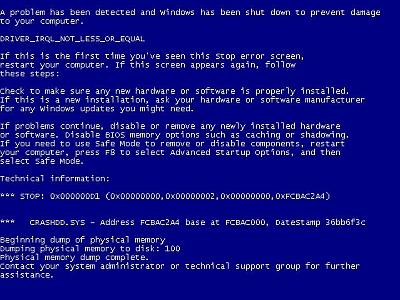
There are a lot of possible causes for blue screen errors, but most of them relate to the computer hardware. The cause of a BSOD error can be a temperature problem, a timing error, a resource conflict, hardware failure, a corrupt registry, a virus or simply a device incompatibility or driver error.
How to analyze blue screen errors
The first thing to do to analyze a blue screen error is to check the meaning of the STOP error code. You need to stop Windows from rebooting when a STOP error is encountered. Once the blue screen of death is shown, you can check the meaning of the STOP error code. Together with the filename of the driver or module, this will give an indication of the error cause.
Another option to analyze the cause of the blue screen error is to look at the Windows system event log or to debug the memory dump (minidump) that Windows created when the error occurred. The event log can be viewed using the event viewer. Right-click Computer in the Start menu, and then select Manage. In the Computer Management window select Event Viewer. The information in the event log can be of great help to isolate the cause of the blue screen error.
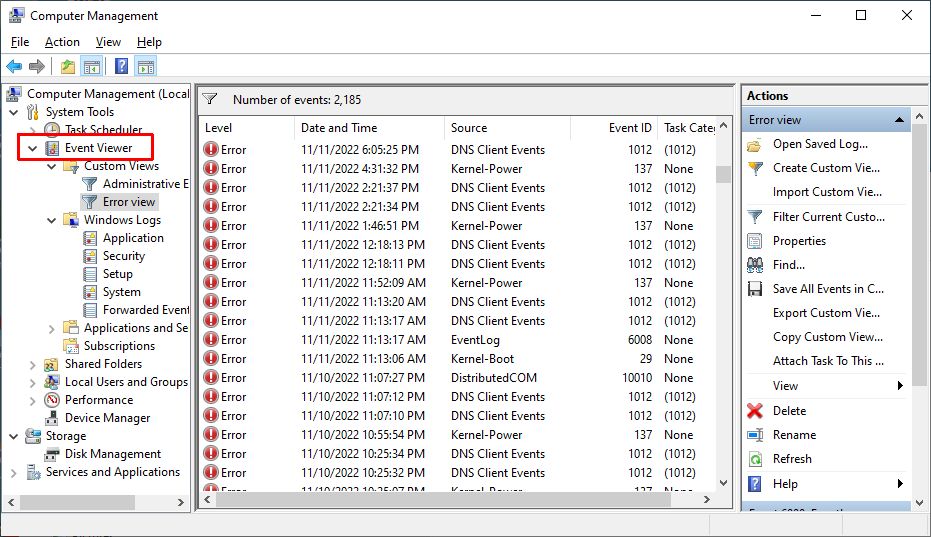
Reading the minidump requires a bit more technical knowledge, but Microsoft has tools to read the minidump.
The most common cause of blue screen errors
In reality, the most common cause of blue screen errors is a device driver problem. Outdated, incorrect or corrupt drivers can cause the system to encounter a STOP error, resulting in the BSOD.
So the easiest way to try and fix a blue screen error is to reinstall and update your system’s device drivers. This will ensure that all driver bugs are fixed and that all hardware has the correct driver.
If you know which device caused the error, you can update or reinstall that driver first. The file name in the blue screen of death can help identify the driver. Look for a file with the .SYS extension and search for that file name.
If you do not have the drivers for all devices, or are not comfortable updating your PC’s drivers manually, you can use a driver update tool to find, download and update all device drivers for you. Such tools will accurately identify your computer hardware, including any device causing an error, and automatically install the latest drivers for it.
In most cases updating or reinstalling drivers will solve your blue screen errors.
Other causes of blue screen errors
However, if updating device drivers does not fix the blue screen error, there are a number of additional things to try:
- Load the default BIOS values – resource conflicts and timing issues can be caused by incorrect BIOS settings.
- Update the BIOS – especially after adding new hardware or installing a Windows service pack this can help fix issues.
- Update Windows – missing updates, including service packs can be a source of stop errors.
- Check your system – run a virus scan and spyware scan after updating your definition files.
- Driver rollback – if you have recently updated a driver, you can use the driver rollback to revert back to the previous driver version.
List of STOP Errors Causing BSOD:
- Stop 0×00000003 UNSYNCHRONIZED_ACCESS
- Stop 0×0000000A IRQL_NOT_LESS_OR_EQUAL
- Stop 0×0000001E KMODE_EXCEPTION_NOT_HANDLED
- Stop 0×00000023 FAT_FILE_SYSTEM
- Stop 0×00000024 NTFS_FILE_SYSTEM
- Stop 0×0000002E DATA_BUS_ERROR
- Stop 0×0000003F NO_MORE_SYSTEM_PTES
- Stop 0×00000044 MULTIPLE_IRP_COMPLETE_REQUESTS
- Stop 0×00000050 PAGE_FAULT_IN_NONPAGED_AREA
- Stop 0×0000006B PROCESS1_INITIALIZATION_FAILED
- Stop 0×00000073 CONFIG_LIST_FAILED
- Stop 0×00000074 BAD_SYSTEM_CONFIG_INFO
- Stop 0×00000076 PROCESS_HAS_LOCKED_PAGES
- Stop 0×00000077 KERNEL_STACK_INPAGE_ERROR
- Stop 0×00000079 MISMATCHED_HAL
- Stop 0×0000007A KERNEL_DATA_INPAGE_ERROR
- Stop 0×0000007B INACCESSIBLE_BOOT_DEVICE
- Stop 0×0000007E SYSTEM_THREAD_EXCEPTION_NOT_HANDLED
- Stop 0×0000007F UNEXPECTED_KERNEL_MODE_TRAP
- Stop 0×0000008E KERNEL_MODE_EXCEPTION_NOT_HANDLED
- Stop 0×0000009C MACHINE_CHECK_EXCEPTION
- Stop 0×0000009F DRIVER_POWER_STATE_FAILURE
- Stop 0×000000BE ATTEMPTED_WRITE_TO_READONLY_MEMORY
- Stop 0×000000C2 BAD_POOL_CALLER
- Stop 0×000000C4 DRIVER_VERIFIER_DETECTED_VIOLATION
- Stop 0×000000CA PNP_DETECTED_FATAL_ERROR
- Stop 0×000000CB DRIVER_LEFT_LOCKED_PAGES_IN_PROCESS
- Stop 0×000000CE DRIVER_UNLOADED_WITHOUT_CANCELLING_PENDING_OPERATIONS
- Stop 0×000000D1 DRIVER_IRQL_NOT_LESS_OR_EQUAL
- Stop 0×000000D5 DRIVER_PAGE_FAULT_IN_FREED_SPECIAL_POOL
- Stop 0×000000D8 DRIVER_USED_EXCESSIVE_PTES
- Stop 0×000000DA SYSTEM_PTE_MISUSE
- Stop 0×000000EA THREAD_STUCK_IN_DEVICE_DRIVER
- Stop 0×000000ED UNMOUNTABLE_BOOT_VOLUME
- Stop 0×000000F2 HARDWARE_INTERRUPT_STORM
- Stop 0×000000FC ATTEMPTED_EXECUTE_OF_NOEXECUTE_MEMORY
- Stop 0×000000FE BUGCODE_USB_DRIVER
- Stop 0xC0000218 UNKNOWN_HARD_ERROR
- Stop 0xC000021A STATUS_SYSTEM_PROCESS_TERMINATED
- Stop 0xC0000221 STATUS_IMAGE_CHECKSUM_MISMATCH
- Stop 0xC0000244 STATUS_AUDIT_FAILED
Please share your own experiences with blue screen of death errors, including possible solutions. New insights can help others, or maybe we can help you with specific STOP errors.
Comments
410 Comments on How to Fix Blue Screen Errors
-
What is BSOD or Blue Screen Of death : Techie Zone on
18th May 2009 8:10 pm
-
Morgan on
25th May 2009 6:10 am
-
Anthony on
25th May 2009 3:22 pm
-
Fix Driver Irql Not Less Or Equal Error | DeviceDriverFinder.com on
27th May 2009 7:16 pm
-
Tim on
29th May 2009 6:08 pm
-
Anthony on
29th May 2009 10:11 pm
-
Nicki on
6th Jun 2009 1:57 am
-
Nicki on
6th Jun 2009 2:00 am
-
Anthony on
6th Jun 2009 2:59 pm
-
Nicki on
9th Jun 2009 2:29 am
-
Anthony on
9th Jun 2009 8:43 am
-
Nicki on
21st Jun 2009 2:58 am
-
Janice on
21st Jun 2009 1:47 pm
-
Anthony on
21st Jun 2009 6:08 pm
-
Rose on
22nd Jun 2009 7:00 pm
-
Anthony on
22nd Jun 2009 7:40 pm
-
Nicki on
24th Jun 2009 1:03 am
-
Anthony on
24th Jun 2009 7:40 am
-
Nicki on
30th Jun 2009 12:48 am
-
Anthony on
30th Jun 2009 8:55 am
-
Rene Celibataire on
1st Jul 2009 10:57 am
-
kunal on
1st Jul 2009 2:07 pm
-
Anthony on
1st Jul 2009 3:00 pm
-
kunal on
1st Jul 2009 3:39 pm
-
Bobby Amoureuse on
6th Jul 2009 7:01 am
-
Anthony on
6th Jul 2009 6:14 pm
-
Ryan on
10th Jul 2009 2:46 pm
-
Anthony on
11th Jul 2009 9:53 am
-
Ryan on
13th Jul 2009 1:11 pm
-
Anthony on
13th Jul 2009 3:31 pm
-
Ben on
16th Jul 2009 10:01 am
-
jeffrey on
16th Jul 2009 3:41 pm
-
Anthony on
17th Jul 2009 5:05 am
-
Ben on
17th Jul 2009 1:45 pm
-
Anthony on
17th Jul 2009 2:04 pm
-
john on
19th Jul 2009 12:31 am
-
Anthony on
19th Jul 2009 5:00 am
-
Robin on
19th Jul 2009 12:49 pm
-
Anthony on
19th Jul 2009 5:13 pm
-
Chris on
20th Jul 2009 1:24 am
-
Anthony on
20th Jul 2009 3:19 am
-
Henry on
20th Jul 2009 8:31 am
-
Anthony on
20th Jul 2009 1:17 pm
-
Robin on
20th Jul 2009 6:28 pm
-
Anthony on
21st Jul 2009 11:50 am
-
Chris on
22nd Jul 2009 2:41 am
-
Anthony on
22nd Jul 2009 3:23 am
-
Andy on
23rd Jul 2009 4:38 am
-
Anthony on
23rd Jul 2009 9:06 am
-
stanly on
24th Jul 2009 11:36 am
-
Anthony on
24th Jul 2009 11:51 am
-
Andy on
24th Jul 2009 12:37 pm
-
Anthony on
24th Jul 2009 3:30 pm
-
LaptopUser on
25th Jul 2009 6:56 pm
-
tammy on
26th Jul 2009 4:49 pm
-
Anthony on
27th Jul 2009 4:59 am
-
adhi darmawan on
30th Jul 2009 12:10 pm
-
amir on
30th Jul 2009 12:16 pm
-
Anthony on
30th Jul 2009 12:53 pm
-
amir on
31st Jul 2009 7:50 am
-
Anthony on
31st Jul 2009 8:49 am
-
Alberto on
1st Aug 2009 3:54 pm
-
Alberto on
1st Aug 2009 4:09 pm
-
Anthony on
2nd Aug 2009 11:20 am
-
Michael on
3rd Aug 2009 1:07 pm
-
Deborah on
3rd Aug 2009 9:49 pm
-
Anthony on
4th Aug 2009 3:23 am
-
Jesse Cooper on
7th Aug 2009 1:44 pm
-
Anthony on
7th Aug 2009 2:11 pm
-
Jesse Cooper on
7th Aug 2009 2:34 pm
-
Neil on
7th Aug 2009 3:50 pm
-
Anthony on
8th Aug 2009 4:28 am
-
Neil on
8th Aug 2009 3:51 pm
-
Sean on
9th Aug 2009 4:53 am
-
Sean on
9th Aug 2009 4:55 am
-
Anthony on
9th Aug 2009 7:23 am
-
Neil on
9th Aug 2009 8:55 am
-
mickey on
9th Aug 2009 9:07 am
-
Anthony on
9th Aug 2009 1:00 pm
-
fred on
9th Aug 2009 11:19 pm
-
Paul on
10th Aug 2009 5:08 am
-
Anthony on
10th Aug 2009 8:08 am
-
Paul on
11th Aug 2009 4:57 am
-
Anthony on
11th Aug 2009 11:11 am
-
Paul on
12th Aug 2009 2:14 am
-
erik on
12th Aug 2009 11:49 am
-
Anthony on
12th Aug 2009 2:29 pm
-
erik on
13th Aug 2009 1:21 pm
-
Anthony on
13th Aug 2009 2:20 pm
-
Jeff on
13th Aug 2009 11:16 pm
-
Anthony on
14th Aug 2009 5:05 am
-
Muntaha Masood on
15th Aug 2009 6:05 pm
-
Jeff on
15th Aug 2009 6:34 pm
-
Anthony on
16th Aug 2009 11:53 am
-
erik on
18th Aug 2009 12:39 am
-
Anthony on
18th Aug 2009 1:30 pm
-
SID on
18th Aug 2009 4:00 pm
-
Anthony on
19th Aug 2009 10:10 am
-
geo on
19th Aug 2009 11:10 pm
-
Anthony on
20th Aug 2009 11:34 am
-
SID on
20th Aug 2009 12:34 pm
-
geo on
20th Aug 2009 5:28 pm
-
Anthony on
21st Aug 2009 4:42 am
-
Muntaha Masood on
22nd Aug 2009 6:32 pm
-
Anthony on
23rd Aug 2009 6:17 am
-
Vibhuti on
26th Aug 2009 1:00 pm
-
Anthony on
26th Aug 2009 4:57 pm
-
Debdeep Mukherjee on
29th Aug 2009 11:34 am
-
Anthony on
30th Aug 2009 6:35 am
-
Debdeep Mukherjee on
30th Aug 2009 8:09 pm
-
Anthony on
31st Aug 2009 7:19 am
-
Debdeep Mukherjee on
31st Aug 2009 7:27 am
-
Anthony on
31st Aug 2009 7:35 am
-
Debdeep Mukherjee on
2nd Sep 2009 2:15 am
-
paul on
2nd Sep 2009 5:48 pm
-
Anthony on
3rd Sep 2009 3:08 am
-
pakzad on
3rd Sep 2009 3:35 am
-
Anthony on
3rd Sep 2009 7:01 am
-
paul on
3rd Sep 2009 7:45 am
-
Debdeep Mukherjee on
3rd Sep 2009 1:16 pm
-
Anthony on
3rd Sep 2009 1:38 pm
-
Debdeep Mukherjee on
4th Sep 2009 3:31 am
-
Anthony on
4th Sep 2009 4:01 pm
-
Raymond on
8th Sep 2009 4:51 am
-
Anthony on
9th Sep 2009 7:22 am
-
Jolene on
12th Sep 2009 3:06 pm
-
Jolene on
13th Sep 2009 2:38 am
-
Quint 52 on
13th Sep 2009 3:45 pm
-
Anthony on
14th Sep 2009 4:56 am
-
Hamid on
19th Sep 2009 8:33 pm
-
Anthony on
20th Sep 2009 9:39 am
-
ayanami-x on
21st Sep 2009 3:32 am
-
Anthony on
21st Sep 2009 6:00 am
-
ayanami-x on
21st Sep 2009 7:09 am
-
ayanami-x on
21st Sep 2009 8:35 am
-
deafbiz on
21st Sep 2009 4:50 pm
-
Anthony on
22nd Sep 2009 8:53 am
-
mist on
26th Sep 2009 9:22 pm
-
Anthony on
27th Sep 2009 5:21 am
-
Sumit Anand on
28th Sep 2009 4:47 pm
-
Debdeep Mukherjee on
28th Sep 2009 6:02 pm
-
Anthony on
29th Sep 2009 4:00 am
-
PingPongPulse on
29th Sep 2009 6:14 pm
-
Jolene on
30th Sep 2009 1:06 pm
-
Gator on
30th Sep 2009 2:34 pm
-
jimmyltc on
1st Oct 2009 6:36 am
-
rushi bhatt on
1st Oct 2009 2:33 pm
-
sumit puri on
1st Oct 2009 3:01 pm
-
Anthony on
1st Oct 2009 5:17 pm
-
PingPongPulse on
1st Oct 2009 9:18 pm
-
Anthony on
1st Oct 2009 10:12 pm
-
rushi bhatt on
2nd Oct 2009 7:23 am
-
Jolene on
2nd Oct 2009 3:21 pm
-
Anthony on
2nd Oct 2009 9:41 pm
-
Windward Wahine on
2nd Oct 2009 11:22 pm
-
Jolene on
3rd Oct 2009 4:38 am
-
Martyn Bowie on
3rd Oct 2009 10:44 pm
-
emanuel on
4th Oct 2009 4:53 am
-
Samantha on
4th Oct 2009 5:13 am
-
Jonny on
4th Oct 2009 5:20 am
-
Anthony on
5th Oct 2009 9:19 am
-
Jolene on
5th Oct 2009 10:28 am
-
PingPongPulse on
6th Oct 2009 5:47 pm
-
Vivek Banerjee on
7th Oct 2009 3:06 pm
-
Anthony on
8th Oct 2009 5:45 am
-
John on
8th Oct 2009 1:03 pm
-
Elke70 on
10th Oct 2009 5:35 pm
-
Hman on
11th Oct 2009 10:55 pm
-
Hman on
11th Oct 2009 10:59 pm
-
Anthony on
12th Oct 2009 9:04 am
-
Hman on
12th Oct 2009 5:18 pm
-
John on
13th Oct 2009 9:19 pm
-
Anthony on
13th Oct 2009 10:02 pm
-
Rick on
16th Oct 2009 5:56 pm
-
Anthony on
16th Oct 2009 8:10 pm
-
Rick on
16th Oct 2009 9:05 pm
-
Rick on
16th Oct 2009 9:44 pm
-
Anthony on
17th Oct 2009 7:43 am
-
fred on
17th Oct 2009 2:37 pm
-
Anthony on
17th Oct 2009 2:58 pm
-
Rick on
17th Oct 2009 5:34 pm
-
Anthony on
17th Oct 2009 11:13 pm
-
Rick on
18th Oct 2009 2:46 am
-
Deep on
18th Oct 2009 3:25 am
-
zed on
21st Oct 2009 11:00 am
-
Anthony on
21st Oct 2009 11:22 am
-
sean on
21st Oct 2009 5:02 pm
-
Justin on
22nd Oct 2009 3:59 am
-
sean on
22nd Oct 2009 5:31 am
-
Anthony on
22nd Oct 2009 12:58 pm
-
Jaymz on
24th Oct 2009 11:55 pm
-
Ki on
25th Oct 2009 12:48 am
-
sean on
25th Oct 2009 3:12 am
-
roderick on
25th Oct 2009 5:23 am
-
sean on
25th Oct 2009 6:14 am
-
Anthony on
25th Oct 2009 1:22 pm
-
sean on
25th Oct 2009 4:36 pm
-
roderick on
25th Oct 2009 9:17 pm
-
sean on
25th Oct 2009 9:36 pm
-
Ki on
25th Oct 2009 11:08 pm
-
sean on
26th Oct 2009 3:15 am
-
Kriz A on
26th Oct 2009 6:22 pm
-
Anthony on
26th Oct 2009 9:09 pm
-
alex on
27th Oct 2009 7:37 am
-
Anthony on
27th Oct 2009 8:36 am
-
Ki on
27th Oct 2009 3:54 pm
-
Darrel on
28th Oct 2009 2:28 am
-
alex on
28th Oct 2009 3:54 pm
-
Larry on
30th Oct 2009 2:20 pm
-
Anthony on
30th Oct 2009 5:47 pm
-
Darrel on
31st Oct 2009 11:53 am
-
Anthony on
31st Oct 2009 12:30 pm
-
Darrel on
31st Oct 2009 3:05 pm
-
H on
31st Oct 2009 6:56 pm
-
JAQ on
2nd Nov 2009 5:05 pm
-
Anthony on
3rd Nov 2009 1:21 am
-
Tracie on
4th Nov 2009 3:39 pm
-
Anthony on
4th Nov 2009 4:22 pm
-
Tracie on
4th Nov 2009 6:27 pm
-
sean on
4th Nov 2009 8:05 pm
-
hackt on
5th Nov 2009 8:12 pm
-
hackt on
5th Nov 2009 8:16 pm
-
Anthony on
5th Nov 2009 11:47 pm
-
hackt on
6th Nov 2009 7:02 am
-
hackt on
6th Nov 2009 7:29 pm
-
steven schanstra on
10th Nov 2009 3:21 pm
-
steven schanstra on
10th Nov 2009 3:22 pm
-
Anthony on
10th Nov 2009 5:33 pm
-
Devin on
16th Nov 2009 2:59 am
-
Anthony on
16th Nov 2009 10:33 pm
-
Rick on
18th Nov 2009 4:38 am
-
Guska on
18th Nov 2009 8:54 pm
-
Camren on
18th Nov 2009 10:55 pm
-
Anthony on
18th Nov 2009 11:19 pm
-
Guska on
19th Nov 2009 1:03 pm
-
Anthony on
19th Nov 2009 9:32 pm
-
error while logging in on
21st Nov 2009 5:35 am
-
Anthony on
21st Nov 2009 12:15 pm
-
sweeeeeeety on
22nd Nov 2009 7:03 pm
-
sweeeeeeety on
22nd Nov 2009 7:22 pm
-
Anthony on
23rd Nov 2009 11:44 am
-
sweeeeeeety on
24th Nov 2009 1:54 am
-
Matt on
24th Nov 2009 5:35 am
-
Anthony on
24th Nov 2009 12:22 pm
-
David on
25th Nov 2009 5:03 am
-
sweeeeeeety on
25th Nov 2009 12:14 pm
-
Anthony on
25th Nov 2009 6:31 pm
-
N.Morgan on
26th Nov 2009 10:56 pm
-
Anthony on
27th Nov 2009 12:48 pm
-
David on
27th Nov 2009 7:41 pm
-
Anthony on
27th Nov 2009 8:11 pm
-
William on
28th Nov 2009 12:44 am
-
Jai on
28th Nov 2009 3:20 am
-
Anthony on
29th Nov 2009 12:40 pm
-
Joris on
29th Nov 2009 5:35 pm
-
Anthony on
29th Nov 2009 10:06 pm
-
John on
29th Nov 2009 11:33 pm
-
william on
30th Nov 2009 1:46 am
-
Shouldube on
30th Nov 2009 11:26 am
-
Joris on
30th Nov 2009 2:09 pm
-
Joris on
30th Nov 2009 2:12 pm
-
Anthony on
30th Nov 2009 6:43 pm
-
william on
1st Dec 2009 12:00 am
-
Calvin on
2nd Dec 2009 3:49 am
-
Anthony on
2nd Dec 2009 8:13 am
-
Calvin on
2nd Dec 2009 11:51 am
-
Calvin on
2nd Dec 2009 11:52 am
-
Anthony on
2nd Dec 2009 2:00 pm
-
Calvin on
3rd Dec 2009 3:14 am
-
Anthony on
3rd Dec 2009 2:01 pm
-
moonstone on
4th Dec 2009 4:18 pm
-
Anthony on
4th Dec 2009 5:02 pm
-
James on
6th Dec 2009 2:30 am
-
Anthony on
6th Dec 2009 12:32 pm
-
kenji99 on
8th Dec 2009 7:18 am
-
Anthony on
8th Dec 2009 12:40 pm
-
Paul on
9th Dec 2009 2:16 am
-
Paul on
9th Dec 2009 2:40 am
-
kenji on
9th Dec 2009 3:27 am
-
Anthony on
9th Dec 2009 9:56 am
-
kenji on
10th Dec 2009 3:48 am
-
kenji on
10th Dec 2009 4:21 am
-
gudd on
11th Dec 2009 6:35 pm
-
Anthony on
11th Dec 2009 10:12 pm
-
Anthony on
12th Dec 2009 2:32 am
-
rathi on
12th Dec 2009 3:38 am
-
sid on
12th Dec 2009 4:51 pm
-
gudd on
12th Dec 2009 4:52 pm
-
Anthony on
13th Dec 2009 12:53 am
-
Anthony on
13th Dec 2009 1:23 am
-
kay on
13th Dec 2009 2:55 am
-
gudd on
13th Dec 2009 5:29 pm
-
Anthony on
13th Dec 2009 7:25 pm
-
gudd on
13th Dec 2009 8:08 pm
-
Nicole on
14th Dec 2009 1:41 am
-
Anthony on
14th Dec 2009 6:24 am
-
gudd on
14th Dec 2009 10:02 am
-
Anthony on
14th Dec 2009 12:03 pm
-
Nicole on
14th Dec 2009 3:08 pm
-
Anthony on
14th Dec 2009 9:32 pm
-
michelle on
15th Dec 2009 1:49 am
-
Sean on
15th Dec 2009 8:43 am
-
Anthony on
15th Dec 2009 10:49 am
-
gudd on
15th Dec 2009 4:27 pm
-
Anthony on
15th Dec 2009 7:21 pm
-
gudd on
16th Dec 2009 1:34 pm
-
damien on
17th Dec 2009 3:16 am
-
Anthony on
17th Dec 2009 1:24 pm
-
Tracey on
17th Dec 2009 1:58 pm
-
Ras on
17th Dec 2009 2:48 pm
-
Johan on
18th Dec 2009 7:24 am
-
Anthony on
18th Dec 2009 3:00 pm
-
sushant on
19th Dec 2009 2:53 am
-
gudd on
19th Dec 2009 6:44 am
-
Anthony on
19th Dec 2009 12:19 pm
-
sushant on
19th Dec 2009 2:32 pm
-
Bencleric on
23rd Dec 2009 5:28 pm
-
Bencleric on
23rd Dec 2009 5:34 pm
-
Anthony on
23rd Dec 2009 6:16 pm
-
Lon on
29th Dec 2009 4:03 am
-
Anthony on
29th Dec 2009 8:39 am
-
Lon on
29th Dec 2009 2:51 pm
-
Anthony on
29th Dec 2009 5:16 pm
-
Lon on
30th Dec 2009 1:37 am
-
Lon on
30th Dec 2009 4:15 pm
-
956_Classic on
30th Dec 2009 9:22 pm
-
Anthony on
30th Dec 2009 10:44 pm
-
956_Classic on
31st Dec 2009 12:24 am
-
Karl on
31st Dec 2009 3:18 pm
-
Thomas on
1st Jan 2010 2:09 pm
-
Anthony on
2nd Jan 2010 12:32 pm
-
Tom on
5th Jan 2010 9:33 pm
-
pleasssse help!! on
6th Jan 2010 12:45 am
-
956_Classic on
6th Jan 2010 2:54 am
-
Jacket on
6th Jan 2010 6:13 am
-
robert on
6th Jan 2010 8:22 pm
-
WarriorMP on
6th Jan 2010 10:12 pm
-
Anthony on
6th Jan 2010 11:32 pm
-
Anthony on
6th Jan 2010 11:40 pm
-
Sean on
7th Jan 2010 4:18 am
-
Sean on
7th Jan 2010 4:21 am
-
jbmoney7 on
7th Jan 2010 6:44 am
-
Sean on
7th Jan 2010 7:45 am
-
Anthony on
7th Jan 2010 7:44 pm
-
jbmoney7 on
7th Jan 2010 7:48 pm
-
Anthony on
7th Jan 2010 8:00 pm
-
Jaycee on
7th Jan 2010 8:52 pm
-
Anthony on
7th Jan 2010 11:57 pm
-
Beth on
8th Jan 2010 1:31 am
-
Jacket on
8th Jan 2010 1:42 am
-
Anthony on
8th Jan 2010 8:36 pm
-
Jacket on
8th Jan 2010 11:49 pm
-
Anthony on
9th Jan 2010 5:53 pm
-
Jacket on
10th Jan 2010 11:35 am
-
Niwa on
11th Jan 2010 1:23 am
-
Calahan on
11th Jan 2010 9:06 am
-
Anthony on
12th Jan 2010 11:27 am
-
Darren on
13th Jan 2010 6:09 pm
-
Anthony on
13th Jan 2010 10:41 pm
-
Jacket on
14th Jan 2010 8:14 pm
-
Ali Muhammad on
15th Jan 2010 5:28 pm
-
nicola on
15th Jan 2010 6:07 pm
-
Anthony on
15th Jan 2010 6:34 pm
-
Ali Muhammad on
15th Jan 2010 7:15 pm
-
Peter Forman on
15th Jan 2010 10:41 pm
-
Ingrid on
16th Jan 2010 4:30 am
-
Jacket on
16th Jan 2010 6:34 am
-
Anthony on
16th Jan 2010 10:40 am
-
nicola on
16th Jan 2010 2:57 pm
-
Ali Muhammad on
16th Jan 2010 5:55 pm
-
Ali Muhammad on
16th Jan 2010 6:16 pm
-
Ali Muhammad on
17th Jan 2010 4:43 am
-
Ali Muhammad on
17th Jan 2010 1:38 pm
-
Anthony on
17th Jan 2010 3:25 pm
-
Ingrid on
18th Jan 2010 12:27 am
-
Anthony on
18th Jan 2010 4:35 am
-
Ingrid on
19th Jan 2010 1:46 am
-
Anna on
20th Jan 2010 12:24 am
-
Jacket on
22nd Jan 2010 11:22 am
-
John C on
22nd Jan 2010 8:57 pm
-
Ali Muhammad on
23rd Jan 2010 3:18 am
-
Jacket on
23rd Jan 2010 6:33 am
-
vibin on
24th Jan 2010 1:31 pm
-
john on
27th Jan 2010 8:09 pm
-
ANGEL on
27th Jan 2010 11:04 pm
-
Anthony on
28th Jan 2010 12:12 am
-
Aaron on
28th Jan 2010 10:18 am
-
kim on
28th Jan 2010 3:49 pm
-
Mystery BSOD - Hardware Peripherals on
28th Jan 2010 5:47 pm
-
Anthony on
28th Jan 2010 10:15 pm
-
nicola on
29th Jan 2010 12:13 am
-
Aaron on
29th Jan 2010 1:07 am
-
Anthony on
29th Jan 2010 10:01 pm
-
Kyla on
30th Jan 2010 3:19 am
-
nicola on
31st Jan 2010 4:20 am
-
Philippe Jacques on
31st Jan 2010 5:30 pm
-
Caitlin on
31st Jan 2010 10:14 pm
-
Caitlin on
31st Jan 2010 10:36 pm
-
Anthony on
1st Feb 2010 1:18 pm
-
Inun Reyes on
1st Feb 2010 8:51 pm
-
Anthony on
1st Feb 2010 9:33 pm
-
Inun Reyes on
1st Feb 2010 9:57 pm
-
Philippe Jacques on
1st Feb 2010 10:49 pm
-
ayien on
3rd Feb 2010 7:57 am
-
Anthony on
4th Feb 2010 8:48 am
-
Ian on
4th Feb 2010 12:19 pm
-
Inun Reyes on
4th Feb 2010 4:50 pm
-
Abbie on
4th Feb 2010 9:09 pm
-
Anthony on
4th Feb 2010 11:07 pm
-
Inun Reyes on
4th Feb 2010 11:27 pm
[...] Blue Screen of Death, or simply BSOD, represents an error notoriously associated with Microsoft Windows operating [...]
My blue screen of death isnt any of the ones you listed. It is a blue screen that says: STOP: c0000218 {Registry File Failure} The registry cannot load the hive (file): \SystemRoot\System32\Config\SOFTWARE or its log or its alternate. It is corrupt, absent, or not writeable. Please someone help me!
@Morgan – The BSOD error you are describing is caused by a corrupt registry. Microsoft has a knowledge base article on recovering from a corrupt registry that pertains to the c0000218 error.
http://support.microsoft.com/kb/307545/en-us
Did you try those steps?
Anthony
[...] Microsoft further advices that you try to load the last known good configuration using the start menu (press F8 during boot). But you do need to make sure that the problem does not introduce itself again as a result of changes or updates. So the best way is to find the real cause of a blue screen error and fix it. [...]
Morgan,
My BSOD says that there is a problem with file: nv4_disp
It states that the device driver got stuck in an infinite loop. What do I do next?
Thanks for your help!
Tim
@Tim – The nv4_disp is related to the n4v_disp.dll file which is part of the Nvidia device drivers for your video card. The most common solution to that problem is to get the latest drivers from the Nvidia support site ( http://www.nvidia.com/Download/index.aspx?lang=en-us ) and download your video card drivers.
In the Control Panel, select System, select the Hardware tab and click the Device Manager button. Then open up Display Adapters, right click your video card and select Update Driver in the popup menu. Make sure to select the location for the drivers manually (not let Windows search), and pick the downloaded Nvidia drivers.
Hope it helps.
Anthony
Hey there! Major problem: I receive an array of stop errors, varying from starting IE or MS Word to browsing the internet to turning on my computer. Some include:
IRQL_NOT_LESS_OR_EQUAL
PAGE_FAULT_IN_NONPAGED_AREA
BAD_POOL_CALLER
BAD_POOL_HEADER
I forgot to mention that the first is the most common, and the only applicable file/program mentioned is win32k.sys. I’ve scanned for viruses several times and they’re all negative, and I’m wondering if it’s the anti-virus software. I really need some help before I decide to just get a new computer.
By the way, I have a 4 year-old Gateway with Windows XP.
@Nicki – Your system seems unstable overall. The common causes for this type of BSOD errors is memory and a corrupt Windows installation.
I suggest you check your memory with something like memtest86. Also try loading the default bios settings (in most cases F2 during boot will bring you in the bios). This will reset all memory timing to default.
Another thing I’d suggest is to run “sfc /scannow” in the command prompt. This will verify and correct your Windows system files.
I do not expect it is the antivirus software.
Anthony
Anthony,
I ran “sfc/scannow” in the command prompt, and after the protected files were scanned, the window closed. Should I have received a positive or negative follow-up report? I also pressed F2 during boot and selected “Load Optimal Default” in the BIOS. Is that correct? The BIOS boot version is EV91510A.15A.0123.
Lastly, is there another memory test available? I appreciate all your help.
@Nicki – The SFC command will automatically replace corrupted system files with the original ones, so there should not be any follow up report.
The Bios default selection is indeed correct.
The best is really to use memtest86, but you can also try the Windows Memory Diagnostic from http://oca.microsoft.com/en/windiag.asp
Anthony
Anthony,
Thanks SOOO much for your help! So far the BIOS settings worked! The memory test came up negative, but I plan on running the extended one soon.
Thank you! Thank you! Thank you!
I have had so much trouble with BSOD, tried several diff things, reinst WIN XP SP 3, remove SP 3, change antiV software, each time comp – Media Centre AMD Emachine would run fine then months later would BSOD with diff codes reappears. Last code was 0*000000C5, before that just shutdowns, before that o…8E, before that – 0…7F. Any ideas before I start buying new mem, MoBd, & HD? Thanx, Jan
@Janice – I’d recommend you run a memory test, because that could explain the erratic symptoms. Another option is a temperature problem. Try cleaning the system inside and make sure there is sufficient airflow around it.
Hope it helps!
Anthony
What do you do if the BSOD flashes too fast for you to see and then automatically reboots again and again and again (does the same for safe mode)
@Rose – You can configure Windows not to automatically reboot on a BSOD error.
In the Control Panel go to System. Select the Advanced tab, and under Startup and Recovery select the Settings button. Now you see a checkbox called Automatic restart under System failure. Make sure that is cleared and click OK (this is Windows XP, Vista has the same option).
Next time a blue screen error occurs, the screen will stay and Windows will not automatically reboot.
Anthony
Anthony,
I recently booted my computer with normal startup (I had it on selective with the anti-virus turned off). I received a new BSOD moments after an update was successfully installed: Update to.NET Framewok 3.5 Service Pack 1 for the .NET Framework Assistant 1.0×86(KB963707).
I received the blue screen error:
STOP 0×00000024
Ntfs.sys address F84DE886 base at F84B9000, DateStamp 4800be5
Is the cause the anti-virus software or could it be the update? If it’s the update, how can I re-install it?
Any help would be appreciated.
@Nicki – the stop error you list is actually a disk or file system error. Quite often you can fix that by running a “chkdsk /f” at the command prompt (with admin rights). This will check the disk and file system and correct any error found.
Some more on this: http://support.microsoft.com/kb/228888
So I do not think the .NET framework nor the AV software has to be the cause, it could be that .NET update is using a part of the disk that has errors.
Anthony
Anthony,
I successfully ran the disk check a few days ago, but today when I booted up my computer, I received a STOP 0×07E blue screen error. It also read:
VETEFILE.SYS Address AA2DB30E base at AA2D8000 DateStamp 482a3efc.
I reloaded optimal BIOS settings, but what else can I do to to try to fix this? Please help!
Thanks so much!
The vetefile.sys file is part of Antivirus software by Computer Associates, so maybe that is causing your problems. You can try uninstalling and then reinstalling that, or maybe try switching to AVG ( http://free.avg.com/ ) to see if that help.
Stop error 0×07E really indicates a driver problem, so this is related to the VETEFILE.SYS you indicate. This driver file is part of the Vet File Scan Engine, which listed in the Device Manager under Non-Plug and Play Drivers (make sure to select the ‘View hidden devices’ option in the View menu).
Anthony
Do Blue Screen errors still exist? i haven’s seen one since Windows ‘98!!!
hi anthony
i recently added a new hdd to my pc , it worked well for months then the pc started getting hanged every now and then , then it would ask for : to repair windows , it worked for days then again it woud`nt even repair i reinstalled windows several times but same problem , so thinking that the old hdd might be the problem (since during chkdsk errors wer found) i reinstalled th windo in the nu hdd (making it master) just after i reinstalled all my softwares it showed BSOD giving
0*00000003 , 89c62150 ,0*89c622c4 ,0*805d1142 error
plzz help!! also is the old hdd realy useless(any way 2 know that)
thanks
@kunal – From the fact that you only started having problems with the new disk, it is more likely that this new disk is causing some kind of problem. Is it a IDE or SATA disk?
One possible solution for stop error 0×00000003 is a Microsoft hotfix: http://support.microsoft.com/kb/841005
This is assuming you are running XP of course.
And also make sure you Windows updates are all installed, so all possible patches applicable to the system are present.
Regarding the disk, a disk check should tell you if it is still okay. To make sure, do a full format (not quick), so all bad areas are marked and excluded for data storage.
Anthony
it`s SATA
actually it started getting error after 2-3 months
and thanks for help
@Rene Celibataire of course they exist. Im with XP , blue screens appear often.
Ive heard that you can see blue screens on Vista too , is it true ?
Yes it seems that Anthony have missed some errors , but anyway really useful post.
@Bobby – Blue screen errors are as old as Windows is, so you can indeed see them in Vista and even Windows 7 for that matter. The article is meant to help readers understand and troubleshoot blue screen errors, and the list is based on XP errors, although most will be valid for Vista as well.
Anyway, thanks for you reply to Rene and I am glad you liked the article.
Anthony
Hi Anthony, I’m having serious blue screen problems mostly IRQL_NOT_LESS_OR_EQUAL and sometimes PAGE_FAULT_IN_NONPAGED_AREA and I really don’t know how to fix it.
I wrote all the STOP numbers down for the 3 blue screens I just got a few minutes ago, The first one was the IRQL one which happened during a windows defender scan (I have Vista) and then after I wrote the numbers and such down and restarted it, it happened again,
I wrote it down again (it was different) and then restarted and got it once more during a disk check the computer said was recommended to do after those restarts and then it happened again during that which was the same as the 2nd blue screen but different STOP numbers and some addtional stuff.
the first one was
IRQL_NOT_LESS_OR_EQUAL
STOP: 0×0000000A
(0xFFFFFA000424C140,0×000000000000000c… 0×0000000000000001, 0xFFFFF80001CA89AD)
second one was:
PAGE_FAULT_IN_NONPAGED_AREA
STOP: 0×00000050
(0xFFFFFA0006B2E178, 0×0000000000000000, 0xFFFFF80001CA21FO, 0X0000000000000005)
and the last one was
PAGE_FAULT_IN_NONPAGED_AREA)
acpi.sys
STOP: 0X00000050 (0xFFFFFA00047E5058, 0×0000000000000000, 0xFFFFFA6000915DE2, 0×0000000000000005)
acpi.sys – Address FFFFFA6000A15DE2 base at FFFFFA60008F7000, Datestamp 47919283
after this 3rd one happened I shutted the computer down and got back on 10minutes later and it managed to work and so im on now typing this out >.<
Any help on this is greatly appreciated
@Ryan – The type of erratic errors you are experiencing together with the ACPI.SYS file, indicate there is something wrong with the power or power settings. Just to make sure, you can try starting in Safe Mode (F8 at startup) and run a “SFC /SCANNOW” at the system prompt. This will check and restore Windows system files.
But more likely it is a power problem. So you can boot into the Bios (in most cases F2 during boot) and see if you can disable the ACPI setting in the power section of the menu.
Is this a laptop or a desktop you are having problem with?
Anthony
@Anthony – I scanned using SFC /Scannow and it found some files that where corrupt and couldn’t be fixed, my reason for being so long to reply was I found out I had rootkits on my computer just a few days ago so I had to reformat the computer.
I tried turning off the ACPI setting (there was two of them there, which I can’t remember the names of. One was disabled and the other was enabled) So when I tried disabling the one that was enabled the computer couldn’t load windows, so I enabled the disabled and still didn’t load until I turned the second one back on again.
Its a desktop problem a very annoying problem
~Ryan
P.S: Thanks for the help I appreciate your time to help out!
@Ryan – If you had Windows system errors reported by SFC, then they should be fixed. The presence of rootkits is worrying, so good you reformatted. But are you saying that the blue screen errors keep happening after you reformatted and reinstalled Windows?
Anthony
Hi
I’m having a BSOD problem which I cant seem to get around.
I get code 0×00000024 which I understand is a NTFS problem.
Ive run diagnostics and scandisk/chkdsk from DOS which all come up ok.
Ive also tried to repair windows with the OS disk which just hangs straight away.
I cant access windows at all to run any of the other diagnostics or changes suggested.
Any help would be greatly appreciated.
hi. I’m having a the blue screen of death on my windows vista home premium. i would fix it if i knew what caused it. can you tell me how to fix this if it said: Stop
0×0000004E (0×0000008D, 0×0009B180, 0×00400000, 0xc000B151). I don’t lnow what those numbers stand for.
@Ben – Stop error 0×00000024 is indeed a disk related problem. If you can not repair it and the chkdsk signalled no errors, it could be anything with the setup of the disks. If it is a desktop, you could open it and check the cables.
Also check the disk assignment in the Bios, depending on the Bios type and version, you can sometimes change disk settings LBA and PIO mode. But that is mostly for older systems.
One other thing to try is to run “SFC /SCANNOW” from the command prompt (requires admin level), which will check and restore your Windows system files.
@jeffrey – Microsoft only has details for stop error 0×00000024 for W2K, but it is indeed also reported in later Windows versions. From what I know, quite a few are related to memory errors. So try running a memory test first. Memtest86 is a good test program.
Anthony
Thanks Anthony,
I fixed the problem by taking out the hard drive and using it as a slave in another computer. When Windows picked up on the drive it repaired the corrupted files. Problem solved!
Ben
@Ben – Great to see you were able to solve it that way. And thanks for sharing!
Anthony
i have this code i dont know what to do i tried everything i uninstalled the programs i know that must have cause it but still wont work i didint upate a driver either or install a driver
0×0000000a(0xc340c033,0×0000001c,0×00000001,0×804f8a8c)
pls help thank you
@john – Stop error 0×000000a is mostly related to an irql_not_less_or_equal error.
You can check some of the ideas in the link, but also check if you did not add any hardware. In most cases the error is caused by new hardware or a driver update (maybe you have Windows set to auto-update). Try using a restore point from before the update and program install you mention. Possibly the program uninstall did not remove everything.
If that does not help, try running a memory test (memtest86) or try loading the default BIOS settings.
Anthony
I have this error:
The Device Driver stuck in an infinite loop.
…
STOP: 0×000000ea (0xFFFFFA800BF018A0, 0×0000000000000000, 0×0000000000000000, 0×0000000000000000)
There is no information about any driver file.
i reinstalled the drivers many times and many different ones. it never helped.
The BlueScreen happens when i play games. not every game will cause the error.
Just Games like GTA IV, Battlefield2, Fifa 09, Counter-Strike:Source… Games like Street Fighter IV, Pro Evolution Soccer 09 – works fine without any Error.
PS: It still was the problem when i bought the PC. I went to the store and changed the PC. Still the Error. I never tried to reinstall windows. But i have about 500 GB on my fixed Disc. Wouldnt be so good if i loose them!
I have the PC now for 6 Months i think.
@Robin – Stop error 0×000000ea is indeed related to video intensive applications, where things get stuck in the software.
The most common solution is to update the video drivers, but since you have tried that, also have a look at some other tips to fix stop error 0×000000ea.
The bios settings might help. I am not sure if you are overclocking your video card, but try to set it to default values.
Anthony
Im getting a blue screen almost everyday, and there have been instances where after a blue screen my pc hasnt booted back up to even bios, where theres only power on the motherboard but no beeps, or signal to the mouse keyboard or monitor and often I have to take out the cmos battery and put it back in before it will work again.
The last blue screen I got today says :
Stop: 0×0000007E (0xc0000005, 0×00000100, 0×8BB7FC78, 0×8BB7F974)
Is this hardware or software problem ?
Thanks
@Chris – That definitely looks like a hardware problem. I have had the same (various blue screen errors) and it turned out my power supply that was broken.
If you cannot even get into the bios, that is serious. You could see if a bios update is available, but it might be time for an upgrade…
Anthony
HI,
I have this BSOD that say Run CHKDSK/F to check to hard drive corruption, and it say STOP: 0×0000007B (0xF8959640, 0xC0000034, 0×00000000, 0×00000000).
@Henry – Stop error 0×0000007B is related to the boot device in Windows, so a corrupt disk is very possible. If the chkdsk /f command does not help, another possibility is a boot sector virus, so make sure to run a virus scan with an updated antivirus program.
Microsoft actually has a decent description of stop error 0×0000007B covering the possible causes and fixes.
Hope it helps.
Hi again Anthony,
i thank you very much for your answer, i am trying another thing. To turn off the hardware acceleration (hope its correct translated in german it means Hardwarebeschleunigung) But my ATI Drivers of my ATI Radeon HD 4870 dissallow the options to me. So i cant change them. Maybe you have an idea how i can change the hardware acceleration on another way ?
@Robin – Normally the hardware acceleration is available in the display properties window under the Advanced button. If the hardware acceleration can not be changed there, the driver you have installed does not allow it.
I do not know of any registry setting that will allow you to manually disable the hardware acceleration… unfortunately.
Anthony
Thank for your previous help Anthony, I wanted to also add that I put my pc together 1 year ago, and never had any problems with it previously but after going away on a 3 month holiday I get back and find that it wasnt booting up anymore, only the lights and fans were working on the mobo, so I took it to my friends house to check the parts on his comp and it turned out the 8500 gt graphics card was dead so I recently purchased a 1gb 250 gtx along with a higher power supply just to be sure and it was working again for 1 week and now Im having the exact same problems again, after I shut down I wake up the next morning to find that I cant boot up again, after trying several times and then taking out the cmos it works again but then it freezes either at the dos or during the welcome screen or at the desktop where the mouse and keyboard stop working and then on the 3rd reboot its all fine again only to repeat the process the next time I shut down.
Im starting to think it is either the ram or the motherboard after getting this error yesterday…STOP: 0×0000001A (0×00008884, 0×836FDE90, 0×836FE050, 0×00000002)
My specs are: Asus P5k Deluxe -Wifi, Intel duo core E-6750, 4 gb A-Data Ram, 250gb Seagate SATA HDD, 600w Antec Power supply, Gigabyte 1gb 250GTX card.
Thank you so much for your help.
@Chris – 1 Year is pretty recent, so things should not break already!
The 600 watt power supply is quite adequate, considering that you are running only one hard disk. Two things I can still suggest:
- update the bios if an update is available
- run a RAM test (memtest86) to see if the memory is indeed faulty
Hi Anthony,
Recently i have been getting BSOD that says:
BCCode: 1000008e
BCP1: C0000005
BCP2: 8c3CB6CO
BCP3: 94ECA69
BCP4: 00000000
OS version: 6_0_6000
and another saying (whilst BSOD)
Stop: 0×00000116 (0×84A56510, 0xeBEA7260, 0×00000000, 0×00000002)
nvlddmkm.sys – address 8BEA7260 base at 8BE9B000, Datestamp 4a1dd468
At first I thought this was a display driver issue so i decided to download and install the latest display driver for my laptop . Unfortunately, this didnt resolve the problem and i kept getting the BSOD. Then after some research i found out that Vista and Nvidia graphics cards clash alot so last nite I installed the Windows 7 release candidate in the hope that this would resolve the issue. However, i continued to get the BSOD. Currently, i have reduced the resolution on my laptop and it seems to be ok however, i would much prefer to run it at a higher resolution. Any suggestions as to why im getting the blue screen?
Thanks in advance,
Andy.
PS. i also realised that my laptop blue screens when im running a few different things at once (although previously this wouldnt be a problem)
Specs: Asus F3Sseries, CPU: DUO T7500, HD: 200GB, Memory: 2GB, OS: Windows 7 (previously Vista), Graphics card: Nvidia GeForce 8600M GS 256MB.
@Andy – I fear Windows 7 will not be much better than Vista, since the WDM and driver architecture are the same. Unless the Nvidia comes out with improved drivers for Vista/Windows 7 this could remain an issue.
Did you try using different refresh rates at the higher resolution? Also see if you can turn the hardware acceleration off for the video card in the display properties.
A last option would be to use alternate drivers. Have a look a the omega drivers, which can be used instead of the Nvidia drivers.
Hi Anthony,
I’m having a BSOD on my windows xp everyday, it said:
PAGE_FAULT_IN_NONPAGED_AREA and sometimes IRQL_NOT_LESS_OR_EQUAL.
The blue screen errors keep happening even after i reformatted and reinstalled Windows.
Perhaps the cause is my internet connection? because my mozzila often crash, so do safari, or chrome..
Thank you so much for your help.
@stanly – If you have seemingly random blue screen errors like that and have even reinstalled Windows already, it is probably faulty hardware or a hardware configuration problem (could even be caused by timing issues and temperature).
First try loading the default bios settings, so the motherboard setup is standard.
Also test your RAM with memtest86 to make sure the memory modules are not defective.
The internet connection would not cause such errors, unless you have problems with your network controller.
I am assuming here that you have a firewall active and are running antivirus software… coz a virus could also cause this.
Hi Anthony,
Thanks for the reply
ill try downloading the omega drivers and ill give it a go. But just another question.. from what you said previously about Nvidia drivers clashing with Vista/Windows 7, does that mean that if i reformat my laptop back to windows XP, it will be fine? or do you think it is hardware issues thats causing my BSOD?
Cheers,
Andy.
@Andy – Hope it works! And yes, I do expect that the BSOD errors would be gone if you revert back to XP.
I have a problem that made BSOD by Power Supply Broke. Someday ago, while I had used my PC perfectly, after I booted my comp it appeared BSOD but I could not found the source of this problem. I tried to reinstall windows, clean RAM and cards, reset bios but BSOD hadn’t be disappeard. I’m very tired to fix my computer. I asked my friend , he suggested me to change power supply and that’s resolve my problem.
My daughters computer has the blue screen of death error stop:c0000218 registry file failure. we tried the f8 during reboot and it returns to blue screen. We also tried to restart with the disks and still back to blue screen. Please help!
@LaptopUser – Thx for sharing. a broken power supply will give you very random BSOD errors indeed.
@tammy – If you can not start the computer with the setup disk, then the cause of your stop error c0000218 is most likely not a corrupt registry, but some hardware problem. If you have changed anything on the computer recently, try changing it back (like adding external devices, adding memory, etc.).
Are you sure the computer is starting from the CD/DVD? You can check the Bios setup to make sure that is the case. Press F2 during startup to get into the Bios and then check the startup or boot settings. You can define the sequence of boot devices, and need to make sure the CD/DVD drive is the first in the list.
If all this does not work, I’d suggest you bring the PC to a repair shop, as most likely a component is defect.
Hi, sorry for intruding…
I tried to install alcohol 120% to my friend’s vista and now it’s look like something is broken… still it’s said that is when BSOD occurred it said something like dumping data or kinda like that and keep looping when the windows started so I can’t uninstall the apps and stuck there doing nothing… (T_T) please help me!!!
My problem is 0*0000007E Viaudios.sys how can i solve it?
When i want to run games it reboot after BSOD.
@ adhi darmawan – I am not sure Alcohol 120% is compatible with Vista. Try MagicDisc instead, that I know works for sure.
But these tools use virtual drivers to simulate a drive when mounting an image, so there is probably where your friends system now fails. Did you try starting in Safe Mode (F8 during boot) and then uninstall Alcohol 120%?
@amir – stop error 0×0000007E is related to the Via audio driver in your case. You should try updating the driver or uninstalling and reinstalling it in the Device Manager.
What causes viaudio.sys error? And does a sound driver can stop running a game & restart Win???!!!! ((( I ran sfc /scannow some days ago does it depend on my problem??? thx.
@amir – viaudio.sys is a driver file for a Via Technologies PCS audio device and yes, it can stop a game from running and restart your PC.
Try the Via website for an updated driver.
Hi there, i tried doing several things in fixing my blue screen of death but none worked. I tried the spy ware in safe mode but that didn’t work, but i couldn’t because i cant connect to the internet in the safe mode so i couldn’t update the drivers. Anyways my error says only this:
Stop:0×0000008E (0xc0000005, 0×00000000, 0xA018CA48, 0×00000000)
If anyone can help me i would really appreciate it.
“but i couldn’t because i cant connect to the internet in the safe mode so i couldn’t update the drivers.” What i mean by this is that i couldn’t update the drivers because i cant connect to the internet in safe mode even thought i put safe mode with network. Also, i did try the registry fix like Reg cure.
@Alberto – Try loading the default bios settings.
Another option to try is to disable the hardware acceleration of the video card.
Did you see any file name on the blue screen (xxxx.sys or something)?
I finally fixed my blue screen problem with your great information. Thanks it was a terrific help.
Michael
Hello, I have a BSOD error Machine_Check_Exception stop:0×0000009c (ox00000000,0×808855F0,0xA2000000,0×84010400) won’t let me partition the hard drive so I can’t load winXP. I am on a laptop. My hard drive is 160GB my memory is 1GB. Tried chdsk/P and R – say I have bad sectors unrepairable only does 50% of hard drive then freezes. By the way this is a new hard drive. Can anyone help me. Thanks
@Deborah – If you can not even partition or format the drive, there is certainly something wrong with the hard disk or its setup. If it is a new disk as you say, I would take it back and have it replaced or have them test and format it for you.
Hello, thanks for your website!
I get a BSOD error when trying to print to an HP network print adapter. It works fine on all other machines though.
The error code is 1000008e parameter1 c0000005, parameter2 ba93dcc4, parameter3 acd8aad8, parameter4 00000000
Event Category(102) Event ID:1003
I have tried to uninstall and reinstall the network print adapter software twice, but that hasn’t worked. Any other ideas, or will I be forced to use another printer =:( ?
Thank you
@Jesse Cooper – Error 8E that you are reporting means a not handled kernel level exception error. Combined with the 1st parameter, the c0000005, this most likely is due to a memory error.
There are a few things you can try:
- a memory test (RAM), using a program like memtest86
- load the default bios settings (or check if any memory options like memory caching are active and disable them)
- update the bios to the latest version
The printer and printer driver should not be the problem, especially since you use the same on other systems.
There is one more option, which is a virus, but that would not be the cause if you run up to date antivirus software.
Thanks a lot.
I’ll look into it and see what I can unearth! It won’t be so bad if it’s a memory chip as that’s easily replaced. Hopefully I wont have to mess around with the bios.
This is a really useful site – thanks. Unfortunately I too am having blue screen error. I tried to restart my pc while back and got an error ntoskrnl.exe missing. When I tried to boot into recovery disc I got a blue screen. I used a windows slipstream to get into my harddrive and found that every file in windows/system32 beginning with “m” to “z” had been deleted. I replaced all files and tried to reboot. Ntoskrnl error was gone but now instead I got blue screen again. Did memory test and found one suspect dodgy stick of Ram which I removed – still blue screen. Backed up my HD using slipstream and wiped the HD and tried reinstalling windows. Still I get a Blue screen. Finally reset Bios to factory settings and still get the same Blue Screen error. The error states ***stop: 0×0000007B (0xF78D663C, 0XC0000034, 0X00000000, 0X00000000). It must be hardware problem as HD is now wiped but that doesn’t explain the System 32 folder being semi deleted. Has me totally stumped. Any help appreciated.
@Neil – One option I see as possible is a boot sector virus. Did you really boot from a virus-free Windows CD when you reinstalled? If so, make sure to do a full NTFS format, not a quick format. I would even suggest you remove the existing partitions and recreate new ones.
Apart from that your problems really point at a problem with the HD indeed. Did you do a full CHKDSK /R to check for bad sectors? If possible, try using a different HD as your system disk.
Anthony – I have tried different hard drives, same result = blue screen. I have used military of defence program to wipe the HD’s so I am happy all partitions etc are now gone. I used chkdsk/r to check all HD’s and got no errors. I tried something else. I got hold of a vista disc, tried booting from it and installed updated vista sata controller drivers and got the following blue screen
Worker_Thread_Return_at_Bad_IRQL
Stop: 0×000000E1 (0×888070A1, Ox00000002, 0×00000000, 0×8892D260)
Does that new error point in a new direction?
Hi anthony i was curious if you could help me.
my blue screen of doom is the one that is in the screenshot at the beginning of the article
i did go in the bios and try switching it and defaulting it and it did work for about 15 minutes and then boom it bsod’d again
and it keeps on doing it. i cannot run the computer for mmore than 5 minutes without getting yet another blue screen.
i’m thinking a complete reinsall of the OS will do this. or am i going to have to invest in a new computer.
i forgot to mention that i cant do a system restore anymore- it comes up with a message saying that somebody turned it off
@Neil – If a fresh installation of Vista does not even work, then you definitely seem to have a hardware problem. From your description so far I am beginning to fear it might be a motherboard problem.
If you cleaned the hard disk, reset the bios and tried a fresh Windows installation, I am not sure what to recommend anymore. The new error you reported does not really help me there. Is it an older motherboard or a recent one?
@Sean – I suggest you run a memory test to make sure you do not have faulty RAM.
Also make sure your Windows and device drivers are up to date, many of such problems are caused by driver problems.
It could also be a temperature problem. If it is a desktop, try running it without the cover for a while to check if it is. You might need to clean the inside of the PC to restore the airflow.
The system restore can indeed be disabled. You can turn it back on, but that won’t help you now. Better to do that once it is running fine again.
Anthony – I had some success last night. Mine is a Dell Dimension 9200 and I did a search regarding my latest blue screen error and Dell and Vista. Results seem to indicate It is possibly unrelated to the previous errors as there seems to be some issues with the Sata controller driver with Vista (surprise surprise) the work around is to go into Bios and on the Sata Drive options you can set it to “Raid On”, or “autodetect”. Setting to autodetect means you don’t need to install sata control drivers during a fresh install of vista. Doing this I got vista to install. I have tried briefly to get Vista to see my 2nd hard drive but no joy there yet, I think I may now have to install those Sata drivers and hope it doesn’t drive vista crazy again. Unfortunately, I still don’t know what the root cause of my initial blue screen was so I can’t really offer any help to others out there with the same issue. Thanks for your help.
Hi Anthony,
Looks like you have done expertism in BSOD eroors.
I also have one for you.
I was installing XP SP3 but at the time it shows “Setup is Starting WIndows” a blue screen appears says DRIVER_IRQL_NOT_LESS_OR_EQUAL sometime it says IRQL_NOT_LESS_OR_EQUAL. I have two RAM sticks of 512MB each. I have tried everything from my side. I have tried swapping RAM with the slots, I have removed network adapter from Motherboard. I have formatted my whole HD through Partition Magic but still i am geting the same errors. I have contacted various Hardware engineers and they all are saying i have to change my Motherboard. It’s quite expensive to change motherboard.
Request you to help me out. Thanks in advance.
@mickey – Yeah, I have had my own share of BSOD errors ![]()
Considering what you have tried already, the only I can suggest is to load your default bios settings. It appears that the SP3 update installed some incompatible update in your system. If your PC worked fine before SP3, then I don not think your motherboard is suddenly faulty.
Anthony,
A friend asked me to take a look at her laptop which she tried downloading movies onto, you know what happens next right. She proceeded to get multiple viruses implanted onto her laptop, spyware, etc. When booted up it gets a BSOD irql_not_less_or_equal error. Ive booted it into safemode to try and see if she had any virus software installed and it seems as though she doesnt. Also when it boots up it has a black screen with nothing on the desktop, its just black, It does say its in Safemode but theres no startmenu or hotkeys available to click on. I can cntl/alt/del and the task manager pops up and i can run some programs but most of them have errors and wont start. How do i go about fixing this laptop.
Hi I started getting the BSOD almost everytime I start my computer and I’m not sure what is causing the trouble but it always starts with STOP: 0×000000D1 and it says IQRL_NOT_LESS_OR_EQUAL.. I don’t know what to do and I wish to get rid of it A.S.A.P. I’m glad I ran into this site in my attempt for trying to find a cure.. and I had my computer for about 3 years now… please help because it would be greatly appreciated. Thank You.
@fred – Really the best thing to do is to boot from a clean Windows CD/DVD and reinstall from there. Delete any partitions on the hard disk, recreate them and do a full format. That way you are sure any viruses are gone.
Cleaning up a Windows PC in that state is going to be a nightmare…
@Paul – Most likely it is due to a driver problem or a memory problem. So update your device drivers and run a memory test to check you RAM (memtest86 can be used).
Apart from that you could recreate your page file to make sure the virtual memory is not causing the problem (just set you page file size to NONE, reboot, and then set it back to the previous value which should be about 1.5 times your RAM size).
I guess it’s not the virtual memory that’s causing the problem and I wanted to make sure with the memtest86 but it said that I need a floppy disk for storage of the data but I didn’t really know what to do since my computer didn’t have a slot for the floppys like the old computers.. Is there a way to still use memtest86 without the floppy for example like memory sticks and usbs? Thank You.
@Paul – On the memtest86 website, go to the Free Download page and there you will see downloads for a CD (ISO), USB, and floppy, so you can use a CD-ROM or USB.
Oh okay I see thank you very much I wouldn’t have known what to do if it wasn’t for your help! You saved my back big time!!
>>What do you do if the BSOD flashes too fast for you to see and then automatically reboots again and again and again (does the same for safe mode)
<<
Anthony,
I have the same problem & i followed your suggestion by not having the system reboot on error in control panel….. BUT still after the adjustment – the BSOD continues to flash too quickly. Strange, why haven’t it worked for me. I can confirm the settings have been saved in control-panel. system/advance/startup&recovery..
@erik – I have never heard of that. If the Automatic restart is disabled in the system settings of the control panel, the BSOD should show and not immediately be followed by a reboot. You could try pressing the Pause/Break button, that used to work on some older computers.
But you can certainly also look at the event manager and find out more about the blue screen error.
Anthony,
I am aghast the blue screen stayed for 2 seconds & disappeared followed by the reboot……… all at sea. Maybe i should get a camera to take a picture of the error msg LOL. if i could shoot fast enough.
The event manager shows no fatal error…
I know for a fact it is the intel wifi driver/device – because when i disable this device – the system will never reboot. Once i re-enable the driver for this device – it happens intermittently – about every hour or 2. I have checked with Sony (Vaio) and Intel – this driver is the latest.
@erik – It could be that the wifi device is having a resource or compatibility conflict with another device. So since you already have the latest driver for the wifi, you could try updating the other drivers. Or, try to pinpoint the conflict by disabling other devices one by one…
Anthony,
Could you please help me on this?
I have been recieving the blue screen more frequently lately, at least once a day now. I have made sure all the updates are installed from Microsoft. My computer is a Sony Vaio with XP media center. The last error screen had these codes displayed. Also the computer makes a tapping noise sometimes….like the hard-drive arm is swinging back and forth?
Stop:0×000000F4 (0xc0000003, 0×86EBBA38, 0×86EBBBAC, 0×8060566E)
@Jeff – Stop error 0×000000F4 is often related to a hardware problem indeed. It cam be the memory, so run a memory test to check for that. But also possible is a hardware misconfiguration. Loading the default bios settings can sometimes help there.
But it could also be that the CMOS battery (important for bios and settings storage), is faulty. If you have a Vaio desktop, you could open it up and reset the CMOS (there should be a jumper on the motherboard next to the battery, check your manual for that). In case of a laptop I would not open it, bring it to a repair center.
Although I have not seen this error as a result of a hard disk problem, you can always run a full disk check (use CHKDSK /R) or even replace the HDD.
Stop 0×00000050 PAGE_FAULT_IN_NONPAGED_AREA
well this is exactly my error which is in ur list as well.
please lemme know how to fix it.
its a system of dell wth windows vista.
I purchased “Win Cleaner” and installed last evening. So far, I have not had the blue screen. Things seem to be running much faster also! I hope this works, will let you know if blue screen comes back.
@Muntaha Masood – Stop error 0×00000050 is a memory error, which can be caused by faulty memory, so try running a memory (RAM) scan with a program like memtest86.
Another common cause of this error is a problem with a video driver (video cards often use additional memory for processing). So try updating or reinstalling your video driver.
@Jeff – In rare cases blue screen errors can be caused by registry problems, so maybe that’s why the problem got fixed. I hope you won’t see it again!
>>
@erik – It could be that the wifi device is having a resource or compatibility conflict with another device. So since you already have the latest driver for the wifi, you could try updating the other drivers. Or, try to pinpoint the conflict by disabling other devices one by one…<<<<<<<<<<<<<<
Anthony, thanks.
I disabled & enabled the devices one by one to arrive at the conclusion that the wifi device (or driver) was the source of the error. but How can i check what conflict it is having with other devices? they have all been disabled/enabled one by one after 12 hours each,
Also, wifi using IRQ 18 has no conflict. only one device using this IRQ.
@erik – It could be a I/O address or memory range conflict as well, not necessarily a IRQ conflict. But those things should be addressed by the drivers…
Have you tried installing the original, older driver for the Wifi device instead of using the latest one?
hey i have the bsd too. i cant run the pc in safe mode aswell.
but i have access to command prompt through startup repair.
how would i uninstall software i suspect is the problem
@SID – The easiest method to remove faulty software in your case is to change the active directory to Program Files and then the program directory for the software, and then delete all files there.
For example:
CD C:\Program Files\Adobe\Reader 8.0
DEL *.*
This would remove all Acrobat Reader program files, so it could not run anymore.
There might be entries in the Registry you need to remove after that, but the program should not be able to cause any problems anymore.
Stop 0×00000050
PAGE_FAULT_IN_NONPAGED_AREA
what to do to fix this.
i have windows xp.
Stop: 0×00000050 ( 0xE3AA9000, 0×00000000, 0×80560F58, 0×00000001)
@geo – Did you try the memory test as recommended in comment #94?
Also try updating your video driver. Those are the 2 most common causes for stop error 0×00000050.
thanks i’ll try that in a bit
the stop error i received was
stop: ox000000f4 (0×00000003, 0×91ff2330, 0×91ff247c, 0×82852400)
any known causes?
k ill try what u recommended me
@SID – The combination of stop error stop: 0×000000f4 together with 0×00000003 as the value for the first parameter in most cases means a disk problem. Could be cable, master/slave settings, hard disk itself or the combination of IDE or ATA devices in the system.
On cause is explained in more detail by Microsoft.
This makes me a little doubtful on whether your plan to remove software will solve the issue. Any reason you believe that to be the cause?
hi Anthony,
here i am again. well its kin ov strange. As after reporting my error to u last time i just remembered i installed something odd thrugh an advertisement..so i uninstall it nd the Blue screen error neva appeared after tht..till last night, i mean igt went well for 4 to 5 days….i was relaxed before but now i had it again last night with a different message which said IQRL_NOT_LESS_OR_EQUAL. so i m confused now wht xactly to do..lemme remind u in my last mail to u the error was page_fault_in_non_page area.
thnx alot u r doing a gr8 job there,,,hope to hear from u soon.
@Muntaha Masood – If the initial problem was caused by software, and you uninstalled it, I would suggest you run an antivirus and malware check. Also try running a registry cleaner to make sure nothing of the program is remaining.
Other than that it could still be a RAM problem, so the memory test still make sense in case you did not try that.
Hi Anthony
I bought an HP Paviliion dv3t series laptop a month back. Today I started my laptop and found the blue screen with bccode 000007e. bcp: c0000005, bcp2: 800020903aa, bcp3: a60021b27d8, bcp4: a60021b21b0
There is a temporary dump file that has been created but i cant open it because i dont have the software which supports it. I cant even download it because I cant access the internet on safe mode (even with networking).
I am not sure whats wrong with my computer. Can you help me out?
Thanks in advance
V
@Vibhuti – Apart from the dump, please check the Device Manager and see if there is any unknown device or device in error. The most common cause of stop error 0×000007e is a device driver problem.
Also have look at the event log to see if that contains useful information on the error situation.
Hi Anthony,
My problem is same as Vibhuti’s. Today morning when I started watching a movie in full-screen mode my DELL STUDIO15 laptop with Vista 64bits, p8600, 4GB Ram suddenly showed the STOP ERROR, 0*0000007E. After that now I can do all the work in my alptop, but the movie can’t be watched in full-screen mode. Although I don’t know whether the problem is anything of that sort, i mean whether that is the root cause.
Because from that time onwards I can’t shut down my computer properly. It is always shutting down with that BSOD same error even if I am shutting it down with the conventional procedure. I can’t open the dump file, I checked the event logs and gathered the following information(I have written the source at first) but can’t decipher. Please help me out:
WINLOGON- The winlogon notification subscriber was unavailable to handle a notification event.
Event System- The COM+ Event System detected a bad return code during its internal processing.
HRESULT was 8007043c from line 45 of d:\vistasp1_gdr\com\complus\src\events\tier1\eventsystemobj.cpp.
Please contact Microsoft Product Support Services to report this error.
plugplay manager – The service ‘TabletInputService’ may not have unregistered for device event notifications before it was stopped.
bugcheck – The computer has rebooted from a bugcheck.
The bugcheck was: 0×0000007e (0xffffffffc0000005, 0xfffff800022893aa, 0xfffffa60015e07d8, 0xfffffa60015e01b0).
A dump was saved in: C:\Windows\MEMORY.DMP.
Event Log – The previous system shutdown at 05:37:09 on 29-08-2009 was unexpected.
Warning-Time-Service-
NtpClient was unable to set a manual peer to use as a time source because of DNS resolution error on ‘time.windows.com,0×9′. NtpClient will try again in 15 minutes and double the reattempt interval thereafter. The error was: No such host is known.
(0×80072AF9)
@Debdeep Mukherjee – Based on your scenario I would suggest you reinstall the video and audio drivers, as those are the only devices really used in the movie playback. The other error symptoms you mention are most likely the result of the initial error, so I do not really think the network device is a problem.
But reinstalling the drivers and loading the default bios settings are the best first steps in fixing BSDO errors like 0×0000007E.
If both don’t help, try running a memory test, the video card might allocate more memory in full screen video playback mode, which means it could be a RAM issue.
I even tried to install that but in vain. Whenever I’m going to install the driver from the CD it is crashing instantly. Now even by BlueTooth driver has gone corrupted. I disabled all the 3 drivers for the time being and the system is shutting down properly. It was getitng crashed at the tail end of “SHUT DOWN”, initially.
Now, even if I click the wi-fi bluetooth button in the keyboard and it gets activated within minutes it is crashing. Any suggestions? The full-screen mode was working was working fine for last 2 months since I bought but from yesterday. I just can’t fathom as what has gone wrong !!
@Debdeep Mukherjee – Seems your system got corrupted by something in the last days. If possible, try doing a system restore to a date before that.
If you did not already, also run a virus check to rule out a virus as the cause.
Another option is to simply reinstall Windows completely, but that will obviously take more time
I have tried everything, as it was not shutting down properly initially so the system restore wasn’t completing properly. Now with the shut down is ok as I have disabled the drivers, to my horror, all my restore points are gone. I am even trying hitting F8 for a “restore factory settings” while booting but I don’t know , it is not routing me to that “Advanced Boot Options”.
Please tell me if there is any way to restore factory settings for DELL Laptops from inside, i mean while working inside the windows other than before the booting starts?
@Debdeep Mukherjee – You can indeed recover Windows from the factory image, but that is still like a fresh install.
Hi Anthony,
Now that I have formatted my PC and re-installed all my drivers again, the Blue-Screen problem is gone. But my “IDT High Definition Audio CODEC” Driver is getting corrupted everytime I’m restarting the Windows. Suppose now I’ve installed, the sound is working properly, but when I’ll restart again, it will be gone, in Device Manager, an Exclamatory Mark will reside just before that Driver Name. I don’t have any clue as to how to fix it but that is the recommended driver for me according to DELL Configuration. I even tried installing the latest version of that driver from the DELL Website but no luck.
Another thing, for formatting the laptop, the Recovery Drive(D:)[generally] is gone. Is there any means to get it back again by creating it somehow manually??
Hello. I have been receiving this blue screen several times now. I was able to reboot and go ahead problem free until a couple days ago. The computer went heywire – alerts coming up telling me to run virus scan. I discovered two virus – win32/cryptor in two locations:
c:\Program Files\Internet Explorer/IExplore.EXE{168}
C:\WINXP\EXPLORER.EXE{140}
before the virus scan was complete, I heard what sounded like a circut breaker going and the blue screen appeared. this was included:
stop: 0×0000005 0×804D92c2 0xF7E875C4 0×00000000
also, the power supply seemed to be very warm to the touch. it is a 400watt. I am unsure of any other info I can or should include here, but any help would be appreciated. Oh, I can not get past the blue screen which now comes up right away upon attempting to reboot. I’m using a secondary computer.
@Debdeep Mukherjee – Not sure about the audio driver issue, if it is the right driver it should not show an exclamation mark after rebooting.
Regarding the recovery partition, you might be able to recreate it, but you will need the recovery disks that came with the computer. You can request those from Dell if you did not get them.
@paul – The win32/cryptor virus is a trojan that would not harm you computer in a physical way, so I am suspecting that something really broke down. It could be the power supply or the motherboard. Unless you are quite a techie, it would be best to take it to a computer shop. They should change the power supply and see if that fixes it. Once you get it running again I really recommend that you do a clean format to get rid of any viruses (after you back up your personal data of course).
hi dear.
i’ve got a mess. after installing a software, suddenly it happened. system turned off and restarted again with blue screen,without any text. and the problem repeats again and again. i accesed safe mode and delated installed file,but the problem is still there.please help me.
thanks
@pakzad – Try running a complete system scan with your (updated) antivirus software, it sounds like you might have a virus. Deleting the software would not fix that. What was the software you installed and where did you get it from?
Anthony – thank you for your reply. I had a compter savy friend look at the machine and he quickly concluded the problem to be the motherboard – three blown capacitors. So…we are going to buy a new motherboard – it’s old anyway – bout time I got something newer. And I figured that I might as well buy a better processor as the one I currently have is…old. Hmmm, might as well replace the power supply too. Bout th only thing worth keeping is the vid card. I will do the clean format. Anyways – thank-you for your time. Cheers.
Hi Anthony,
I got the backup disc anyways. Regarding the driver issue, the dell support guys suggested me to format the computer again as they are suspecting that the drivers have not been installed in a proper sequence as it should be !! Later on they told me not to install that IDT Driver which was the culprit. The normal soundof the computer is now working fine with the default High Definition Audio Driver that comes with Vista. But I have a Hi-Fi Sound Blaster of Creative. I can’t install that application right now as it says “No Audio Driver has been found in your computer, so the setup can’t continue, Install the audio driver and try installing this again” or something like that!! So that concludes that IDT will have to be installed. No Escape!!
I am still in a dilemma whether I will install that IDT again, as I have already reinstalled the OS twice in 3 days, which is definitely not desirable!!
Please suggest If you can find any other options, but that is the defailt driver that came with the laptop, so it’s that right driver. Dun know why that exclamatory sign came!!
I even tried installing the latest version of that driver from their page but no use!!
@Debdeep Mukherjee – THe IDT driver has been the cause of many problems with Vista (and even XP) users. Some people have been able to fix the problem by using the Sigmatel Audio driver from the Dell site. Is that the driver you tried already?
And make sure you turn on System Restore, so you can just fall back to the previous configuration if things go wrong again…
Ohh is it?? So IDT has been the culprit for long!! I dint know the other SIGMATEL driver’s name before u told me….thank you once again…..one thing I just want to clarify, will that SIGMATEL be able to drive that XI-FI Sound Blaster from CREATIVE?
If not, then it’ll be of no use for me….If yes, then nothing will be better than this!!
@Debdeep Mukherjee – Not completely sure about which Creative audio cards it is compatible with, I just know it solved problems for people with very similar problems as you on Dell computers. Worth a try I’d say!?
My 5-years old VAIO was shutting down with the following BSOD message.
Stop 0×0000000A IRQL_NOT_LESS_OR_EQUAL
It might have been caused by updating XP from SP1 to SP2.
I managed to solve it by updating the driver for the VAIO wireless receiver.
lesson learned – if you haven’t updated any hardware, check whether you have updated Windows. Also check your computer manufacturer any update drivers.
I hope this help. Good luck.
Will Windows ever be without blue screen errors? Even in Windows 7 the blue screen can still occur…
Hello. I have a fujitsu tablet pc and ever since i bought it, i have been experiencing Bluescreen for about 3-4 times already. I am using Windows vista. Anyways, all i managed to see when it became bluescreen was 0×000000124. Do you have any idea what could have cause this problem?
These are the problem details.
Problem signature:
Problem Event Name: BlueScreen
OS Version: 6.0.6001.2.1.0.256.6
Locale ID: 18441
Additional information about the problem:
BCCode: 124
BCP1: 00000000
BCP2: 86830028
BCP3: B2000018
BCP4: 02000E0F
OS Version: 6_0_6001
Service Pack: 1_0
Product: 256_1
Files that help describe the problem:
C:\Windows\Minidump\Mini091309-02.dmp
C:\Users\s9441099a\AppData\Local\Temp\WER-278524-0.sysdata.xml
C:\Users\s9441099a\AppData\Local\Temp\WER47E8.tmp.version.txt
Hey Anthony,
I’m getting the BSOD. Not sure why. Here is what is says:
“A problem gas been detected and windows has been shut down to prevent damage to your computer.
A process or thread crucial to your system operation has been unexpectedly been exited or terminated.
If this is your first time you’ve seen this Stop error screen, restart your computer. If this screen appears
again, follow these steps:
Check to make sure any new hardware or software is properly installed. If this is a new installation,
ask your hardware or software manufacturer for any windows updates you might need.
If problems continue, disable or remove any newly installed hardware or software. Disable BIOS memory
options such as caching or shadowing. If you need to use Safe Mode to remove or disable components,
restart your computer, press F8 to select Advabced Startup Opyions and then select Safe Mode.
Technical Information:
*** STOP 0×000000F4 (0×00000003, 0×8779A020, 0×8779A194, 0×80SFAF28)
Beginning dump of physical memory
Physical memory dump complete.
Contact your ststem administrator or technical support group for further assistance.”
Please help!
@Jolene – That issue seems to be related to a NVidia/sound problem and is also related to the PCI-e bus. The most common solution is the BIOS. Try loading the default BIOS settings, and if that does not work, check if there is a BIOS update for your computer and update.
@Quint – Stop error 0×000000F4 in combination with the first parameter can mean a disk problem or a CMOS problem.
Run a “chkdsk /r” in a command prompt to check the disk(s).
Depending on your motherboard, you could try also removing and replacing the CMOS battery (older motherboards), or resetting the CMOS using the instructions in PC manual.
HI,excuse me for say this problem here.
i setup DeepFreez in my system without any knowledge ,after reboot i try to unistall Alcohol120% ,in during have 2 error but i push ok button without read it,it was to reboot and i push yes,now have a blue screen Error PAGE_FAULT_IN_NONPAGED_AREA and reboot,in safe mode too.i rapair winxp from cd,but still have it problem
what must i to do?
plz help me stright command.
@Hamid – If you can not repair the Windows installation with the repair from the CD, then there are not many options. Reinstalling Windows XP completely is the best option to ensure you and up with a clean installation (make sure to backup any data you might need and then do a full format before reinstalling).
Hi, im having BSOD error DRIVER_IRQL_NOT_LESS_OR_EQUAL then i booted to safe mode and while im backing up my files the BSOD appeared again and says PAGE_FAULT_IN_NONPAGED_AREA. seems to me like errors are shifting. is it because of a faulty ram? what is the easiest fix that i can do? :/
please advise. thanks in advance =)
@ayanami-x – This could indeed be because of a RAM problem. Easiest way to confirm is to run a memory test.
Random error can also mean virus problems, so make sure you run a full system scan with an updated antivirus software as well.
hi Anthony!, i downloaded and burned the .iso memory test and had my laptop booted from the memory test cd. it shows errors while its running then restarts when the scans completed (100%). does this confirm that its a faulty ram?
now it says memory_management on BSOD :/
Hi Anthony…
I am very glad Ive come across your blog, in fact I am thrilled….I will put it to work as soon as.
I have had the shock of facing BSOD for the very first time yesterday!
Before I go and start to tackle the issue on my laptop, I would like you to reassure me that it is OKay to go ahead and sort out the problem…finding solution and fixing it etc.
Without the fear of damaging and losing my laptop altogether?
Will await for your go-ahead
Jackie
@ayanami-x – The technical info page in the memtest86 website shows you how the error will be reported. If that is what you see, you should indeed change your RAM. You can try exchanging them if you you have multiple memory modules, but most likely one of them will have a problem in that case.
@deafbiz – If you have a BSOD problem you would want to solve it, wouldn’t you?
If you laptop can still start, make a backup of important data. But the steps that are explained are all focused on finding the cause and right solution, they would never damage you laptop to an extend that you won;t be able to recover it. Reinstalling Windows is always a (last) option.
ok i have an error bsod ..c0000218 {Registry File Failure} The registry cannot load the hive (file): \SystemRoot\System32\Config\SOFTWARE or its log or its alternate. It is corrupt, absent, or not writeable. Please someone help me!
I cannot get into safemode..I get an error lass and then it goes and i get an error that says xp cannot use safemode restart on exit…I can however get into the bios I set it back to default settings..didn’t help..my comp keeps going back to restart and loading files on blackscreen…is there anyway I can save my files pics etc without going into safemode?
@mist – You can try repairing your registry with Microsoft’s instructions for this problem: http://support.microsoft.com/kb/307545
One other option is to install another installation of Windows on your system (different partition or at least different folder), and then access the files from there. This way you create a multi-boot configuration with 2 Windows XP instances.
Last option is to take you hard disk and put it into a different (working) computer and access the files from there.
Hey..
I am facing a BSOD error::
STOP: 0*000000F4 (0*00000003, 0*82CED598, 0*82CEP70C, 0*805D1142)
IT THEN STARTS WITH THE DUMP OF PHYSICAL MEMORY COUNTS TILL 100 AND REBOOTS.
I AM USING WINDOWS XP ON LENOVO R6 MODEL. I AM ABLE TO RUN WONDOWS IN SAFE MODE.
PLS SUGGEST THE SOLUTION SO THAT I DONT LOSE MY DATA.
PO
Hi Sumit,
If you are able to work in SAFE MODE, then u can connect a pendrive or external hard disk and can take the backup of all the existing data. That should not be a problem. After backing up everything u can carry on with the recovery process.
@Sumit Anand – As mentioned in comment #103, stop error 0×000000F4 in combination with the value 3 in the first parameter often means a disk problem, so make sure you run a full disk scan in Safe Mode.
One other option is a CMOS battery problem, you can go in the bios and try loading the default settings to see if that helps.
hi anthony, after reading the thread about the BSOD you’ve been a great help to everybody, now i need your help too, im having a BSOD too on my sony vaio, and it shows:
IRQL_NOT_LESS_OR_EQUAL
stop: 0×000000A (0xFF1711F2, 0X0000000, 0X804D6B64)
so what do you mean by this error, this is my problem for a quite a while now, im almost give up fixing my laptop, but when i found your forum i told myself why i dont try one more time so pls help and thank in advance!
PPP
Hey Anthony! Although I download the BIOS and updated it, I still have problems D:
What to do?
Anthony my hat is off to you my good man. This site of yours is full of great advice and is easy to understand. I found it by one of the best mistakes I have ever made and it has made thing so much easer for me. I love the fact that you do not need a degree in computers to understand it and the answers are in a easy to follow layout. You have put a lot of hard work and fore thought into this and for that I want tio thank you very much. You are truely a good man. Thanks again.
Hi! Anthony and guys, sorry if I missed out any information, how about the BSOD error message: ‘DRIVER_POWER_STATE_FAILURE’? Any idea what is this about and how to resolve this issue? (Do you think it is related to NVIDIA or Window Vista SP2)?
Tks.
hiii…anthony… i got follwing error when i am connected to net from mobile via USB cable…….
STOP : 0×0000007E (0×C0000005,0×AA96A28F,0×F66525F4,0×F66522F0)
help me!!!!!!!!!!!!!!!!!!!
Hi Rushi,
One of the best resolution to fix any fatal error is to reinstall Operating System. As far as bsod is concerned you can try to do system restore from safe mode but it works rarely. U can also try and updated drivers for your computer.
Sumit Puri
@PingPongPulse – Did you try my advice in comment 37? And try the system scan (sfc /scannow at the command prompt).
@Jolene – What is the error number you are getting?
@Gator – Glad you like the site, hope you found some useful info! And … tell your friends
@jimmyltc – If you are getting the 0×9F stop error, most of the time it is related to a driver not handling the power change state properly. When do you get it exactly? And is there a .sys file name on the BSOD?
@rushi bhatt – That does look like a driver problem. Have you tried updating the driver for your mobile USB cable/phone? Also check the USB settings to make sure it is set to 2.0 and not legacy (1.1).
Another thing to try is to disable the ‘regular’ network device(s) when you use your mobile to connect. So disable the wireless and wired network devices in the device manager.
Regarding sumit puri’s comment, although in general reinstalling the OS will help, I have my doubts regarding your scenario, and it is rather time consuming.
hi anthony, thanks for the response, ill try to do the advice that you did in comment 37, and i think my BSOD error on my laptop has something to do with my RAM, coz as far as i remember i upgrade my RAM from 512 (2-256) to 1.25 GB, i only change one memory the 256 to 1GB, i didnt replace the other 256 RAM, i think i need to change it too to 1GB so that it would balance the 2 memory, what do you think about it Anthony, thanks in advance
@PingPongPulse – Could very well be. You can probably test it first by removing the 256 MB module and see how it runs with 1 GB, laptops do not always require 2 memory modules like desktop motherboards often do. But check the manual on it in any case.
@ sumit
thxs man..
i knw that best way to format OS but i don’t want format it now.. n in safe mode i am not able to update driver….
so…plz…any other solution
I been getting the same error number 0×000000124.
@Jolene – Have you tried to see if there was a bios update? And have you tried updating your device drivers, as that is still the most common solution to many blue screen errors that are not related to hardware failures.
Aloha Anthony:
I was trying to perform system recovery on HPdv9000 Notebook with Windows Vista Home Premium. I received a NEW hard drive from HP last week. I inserted the recovery CD (also from HP) and installed the new hard drive. Windows does not start up Normally. I can use windows in Safe Mode with Networking to install updates. My BSOD error is as follows:
***Stop 0×00000116 (0×85EB6778, 0×8A7C3E30,0X00000000, 0X00000002)
***nvlddmkn.sys – address 8A7C3E30 BASE AT 8A7C0000, DATE STAMP 4578eca9
Could you please assist?
I updated my BIOs but it’s still not working.
I not sure about my device drivers. I have no idea how to update my drivers.
Hi can you help with the following BSOD
PFN_LIST_CORRUPT
stop 0×0000004e
havent got a clue what this is, i have been getting the other which talks about page fault in a non page area as well
help
well i have this other problem which is (PROCESS1_INITIALIZATION_FAILED) and i dont know what to do how can i repair this and the technical information number thing is STOP: 0×0000006B (0xc0000040,0×00000002,0×00000000,0×00000000) plz any repair info (that works) would help……………….
Anthony,
Alrighty! So glad I found this as it seems you may be able to help me along with all the other wonderful people experiencing bluescreen…
My laptop booted up fine one morning then crashed, i manually turned it off then problem started.
Got STOP error c000021a, with 0xc0000003 (0×00000000 0×0000000) – might have to check those parameters but pretty certain it was mostly zeros.
The bluescreen told me there was a ‘fatal system error’ and failed to boot up the operating system.
I’ve done lots of the diagnostic stuff, all of them passed except for a few hard drive ones and had these subsequent error codes:
- 2000-0142.
got these ones during the harddrive testing:
- 0F00:075D – says the self-test failed the read portion of the test.
- 0F00:0244 – says uncorrectable data error or media is write protected.
- 0F00:1A44 – says uncorrectable data error or media is write protected.
- 0F00:065D – says says the self-test failed the read portion of the test.
Also safemode failed to boot up Vista, as did last good configuration, and anything else I’ve tried.
I’ve heard windows update can do funny things like this and since about march my updates started failing and I’ve tried almost everything to get them to install…to no avail.
Is this a simple case of getting a new hard-drive? lots of stuff I don’t want to lose.
Any help would be greatly appreciated!
I need alot of help. When I turn on my Windows XP computer, it comes to a screen saying that Windows did not start successfully. I have the option to choose Safe Mode, Start Windows Normally, Start Windows Normally With Last Configuration, etc. They all end with the same result.
The bkue screen says “A problem has been detected and windows has been shut down to prevent damage to your computer.” With a message following saying UNMOUNTABLE_BOOT_VOLUME
STOP: 0×0000000ED (0×8A635030, 0xC0000006, 0×00000000, 0×00000000)
BTW, i do not have the installation disk, for I have lost it.
I would really appreciate it if you helped me.
@Windward Wahine – Stop error 0×00000116 together with the nvlddmkn.sys driver file is related to the NVidia display card. You can start in Safe Mode because that uses the default VGA driver. Try downloading the latest NVidia display driver for your video card. Uninstall the current drivers and then install the downloaded drivers.
@Jolene – Updating drivers can be done in the Device Manager (from the Control Panel). Right-click a device and in the popup menu select Update driver.
@Martyn Bowie – The first things to do in case of stop error 0×000000e4 is to run a “chkdsk /r” and a “sfc /scannow”, which will check your disk and check your system respectively. Let me know if that helps.
@emanuel – Stop error 0×0000006B is not something I have seen a lot. From what I know it generally is hardware related. When are you getting this error?
At least try running a memory test (RAM) with memtest86.
@Samantha – Microsoft has a decent article on stop error stop error 0xc000021a, but I guess you might have used that already.
If you can still boot somehow, try running a “chkdsk /r” to check and repair the disk. If not, repairing using the recovery console might work (using a Windows CD/DVD). The last option is to do a fresh install, removing and recreating the partitions and doing a full disk format. Backup your data first though!
If you add a new hard disk, install Windows on that, boot from it and use your current disk as a second hard disk. You can probably still access most data that way.
@Jonny – Stop error 0×0000000ED really means that there is no valid boot volume. First see if there is any other disk that might be used incorrectly for booting (remove USB sticks and CD/DVD’s in the drive). If that is not it, check the hard disk cables (simply disconnect and reconnect them). If all that does not help, you really need a Windows setup disc to boot and recover.
I did exactly what you said and updated some drivers. But my TPC is still experiencing BSOD. ): Are there any other solutions?
hi anthony, im back, well this is to inform you that i already fixed my BSOD error, i want to thank you for helping me and everybody here in your forum, i follow one of your comments here about my RAM, what i did i have 2 RAM on my memory, one is a 1GB and the other one is only 256MB, thats the reason why im having a BSOD, its not balancing at all, you told me to remove the 256MB stick and i let the 1GB RAM and my laptop works fine no more BSOD so i figured it out that when you have 2 slots for your RAM make it balance or jst use one with the highest memory, so what i did i ordered another 1GB of RAM so that it would balance my laptops memory, so thank you anthony i really appreciate it so i think this is also a big help to others what i did with your guidance and support, thanks anthony and more power to tyou!
Hi Anthony!,
I was using a software i.e ‘Driver Detective’ when I got a serial expired pop-up. I foolishly downloaded a keygen to get a new serial and it gave me a
BSOD “irql_not_less_or_equal”
0×0000000A (0×00000000, 0xC000001C, 0×00000001, 0×804E1BE8).
I can now work only in debugging mode. Everytime I try to run in normal mode I get the same BSOD. I have tried all kinds of virus cleaners and registry fixers with no result.
Please help!.
PS: Forgot to mention I am using XP Pro SP3. Also system restore and Last Known Good Configuration not working.
@Vivek Banerjee – Keygens are indeed known for containing viruses, backdoors and malware. Considering what you have tried, the best thing might be to do a clean Windows install.
Hi Anthony:
This is what I get from my PC :
A problem has been detected and windows has been shot down to preven damage to your computer.
If this is the firts time you’ve seen this STOP error screen, restart your computer. If this screen appears again- Follow these steps.
Disable or unistall any anti-virus, disk defrakmentation or back-up utilities, check your hard disk configuration and check for any up dated drivers.
Run CHKDSK/F to check for hard drive corruption, and then restart your pc.
Tech. Info.
….Stop: 0×00000024 (0×001902030,ox8aE62248, oxC0000102,0×00000000)
I had try to restart the pc on safe mode, or safe mode with prompt command, but everything has failed. I even removed the battery from hard drive but nothing, could you please help me ? Thanks a lot.
Hi Anthony
I got this scary stop error on BSOD 0×0000008E(0xc0000005,0×8B1B88EC,0XBA4E3970,0X00000000)
””’00000AC7-address 8B1B88EC base at 8B1B8000, Datestamp 4accc699
I tried memtest + scanned and clean registry + scanned for virus etc but no luck I can event restore the system from a date point cause i had the checkpoint off I can access safe mode only I cant install SP3 either from safe mode cause it seas ndis.sys used by an other application
please help I dont know even where to start
my bsod says MEMORY_MANAGEMENT , i havent noted the number down but that is what it says
ill get the full details later and post
@John – In that case you will need a Windows CD/DVD to start from and run the Repair option of the setup. If it is a desktop, you could first try to check the hard disk cables also.
@Elke70 – Did you try to run “SFC /SCANNOW” at a command prompt to repair the Windows system files? Might be that some files got corrupted or replaced by invalid versions.
@Hman – Most likely it is stop error 0×0000001A. Does it happen randomly? And what is your PC configuration and Windows version?
It happens randomly, ive tried reinstalling vista/xp many times and it does not go away, even in safe mode it eventually comes, now it definitely happens everytime – im running windows vista sp1 as i havent been able to install sp2 or sp3 because of this interupting. Do you need anymore details or numbers etc to know or the problem? if so how do i note em down as it restarts after like 5 seconds.
Anthony I have windows xp home edition, but, it wouldn’t let me do anything else, it won’t get out of the blue screen.
Thanks.
@John – Do you mean you can not start from the Windows XP install CD?
@Hman – You can configure Windows to not automatically reboot when a stop error occurs. In the control panel, select System, go to advanced settings and then startup and recovery.
But at least also try:
- loading the default Bios settings, or even reset the CMOS battery
- running memtest86 (you probably need to download and burn the ISO on a different PC)
- reinstall your audio and video drivers
Hi I have an IBM Intellistation Z Pro that I bought recently from a friend. It was working fine and then last night I got the BSOD. The Stop error I wrote down is:
Stop: 0×0000007E (0×80000003,0×805c24e8,0xb84c32b4,0xb84c2fb0)
I tried rebooting in safe mode and last known good configuration, still got BSOD. The part in the parenthesis is occasionally different but I have seen that exact one more than once. Please help. I cant get into windows to try anything and I can’t find my BIOD (f2 doesn’t seem to work, or maybe I am pressing it at the wrong time).
@Rick – Weird that you can’t get in the bios. Not sure about your PC, but maybe try the Del key, Esc or F1.
One other option is to open the PC, and look for the CMOS reset jumper/switch. You will probably need the manual for that to locate it on the motherboard. In case you did not get that, I am sure it is also available on the IBM website.
Last option is to use a Windows boot CD and use the Repair option in the setup.
(I am assuming you did not change the PC configuration, extra memory, HDD, etc.)
Thanks Anthony I will try that. I will let you know what I get.
I have a schematic for the motherboard. I found a button that says clear CMOS, there is also 2 more buttons nearby, one says reset under it. They don’t appear to be jumpers but they are located where the jumpers are indicated on the diagram.
@Rick – Can very well be, it is basically making a connection, so a jumper or a button will work. You probably need to press it and hold it down a few seconds. That will reset it.
I have a BSOD, I can’t even go into Safe mode it continually resets. What can you suggest? I was able to get to the diagnostic page and running blue screen, and it seems to be running with no issue found. CAn you suggest something for me..
@fred – Did you make any changes to your system? If so, try to reverse/undo them. Adding memory, changing disks, or even plugging a USB device can cause BSOD errors.
You can try the Bios load default option, but if all that does not help, you will need a Windows setup disk and try the Repair option in the Setup.
Anthony,
I have tried several times to hold the button in and reset it, nothing seems to happen and I still get the error.
The Blue Screen tells me to turn off BIOS memory options but I can’t seem to find out how to do that.
IBM wants to charge me to even answer my questions. Should I reset the CMOS while the PC is powered up, or should I do it when it is turned off? Should I do it suring POST or while it is sitting on the Blue Screen?
I haven’t changed my configuration since I got it, but in the last few days I had installed some games. Also there were some updates that installed I remember. But I do not remember what. Is there a way to access the disk without booting windows so i can remove some stuff?
I have another disk that I can slot in, but I haven’t tried it yet. Not sure if I can boot from it. Kind of concerned because it is my wife’s and I do not want to mess up her hard disk. (Her computer is exactly the same as mine except for the video card. Mine has a different one that my friend put in before I bought it from Him.)
@Rick – Only push the CMOS reset button when the computer is turned off. Also make sure the power cord is unplugged.
Are you already able to get into the Bios when the computer is starting? If so, try loading the default bios settings.
If it is something on the disk, you really need to be able to restart the PC and remove or repair stuff. Best is to use a Windows CD and use Repair in the setup. You can boot from a second hard disk, but you can only remove files that way, not uninstall programs as you will really be running the Windows configuration from the other hard disk.
The video card can certainly be a cause. Are the right drivers installed for it?
Anthony,
I had an issue with the video card a while back and installed the latest drivers, problem solved. That was over a week before I began having the blue screen.
How long should I hold down the CMOS button?
Also I am not sure if I can get into the BIOS or not. What my options seem to be are [f1] Setup/configuration
[f12] Boot Menu
In the setup part, nothing looks familiar from my other computers, and I am not sure if I should change anything. I certainly cannot find any memory shadowing or caching options to turn off like the blue screen suggests.
If I let the POST continue past this part I get the option to press control-c to enter something that appears to be designed to set up RAID and stuff, which I know nothing about.
Thanks for taking the time to try and help me, I am hoping to recover stuff without having to format the hard drive. Also, at this point I do not have access to a disk to run the repair tool.
hey, i got the blue sceen, i have a dell, win xp home edition,i can log onto my account, but after a few mins its goes to the blue sceen everytime. I try scanning something or chkdsk /f minutes later its goes to the blue sceen, can’t get into safe mode or anything in f8. So how can I fix this?
Deep
hi I’m having a really annoying and serious problem, i think? i know not much at all about computers but a continual reboot process takes place. if i try to start my computer then it gets to the stage as shown in your blue death screen shot above and this screen is up for a split second before it restarts, followed by the same process over and over. none of the safe modes work, even though i probably wouldn’t know what to do on them. i don’t think i was downloading anything, i clicked on a link i was sent by a friend then all of a sudden it restarted. please help me!!! i have a lot of songs and things on there i don’t want to lose! what can i do?
@Rick – You should not need to hold the CMOS reset button for more than a few seconds, use 5 to be sure.
F1 is more likely to be the bios setup. What do you see when you select F12?
The Raid setup is only related to the hard disks, should have nothing to do with your problem unless you made changes to the hard disk configuration recently.
@Deep – Best option is probably to boot from a Windows CD and use the Repair option of the Windows setup.
@zed – The default Windows setup makes it automatically reboot when a blue screen error appears. Really stupid, but Microsoft’s way to limit the impact of such errors I guess. But if the error repeats, like in your case, it makes things worse. You can try booting from a Windows CD and use the Repair option as well, but if it is a virus as I suspect, it might not help.
Best option in that case is to take out the hard disk, put it in a (well-protected) different system as a second hard disk and scan and clean it there. Make sure the antivirus software on the other PC is active and up to date though!
i should probably help anthony out here a little bit.
as someone who loves to screw with computers and overclock and set higher speed on the FSB, your computer will blue screen if there is not enough memory avialable on the RAM. this can happen from having too many resource heavy programs open at one time. secondly, if you change your FSB speed it will blue screen on you all the time if it is too high.
blue screens can also come from faulty RAM and possibly a hard drive so if you can, test the RAM to find out if it is faulty and if it is indded faulty, just replace the bad RAM.
oh yeah, they can also come from malicious software
beware downloading and running executable files that you find on sites like metacafe.
So downloaded some windows updates, ended up with BSOD.
Problem is, it doesn’t stay up on the screen long enough to see which one it is.
List of details:
– Windows XP
– Can’t run from safe mode, normal mode, etc.
– Every one of above listed options has same reaction, windows load screen comes up for a second or two, then BSOD flashes for a split second. Then it restarts back to screen asking for safe mode, etc.
– Tried restarts
– Don’t have a copy of XP, it was preinstalled
– Was suggested I change the BIOS so that the comp doesn’t automatically restart after BSOD appears, couldn’t figure out how to change the BIOS settings, more info on that would be great
– I do have lots of stuff on a external hard drive, has not been updated recently though, would like to save more current changes and additions since then
well justin if a windows update did that then i hope you know somebody who has a boot disk of windows.
i know i’m not anthony, lol, but w/e
@Justin – Sean is right, considering your scenario, you will really need to find a way to boot your system from a Windows CD. Even if Windows was pre-installed, you can often still request a CD from the vendor.
Further, the automatic reboot on a BSOD is not configured in the bios, it is a Windows setting that can be changed in the control panel (advanced system settings).
Hi, enclosed is my BSOD message. I can’t get on to my computer to try to find a fix for it, so am using my iPhone to try to get some help. Any would be hugely appreciated.
Thanks in advance
Jaymz
STOP: 0×00000024 (0×001902FE, 0xF78CA958,
0xF78CA654, 0xF76B0157)
zewtewflq1.sys – Address F76B0157 base at F76A7000, Datestamp 4ae2cb07
Anthony,
My problem is fairly simple, but I still need help.
I have selected all the menus (F8,F12,F2)
AND I have selected ALL the options.
I have pressed F2 went to the setup and fiddled with everything.
But the BSOD still shows. I honestly have no idea of what to do.
?Stop 0×00000024 NTFS_FILE_SYSTEM
Is my STOP error.
It’s probably just a virus, actually I am pretty sure it’s a virus because I was browsing a normal site and I had gotten redirected to a random site. Unfortunatly, I’m very forgetful and my firewall had been turned OFF.
So although the solution to my problem is very simple could you help me?
Please?
Thanks.
@ Ki
you should run it in safe mode and run a virus scan..clean it up..see if you still get it.
i did it to mine when i got the BSOD from a .exe that i was stupid enough to DL and install..and it did work.
sorry anthony, thought i’d answer a few questions hope you dont mind
Hi there. I’m really need help with my BSOD
I’ve been getting BSOD for a while with random msg.
Most of them are IRQ not equal or less.
Sometime It will just restart without error message.
Check Memtest two pass are fine.
Some BSOD shows system halt hardware fail.
i’m not sure if it’s the motherboard.
I’ve been reclaim my ram module for several times already
Since it will show red error in memtest at somepoint
Now i can’t get pass 2 hour mark with Prime95
Could this be the MB that cause all the trouble?
Or CPU?
ps. I ran western digital hard disk diag. tool
pass with full diag.
QX6850 on Asus Striker Extreme
8GB (4×2GB) Corsair Dominator 8500C5D
8800GT SLI
900 Top Power PSU
300GB Velociraptor.
wow Roderick…i hope you can get that fixed you have a good rig.
@Jamz – Stop error 0×00000024 is related to the file system, so it is a serious error. Maybe you have seen the Microsoft knowledge base article on it already. You most likely need a Windows setup/boot CD and run the repair option. In the recovery console you can run a check disk to find and repair errors.
@Ki – If you are suspecting it is a virus, cleaning the virus is the first thing to try. If you can boot in Safe Mode, you can try a virus cleaner. If that does not work, the best option is to put the hard disk in another (virus free) PC as a secondary disk and run the virus cleanup from there. The obvious last option is to format and reinstall…
@roderick – That kind of system instability is mostly due to memory or motherboard errors indeed. I assume you have made sure you have all the right device drivers installed, because that can also be the cause of irql not less or zero errors.
Also in case you are overclocking, try disabling that, loading the default bios settings can often help.
@sean – Anyone is free to contribute. We try to use our experience and knowledge to help others solve problems, and anyone else who can help is most welcome. Thanks.
yeah roderick i completely forgot..if you overclocked your CPU or GPU too much it will BSOD on you so bring the OC down one point each time and that should do the trick..
Hi again.
Thank you for all comments
(I’m really surprise i got a really fast response from here
)
i’m running on the stock speed. no oc’
3.0Ghz
and I tried to maintain cpu core temperature not to exceed 65c
I’ve been researching about the memory to set it at the right voltage and setting.
(2.2v)and the rest of the setting auto.
I ran mPrime (Boot from UBCD-so it take out OS/HD/Driver issue out of equation) before went to bed,
in the morning it stuck at boot main menu so i assumed it get restarted
Memtest86/Memtest86+/Windows Mem Diag: All pass when i tried this morning
Now it seems to be leaning toward MB problem.
also i’ll buy a cmos battery to replace the current one when i go out today.
i got cmos bios checksum error a couple time back then.
yeah dont set the FSB too high or it will BSOD..also yeah i agree it is the mobo, and if your mobo is a lil old there is a chance the battery could have fried on you..also a slight chance your motherboard may have short circuited if it is the latter you have to buy a new one, basically
Um sorry for the following qustion: But where is the hard disk? Because safe mode doesn’t work…
ki the hard drive (hard disk) should be at the bottom of your PC (in most cases)
and if you cant do safe mode then i’m just going to go out on a limb and say that you most likely will need to buy a new hard drive or a new computer, but we’ll let anthony make the final call on that last one.
After i installed ESSET Nod 32 Antivirus, my computer crashes and sends me a bluescreen stating that it stopped due to zsjqiiva5.sys file. I ran on safe mode did some virus cleaning with AVG free, i uninstalled Nod32 , but no luck.
@Ki – The location of the hard drive varies depending on the PC unit. For tower and midi towers, the hard disk are mostly in the front of the PC in a disk bay. It should contain the CD/DVD drive, the hard disk(s) and maybe still a floppy drive.
But if you you need to ask, maybe you should get someone to help you that knows a little more about hardware…
@roderick – Have you tried setting Windows not to reboot automatically, so you can see the BSOD error and check if it is the same error every time?
@Kriz A – In Safe Mode, try running “sfc /scannow” in a command prompt. That will check and repair your Windows system files.
hi, i got this BSOD after installing a patch for a game similar to WoW. STOP: 0×0000007e (0xc0000005, 0×82001674, 0×8F086BB0, 0xF0868AC). after getting BSOD, i updated my video and audio driver, installed latest window updates, ran sfc /scannow which says some of my files are corrupted but i am denied access to logs, ran memory test, chkdsk, set bios to default. I also up my virtual memory higher than recommended. nothing helped.. still getting BSOD. I am on vista, my display driver crash occasionally before BSOD came and i only get BSOD when trying to play that game. help please.
@alex – Did you run the “sfc /scannow” in Safe Mode?
Further, you can try:
- disabling the hardware acceleration for the video
- using the startup repair option from the Vista startup CD/DVD
Yeahh, that sounds about right…thanks for the help guys :]
Hey there Anthony, I can see you are really good. I have been getting a lot of blue screen errors on my laptop for a long time, these errors include:
IRQL_NOT_LESS_OR_EQUAL
PAGE_FAULT_IN_NONPAGED_AREA
KMODE_EXCEPTION_NOT_HANDLED
It happens everytime I open a memory-intensive application such as games, websites that run on flash. I tried running a memory test using memtest86, but after it reaches a certain progress I get a blue screen too. Are my suspicions correct that my ram chip is failing already? Thanks
Panasonic CF 73 Toughbook
Windows XP 2002 Professional Service Pack 3
512 MB RAM
Pentium 4 1.4 Ghz
ATI RADEON 7500 32 MB
tried running sfc /scannow on safemode too. same thing. some files corrupted but unable to access logs.
display driver unable to change settings
i dont have the vista startup cd with me.
tried to open minidump file but access denied. there is no administrator on my laptop.
scanned my registry but still BSOD. all my drivers are uptodate and microsoft signed.
any other options? this BSOD only occurs when i start a particular game after a particular patch
My PC, running XP SP3, just went to blue screen suddenly. I made no changes to my system — it just happened. I cannot get into Windows, normal or safe mode, and it goes to BSOD with the following:
IRQL_NOT_LESS_OR_ZERO
*** STOP: 0×0000000A (0×00000000, 0×00000002, 0×00000001, 0×804DC11D)
Since I cannot get into anything to run safe mode, change anything, what are my options?
Thanks.
-Larry
@Larry – One of the few options you have is to boot from a Windows XP CD/DVD and run the Repair option. You might be able to fix it that way, but it does depend on the cause, which can be a driver problem, virus or faulty hardware.
Hey there Anthony, I can see you are really good. I have been getting a lot of blue screen errors on my laptop for a long time, these errors include:
IRQL_NOT_LESS_OR_EQUAL
PAGE_FAULT_IN_NONPAGED_AREA
KMODE_EXCEPTION_NOT_HANDLED
It happens everytime I open a memory-intensive application such as games, websites that run on flash. I tried running a memory test using memtest86, but after it reaches a certain progress I get a blue screen too. Are my suspicions correct that my ram chip is failing already? Thanks
Panasonic CF 73 Toughbook
Windows XP 2002 Professional Service Pack 3
512 MB RAM
Pentium 4 1.4 Ghz
ATI RADEON 7500 32 MB
@Darrel – Yes, such erratic errors are often due to faulty memory. The fact that you can not run a successful memory test confirms that. Assuming you did not overclock your memory, in which case you should still try the default timing in the Bios, I’d get some new RAM. Luckily memory is relatively cheap these days.
Thanks Anthony
Hi
I was wondering if anyone could help me. My PC frequently goes to blue screen mode and I have had two seperate STOP messages appear. I recently upgraded my memory but I ran a memtest and it came out ok. Here are the two codes, anyone have any idea of what they mean? STOP: 0X0000008E(0XC0000005,0X8054B680,0XECF75B88,0X00000000)
and STOP:0X00000050(0XFFFFFFFC,0X00000000,0X8056893A,X0X00000000)
can someone help me with this.. T_T
i went BLUE SCREEN on my new high spec desktop
i installed vista and after a while boom..
after the reboot here is the log..
Problem signature:
Problem Event Name: BlueScreen
OS Version: 6.0.6000.2.0.0.256.1
Locale ID: 1033
Additional information about the problem:
BCCode: d1
BCP1: 00000004
BCP2: 00000002
BCP3: 00000001
BCP4: 9096093C
OS Version: 6_0_6000
Service Pack: 0_0
Product: 256_1
Files that help describe the problem:
C:\Windows\Minidump\Mini110309-01.dmp
C:\Users\JAQ\AppData\Local\Temp\WER-50029-0.sysdata.xml
C:\Users\JAQ\AppData\Local\Temp\WERD41F.tmp.version.txt
Read our privacy statement:
http://go.microsoft.com/fwlink/?linkid=50163&clcid=0×0409
@JAQ – Did you already install the Vista Service Packs? If not, try that first.
Also, did you upgrade or do a fresh install of Vista? If you upgraded, check the Microsoft article on the stop error 0×000000D1 error causes in Vista.
I got a blue screen error and windows will not load in any mode, safe, previously ran or normal…the error states BAD SYSTEM CONFIG INFO and the following technical date: ***STOP: 0×00000074, (0×00000003, 0×00000002, 0×80083000, 0xc000014c Should I just buy a new computer? No many how many times I try to restart windows it never loads or leaves the blue screen?
@Tracie – The only cause I know for stop error 0×00000074 is faulty memory. You can have a look at the Microsoft info on that. One thing you can try is to get into the system Bios (in most cases press F2 while restarting the PC), and load the default bios settings. That will bring the RAM timing to the default, which can help in some cases.
No need to buy a new computer though, buying new RAM is much cheaper!
Anthony….Thanks for the links….I will check them out. We had already tried resetting the bios settings to factory default settings and it still reverts back to the blue screen. Thanks!
yeah i agree with Anthony that all you need is new RAM. happened to me before and i bought new sticks and it works A-OK
hi chris this is the 2nd time i got BSOD. i tried running windows XP service pack 3 and i can’t see any Repair options in it. It only ask me to reformat or reinstall. i tried reinstalling and i now have two windows xp. how can i repair this one? im trying to get an important file from it before i reformat it again.
sorry it should be anthony. where did i get chris?
@hackt – What was the BSOD error number you got?
It seems you reinstalled a copy of Windows XP with SP3, rather than only SP3. That is the only way you can get 2 XP installations.
If you have installed a second copy, what happens if you boot into that one? If that works without the BSOD, you can access all hard disk partitions, including the one(s) from the other XP installation. So copying a file should not be a problem.
Or I am misunderstanding the configuration?
the BSOD error is faster than a second. i cant see. i have 2 xp installation in C and it is in the new xp installation where i browse the web cause everytime i visit the original 1 the BSOD still appears but on the new 1 it runs normally. i was thinking on how i can get the files on the original xp cause when i check my C half of its space is being consumed. I tried to look for it on the search options but no results were found.
is it possible to retrieve and copy the files? how? thanks.
i recorded it in a video.
it has this message
IRQL_NOT_LESS_OR_EQUAL
technical information
*** STOP: 0×0000000A (0×00000000, 0×0000001c, 0×00000001, 0×804FAE14)
ok my error says stop: 0×0000007b (0xff78aa524,0xc0000034,0×00000000,0×00000000
what does that mean?
@hackt – You need to configure Windows not to reboot automatically on a stop error, so you can see the error code. Anyway, you got it a different way ![]()
Stop error 0×0000000A is often a hardware or driver error. You can search some of the earlier comments for this error to see what you can try to fix that stop error.
Accessing the files on your other Windows configuration should be possible though. Did you install both Windows copies in the C: drive or are you using multiple partitions (drives)?
@ steven schanstra – Stop error 0×0000007b is a problem with your boot device. Could be your hard disk is having problems, or maybe you have a USB stick plugged that is being used to boot? If the latter is the case, simply remove the USB stick.
In any case you need to boot the system to be able to check the hard disk. You can use a Windows CD for that.
Im getting Stop 0×0000006B PROCESS1_INITIALIZATION_FAILED every time i try to boot windows.. it wont even let me boot into safemode it started happening after my motherboards chipset fan died. since then iv swaped out the mobos and im still getting the same error any idea how to fix this without access to safemode?
@Devin – If you installed a new motherboard, you need to reinstall Windows. The configuration will be different. Did you do that? And after that the BSOD still appeared exactly the same?
Did you also run a RAM test?
Hi im getting the
STOP: 0X00000024(0X001902F8,0XF790A704,0XF790A404,0XF7118411)
Which appears to be the same problem Nicki had on the 24th of June…
Now my problem goes a bit further then hers… My computer gets to the selection screen
Safe Mode
Safe Mode with Command Prompt etc etc
As I press enter on Safe mode with Command Prompt Or any other infact It bluescreens and immediately restarts the system…
I have entered my windows disk to perform a Reformat but even that does not work it gets to the part where i press enter to start reformatting i press enter then BAM! Bluescreen again then i have to reboot it myself…
I think my computer is completely screwed HELP
Thanks in advance
Hey, I accidently closed my laptop before it shutted down fully and I tried to run it today but then it asked me to run in safe mode,start windows normally,etc…(I tried everything).Then when I select start windows normally or safe mode or something else it start loading and the windows logo appears but then on one second some blue screen appears and shuts down instantly
Can any one help me i keep getting this blue screen error
the computer has rebooted from a bug check 0×0000004e (0×0000000000000099, 0×000000000010abc0, 0×0000000000000000, 0×000000000010bdc0)
@Rick – Seems some hardware in your system is defect. At least make sure you load the default BIOS settings.
If that does not help, try changing the RAM.
@Guska – Windows will restart on a BSOD error. You can change that in the Control Panel in System, Advanced. But of course you need to be able to run Windows for that. If you can not even boot in Safe Mode, then you will need to boot from a Windows setup or recovery disk and use the Repair option in the setup.
@Camren – In most cases stop error 0×0000004e means a memory (RAM) problem. Run MemTest86 if you can , otherwise try changing your RAM.
Hy again ehhh, how to boot from disk and will that ruin my perfomance?
@Guska – You need to make sure that you configure the Startup options in the Bios to boot from your CD/DVD driver first. Use a Windows setup disc to boot.
While starting, your system might tell you to press a key to boot from CD/DVD.
And it has nothing to do with performance, it is a single boot to fix your Windows configuration.
cant start my pc …….evrytime i try to log in a ble screen appears i dont kno wat to do. technical info *** stop: 0×0000008e (0xc0000005,0×866daf51,0xba4b3b64,0×00000000). wat shud i do?????
@error – Did you install any software with virtual devices, like MagicISO or Deamon Tools? The error could be a problem with a virtual device driver.
One other common option is a memory (RAM) error, so run a memory test.
Try booting in Safe Mode to correct things (F8 during startup).
Hey
I got the blue screen a few days ago and cannot get onto windows at all however, because my computer is set to automatic restart I cannot read the error displayed.
I checked many posts on how to get rid of it but in all of them they all had the errors displayed, so does anybody know how to disable automaic restart but not via control panel as I cannot acces the computer in any mode, so that you can help me get rid of the BSOD completely. I do think that it was caused due to me installing a new software, but am not 100% sure.
Your help is really appreciated,
Thank you
Hi,
I managed to disable the automatic resart, and this is the error displayed on the bkue screen:
*** STOP: 0×00000023 (0×000E0100,0xF7BBA888,0xF7BBA584,0×86298805)
Can you please help me resolve this.
Thank you
@sweeeeeeety – Stop error 0×00000023 is related to the file system. If you can still boot in Safe Mode, you can try running a CHKDSK /F at the command prompt. If the safe mode does not work, you’ll need a bootable Windows CD and start from that. You can then try the Repair option or also run the CHKDSK /F in the recovery console.
I did the chkdsk and no errors had come up and I still get the same error ![]()
What shoud l do ????
Thank you
Hey Anthony,
I’ve looked through the web + this site and got no luck with my problem.
Can you help with this blue screen message?
top: 0×0000008e (0xC0000018, 0×80536306, 0xBAEA78E4, 0×00000000)
@sweeeeeeety – Did you try uninstalling the new software that you mention in your first comment? Also try running a virus scan is possible to exclude any viruses related to the recent software installation.
@Matt – Most 0×0000008e stop errors are related to faulty RAM, so run a memory test first. There is one known virus that can cause this error too, so running a virus scan is also a good idea.
If all that fails, it could very well be a motherboard issue….
Hi hope you can help me. This is what I got on the blue screen:
***stop: 0CX0000005, 0XF75DE0BF, 0XF7A2A208, 0XF7A29F08
*** PCI.SYS-ADDRESS F75DE0BFBASE AT F75D7000, DATESTAMP 3B7D855C.
I reformatted the SATA hard drive in another computer. It reformatted properly but I still get the above listed information when I put it back into the other computer from which It came.
Can you advise me what I should do?
Thanks
How can I run a scan if I cannot get onto windows at all? Is there a way of doing it
@sweeeeeeety – If you can not start Windows at all, the only option is to use a Windows boot CD and use the Repair option of the Setup.
Apart from that reinstalling Windows is the next option. You could also install another copy of Windows on the same disk and than run a virus scan, but I am not sure if that is worth the effort.
@David – I am not familiar with that error code as a bsod error. But from your description it sounds as if you reformatted AND installed Windows maybe? In that case the Windows system configuration probably does not match your PC configuration, which makes sense since it will be based on the other PC. If possible, use a Windows boot CD and reformat and reinstall on your own PC.
Help have blue screen with the following information
bugcheck 0×00000116 (0×89165510), 0×92a41330,0×00000000,0×00000002
it only occures when my computers is woken from sleep. can you help?
@N.Morgan – Stop error 0×00000116 is a video or display error. In some (older) BIOS you can set a option related S3 wake up, you could try changing those to see if it helps.
Checking if you have the latest video drivers also is a good idea.
What Windows version are you using?
I reformatted the hard drive on a different computer without problems (Windows XP, Service Pack 3). Inserted the formatted hard drive back into the original computer, booted up and received the BSOD. I restarted in the advanced mode pressing the F-8 key. I tried each method outlined in the advanced mode. Each time the computer returned the BSOD. Since onboard video is on the mainboard. I purchased and installed a PCI video card. Again I received the BSOD when I turned on the computer. I suspect that the BIOS has somehow been corrupted but have no way to re-load or update the BIOS information. I will keep the board and install it in another computer in order to determine if the motherboard is bad. Meanwhile. I will purchase and install a new motherboard. If you have any idea, please list them. Bet I’m not the only one this happened to.
BTW, I am using Windows XP, Service Pack 3
Thanks
@David – You can format the disk in a different PC, but after that you need to insert it into the original PC and then install Windows from CD. That way the Windows configuration (drivers) will match the original PC’s configuration.
They way you did it (if I understand right), the Windows configuration is based on the motherboard, chipset and bios of the other PC, will will definitely not work in the original PC.
Just now My computer stroked out in a BSOD, but there were no error codes! Luckily I was able to resuscitate my terminal with some defibrillators. Can anyone help me find out about this BSOD with no stop codes or even text for that matter and how to prevent it!??! (It’s possible that I have faulty ram and that my hardware ran into some temperature issues) PS~ My RAM are about Eight years old…
anthony,
i have a 2month old laptop running windows vista, and after i installed an anti-virus tht my school suggestd i download i started getting the BSOD with error:
0×0000006F
SESSION3_INITIALIZATION_FAILED
can you help me please?
-Jai
@William – What Windows version are you running? The BSOD screen should show some information as to the type of error…
@Jai – Are you certain the AV software is a valid anti-virus software? Stop error 0×0000006F is often related to wrong device drivers, but in many cases this is actually due to invalid, malicious device driver files. Good AV software should be able to identify and fix the virus or trojan files. What is the AV software your school suggested and did you download it or get it on a CD?
Hello,
I’m dealing with a blue screen STOP 0×00000124 and i can’t find the problem.
I’ve already updated everything but it didn’t helped.
The stop occurs while playing games, and most of the time after an hour or more.
What can i do?
@Joris – What is your Windows version?
One cause I know of is a HDD configuration problem, typically occurring after bios updates. Check your Bios settings to make sure everything is as it should be.
The fact that it occurs after some time also indicates a possible heating problem, so if you are overclocking, try disabling that (again in the Bios), and make sure you have enough ventilation around your PC.
An older cause is a audio/video driver conflict, but if you already tried updating and reinstalling all drivers, that should not be it, although games do use the video and audio intensively.
I’m having a blue screen issue that I cant seem to find a reason for :
STOP: 0X0000007E (0XC0000005, 0X8A91DBCB, 0XF78D26A4, OXF78D23A0)
Thanks in advance for the help
@Anthony: Like an average user I’m running Windows XP~ SP3. I hope my pc isn’t on it’s death bed ![]()
It hasn’t run into any errors since (Involving that blank blue screen). Maybe it was just a hardware malfunction, just not within the written stop conditions?
Please can someone help me…i have a SONY VAIO VGN-FE41Z….which
works ok on battery..but if you connect power supply it will start giving fault (blue screen ) there is no time limit has it could happen at anytime……Thanks
STOP>>0X00000124 (0X00000000,0X8588B024,0XB2000040,0X00000800)
COLLECTING DATA FOR CRASH DUMP…
INITIALIZING DISK FOR CRASH DUMP…
BEGINNING DUMP OF PHYICAL MEMORY.
DUMPING PHYSICAL MEMORY TO DISK..100
PHYSICAL MEMORY DUMP COMPLETE..
@Anthony
I’ve checked my Ram with windows memorytest and no errors were found.
I’ve checked the overheating with Hot CPU Tester Pro(Lite Edition) 4.4.1
and these were the results:
Test Started at: 00:01:34
Test Duration: 06:00:04
Physical Processors Available: 2
Logical Processors Available: 2
Multi-Processors System(SMP): Available
Hyper-Threading Technology: Not Available
CPU Name String: AMD Athlon(tm) 64 X2 Dual Core Processor 5600+
Speed: 2911MHz
Logical Processors Tested: CPU 0, CPU 1
Average CPU(s) Performance: 100.0%
Modules Results:
Complex Matrix: Finished without error
Calculating Pi: Finished without error
Sorting Algorithms: Finished without error
Prime Test: Finished without error
Fast Fourier Transforms:
Chipset:
L1 Cache:
L2 Cache:
Memory: Finished without error
HD: File Exception error:SHARE.EXE was not loaded, or a shared region was locked:CPU 0: A sharing violation occurred while accessing an unnamed file.
MMX: Finished without error
SSE:
SSE2/SSE3:
3DNow!:
No errors except fore the file exception error. (but i don’t think that’s the cause)
I’ve read also on the web that you should disable C1E in your BIOS, but i don’t find that in mine (I have a Gigabyte GA-M52L-S3).
With the STOP 0×00000124 there are also 4 other codes between () The firs and the last are always the same (i think) but the midlle two are always different. Last time it was:
STOP 0×00000124 (0×00000000 / 0×86165028 / 0xF6404000 / 0×00000135)
I really need your help, i don’t have a clue what’s wrong with it.
I have Vista
@John – Stop error 0×0000007E is mostly related to driver problems. Do you see any .SYS file name in the BSOD screen?
@william – Let’s hope it was a one time error then…
@Shouldube & Joris – What I have seen that in most cases stop error 0X00000124 relates to disk errors. Check your HDD setup and controller configuration for things like DMA access and SATA modes. Can be a bios selection or even a motherboard jumper/switch. Go with the lower modes to verify.
(I am assuming you checked and updated all the device drivers already).
@Anthony: I lol’d when you said that ;_D
Thanks and take it east Anthony
Hey,my Windows XP laptop has this blue screen error.
Stop 0×0000007B
Please tell me how to fix this as soon as possible!
@Calvin – Please have a look at my comment #43, which pertains stop error 0×0000007B. Also make sure you do not have an external hard disk plugged during boot, that can also cause problems if the disk is not bootable.
Sorry,but I don’t really understand the steps.(really sorry..) Is there something … like specific steps I should take to fix this problem? : /
And I can’t find my recovery discs,so reformatting is out. : /
@Calvin – There are multiple possible causes, so specific steps are not possible until we know the cause. Did anything specific happen before you got the error, or did you install any new software or hardware?
In any case, make sure you have no USB devices plugged and remove any discs in the CD/DVD drive. Then check the BIOS (Del or F2 key during startup) and make sure the hard disk is recognized as a bootable device.
After that you can try the F8 key during boot to get in the boot menu, but I fear you are going to need a Windows recovery or installation CD.
So there’s no hope for my laptop? :\
@Calvin – If you had a floppy drive, you could still try to download the setup disks from Microsoft.
Depending on your laptop make and model, there could also be a recovery partition on the hard disk. In that case you need to follow the instructions in the laptop manual on how to recover from that (in most cases some function key during boot).
i cannot even start it in safe mode so how can i fix it. After pressing F8 and trying all options, it just keeps returning to blue screen of death. any advice?
@moonstone – You will need a boot CD in that case. Either a recovery disc or a Windows installation disk.
You could try going into the bios and load the default settings, but that might not help.
Hello I realy need help I don’t know how all this works but i got a blue screen and don’t know how to fix it I tryed almost everything I could I got a dell laptop don’t know if it vista or xpand everytime I try to do safe mode it brings me back to blue screen but my stop code says this: 0×0000c1f5 (0xFFFFFFFFc01a000a, 0xFFFFFa8004006000, 0×0000000000000000, 0×0000000000000000) and any help is great thanks
@James – Most likely it is a Vista system, because this is a know error (see Microsoft KB946084). They have a hotfix for it as can be seen in the KB article.
But a better and simpler method is to use a Windows 7 install disc since that will fix the problem on your hard disk automatically. For details on that, see Microsoft KB970101.
Basically it means boot from the Windows 7 install disc, and then simply cancel out the setup process.
Hope this helps!
Dear Anthony,
I realy need help I don’t know how fix this BSOD problem like this;
A PROBLEM HAS BEEN DETECTED AND WINDOWS HAS BEEN SHUTDOWN TO PREVENT DAMAGE TO YOUR COMPUTER
IF THIS IS THE FIRST FIND YOU’VE SEEN THIS STOP ERROR SCREEN
RESTART YOUR COMPUTER. IF THIS SCREEN APPEARS AGAIN FOLLOW THESE STEPS.
CHECK FOR VIRUSES YOUR COMPUTER. REMOVE ANY NEWLY INSTALLED HARD DRIVE OR DRIVE CONTROLLERS.
CHECK YOUR HARD DRIVE RUN CHKDSK/F TO CHECK HARD FOR HARD DRIVE CORRUPTION AND RESTART AGAIN COMPUTER.
*** STOP: 0x 000000713 (OXF7802524,0XC00000034, 000000,000000 ).
could you please to help me, to find error?
Thank you very much.
@kenji99 – I have never seen any report on stop error 0×00000719…
Is this the first time you ever see it? And does it happen every time you start Windows? Lastly what Windows version is this?
Normally the first steps are to undo what you did just before the blue screen, so uninstall any software if you just installed any, unplug any device if you plugged any new (USB) device, or roll back the (driver) update.
If you did not change anything before the BSOD, try running a memory test first.
I get a BSOD everytime I try and start up my laptop. I cannot start it any any other mode either……..any hope?
I reset all my BIOS settings, and that did not work:
Technical information:
0×00000024 (0×00190203, 0×86D6C460, 0X00000000)
Anthony, thank you for quick reply, I have notebook with OEM windows 7 and I have error 0×00000713… after tried installed dual boot in the second partition with windows xp deluxe edition , just now I repaired with cd system repair disc, and back to windows 7.
The first time I tried installed with boot from CD windows xp professional sp3 to second partition , when start up disc, the display got error 0×000007B
any solution for this case?
Thank you
@Paul – Stop error 0×00000024 is a NTFS file system error, which basically means there is a problem with the disk. I guess you can not start it in Safe Mode as well, right? If so, you can do a “chkdsk /r” at the command prompt. If not, you will need to use a recovery or installation CD/DVD to start from and them run the repair option.
@kenji – Just to point out, if you want t dual boot system like that, make sure you install XP first and then Windows 7, otherwise you will have boot manager problems.
Stop error 0×0000007B does indicate you have a problem with your boot device. Normally you might be able to repair it with VistaBootPro. Unfortunately it is not free anymore, I think it used to be earlier.
@Anthony, Usually we install a newer version in the first and the second old version will there is a problem with boot manager but i have read the tutorial from this link http://www.sevenforums.com/tutorials/8057-dual-boot-installation-windows-7-xp.html
btw thank you for your replied
Anthoni, i have free download for vistabootpro from this link..
http://en.kioskea.net/telecharger/download-126-vista-boot-pro
thanks
hey antoni , This is what my blue screen is like , I have a dell latitude d600 and it has a problem . Whenever i put it on as soon as it boots completely and gets to the welcome page of windows xp , a blue screen with some number codes pops up and it restarts the system .
@gudd – Windows will by default indeed restart automatically on a blue screen error. You can change that, but you first need to boot your system again.
Try pressing F8 during boot and in the start menu, select Safe Mode.
If that works, you can change the automatic booting (Control Panel->System). You can also check the event manager for error events and the device manager for device errors.
Once you have an idea about the cause, you can try and fix it (depends on the stop error code).
Hey Anthony, i am having BSOD errors that i could not find on your list, could you tell me what they mean and how to fix them? The “Technical information” It listed when it BSOD’d was “Stop: 0×00000124 (0×0000000000000000, 0xFFFFFA8008BAF030, 0×00000000B2000040, 0×0000000000000800)” Get back to me!
Thank you!
I realy need help I don’t know how fix this BSOD problem like this;
A PROBLEM HAS BEEN DETECTED AND WINDOWS HAS BEEN SHUTDOWN TO PREVENT DAMAGE TO YOUR COMPUTER
IF THIS IS THE FIRST FIND YOU’VE SEEN THIS STOP ERROR SCREEN
RESTART YOUR COMPUTER. IF THIS SCREEN APPEARS AGAIN FOLLOW THESE STEPS.
DISABLE OR UNINSTALL ANY ANTI-VIRUS, DISK DEFRAGMENTATION OR BACKUP UTILITIES. CHECK YOUR HARD DRIVE CONFIGURATION, AND CHECK FOR ANY UPDATED DRIVERS. RUN CHK DSK/F TO CHECK FOR HARD DRIVE CORRUPTION, AND THEN RESTART YOUR COMPUTER.
*** STOP: 0x 00000024 (OX00190203, OX867BB568, OXC0000102, OX00000000 ).
could you please to help me, to find error?
Thank you very much.
RATHI
Antoni … thanks for your quick reply , I tried to get into safe mode and i still couldn’t get in because of the blue screen popped up again
i posted the new message as SID …. Thats still me gudd / sid
@Anthony – Stop error 0×00000124 is not too common, and I know of a few possible causes, depending on the Windows version. One option is a driver conflict between audio and video drivers, so try rolling back those driver or update them to see if that helps.
Another option is related to disk access, which could be due to a raid configuration or a 32 bit disk access misconfiguration.
Which OS are you running?
@rathi – Stop error 0×00000024 is related to the NTFS file system. First thing to do (assuming you can start Windows) is to run a disk check (CHKDSK /F in a command prompt). Also try updating or rolling back your disk controller drivers, which could be IDE/ATA or SCSI drivers.
@sid/gudd – I thought it was the same person ![]()
If you can not boot into safe mode, you will need to use a recovey disc or a Windows setup CD/DVD. Boot from it and start the Repair option.
“@Anthony – Stop error 0×00000124 is not too common, and I know of a few possible causes, depending on the Windows version. One option is a driver conflict between audio and video drivers, so try rolling back those driver or update them to see if that helps.
Another option is related to disk access, which could be due to a raid configuration or a 32 bit disk access misconfiguration.
Which OS are you running?”
I am running Windows Vista Home Premium Service Pack 2 64-bit Operating system.
my laptop has the Stop 0×0000000A IRQL_NOT_LESS_OR_EQUAL stop error. my laptop cant even start up. i try to go on safe mode but it doesnt do that, it just goes straight to the blue screen. HELP PLEASE!!!!
Hey Anthony thanks very much …. so its more of a software problem than a hardware problem right ?
@Anthony – I’d first suggest that you try to rollback your audio and video drivers to see it that helps. The try updating them to the latest version.
If the drivers do not resolve it, you should check the hard disk access configuration.
@kay – You will need a Windows recovery or Windows startup disc to boot from and then do a Repair in the setup menu. If you have a recovery partition, you can try F11 to access that, but in most cases you can only do a full factory recovery, which means you would loose everything on the disk (personal documents). Okay if you have a backup of course….
@gudd – Hard to say for sure at this moment. Once you can boot again, you should certainly run a memory test to make sure the RAM Is not faulty. Other hardware is less likely to be at fault, more often than not, blue screen errors are driver errors.
Thanks anthony … your answers are real quick .. anyway my system also ran on an A14 instead of an A16 DELL BIOS , do you think this might have also been a problem ?
@Anthony. Hello! I am having serious problems! 2 days ago, I was doing a system restore because some components were missing on my active shield. This has happened before and system restore fixed the problem. Anyway, right when the system restore was finishing, the BSOD appeared and gave the code 0×0000007E (0xC0000005, 0×805E492E, 0xF97013BC, 0×697010B8. I have tried everything to fix this and nothing works. I can’t get into windows at all. I’ve tried the recovery console and its not working. I read somewhere that going into the motherboard and removing the battery for a few seconds and putting it back in helps. I haven’t tried that yet. Please help me!! I’m desperate and out of options at this point!! Thank you! And, btw, I have a Dell Dimension 3000.
“@Anthony – I’d first suggest that you try to rollback your audio and video drivers to see it that helps. The try updating them to the latest version.
If the drivers do not resolve it, you should check the hard disk access configuration.”
How would i go about doing this?
ANTHONY SO I DID EXACTLY LIKE YOU SAID CONCERNING THE REPAIRS BUT I AM TAKING INTO THE COMMAND PROMPT , WHAT COMMANDS DO I USE THEN TO REPAIR THE OS
@gudd – A bios update can definitely have serious consequences. In general updating the bios is a good idea, but in rare cases you can run into compatibility issues with existing hardware. If you noticed the blue screen error happening after updating, it is a good idea to update the bios with the older version to see if that solves the problem.
Regarding the Recovery Console, you can type “help” to see the available commands. “fixboot” will rewrite the boot record, and you can use the “chkdsk” command to check the disk.
@Nicole – Reinstalling Active Shield might have been a better option. Anyway, you can first try unplugging the computer from the power for a few minutes and then plugging it back. Another thing to try is to go into the Bios (F2 or Del in most cases) and load the default bios settings. Removing the bios battery could help, but that basically also resets your bios.
@Anthony. Thanks so much for your quick response! I tried unplugging the tower for a few minutes but that didn’t work. I can get into the BIOS menu by pressing F2 but there isn’t any option to set BIOS to default that I can see. Can this possibly be fixed in the recovery console? I’ve already tried chkdsk /r but it didn’t work. I want to avoid going into the motherboard if at all possible. I’m kind of nervous about doing that.
@Nicole – You cannot boot into Safe Mode at all? Considering the history, you should really try uninstalling Active Shield, and then maybe reinstall it.
hi there i have a blue screen problem it is error c0000218 registry file failure
i don’t have a windows cd because i never got one it is automatic in my computer it’s a dell and that is the way i bought it already in the computer so i don’t know what to do now…can it be fixed
I Formatted my PC & when I Ran AVG Anti-Virus,I Got This Blue Sreen Error & Know I cannot see My Destop & I Have to work In Safe Mode..
PLZ, Some One Help Me Get This Error..
& my pc does not have a Cd-Rom..it is Broke…
i dont Know how 2 fix this…
@michelle – Microsoft has a detailed explanation on how to recover from a corrupt registry file, but unfortunately you DO need a recovery or setup disc to boot up the computer into the recovery console.
@Sean – Did you try uninstalling AVG in Safe Mode? You might need to reinstall it. What is the stop error code you see on the blue screen?
Hey one more thing … i wouldn’t want to mess things up so thats why i’m asking loads of questions lol.. Anyway could you please give a detailed explanation in the difference between the “fixboot” command and the “chkdsk /r” command
@gudd – the FIXBOOT command will only rewrite a boot sector on the hard disk, while CHKDSK /R will check and repair all bad sectors on a hard disk. They are rather different but complementary. The chkdsk command basically verifies the disk sectors and marks them as bad if they are not good anymore, that way they will not be used during later ‘normal’ operation.
so in your own view which do you feel would be best for me
fixboot or chkdsk /r
my problem is after the blue screen and reboot it will not log onto any of the options ie safe mode without rebooting again and doing the samething ?
@gudd – There is no harm in trying both, but I’d suggest you run the chkdsk /r first.
@damien – Can you see the stop error code on the blue screen?
The automatic reboot is default in Windows when a blue screen error occurs.
You probably will need a Windows recovery disc or a setup disk to run a repair.
HELP!!!
Problem event name: Bluescreen
OS version: 6.0.63002.2.2.0.768.3
Locale ID: 3081
BCCode: a
BCP1: 83DFFD40
BCP2: 00000002
BCP3: 00000001
BCP4: 828D5C98
OS version: 6_0_6002
Service pack: 2_0
Product: 768_1
I don’t have an installation disc as computer came loaded with Vista.
What can I do, I only can operate in safe mode and cannot access the internet?
HELP!!!!!
Hi Anthony.
BSOD error 0×00000050
(0×FFFFFFE, 0×00000000, 0×8A0F4511, 0×00000000).
ati 3duag.dll address 8A0F4511 base at 8A0E0000 Datestamp 411c2ole
OS Version:6_1_7600
Service Pack:0_0
Product: 256_1
Please help me. Thanks alot.
Hey there, I just bought sony Vaio FW 590FEB series,
within 6 days of usage, I experienced 4 bsod.
The windows is shut down to prevent…bla…bla…bla
Bad_Caller (something2) I am not sure
But it happens when I was running VLC media player, Utorrent (2 downstream), and Google Chrome (9 tabs)….
Is it because of software or hardware problem??
thanks!!
@Tracey – Try running “sfc /scannow” from a command prompt (as administrator) to check and correct your Vista system files. Also have a look at the device manager to see if there are any devices that are in error, you might need to reinstall drivers for those.
One last general tip is to run an antivirus scan (full system scan). All this can be done in safe mode.
@Ras – Did you check my reply in comment #28? That was related to the acpi.sys file, and yours seems to be related to the video card. Did you try reinstalling your ATI video drivers?
@Johan – The software you are running should not be a problem, although you need to be very careful with torrent files as they often have viruses or trojans.
What is the stop error code in your blue screen error?
Hi Anthony, i am having error with a file igxprd32. i am getting a BSOD due to that. also my entire screen gets flipped first and then i get a BSOD. can u help me please?
thanks
Hey Anthony , i just fixed my windows XP boot error …Thanks
@gudd – Glad you fixed it. Happy holidays
@sushant – The igxprd32.dll error often comes up in combination with a display error, so the flipped screen makes sense in a way. The first thing to try is to update or reinstall your video drivers. Even try uninstalling them, let Windows install the default driver and then update them with the latest video driver from the right manufacturer (probably NVidia, ATI or Intel).
ya , i updated it from intel and hasn’t given any prob so far. thanks a lot!!
i had this problem before. the blue screen of death. i try to reformat one of the desktop of my friend. and the installation is running. in the middle of the installation the BLUE SCREEN OF DEATH came out. so what i did, i change the number of the partition of the main drive. coz the hard disk capacity is 160GB. the first i made is 3 partition while C is 70gb and D is 50 and E is existing number of drive. after installing in C the windows, blue screen come out. so i decided to change the partition. i made the C to 100GB and other remaining number of drive i made it D. and i install it. and everything goes perfect. the death of blue screen didnt come out anymore. perfect… everything goes smooth. and i just made a new partition in device management after i finish install the windows.
2nd option. if you got same problem with the death of blue screen. and you dont need to reformat anything. all you need to do is
restart your computer… after it loads the bios came out press F8
and then choose safe mode. after safe mode choose administrator
after you done those steps
go to run then type cmd
in command prompt just write cd..
cd..
cd..
you have to write it 3times
after that one write the word CHKDSK
wait until it will say completed.
chkdsk can repair the bad sector if your hard drive. and it will fix some of the hardware that was malfunction by software.
Goodluck
@Bencleric – Thanks for your comments!
You can definitely have more than 2 partitions when you install XP, but it is important to keep the proper sequence during installation. The boot.ini entries in Windows are based on disk and partition numbers, so mismatches can result in a BSOD with the UNMOUNTABLE_BOOT_VOLUME error.
The chkdsk command is always a good option to try, but there is no need for all the cd.. commands, you can simply use “chkdsk c: /f” to specify the drive. The “/f” parameter is also required for the program to actually fix bad sectors, otherwise it will only check the disk.
I have had this desktop HP less than two months running WIN7. I am getting BSOD randomly every day. With the following error message:
This was likely caused by the following module: ntoskrnl.exe
Bugcheck code: 0×50 (0xFFFFF6A000001790, 0×0, 0xFFFFF80002A93AE2, 0×5)
Error: PAGE_FAULT_IN_NONPAGED_AREA
Dump file: C:\Windows\Minidump\122809-31574-01.dmp
file path: C:\Windows\system32\ntoskrnl.exe
product: Microsoft® Windows® Operating System
company: Microsoft Corporation
description: NT Kernel & System
Any ideas on where I can start troubleshooting from?
@Lon – First thing I’d try is to run a memory test to see if there is no RAM error (use memtest86 or similar). Apart from that, also try “sfc /scannow” at the command prompt (with admin rights) to check and correct your Windows 7 system files.
I ran the sfc /scannow after reading some of your previous posts. It found errors, but stated that it could not fix some of them. While I was reading the command prompt screen about the above listed results I got another blue screen with a MEMORY_MANAGEMENT error message this time. I have seen you post about the “memtest86″ before how do you use it or access it? FYI, I also received another blue screen when I was using McAfee to scan for viruses. Thanks in advance!!
@Lon – Check the memtest86 website. Select Free Download in the left-hand menu and then you can download a bootable CD image (.iso file). Burn it and boot from it.
Your seemingly random errors do point to a possible RAM error indeed.
Okay…I made the CD, but now I am getting a little nervous on the process to boot from the CD. What are the correct steps. Please and Thank You! Not sure if this helps but I have a HP AMD Phenom II x 4 810 Processor 8g memory. Running Windows 7 Home Premium
Do you burn the zip file to the CD or extract them first and then burn the .ISO file to the CD?
I have the same problem
i get the damn blue screen wit an error
heres wut it shows me
Problem signature:
Problem Event Name: BlueScreen
OS Version: 6.0.6002.2.2.0.768.3
Locale ID: 1033
Additional information about the problem:
BCCode: 1000008e
BCP1: C0000005
BCP2: ABBDA52F
BCP3: C185D988
BCP4: 00000000
OS Version: 6_0_6002
Service Pack: 2_0
Product: 768_1
Files that help describe the problem:
C:\Windows\Minidump\Mini123009-01.dmp
C:\Users\956_Classic\AppData\Local\Temp\WER-64397-0.sysdata.xml
C:\Users\956_Classic\AppData\Local\Temp\WER90D9.tmp.version.txt
Read our privacy statement:
http://go.microsoft.com/fwlink/?linkid=50163&clcid=0×0409
@Lon – You extract the .zip file first and then burn the .iso file.
@956_Classic – Stop error 0×0000008e is in most cases due to a memory error, so I suggest you first run a memory test as well using the memtest86 program.
If the RAM turns out to be fine, you can look further.
Any recent changes to your computer?
well i recently got a portable hard drive that i keep hookd up the pc
and i use a USB Mic but ive had that longer than the portable hard drive.
last ngiht when i got the 2nd blue screen was as soon as i unplugged my usb mic.
Kould this have happened from an infected file from where i download different things??
On Memtest86 what do i have to do exactly????
Hi Anthony, sorry to jump on the bandwagon here, but I’m getting blue screen errors. I just upgraded my PSU from a 700w OCZ to a 850w Corsair. Before this upgrade my computer was solid as a rock and no overclocks. After i swapped in the new PSU I was not booting, so after trouble shooting I reset the CMOS and it booted up fine. I set the bios back to default and logged in. Windows loaded to deskptop fine then I got a blue screen about a minute later without doing anything. After repeatedly troubleshooting my hardware connections and my bios settings I am at a loss. I swapped video cards from my gtx260 back to my 9800gtx and reinstalled the nvidia drivers, and I thought that fixed it as I was able to go about 30 minutes, even testing a game. As soon as I logged out of the game i got another bluescreen. I tried swapping both the video cards and back to my old PSU with the same results.
I dont have the error code as it reboots too fast, but my computer does not blue screen at all in safe mode with networking, so I think it has something to do with the drivers, but I dont know what would have changed from a PSU swap. It’s either something driver related OR I am missing something critical in my bios settings. My comp is a Asus P5Q, intel E8500, 6gigs of Patriot extreme ddr2 800mhz, bfg gtx 260 prior to bluescreen, went back to xfx 9800gtx. 160gig sata2 boot drive and 640G sata2 data drive. And the newest addition again which is the Corsair 850tx PSU or the OCZ 700w gameXstream. Lastly I should note that with the new PSU I tried using the 8pin cpu power instead of the 4 I was previously using. I also tried only using 4pin cpu power again. Sorry for such a long post but I’m trying to be specific. Thanks
Ever since installing a bunch of new components into my computer and installing a few games the BSOD has been appearing quite frequently. the technical information reads:
STOP: 0×000000D1 (0×00724968, 0×00000002, 0×00000001, 0×82A6ED99)
tcpip.sys – Address 82A6ED99 base at 82A01000, DateStamp 4a856b4a
What do I do to get rid of it?
@956_Classic – If your mic or external hard drive have drivers, try reinstalling those (although I expect they are supported directly by Windows). Does the external hard drive have external power or does it rely on the USB port for power? Laptops sometimes have problems with providing enough power on the USB port, which could cause problems. On the memtest86, please follow the instructions on the website.
@Karl – Good that you provide details, thanks. But what is the Windows version?
Switching the power should not be a cause, unless something got defect when you did the swap. The only really sensitive thing is the RAM as it is sensitive to static electricity. There are two things I’d suggest:
1) reinstall the Intel system drivers. They affect ACPI behavior which is power related.
2) in Safe Mode, configure Windows not to reboot on a system error (Control Panel->System->Advanced). If a blue screen error happens again you can see the stop error code.
@Thomas – Stop error 0×000000D1 is generally due to a driver, so try uninstalling the drivers for the new hardware and reinstall them. Also check the device manager to see if there are any unknown devices or resource conflicts reported.
Hi there, sorry for my bad english
I have BSOD 2 days ago, while watching youtube
my sony laptop use window vista, and on the window says :
?Stop 0×00000050 PAGE_FAULT_IN_NONPAGED_AREA
no file name or anything else under STOP line
.
*** It happend the day after my son installed WINZIP and UTORRENT, so i did use Ccleaner uninstall Utorrent, but not the WINZIP, because Winzip won’t allow me to do so. I tried to swap RAM , safemode ran AVG scan ….nothing help
I tried to do Restore System in safemode but it says …i did not create a restore system points something ?
Please help me !
Best Regards
http://i48.tinypic.com/wkrdc1.jpg
Thats the picture of my bsod..dont worry it really is the picture of the bsod
and this is my gaming rig to boot!!
pleasssse help me anthony, i am at a loss for words and ive tried multiple things.
i cant boot into safe mode by the way.
what do i need to do to get my baby back????
-Sean
hey anthony
my portable hard drive has it s own AC adapter that i plug on the wall
my usb mic is wut had its on driver,i recently updated it and i havent gotten a blue screen error nomore.
im not sure if it got fixed or if its waiting to creep up again on me man lol
I’ve been receiving bluescreens since I recently got my computer. At first I thought it was because of a vista issue since the bluescreen kept siting a vista driver. However, after I installed windows 7 I’ve still been receiving bluescreens.
I’ve done a memtest86 several times with no errors, I’ve used driversweeper to remove any corrupt drivers and reinstalled them, and I’ve ran virus scans daily with no infections.
I’ve asked a tech to look at it and he said he wasn’t sure the cause and tried asking on a tech forum but after i hadn’t found a result immediately they stopped replying.
The computer is only 6 months old and is my college computer so I am in a bit of a bind since it keeps crashing.
I keep getting the blue screen with the code STOP:0×000000f4 (0×00000003, 0×88fc8b30, 0×88fc8c7c, 0×82030650). My laptop will not go past this blue screen even in safe mode.
My HD seems to be locked in a continious restart loop, previous attempts to start in safe mode, last known good and/or start normally have failed. Each time the loops begins Windows XP would launch then a “Blue Screen” would FLASH followed by the restart process starting all over again. There is no oppertunity to even review the blue screen faults as the screen flashes so quickly.
@Tom – uTorrent in itself should do no harm, but the files you download using torrent often have spyware or viruses, so be careful with that. Did you try running “sfc /scannow” at a command prompt in the Safe Mode? That will check your system files and correct any errors in them.
@Sean – That’s a serious error as your hard disk is not recognized as bootable. Check the hard disk cables in the computer, check if the disk is recognized in the Bios properly (load the default bios settings if not). Only other option is to use a boot disc (CD or DVD) to Repair the OS.
@956_Classic – Let’s hope it does not return!
@Jacket – What is the stop error code on the blue screen?
@robert – Stop error 0×000000F4 is often a disk related problem. Try running a disk check from the Repair or Recovery console. You will need to boot from a Windows CD/DVD for this. Please also see my earlier answers on this stop error.
@WarriorMP – By default Windows will indeed reboot on a serious bsod error. That’s one of the first things I always change on a new configuration. But if you can not get into Windows, you obviously can not change that now.
You probably need to do a boot from a Windows CD/DVD and select the Repair option in the setup.
Anthony- i ran chkdsk /f and chkdsk /r and it repaired it. unfortunately, my crappy intel motherboard decided to give out on me. somewhat. sound and itnernet is absent. i bought myself a quality asus. now i can overclock!
but i have a question though …do you think i need a new HDD? even though it appears to be fixed.
* i realize the question i just asked is way way off topic. but yeah
My brothers computer running Vista won’t even boot up. It attempts to but a blue screen pops up saying “A problem has been detected and windows has been shut down to prevent damage to your computer” and it goes on to say check newly installed hardware or software, etc.
I have tried to start the computer in every safe mode offered and have tried system restore (F10) but the blue screen continues to pop up and I can’t get past it to try to resolve the issue.
My brother told me that about a week or 2 ago he got a pop up on screen that said “RegCure has detected 1200 viruses, click here to remove them” which he did and since then it was running strangely and a Red Button “RegCure” was showing up on the task bar.
I figure it’s malware and an anti malware software could remove it if I get to the desktop or in safe mode.
I’m lost, if I can’t get past the blue screen during start up how can I attempt to resolve the issue?
Also, He uses Trend anti virus. if that helps.
Any suggestions? Help!
jbmoney7 regcure is legit. i have it on my computer.
@Sean – If you never had issues with the disk before, there is no need to replace it, disk errors like that do happen sometimes. If you get them more often, I do suggest you get a new HDD.
@jbmoney7 – RegCure is legit alright, although it is not software that I would recommend since the support and refund procedures by Pareto are not the best in the industry.
Regarding the blue screen, if you can not boot Vista, not even in Safe Mode, the only option to repair Vista is to boot from a recovery or Vista setup CD/DVD. Select the Repair option in the setup or use the recovery console.
I read on microsift’s website that I could use a Windows 7 installation CD too. DOes this sound right?
@jbmoney7 – Yes indeed, that works very well. I use it on a corrupt Vista setup recently as well (turned it off while it was updating, which left it not bootable). The Windows 7 setup recognizes installed Windows installations and if one is corrupt (boot-wise), it will offer to correct it. If you have a Windows 7 disc, definitely try it.
When I try to start a game, I’m getting this error (when I look in computer management at it:)
Error code 1000000a, parameter1 00000060, parameter2 0000001c, parameter3 00000001, parameter4 804f88e1.
It’s an IRQL_NOT_LESS_OR_EQUAL but there is no file shown for me to troubleshoot. Is there anywhere you can direct me for more information?
@Jaycee – The irql_not_less_or_equal is often a driver error. Considering that you get the error when you start a game, I’d first try updating or reinstalling the video and audio drivers. If that does not help, I suggest you run a memory test, as faulty RAM is another possible cause for that error (and games often do use a lot of memory for buffers).
You can try looking at the Windows event manager for more details about the error.
Thank you so much for this helpful site. I began getting a BSoD on Vista 64-bit after a service pack 2 update attempted to install. The computer restarts so quickly that I only see a flash and cannot decipher the specific error. The computer will not start in safe mode either. I reformatted the hard drive and attempted to install XP only to get the same blue screen even after install seemed to go correctly. I was able to run Knoppix off a CD and save my data before the reformat so I know my hard drive is intact. I don’t know if you have any suggestions but they would be very appreciated. Thank you!
irql_not_less_or_equal and memory_corruption a few times. I am not sure on the exact stop message since it happens randomly. I do have access to the minidump files if needed through.
@Beth – Try going into the Bios and load the default settings, that might help.
If not, the next most likely cause is a memory error. You could try swapping the memory modules if you have more than one, but be very careful because they are rather sensitive to static electricity. Other than that it could be the motherboard, is it an old system?
@Jacket – Try running a memory test with memtest86 to make sure the RAM is okay first. The irql_not_less_or_equal is often a driver error though. Did you update or install something recently?
as i said in my original post I have tested the ram with memtest86 several times with no issue. I have all my drivers updated and to make sure that the drivers are correct I ran a drive sweeper program and made sure it was all set and clean then reinstalled the latest updates.
The computer has been doing it since I bought it less than a few months ago through 3 OSes. XP, Vista and Windows 7
@Jacket – Yes you are right, I forgot about your first comment. Considering that you have reinstalled all these versions of Windows, and had the error with all, it really must be something with the hardware.
If you have tried the memory test, checked and reinstalled the drivers, checked the hard disk, I fear it comes down to replacing hardware. I can not say what component though as the error is random. You did try loading the default bios settings and turning off the hardware acceleration on the video driver?
Yes, I set the bios to default already and turned off any extra acceleration options for the video drivers. I was considering it to either be the graphics card or the mother board since I’m not sure what else it could be, but I just was hoping that I could figure out what part exactly it is seeing as both parts are relatively expensive. (replacing with the brands I need for my computer’s function) Do you know any way to pinpoint which is at fault? I’m assuming no but i figured it was worth an ask.
I got 0×805D3131 what is it?
Okay so I keep vetting error code 0×00000050. But when I try to run in safe mode I can’t even get to my desktop. I have reset all of my bios settings. After i see the windows loading screen the bsod pops up. I have no idea what to do since I can not get to my desktop please help me
@Jacket – The only think I can think of is to take out the video card and enable the onboard video card if your motherboard has one. If not, you could first try inserting a cheap, simple video card to test if the issue is fixed before getting the video card you really need. If the issue remains with the video card change , it must be the motherboard…
@Niwa – I am not familiar with that error at all. Is it a blue screen error?
@Calahan – Very likely it is a memory (RAM) error. If you can, try and download a bootable ISO image from memtest86 and run that to test the memory.
Im running windows xp on an AMD Dual core system and its started to randomly restart and blue screen, the error codes are 0×0000008e (0xC0000005,0×8054b10d,0xb53f39co,0×00000000)
any ideads????
@Darren – Mostly likely cause is a memory error as commented to earlier stop error 0×0000008E errors with the same first parameter. Try running memtest86 to check your RAM.
got another bluescreen. I wasn’t able to take out the graphics card yet mostly cuz I need it for my 3d software.
PFN_LIST_CORRUPT (0×0000004E)
Dear Anthony,
You are EPIC ^^
I have been posting on other tons of websites and i don’t seem to get a single reply, Even when im trying to give 99% information they just wont give me the 1%. No reply on ACTIVE forums.
Anyways.
I’ll make it simple. I had random BSOD like a month ago. and i followed a thread where the guy says he SWAPPED the ram into another SLOT.
Which in fact DID help stopping the BSOD! But there is another problem which doesn’t seem to have fixed itself with the RAM swap. the PC FREEZES. it would freeze IN GAME/ or just on DESKTOP. If in game/video it repeats that sound where its hung and i have to press the RESET button. Fact is, i got 2 or maybe 3 more random BSOD since i swapped but its NOT like it was before the swap. I mean the swapping DID help. But i just want to know WHY it fixes it temporarily and how do i fix it once and for alllllllll..aarrgg!
Cant wait to hear from you.
I’m still grateful for the whole thread you’ve replied to. Great information.
Ali
ok, so i was trying to get free antivirus and it had a ton of viruses along with it after it started geeking up i managed to get norton full trial in there to stablize it so i could clean most of the viruses out myself and did so till it expired but my avast pro 4.8 antivirus the full version kept saying i had a virus some rootkit virus and this other one windows system/32/atapi crap well i tried cleaning those ones out couldnt figure out how to get rid of it because the antivirus wouldnt dlete it or clean it so after finding the rootkit one and klicking on it i got the blue screen of death and i keep getting a blue error screen that goes so fast i can’t see what it is or anything and it just keeps rebooting i was going to install my windows xp disk over it but while it s rebooting my keyboard or mouse wont work so i can do anything if i could get some help on how to try and save my hard drive from buying a new one since i got the 160 gig wd drive a years back for around 150 and don’t wan to buy a new because im not rich if i can get any help it would be much appreciated
@Jacket – Did you already run a chckdks /f on your system disk? If not, try that, could be some bad sectors on the disk.
@Ali Muhammad – If one of the memory modules has an error, you could reduce the frequency of BSOD errors by swapping them, but depending on the amount of memory in use, the error could still happen. At least try running a full memory test with memtest86, so you know if the RAM modules have any errors.
@nicola – Rootkit viruses are not easy to remove, so doing a full format and reinstall is a good idea.
Regarding the automatic reboot, that is the default behavior in Windows. You can change it, but you need to be able to access the Control Panel for that.
Can you boot from the Windows setup CD? If not, you might need to change the sequence of the boot devices in the Bios, and make sure the CD-drive is the first option. If you cannot get into the bios the only option would be to do a motherboard CMOS reset…
The disk in any case should be fine after you reformat it.
Sir, I’m on 6-6-6-18-1T on 2.1volts ddr2 800 mhz, Single 2gb corsair stick.
Factory is 5-5-5-18-2T on 1.8volts 800 mhz.
Motherboard: 680i chipset
Processor: e6850 3.0 @ 3.6 GHz
memtest proves its stable. I ran it once again today for 4 hours.
I just want to add that i was having BSOD even on stock timings/voltage and even on a little higher voltage on a factory timing.
One thing is certain. I get BSOD in the morning when the pc is COLD.
+ i get the computer FREEZES after running the pc for some time.
The BSOD doesn’t appear much after the PC warms up but most of the times when the pc gets cold over night.
I remember the first time i experienced crashes was when i took my PC to my friends place in SUMMERS, when i used to have very high temperatures at my place but at his place he had his AC on 18 Cº full time. and I belive it was the low temperatures that caused the crashes.
Im just saying that COLD temperature seems to be involved. More as if its not getting much power because of the low temperature? possible?
I really appreciate your help.
Ali
I keep getting the following stop messages:
0×00000124
0×000001A
0×000008E
Please help I have tried a number of suggetions above without any success and its very frustrating
Thanks
Anthony,
I am getting the BSOD quite frequently since I reformatted my hard drive (downgrade from Vista to Windows XP Service Pack 3). It worked fine for about four months then I started getting the BSOD. The only thing I recently changed is my monitor, I am now using dual monitors. I don’t know what is the problem. The error code is:
STOP:0×40000080 (0×8664D130, 0×8623A698, 0xF7A63E60, 0×000000002)
Hope you can help. Thank you!
I have actually already. No errors on any of my disks.
@Ali Muhammad – Temperature variation can certainly affect the operation of electronic equipment, including PC hardware. Normally overheating is more of an issue than low temperatures though, unless we are talking very cold.
In your case it seems a hardware sensitivity as well. The only thing I can recommend is to unplug the hardware cards and memory, make sure the slots are clean and replug them (ISA/PCI/AGP cards assuming this is a desktop).
Power supply could be an issue, what is the wattage?
@Ingrid – Did you try going back to the previous configuration with one monitor? Since that is the only change, try updating or reinstalling the video driver. A dual monitor display does affect the way the video card is operating and interacting with Windows, so the video driver is important.
@Jacket – Okay, good. Well that leave me only my earlier suggestions about the video card and motherboard
hey anthony if i could use my keyboard and mouse to do anything i probably would should i take the harddrive out and put it in another cpu to do that????
Sir Anthony, I think it really might be the power-supply. I’m getting alot of VDROOP on vCore.
I just want to confirm one thing. If the power supply can fail to provide better voltages at low temperatures. It was fine until winters started. I get 6/7 degree celc on c2d 3.6gig.
Specs:
450 watts Asus A-GA45
gtx260
c2d
2gbram
500gb sata WD HD
stikerextreme M/B 680i
I’m not running any other peripheral.
ADDED: Voltage in bios – vcore – 1.45
and the Voltage in cpuZ – vcore – 1.344~1.360
So does that mean my PSU is weak?
Dear Anthony, I got BSOD this morning again. My games crash with a CRITICAL ERROR message and when i try to run them again, i get a BSOD.
But Just like old times. I swapped the module into another slot. and its like perfect again.
But i cant keep changing its slot every second day..One thing is certain now, it really is something with swapping the ram.
More info: i had 4G of ram (2sticksx2gb) on a 32-bit OS xp. I gave one away to a friend of mine. as 32-bit means not full usage of one of the ram, could that be the problem? maybe i have the HALF used ram left with me and i gave the full used to my friend?
Please help me with this. I’m really about to cry at this moment…
Dear Anthony,
I finally figured out what my problem was due to. It was the PSU.
I got my processor back to stock frequencies/voltage and i hate to say but. I’m gonna miss my BSOD.
I still thank you for your help. I wont have solved it without this information you’ve written here.
Cheers
Ali
@Ali Muhammad – Glad you figured it out. Unfortunately random blue screen errors like that can be due to motherboard, memory or power issues. Replacing components is often to only way to pinpoint it. Like I mentioned, I have not seen blue screen errors due to lower temperatures before, but great you worked it out!
Thanks Anthony. I read my minidumps and they all point to the same Intel NIC driver ele5132.sys as the cause of the issues.
@Ingrid – Quite possible of course, good of you to check the minidump files. So the next thing to do is reinstall or update the Intel network card driver.
Went on Intel website and installed the latest driver. No BSOD so far… Crossing my fingers! Thanks for your help.
Finally I find a place where people seem to help each other out. This blue screen has welcomed me the past few days. I can’t go into safe mode and do anything and I have no recovery disk either. What to do?
This is at the end of the blue screen.
STOP: 0×0000007E
0×87035F73
0×8ccc264c
0×8ccc2348
It’s me again. I got another error that was IRQL_not_less_or_equal siting memory_corruption from a vista driver again.
Even though each of my ram sticks had passed 7 passes each individually on memtest 86 I decided to just pop it in and scan them all at once randomly for 20 hours. It tested with no errors until the 10th or so pass it suddenly caught 9 errors.
I’m going to pull out and test each individually. Just wanted to update the situation.
I started getting BSOD about two weeks ago and then today it came again. This time it will not allow me to restart in any mode. Safe mode, Last know.. etc. The message is Page Fault in No Paged Area with Stop:0X00000050 (xxxxx,xxxx,xxxx) The xxx numbers change when I try to restart in the different modes. Any suggestions of what I should do would be greatly appreciated. Thanks
Dear Anthony,
I’m sure you missed me if you didnt, the BSOD sure did. haha,
restoring everything to factory settings in bios did solve the random BSOD but I’m getting a new which might not be the same problem that caused the older BSODs.
What i know about this new BSOD is that,
1 – its the same message every time
*** Hardware Malfunction
Call your hardware vendor for support
*** The system has halted ***
2 – No logs/dump-files created. Event viewer shows nothing.
3 – Most importantly, It will happen in the first 2, 3 boots of the day (First 5 minutes, It might either crash during booting or on desktop.)
Like i mentioned before. Turning the pc on after its been off for quite some time, the more the time its off, the more is the chance to crash on the first boot.
But after a few boots it feels as if the pc warms up and after wards it runs perfect for the rest of the day.
P.S, OCCT PSU torture ran for one whole hour without a crash.
and now i’m a bit confused since I just got home to find that my computer had bluescreened with a ’system_service_exception’ which usually points towards graphic card driver errors if I’m correct in my research.
i have dell laptop with XP SP3 OS gettng BSODs for over 5 months…..
ERROR CODES
0×000000F4
0×000000C2
0×0000007B
i recently started saving mini dumps
i get BSODs while playing games … definetly……thats fr sure
but sm times i get while watching videos etc… plz help
ADDITIONAL DETAILS
my battery is dead
my laptop temp.. goes 60-70 degrees {celsius) in just 1-2 hrs
so i doubt my laptop fans and temp… laptop is about 3 yrs old…
Hey anthony great info bro. Well I hope u can help me out. one of my pc which has win 7 installed just got bsod mainly because I installed a driver in that pc. well Ive tried safemode, last known good configurationr, bios but whateve i try it gives a new error and even the pc wont pickup the windows setup. bro im stucked kindly help me out with this………….
I CAN’T GET AROUND THE BSOD TO DO ANYTHING. I TRY TO RUN IT IN SAFE MODE, AND IT JUST GOES BACK TO THE BLUE SCREEN. WINDOWS NOT BOOTING, SO OF COURSE I’M USING A DIFFERENT COMPUTER TO SEND OUT THIS CALL FOR HELP!!!!! I CAN’T RUN ANY SCANS OR CHECKS BECAUSE IT WILL NOT GO PASS THE BSOD.
THIS IS THE ERROR CODE I GET:
STOP: 0X0000007B (0XF78AA524, 0XC0000034, 0X00000000, 0X00000000)
PLEASE HELP….
@Anna – Stop error 0×0000007E is generally a driver problem. But if you can not get into Safe Mode, you can not roll back the driver. Only option is to use Windows setup disk and use the Repair option or maybe a system restore if you have a recovery partition. But the restore will probably erase all your current data, so the Repair option is preferred.
@Jacket – Your system seems rather unstable all together, it might even be the motherboard since that is the only common component.
@John C – Definitely start running a memory scan with memtest86 first. Download the .iso file, burn it and boot from it to test the RAM.
@vibin – If it is during games, the first thing to check is the video and audio drivers. Try reinstalling and/or updating them. Temperature is possible, but indeed less likely.
@john – Normally you should be able to boot in Safe Mode if a driver is the cause, since Windows starts with the minimum number of devices and services possible in that mode. But if that does not work, the only option is to use a recovery or setup CD/DVD.
@ANGEL – I think your Caps Lock is stuck…
In any case, the 7B error indicates a problem with your boot device. Make sure there are no USB sticks or external USB disks plugged that can be mistakenly seen as boot device. If that is not the case, you can check the physical disk connections (cables) if you can open the computer (not for a laptop).
Last option is to boot from a recovery or setup disk and do a CHKDSK or FIXMBR to restore the hard disk.
I am getting the following-
IRQL_NOT_LESS_OR_EQUAL stop: 0×00000000a (0X00000000,0×000000002,0X000000001, 0×81a6783c)
I have discovered that if I in safe mode disable telephony using msconfig then it will boot normally but I cannot connect to the internet… If I enable telephony it goes back to BSOD…
I have tried uninstalling and reinstalling network adapters… no luck…
Any suggestions?
hi, i had a blue screen of death, but i have never had one until i bought a new charger because the other one broke. could that be the problem? i didnt get to c the code because it instantly re-started
[...] Mystery BSOD http://www.pcauthorities.com/pc-erro…-screen-errors its a long list, so u can browse for urself __________________ Its All About The [...]
@Aaron – Have you checked if you have a fax/modem installed and if so, updated or reinstalled the driver for that?
@kim – Never heard that a charger is the cause of a blue screen. If provides power or it doesn’t… As long as it did not happen when you were plugging or unplugging the charger while the laptop was running this would not be the cause.
Only happened once?
hey anthony so after getting the blue screen of death stay put so i could copy the error codes this is what i got ?
0×0000007b (0xfazc3528,0xc0000034,0×00000000,0×00000000) not sure with this is but i got the hard drive to clean and fix on another computer my old one i was wondering if it was a memory issue so i tried a boot floppy disk a mc afee i had with my old comp not sure if thts a old and it said the memory was clean so i was wondering if it’s my motherboard or something if you can give me any tips it would be greatly appreciated…
Anthony,
Yes I tried reinstalling the fax modem, no success… still the same story.
@Aaron – Did this always happen, or after some change? Normally that stop error is mostly caused by drivers, so maybe you updated the network drivers (or a Windows update did that)?
@Nicola – Stop error 0×0000007B is a problem with your boot device, which is normally the hard disk. If you are certain the disk is fully formatted and connected properly, than it could be a motherboard problem yes. But did you format the disk or just clean it from a virus? Because if the clean failed, this could still simply be a disk problem. Do a full NTFS disk format if you can with the disk in a different system.
Upon shutting down my hp mini 311 about every tenth time I receive a blue screen with bugcode.usb.driver as the error message. When I try to do the windows repair system it does not correct the issue. At one point the computer made me do a system recovery which took about 3 hours to complete. A week later the blue screen error message came back on with the same error. HP customer service center has given me tons of items to supposely fix the issue but nothing works. PLEASE HELP!
hey anthony i did a full format and the drive is fine i added a clean memory stick also and it was still doing that if it’s a motherbaord issue then does that mean i need a new motherboard?
HI Anthony,i have pc with a asus mother board,every time the pc try to boot it goes straight to the BSOD but sillt give the options to start windows normally ,last known goog configuration,you the rest and the stop error code is:
0X0000007B (0XF7C7A640,0XC0000034,0X00000000,0X000000)
I also need to mention the interior was really dusty which is now cleaned.
PLEASE HELP.
Thank you.
Philipppe
Regarless of which startup option I use, I am taken to a blue screen that says:
STOP: C0000218 {REGISTRY FILE FAILURE}
THE REGISTRY CANNOT LOAD THE HIVE (FILE):
\SYSTEMROOT\SYSTEM32\CONFIG\SOFTWARE
OR ITS LOG OR ALTERNATE.
IT IS CORRUPT, ABSENT, OR NOT WRITABLE.
BEGINNING DUMP OF PHYSICAL MEMORY.
dUMMPING PHYSICAL MEMORY
I hjave a CX200S- Gateway and I have no disks or anything
Regarless of which startup option I use, I am taken to a blue screen that says:
STOP: C0000218 {REGISTRY FILE FAILURE}
THE REGISTRY CANNOT LOAD THE HIVE (FILE):
\SYSTEMROOT\SYSTEM32\CONFIG\SAM
OR ITS LOG OR ALTERNATE.
IT IS CORRUPT, ABSENT, OR NOT WRITABLE.
BEGINNING DUMP OF PHYSICAL MEMORY.
@Kyla – You have tried updating all system drivers already?
@nicola – If you have tried all that and the error is still occurring, it is going to be more likely a hardware error. The motherboard can indeed be changed, although it might be wise to consider a new PC depending on the age of the system.
@Philippe Jacques – Stop error 0×0000007B is a problem with your boot device, so considering your scenario it appears that the hard disk has a problem. If you cleaned it, check and make sure all cables and connections are secure. If that does not help, you need to do a disk check and maybe a disk repair depending on what the check finds. The best option is to boot from a recovery or setup CD.
@Caitlin The Windows registry can indeed become corrupted and you will need to repair it. Microsoft has a knowledge base article on how to do that. The link is present in the registry repair article we have on the site.
Hi Anthony. My internet connection drops multiple times during the day. I restart the computer to get the connection back. I then get a blue screen with the following errors- stop:0×000000fe-(0×00000008, 0×00000006, 0×00000006, 0×862dd760). The message on top of the screen states: Windows has been shut down to avoid damage to your computer. I also get file information that describes the problem- C:\Windows\minidump11210-23953-01.dmp and C:\Users\dale\AppData\Local\Temp\Wer-61109-0.sysdata.xml. Can you help me.
Thank you. Inun
@Inun Reyes – Is this a cabled or wireless internet connection?
Did you try reinstalling or updating the device drivers for your network card(s)?
Thanks, For the super fast response. This is a wireless internet connection. I didn’t look at my network cards. I will update or re-install them.
Thank you Anthony i’ll try that and follow up with you.. Thanks again.
hi anthony,
i would like to share my situation here… 1stly, i tried to format my laptop since i wanna try using XP 64bit instead of 32bit.. when i tried to do the setup where i need to choose either i want to install or repair which i pick to install,
it shows a blue screen saying that it cannot detect my hard disk.. but without the setup, it can load my window XP 32 bit normally..
now i formatted my hard disk to make it clean for new window setup.. then, when i tried to do window setup XP 64 bit, again it cannot detect my hard disk.. i tried to do it externally by making my hard disk as an external hard drive. i manage to install my window.. but then the following error occur..
it keep showing BSOD error with 0×0000007B after the black window screen appear.. as i referred to the previous thread about the same matter, i found out that the problem is maybe due to hard disk problem or cable.. would u recommend anything? thanks a lot..
@ayien – The 0×0000007B stop error indeed means a boot device problem.
Have you checked that your computer does not require an additional driver for the disk? During installation Windows has the option to install additional drivers (press F6 key during setup). You will need the Serial ATA drivers on a floppy or you can slipstream them to a Windows setup CD using something like nLite.
Hi Anthony,
Could you help please. Yesterday I got the BSOD. The codes are 0×00000050 (0xf7b50004 0×000000000 0xf7b88536 0×00000000 ) at the bottom of the page it says
ntfs.sys address F7B88538 base at F7b52000 datestamp 4805be5
The problem is that it keeps shutting down and reloading, however it won’t allow me to start up in safe mode it brings me to the menu screen and once selected it then goes back to the start up menu and shuts down – you do see the BSOD for a second. The only thing it will let me do is stop the automatic restart which is where I have got ythe above codes from. Don’t know where to start as I cannot get onto the machine to run any debuggers etc
Hi, Anthony.
My internect connection continues to drop. Windows 7 is showing two files that describe the problem –
C:\Windows\Minidump20410-25734-01.dmp C:\Users\dale\AppData\Local\Temp\WER-61218-0.SYSDATA.xml.
I can’t open these files.
Thanks for the help
I NEED TO KNOW HOW TO MAKE THE BLUE SCREEN GO AWAY D:
@Ian – If you can not start in any mode, the only things to try is to reset your Bios (load the default settings), and if that doe snot work, you will need a setup or recovery CD for Windows. Then you can try the Repair option.
@Inun Reyes – Microsoft has a good knowledge base article on how to read and use minidump files.
Are you getting a blue screen error, or does the internet connection just drop (with an error)?
Anthony, Thanks for the help. After I loose my connection, I hit restart and get the blue screen showing me the errors.
Leave a comment...
