How to Free Up Space After Installing Vista SP1 or Windows 7 SP1
Installing the Windows Vista Service Pack 1 update can take quite a bit of time. The download alone is over 400 MB. Depending on your internet connection the download and installation of Vista SP1 will take a little patience. But since the update addresses quite a few issues with Windows Vista, it is worth the time.
Once you have downloaded and updated SP1, you might not have noticed that the free space on your hard disk has reduced more than expected. The reason for this is that the SP1 update makes a backup of all files that are replaced in the installation. This obviously allows for a reversal of the installation in case of problems.
But what are the chances of reverting back? How many times have you uninstalled a Windows update, let alone a complete service pack update? If your answer is never or hardly ever, you might want to consider removing the backup files. All in all this can free up over half of gigabyte of hard disk space.
The Vista service pack 1 update actually installs a little program that enables you to remove the backup files. Simply click the Start menu and type “vsp1cln.exe” in the Start Search box. Press Enter to execute the application.
If you have the User Account Control enabled, you need to click Continue to proceed.
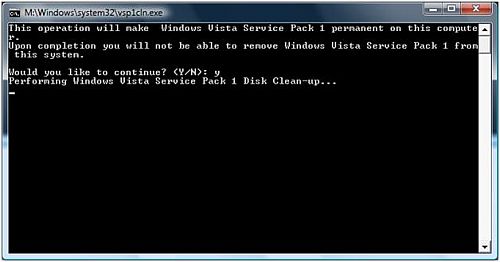
Start the cleanup process by pressing the Y-key. Do not wait for a completion message, the screen will automatically disappear once the cleanup is done.
On our Vista test machine, the actual space freed up by this action was 800 MB!
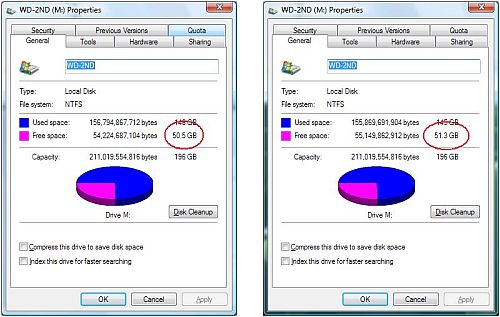
Once you have completed the removal of the backup files, consider running a disk defragmentation program to optimize your free space.
Update
Since Vista Service Pack 2, the vsp1cln.exe program has been replaced by compcln.exe, which can be used to make the service pack changes final. The command can be run from the command prompt or directly from the Start menu, in which case you will need to click Continue in the UAC window.
Please keep in mind that after running the compcln.exe command you will no longer to be able to revert back to SP1 or even Vista without a service pack level. So only run the command if you need the disk space, and have been running Vista with SP2 for some time without problems.
Windows 7 SP1
As with any previous Windows versions, Windows 7 has also had the necessary updates, including a Service Pack 1 update. And again, installing the service pack results in additional hard disk space being consumed for the backup to allow uninstalling SP1 on Windows 7.
If you know that you won’t be needing to uninstall SP1, you can free up the disk space in Windows 7 as well.
The steps to remove the SP1 backup files in Windows 7 are:
1) first start a command prompt window with administrator rights.
2) in the command prompt window type:dism /online /cleanup-image /spsuperseded followed by pressing the Enter key.

@loup – There have indeed been people that have problems with Vista SP1, although I also run it together with outlook 2007 and have no issues.
This kind of cleanup can best be done once you have run SP1 for a while and indeed, really need the space.
BTW, Microsoft has already released patched on SP1, maybe try those.
I actually have had to uninstall Vista SP1. I have found many others have as well. My poroblem was due to the fact that after installing Vista’s SP1, I was unable to use my outlook 2007 (with the latest patches and SP’s).
So, to free up that little space and run the risk of not being able to uninstall the SP, is not worth it to me.